6 layers76 × 56 mm
CM4 MANET
ties1887/Mesh-radio-Halow-LoRa
Modular mesh radio system using Raspberry Pi + HaLow (802.11ah) + LoRa.
122 parts40
 AAPythonCode/AI-Keys
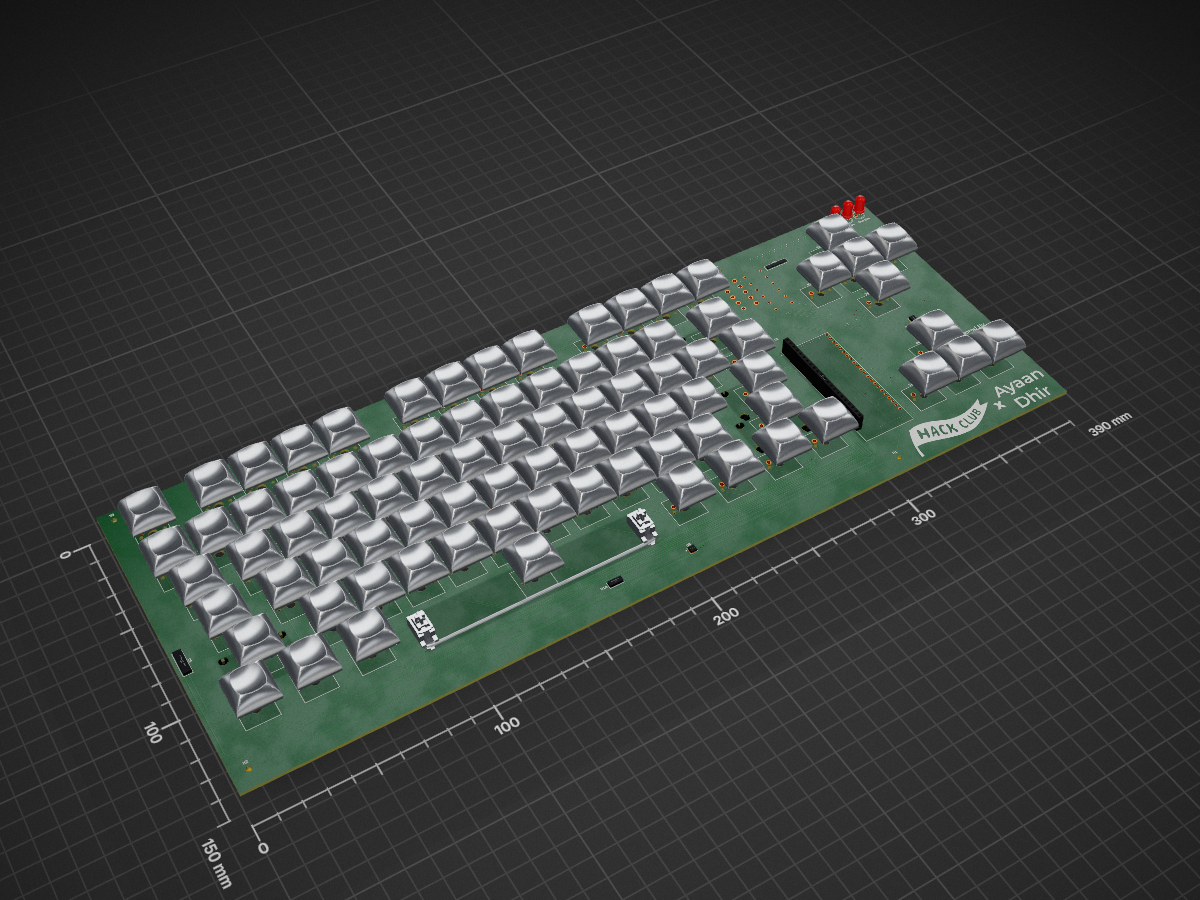
A custom mechanical keyboard designed in KiCad, with a built-in AI function to ask AI a question.
Keyboard - Ayaan is an open-source printed circuit board by AAPythonCode, from the AAPythonCode/AI-Keys repository on GitHub, published under the MIT licence. It is a 2-layer board of 390 × 150 mm with 203 parts on 146 nets, routed with 872 tracks and 86 vias.
It is built around the ESP32-S3-DEVKITC-1-N8R2, TPS63001DRC and TYPE-C-31-M-12, with the XFL4020-222MEC among its other parts. Its parts include 83 diodes, 83 switches, 10 ICs, 7 resistors and 6 capacitors. It belongs with the keyboards and input boards and the ESP32 boards of this library.


A custom mechanical keyboard designed in KiCad, with a built-in AI function to ask AI a question. To make this yourself, check the information down below! ↓
This project was a ride of twists and turns, and I have to firstly credit AIVON for their support on this entire project! They willingly lowered the PCB cost to 100 dollars, just so this project would be able to continue! If you liked this project, please do check out their company at aivon.com! When I was first sifting through each of the possible PCB manufacturers, both JLCPCB and PCBWay gave me extremely expensive prices without even taking in the cost of the parts for the PCBA order! AIVON, however, supported me fully, and gave me a cost that fit right within my budget! Thank you so much AIVON, and thank YOU for taking the time to check out their exquisite company!
Moreover, I'd like to express my gratitude to the Hack Club community and organization! They are the reason why I started this perilous project in the first place, as they provided coverage on all of the parts, whilist their community provided all of their knowledge! Thank you, Hack Club! Please check them out at hackclub.com!
Honestly, after seeing macropads being made on Hack Club's Blueprint program, I realized that I wanted to create something bigger. Someting unique, that at the same time feels useful. So, I realized I wanted to create a big macropad: a keyboard. But, I didn't want to make any generic keyboard. After all, keyboard are nothing special. So, I added my own twist to it: AI! And the rest
is
history.
[!TIP] Though a 3.7V battery is used for this project, you may use higher/lower voltages, in accordance to the TPS63001's datasheet.
Here's a dedicated BOM for creating this keyboard yourself:
| Part | Cost | Link/Download | Manufacturer/Retailer |
|---|---|---|---|
| Cherry MX Brown Switches | $8.00 (with new user discount) | Click Here | AliExpress |
| Keycaps | $4.06 (with new user discount) | Click Here | AliExpress |
| Screws | $1.07 (with new user discount) | Click Here | AliExpress |
| Speaker | $1.79 | Click Here | AliExpress |
| Stabilizers | $3.90 (with new user discount) | Click Here | AliExpress |
| Battery | $6.99 | Click Here | Amazon |
| XFL4020-222MEC (inductor for TPS63001) | $2.47 | Click Here | Coilcraft |
| MCP73831-2-MC | $0.79 | Click Here | DigiKey |
| MAX98357A | $4.75 | Click Here | LCSC |
| USB VBUS TYPE-C | $0.94 | Click Here | LCSC |
| Resistors and Caps | $5.66 | Click Here | LCSC |
| TPS63001 | $2.27 | Click Here | Texas Instruments |
| PCB | Depends On Manufacturer | Click Here Or Check Repo Files | Any PCB Manufacturer |
| Case | Depends On Manufacturer/Manufacturing Device | Click Here Or Check Repo Files | Any Fabrication Device/Company |
[!IMPORTANT] The PCB doesn't have a link to a product page; instead, it downloads gerbers.zip. Don't unzip it; instead, go to a PCB manufacturer's page (such as aivon.com) and drop the zip into its "gerber file uploader." The "gerber file uploader" should look like something similar or exactly like this:

The case's zip file, however, contains an STL and a STEP file, so please unzip it.
And finally, the best part... ↓
The full schematic:
The charging portion of the schematic:
The keyboard portion of the schematic:
The ESP32-S3 portion of the schematic:
The full routed PCB:
The Case:
The Case+PCB:
Assembled Build:
Coming soon! I have yet to finish building the keyboard itself 😅, so I'll post the image after it's complete!
| Qty | Value | Footprint | References |
|---|---|---|---|
| 83 | D | Diode_SMD:D_SOD-123F | D1, D2, D10, D11, D12, D13, D14, D15, D16, D17, D18, D19, D20, D21, D22, D23 +67 |
| 68 | SW_Push | Switch_Keyboard_Cherry_MX:SW_Cherry_MX_PCB_1.00u | SW1, SW2, SW10, SW11, SW12, SW13, SW14, SW15, SW16, SW17, SW18, SW19, SW20, SW21, SW22, SW23 +52 |
| 7 | R | Custom_Libraries:Custom_Resistor | R1, R2, R3, R4, R5, R7, R8 |
| 7 | SW_Push | Switch_Keyboard_Cherry_MX:SW_Cherry_MX_PCB_1.25u | SW73, SW74, SW75, SW77, SW78, SW79, SW80 |
| 6 | C_Small | Custom_Libraries:Custom_Capacitor | C1, C2, C3, C4, C5, C6 |
| 4 | MountingHole | MountingHole:MountingHole_2.2mm_M2 | H1, H2, H3, H4 |
| 3 | Custom Led 5.0mm | LED_THT:LED_D5.0mm | U2, U7, U11 |
| 2 | LOGO | LOGO | G***, G*** |
| 2 | STAB_MX_2.25u | PCM_marbastlib-mx:STAB_MX_2.25u | 2.25u_REF, 2.25u_REF_2 |
| 2 | SW_Push | Switch_Keyboard_Cherry_MX:SW_Cherry_MX_PCB_1.50u | SW32, SW45 |
| 2 | SW_Push | Switch_Keyboard_Cherry_MX:SW_Cherry_MX_PCB_2.25u | SW59, SW60 |
| 2 | Two Pin Connector | Custom_Libraries:Two Pin Connector | U4, U10 |
| 1 | TurboCase:Cutout_TypeC | ||
| 1 | ESP32-S3-DEVKITC-1-N8R2 | ESP32-S3-DEVKITC-1-N8R2:XCVR_ESP32-S3-DEVKITC-1-N8R2 | U1 |
| 1 | MAX98357A | Package_DFN_QFN:TQFN-16-1EP_3x3mm_P0.5mm_EP1.23x1.23mm | U9 |
| 1 | MCP73831-2-MC | Package_DFN_QFN:DFN-8-1EP_3x2mm_P0.5mm_EP1.7x1.4mm | U8 |
| 1 | STAB_MX_2.75u | PCM_marbastlib-mx:STAB_MX_2.75u | 2.75u_REF |
| 1 | STAB_MX_2u | PCM_marbastlib-mx:STAB_MX_2u | 2u_REF_2 |
| 1 | STAB_MX_6.25u | PCM_marbastlib-mx:STAB_MX_6.25u | 6.25u_REF |
| 1 | SW_Push | Switch_Keyboard_Cherry_MX:SW_Cherry_MX_PCB_6.25u | SW76 |
| 1 | SW_Push | Switch_Keyboard_Cherry_MX:SW_Cherry_MX_PCB_2.00u | SW28 |
| 1 | SW_Push | Switch_Keyboard_Cherry_MX:SW_Cherry_MX_PCB_1.75u | SW47 |
| 1 | SW_Push | Switch_Keyboard_Cherry_MX:SW_Cherry_MX_PCB_2.75u | SW71 |
| 1 | TPS63001 | Package_SON:Texas_DRC0010J_ThermalVias | U5 |
| 1 | TYPE-C-31-M-12 | TYPE-C-31-M-12:HRO_TYPE-C-31-M-12 | J1 |
| 1 | Three Pin Connector | Custom_Libraries:Three Pin Connector | U6 |
| 1 | XFL4020-222MEC | XFL4020-222MEC:IND_XFL4020-222MEC | L2 |
It measures 390 × 150 mm and has 2 copper layers, 1.6 mm thick.
203 parts, built around the ESP32-S3-DEVKITC-1-N8R2, TPS63001DRC, TYPE-C-31-M-12 and XFL4020-222MEC. The full list of its parts is on this page, with links to each part's symbol and footprint where PCBKit's library has them.
From the AAPythonCode/AI-Keys repository on GitHub, at the commit this page was made from: the board is Schematic + PCB Files/Keyboard - Ayaan.kicad_pcb and its schematic Schematic + PCB Files/Keyboard - Ayaan.kicad_sch. PCBKit opens the board in the browser, with nothing to install.
Its repository publishes it under the MIT licence: you may reuse it on that licence's terms (keep the author's notice, and for a copyleft licence share your changes alike).
ties1887/Mesh-radio-Halow-LoRa
Modular mesh radio system using Raspberry Pi + HaLow (802.11ah) + LoRa.


CopperPilot/Jetson-AI-Cam-CopperPilot
A carrier for Jetson Nano, Xavier NX and TX2 NX with two IMX219 cameras on a 39 mm stereo baseline, dual 4K outputs and CAN.

clarkmcc/my-first-linux-board
my-first-linux-board is a small F1C200S Linux board built around removable microSD storage, USB-C power and USB device data, a 3.3 V UART console, and power/status LEDs.

fahreddinaykut/Cereyan
Battery-powered ESP32-C3 smart ventilation fan with magnetic mounting, ESP-NOW synchronization, USB-C charging and programmable mobile control.


JMET04/aicad-agent
Deterministic CAD/EDA agent plugin for 2D drawings, AutoCAD, SolidWorks, KiCad, review gates and auditable delivery.