2 layers76.2 × 96.7 mm
 UnfadingSoul97/Senweget
A split Corne Keyboard that doubles as a stenograph
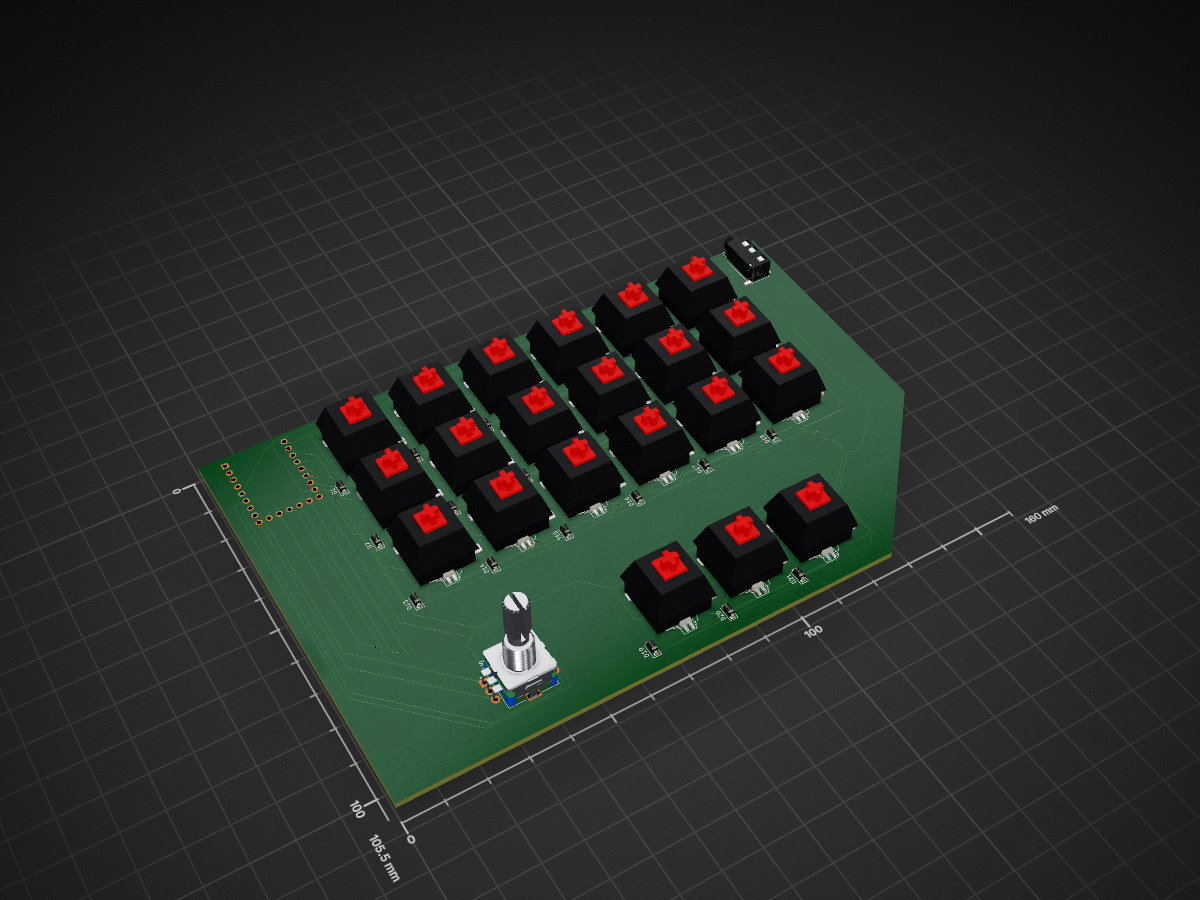
Senwegetv2 is an open-source printed circuit board by UnfadingSoul97, from the UnfadingSoul97/Senweget repository on GitHub. It is a 2-layer board of 160 × 105.5 mm with 66 parts on 66 nets, routed with 956 tracks and 43 vias.
It is built around the RP2040-ZERO, 1N4148W and SK6812MINI-E. Its parts include 42 diodes, 22 switches, 1 IC and 1 connector. It belongs with the keyboards and input boards and the RP2040 boards of this library.


Here ig it will look good cute frog keycaps.
Link to Project:https://cad.onshape.com/documents/2615d6a32fd601db65ed9c82/w/49b2a2fd03e5ba3a97975127/e/aca29c1b2985c1fb6079fbe5
I was just living my life and i thought hey i can make stuff in cad now and wanted to push my limit and wanted to make something that was not too hard but still new to make. The tracing process was probably the hardest part i had to experience in this project.
It can be used for stenograph,Hotswappable but it HAS PER-KEY RGB not that it matters but need to see at Night. And can Play Music 🎵 You can add 🎹,🥁 and you can add custom sounds. One thing am using buzzer cuz i like its buzzing and it cool. For ya nerds who know what you are doing.I have left some free GPIOS for connecting stuff ya like.
I made the Schematic and PCB in KICAD Schematic
PCB Design
PCB
For now i only added for qwerty cuz i really hate writing readme cuz think ADHD idk not tested. Any way it has standared Qwerty and 1 Knob on each side Left one does volume up and down with click as mute Right one does handles and click also does mute cuz why not.
Take the bezzle and put on top on the top of the pcb and add your low profile switches then place it on top of the main body according to the tabs then place in the pcb and bexzzle. and screw it from under the case using 5 M3 screws.the MCU should be facing down on the right side(which means its usb c should face to the downwared direction from the underside of the pcb. For the left side the top should be facing todwards the pcb and under the PCB ofc 1.Take the PCB and add your switches. 2.Put i it on the body. for the right side pcb put the mcu under the pcb which should be facing away form the pcb. for the left one the Mcu should be facing towards the pcb otherwise the usb c wont fit. 3.now place in the top bezzle 4.Now u can screw it from the underneath using M3. screw pls check the length of the screw needed cuz idk the exact height after printing.
| Qty | Value | Footprint | References |
|---|---|---|---|
| 21 | 1N4148W | Diode_SMD:D_SOD-123 | D1, D2, D3, D4, D10, D11, D12, D13, D14, D15, D16, D17, D18, D19, D20, D21 +5 |
| 21 | SK6812MINI-E | LED_SMD:LED_SK6812MINI-E_3.2x2.8mm_P1.5mm_ReverseMount | D22, D23, D24, D25, D26, D27, D28, D29, D30, D31, D32, D33, D34, D35, D36, D37 +5 |
| 21 | SW_Push | SW_Khalih:SW_MX_Kailh_Choc_V1V2_HotSwap_Hybrid_double | SW2, SW3, SW4, SW10, SW11, SW12, SW13, SW14, SW15, SW16, SW17, SW18, SW19, SW20, SW21, SW22 +5 |
| 1 | AudioJack4 | Connector_Audio:Jack_3.5mm_PJ320D_Horizontal | J1 |
| 1 | RP2040-ZERO | Waveform_RP2040-Zero:MODULE_RP2040-ZERO | U1 |
| 1 | RotaryEncoder_Switch | Rotary_Encoder:RotaryEncoder_Alps_EC11E-Switch_Vertical_H20mm | SW1 |


cormoran/dya-keyboard
Pre-built QMK firmware is available in latest build's artifact section in this github actions.


amperolithic/bolide-65-keeb
Bolide65 is a 66 key, 65% keyboard with a rotary encoder and RGB backlighting under each key.


It measures 160 × 105.5 mm and has 2 copper layers, 1.6 mm thick.
66 parts, built around the RP2040-ZERO, 1N4148W and SK6812MINI-E. The full list of its parts is on this page, with links to each part's symbol and footprint where PCBKit's library has them.
From the UnfadingSoul97/Senweget repository on GitHub, at the commit this page was made from: the board is PCB/Senwegetv2.kicad_pcb and its schematic PCB/Senweget.kicad_sch. PCBKit opens the board in the browser, with nothing to install.
Its repository states no licence, so its author keeps all rights: ask UnfadingSoul97 before reusing the design.