2 layers102.5 × 72.6 mm

 etalli/Gavel1
Physical approval controller for Claude Code
Gavel is an open-source printed circuit board by etalli, from the etalli/Gavel repository on GitHub, published under the MIT licence. It is a 2-layer board of 98.8 × 62.1 mm with 24 parts on 30 nets, routed with 100 tracks and 4 vias.
It is built around the RP2040-ZERO and SK6812MINI-E. Its parts include 5 diodes, 4 connectors, 3 resistors, 3 switches and 1 IC. It belongs with the RP2040 boards of this library.



A physical controller for Claude Code. · Landing page
1 Allow Once / 2 Always Allow / 3 Reject) without touching the keyboard. Holding a button for 800ms triggers a custom keyboard macro.~/.claude/gavel/decisions.jsonl for decision history. Run python3 hooks/stats.py to see a summary.The PCB is designed for the Waveshare RP2040 Zero.
| Board | LED output | Status |
|---|---|---|
| Waveshare RP2040 Zero | RGB NeoPixel (GP16) + 3× button LEDs (GP10/GP11/GP12) | Primary (PCB supported) |
| Raspberry Pi Pico | 3× discrete LEDs (GP10/GP11/GP12) | Legacy / DIY wiring only |
The NeoPixel shows the tool risk category color. The 3 button LEDs (one per switch) light up to confirm which button was pressed.
Board type is auto-detected — no manual configuration needed.
Both use the same GPIO pins for buttons (GP2/GP3/GP4). See hardware/wiring.md for full pin assignments.
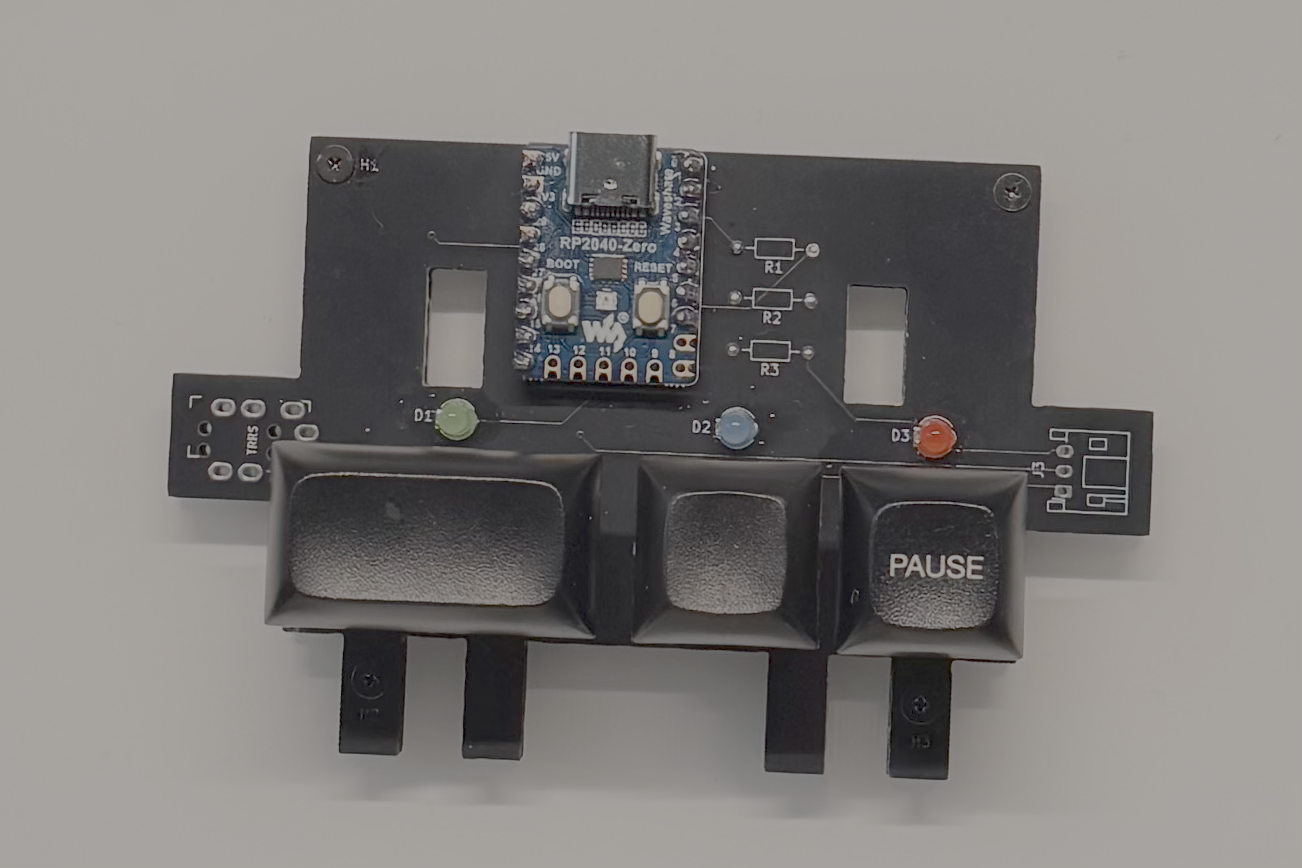
The microcontroller runs two independent roles over a single USB cable:
USB HID keyboard — pressing a button sends the matching keypress to the terminal. Claude Code receives it exactly as if the user typed it. No special Claude Code configuration needed.
Serial listener — Claude Code hooks call Python scripts on the Mac side, which send small JSON messages over the microcontroller's USB serial port to control the LEDs.
| Hook | Category | NeoPixel | Discrete LEDs |
|---|---|---|---|
PreToolUse | readonly (Read / Grep / LS) | Blue | Center LED dim |
PreToolUse | write (Edit / Write) | Yellow | Two LEDs dim |
PreToolUse | network (WebFetch / Agent) | Orange blink | Blink |
PreToolUse | destructive (Bash etc.) | Red | All bright |
PostToolUse | — | Off | Off |
Notification (info) | — | Single slow flash | Single slow flash |
Notification (warn) | — | Three medium flashes | Three medium flashes |
Notification (error) | — | Five fast red flashes | Five fast flashes |
PostToolUse (context ≥ 90%) | — | Three medium flashes, then off | Three medium flashes, then off |
CIRCUITPY/lib/:
adafruit_hid/ (folder) — required for all boardsneopixel.mpy — required for Waveshare RP2040 Zero onlyfirmware/boot.py and firmware/code.py to the CIRCUITPY drive./install.sh to automate this step)boot.py takes effecthardware/wiring.mdpip3 install pyserial~/.claude/settings.json (instructions pending)../install.sh --deploy to copy the hook scripts to a stable location (~/.claude/gavel/) and automatically update their paths in settings.json. This is recommended if you plan to move or rename the project folder.LEDs do not respond when running hook scripts manually from the terminal
No module named 'serial'pyserial may not be installed for the python3 used in your terminal session. Fix with:
pip3 install pyserialNote: Claude Code hooks may use a different Python environment that already has pyserial installed, so hooks can work in a Claude Code session even when manual terminal tests fail.
MIT License — see LICENSE for details.
| Qty | Value | Footprint | References |
|---|---|---|---|
| 5 | MountingHole | MountingHole:MountingHole_2.2mm_M2 | H1, H2, H2, H2, H4 |
| 3 | Conn_01x03_Socket | Connector_JST:JST_PH_S3B-PH-K_1x03_P2.00mm_Horizontal | J3, J4, J5 |
| 3 | LED | LED_THT:LED_D3.0mm | D1, D2, D3 |
| 3 | R | Resistor_THT:R_Axial_DIN0204_L3.6mm_D1.6mm_P7.62mm_Horizontal | R1, R2, R3 |
| 3 | SW_Push | _footprints:k2_CherryMX_KailhChocV1_Socket_Diode-rev2 | SW2, SW3, SW4 |
| 3 | SolderJumper_2_Open | Jumper:SolderJumper-2_P1.3mm_Open_RoundedPad1.0x1.5mm | JP1, JP2, JP3 |
| 2 | SK6812MINI | LED_SMD:LED_SK6812MINI_PLCC4_3.5x3.5mm_P1.75mm | D4, D5 |
| 1 | AudioJack4 | _footprints:MJ-4PP-9_1side | J1 |
| 1 | RP2040-ZERO | _footprints:MODULE_RP2040-ZERO | U1 |

cormoran/dya-keyboard
Pre-built QMK firmware is available in latest build's artifact section in this github actions.


amperolithic/bolide-65-keeb
Bolide65 is a 66 key, 65% keyboard with a rotary encoder and RGB backlighting under each key.


It measures 98.8 × 62.1 mm and has 2 copper layers, 1.6 mm thick.
24 parts, built around the RP2040-ZERO and SK6812MINI-E. The full list of its parts is on this page, with links to each part's symbol and footprint where PCBKit's library has them.
From the etalli/Gavel repository on GitHub, at the commit this page was made from: the board is hardware/PCB/Gavel.kicad_pcb and its schematic hardware/PCB/Gavel.kicad_sch. PCBKit opens the board in the browser, with nothing to install.
Its repository publishes it under the MIT licence: you may reuse it on that licence's terms (keep the author's notice, and for a copyleft licence share your changes alike).