4 layers60 × 30 mm
Iamdt guang chui-60-40a2c53b--主板v1(不建议用于新复刻)-385a2a21
Sysu-PCB-RL-Group/PCB_RL
中山大学PCBxRL的小组仓库
86 parts3
 Sysu-PCB-RL-Group/PCB_RL3
中山大学PCBxRL的小组仓库
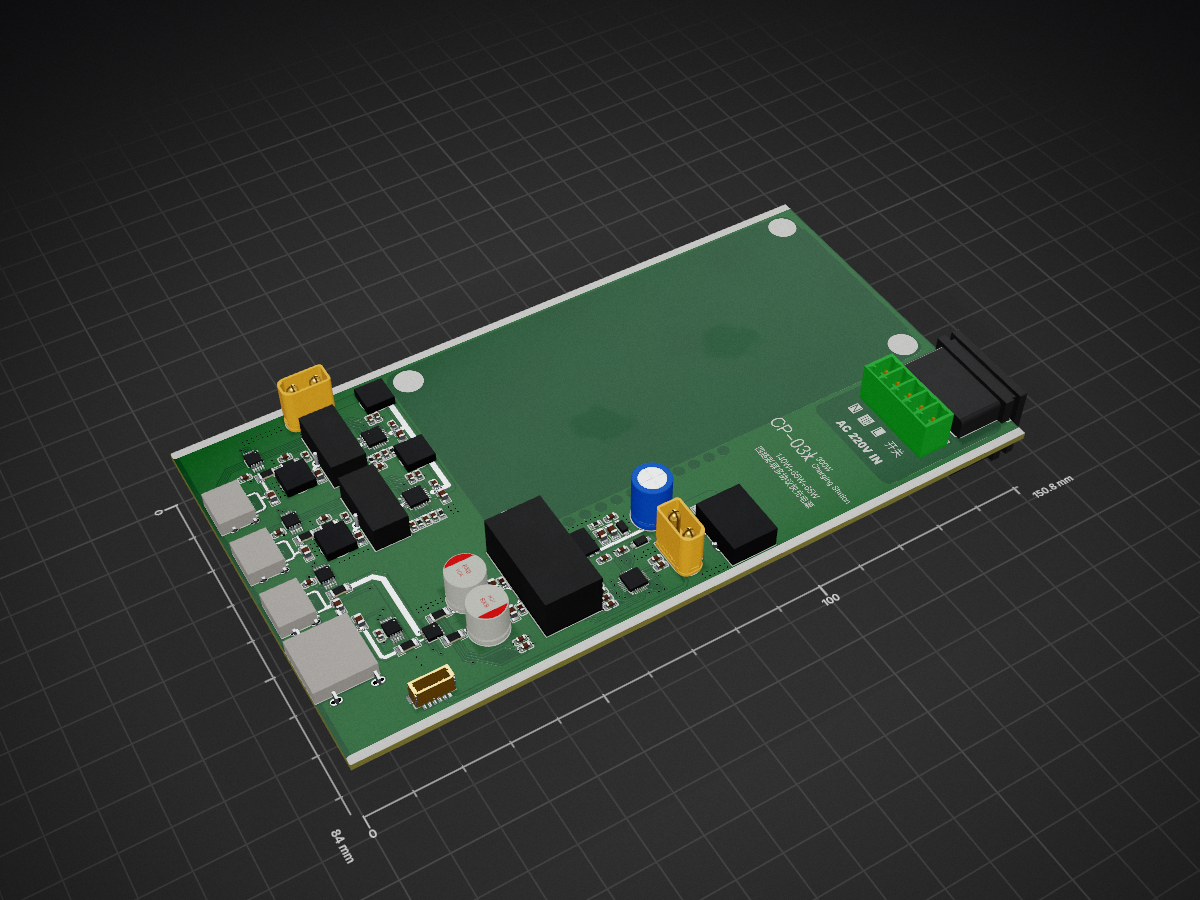
Eda uahyxtbgs-165w three way multi protocol fa dc91a91e--300W四路彩屏桌面电源(彩屏版)-56ddf4ed is an open-source printed circuit board by Sysu-PCB-RL-Group, from the Sysu-PCB-RL-Group/PCB_RL repository on GitHub. It is a 4-layer board of 150.8 × 84 mm with 97 parts on 60 nets, routed with 543 tracks and 249 vias.
Its parts include 45 capacitors, 15 resistors, 9 ICs, 8 connectors and 3 inductors.
基于强化学习的 PCB 自动布局(Double DQN)。
⚠️ 本项目 2026-09-22 起整体重构:旧的 5 步动作栈(
env/pcb_layout_env.py+dqn/+config/argument.txt+main.py/run.py/run_inference.py那套)已废弃并删除。 本文以下内容全部是现行架构。
docs/项目技术文档.mdPARAMS.mddocs/导入信息重构.md(重构前的旧文档在 docs/旧版结构文档/,已作废,仅作历史对照。)
| 项 | 要求 | 说明 |
|---|---|---|
| Python | 3.11 | 项目既有环境即 3.11(conda 环境名 pcb_rl_311);更低版本未验证 |
| 第三方依赖 | 只有 5 个 | numpy / matplotlib / gymnasium / torch / pytest,见 requirements.txt(实测全仓库只 import 这 5 个) |
| KiCad | 训练/推理都不需要 | 只有「重建缓存」和「读真实板的测试」需要 KiCad 10.0+,见下文 |
| 图形显示 | 不需要 | 3 个绘图模块都强制了 matplotlib.use("Agg"),没有 DISPLAY 也能出图 |
| 网络 | 只有装依赖时需要 | 能访问 PyPI(或内网镜像)即可;依赖装完后训练/推理全程离线 |
| 磁盘 | 约 62 MB | 其中 data/ 约 62 MB(板源文件 + 离线缓存) |
git clone https://github.com/Sysu-PCB-RL-Group/PCB_RL.git
cd PCB_RL

# ① conda(推荐,与本机环境同名同版本)
conda create -n pcb_rl_311 python=3.11 -y
conda activate pcb_rl_311
# ② 或者 venv
#   python3 -m venv .venv && source .venv/bin/activate

python -m pip install --upgrade pip
python -m pip install torch --index-url https://download.pytorch.org/whl/cpu
python -m pip install -r requirements.txt

# 自检:这行必须打印出版本号,否则说明解释器或依赖没装对
python -c "import torch, numpy, gymnasium, matplotlib; print(torch.__version__, numpy.__version__)"
想用 GPU:把 torch 那一行换成
python -m pip install torch --index-url https://download.pytorch.org/whl/cu124训练时再加 --device cuda(默认是 cpu)。
python main.py train        # 训练:默认 1000 局 → output/
python main.py infer        # 推理:读 output/best.pt → result/
python main.py help         # 用法
python main.py train --help # 训练的全部参数

# 冒烟(几分钟):装完环境先跑这个,确认跑得通再上正式训练
python main.py train --episodes 5 --eval-every-episodes 5 --log-every 1 --out output_smoke

python -m pytest tests -q   # 测试(需要 KiCad 的用例会自动 skip)
main.py train|infer 的参数原样透传给 scripts/train_dqn.py /
scripts/infer_dqn.py,所以用 --help 看全部选项。
Windows 本机等价写法(本机 conda 环境的绝对路径):
cd E:\PCB_AI\PCB_RL
& E:\miniconda\envs\pcb_rl_311\python.exe main.py train默认值来自 scripts/train_dqn.py:
| 参数 | 默认值 | 用途 |
|---|---|---|
--episodes | 1000 | 训练局数(冒烟用 5) |
--device | cpu | cpu / cuda |
--threads | 0 | torch CPU 线程数;0 = 用默认(吃满核,多人共用机器时建议显式限制) |
--out | output | 产物目录(训练开始时会先清空该目录,见下) |
--boards | 全部 | 逗号分隔的板名,只跑其中几块 |
--seed | 114514 | 随机种子,固定(连网络初始化都由它决定) |
--eval-every-episodes | 50 | 每多少局评估一次(评估更优就写 best.pt) |
data/model_cache/ —— 16 块板的离线几何缓存(index.json + 16 个
.pkl,共 17 个文件、约 1.1 MB,随仓库一起 clone 下来)。这是训练/推理
唯一的几何来源:不要删、也不要重新生成(重新生成需要 KiCad)。output/(best.pt / train_curves.png / train.log / log.jsonl)、
result/。这两类目录都在 .gitignore 里,不会污染仓库。--out 指向的目录会在训练开始时被清空。代码里有安全闸:目标目录若含
.git / data / env / tests / scripts / docs / utils 之一(或就是仓库
根目录)会直接报错拒绝执行 —— 但别去试。训练与推理不需要 KiCad:env/ 里 0 处调用 pcbnew(只在一条注释里提到),
几何全部从 data/model_cache/ 读。只有下面两件事需要本机装 KiCad 10.0+
并设置 KICAD_PATH:
python scripts/dump_models.pypytest tests/kicad没装 KiCad 时,pytest tests 里需要 KiCad 的用例会自动跳过,其余照常运行。
下载:https://www.kicad.org/download/
默认 1000 局(16 块板),本机 CPU 实测参考约 4.4 小时。训练过程中每 10 局往
output/train.log 打一行进度、每 50 局打一行评估;日志每局都落盘,可以随时
tail -f output/train.log看进度。
| 症状 | 原因 / 处理 |
|---|---|
main.py 提示"这个解释器没有 torch" | 用错解释器了:必须用装了依赖的那个(见「安装」) |
CacheError: 缓存索引不存在:… | data/model_cache/index.json 缺失 —— 从仓库重新 clone,别删缓存 |
CacheVersionError | 缓存版本与代码不匹配:代码改过 PcbModel 字段,需要重新 dump(要有 KiCad) |
| 训练一开始就报"拒绝清零 …" | --out 指到了仓库目录,换成 output 之类的独立目录 |
| 出图里的中文显示成方框 | 运行环境缺中文字体。仓库里有 setup_chinese_font 做回退(utils/viz_layout.py),但未在没装字体的 Linux 上验证过;只影响图面文字,不影响数值与训练结果 |
| Qty | Value | Footprint | References |
|---|---|---|---|
| 20 | eda_uahyxt-easyedapro:C0603_1 | C3, C15, C16, C19, C20, C22, C23, C25, C34, C36, C37, C39, C41, C44, C47, C48 +4 | |
| 12 | eda_uahyxt-easyedapro:C0805 | C4, C6, C10, C11, C14, C24, C26, C33, C35, C38, C45, C46 | |
| 11 | eda_uahyxt-easyedapro:C0603 | C1, C5, C7, C12, C13, C17, C18, C21, C40, C42, C43 | |
| 8 | eda_uahyxt-easyedapro:R1206 | R9, R11, R12, R21, R24, R25, R26, R27 | |
| 4 | eda_uahyxt-easyedapro:CAP-TH_BD6.3-P2.60-D0.6-FD-1 | EC4, EC5, EC6, EC7 | |
| 4 | eda_uahyxt-easyedapro:MSOP-10_L3.0-W3.0-P0.50-LS5.0-BL | U7, U8, U9, U10 | |
| 4 | eda_uahyxt-easyedapro:R0603_1 | R2, R8, R20, R23 | |
| 3 | eda_uahyxt-easyedapro:R0603 | R1, R7, R22 | |
| 3 | eda_uahyxt-easyedapro:USB-C-SMD_U263-163N-4GS1735 | J1, J3, J4 | |
| 2 | eda_uahyxt-easyedapro:SOD-123_L2.6-W1.6-LS3.5-RD | T1, T2 | |
| 2 | eda_uahyxt-easyedapro:QFN-24_L4.0-W4.0-P0.50-TL-EP2.5 | U1, U11 | |
| 2 | eda_uahyxt-easyedapro:C0603_4 | C2, C32 | |
| 2 | eda_uahyxt-easyedapro:CONN-TH_XT30UPB-M | CN3, U4 | |
| 2 | eda_uahyxt-easyedapro:CAP-TH_BD8.0-P3.50-D0.6-FD | EC2, EC3 | |
| 2 | eda_uahyxt-easyedapro:IND-TH_L15.5-W7.5-P8.00-D0.8 | L3, L4 | |
| 1 | eda_uahyxt-easyedapro:QFN-28_L4.0-W4.0-P0.40-TL-EP2.4 | U2 | |
| 1 | eda_uahyxt-easyedapro:IND-TH_L23.0-W12.0-P9.00-D1.3 | L1 | |
| 1 | Pad_e373 | ||
| 1 | Pad_e375 | ||
| 1 | eda_uahyxt-easyedapro:DC-IN-TH_HX-DC007B-2.5 | U5 | |
| 1 | Pad_e377 | ||
| 1 | eda_uahyxt-easyedapro:CONN-SMD_6P-P1.00_X1002WVS-06E-LPSWHF | U12 | |
| 1 | eda_uahyxt-easyedapro:CAP-TH_BD8.0-P3.50-D0.6-FD-2 | EC1 | |
| 1 | Pad_e374 | ||
| 1 | eda_uahyxt-easyedapro:CONN-TH_DB-6-1P4P3 | CN2 | |
| 1 | eda_uahyxt-easyedapro:USB-A-TH_U224-051N-3GRA035 | J2 | |
| 1 | eda_uahyxt-easyedapro:CONN-TH_DB125-3.81-5P-GN-S | CN5 | |
| 1 | Pad_e376 | ||
| 1 | Pad_e378 | ||
| 1 | eda_uahyxt-easyedapro:DFN-8_L3.0-W3.0-P0.65-LS3.4-BL | Q4 | |
| 1 | eda_uahyxt-easyedapro:DFN-8_L6.0-W5.0-P1.27_AON6938 | Q1 |
Sysu-PCB-RL-Group/PCB_RL
中山大学PCBxRL的小组仓库


Sysu-PCB-RL-Group/PCB_RL
中山大学PCBxRL的小组仓库

Sysu-PCB-RL-Group/PCB_RL
中山大学PCBxRL的小组仓库

Sysu-PCB-RL-Group/PCB_RL
中山大学PCBxRL的小组仓库

Sysu-PCB-RL-Group/PCB_RL
中山大学PCBxRL的小组仓库

Sysu-PCB-RL-Group/PCB_RL
中山大学PCBxRL的小组仓库

Sysu-PCB-RL-Group/PCB_RL
中山大学PCBxRL的小组仓库


Sysu-PCB-RL-Group/PCB_RL
中山大学PCBxRL的小组仓库


creapunk/CLN-ClosedLoopNemaDriver
Compact closed-loop stepper motor driver designed for NEMA motors

tombueng/LuxDMX
Open-source Art-Net / sACN (E1.31) → DMX512 gateway for ESP32 / ESP32-S3 / Ethernet. Live web UI shows all 512 channels in real time, flags console conflicts, and drives galvanically-isolated DMX.


Every-Flavor-Robotics/motorgo-mini-hardware
hardware files for motorgo mini
It measures 150.8 × 84 mm and has 4 copper layers, 1.6 mm thick.
97 parts. The full list of its parts is on this page, with links to each part's symbol and footprint where PCBKit's library has them.
From the Sysu-PCB-RL-Group/PCB_RL repository on GitHub, at the commit this page was made from: the board is data/kicad-native-batch/eda_uahyxtbgs-165w-three-way-multi-protocol-fa-dc91a91e--300W四路彩屏桌面电源(彩屏版)-56ddf4ed/eda_uahyxtbgs-165w-three-way-multi-protocol-fa-dc91a91e--300W四路彩屏桌面电源(彩屏版)-56ddf4ed.kicad_pcb and its schematic data/bad_data/li-chuang-kai-fa-ban-li-chuang-coloreasypico2-kai-fa-ban-7911d14e/li-chuang-kai-fa-ban-li-chuang-coloreasypico2-kai-fa-ban-7911d14e.kicad_sch. PCBKit opens the board in the browser, with nothing to install.
Its repository states no licence, so its author keeps all rights: ask Sysu-PCB-RL-Group before reusing the design.