2 layers76 × 65 mm
 RetiaLLC/DefconBadge20268
Retia 2024 DEF CON badge (ESP32-S3): docs, pinouts, flashable firmware incl. DOOM and Meshtastic, examples, KiCad hardware sources
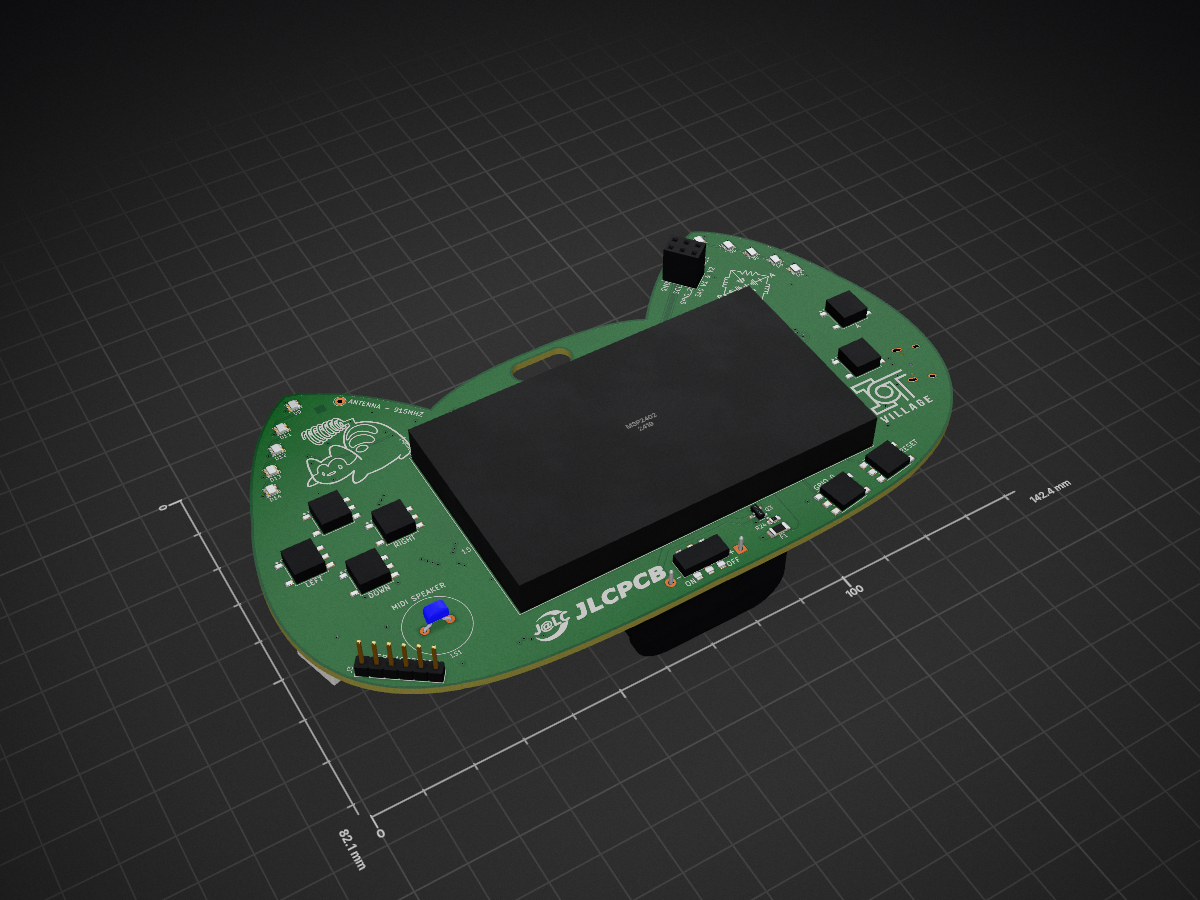
2024 def con badge v1 is an open-source printed circuit board by RetiaLLC, from the RetiaLLC/DefconBadge2026 repository on GitHub. It is a 4-layer board of 168.2 × 82.9 mm with 104 parts on 121 nets, routed with 696 tracks and 148 vias.
It is built around the TLV62569DBV, XKTF-004 and RFM95W-915S2, with the WS2812B-2020 and PS1240P02CT3 among its other parts. Its parts include 33 resistors, 17 capacitors, 14 diodes, 9 switches and 8 connectors. It belongs with the lEDs and displays and radio and wireless boards and the ESP32 boards of this library.


Everything you need to hack on the Retia DEF CON badge: hardware docs, pinouts, flashable firmware (including DOOM, a full NES emulator, Meshtastic, MeshCore, and Reticulum), and example code to get you from "just unboxed" to writing your own firmware.
🚀 Start here: the Badge Launcher v2 "Touch" — the flagship badge experience. One flash + one micro-SD card turns the badge into a pick-what-you-run device: two full-color touch mesh messengers (MeshCore + Meshtastic MUI), classic Meshtastic, a Reticulum RNode, an NES emulator with a 37-game homebrew library, and WLEDkitty — switchable from an on-badge menu in ~10 seconds, no computer needed. Comes with a
MESH-101.mdthat gets two badges messaging over LoRa in minutes. Flash it from your browser at scriptkitty.sh. (Requires a FAT micro-SD card — true of launcher v1 too. Prefer DOOM resident in flash? Launcher v1 "Classic".)
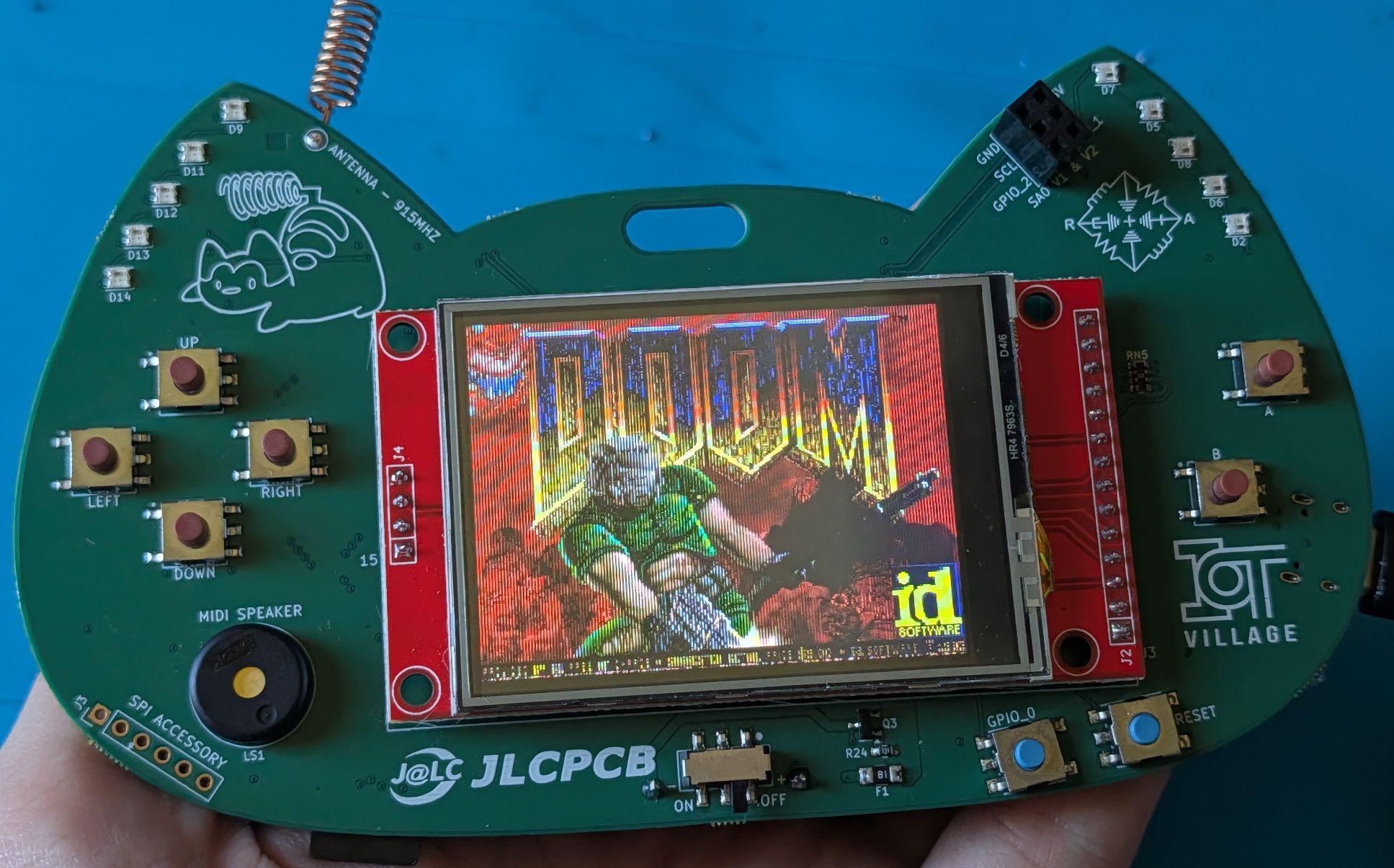
Yes, that's DOOM. Flash it in one command — see below.
| MCU | ESP32-S3-WROOM-1 — dual-core 240 MHz, WiFi + BLE, 8 MB flash, 2 MB PSRAM, native USB-C |
| Display | 2.4″ ILI9341 240×320 color TFT + XPT2046 resistive touch (MSP2402 module) |
| Radio | RFM95W LoRa 915 MHz (SX1276), U.FL antenna |
| Input | 6 face buttons (d-pad + A/B) + BOOT button usable as a 7th |
| Storage | micro-SD slot (tested to 16 GB SDHC) |
| Blinkies | 10× WS2812B NeoPixels, green debug LED |
| Sound | Piezo buzzer (MOSFET-driven) |
| Expansion | SAO v2, QWIIC (I²C), UART header, SPI header, off-board NeoPixel connector |
| Power | 2×AA (boost) or USB-C, auto-switching |
pip install esptool
esptool --chip esp32s3 --port <PORT> write-flash 0x0 firmware/doom/doom-audio.factory.bin
<PORT> is /dev/cu.usbmodem* (macOS), /dev/ttyACM0 (Linux), or COMx (Windows). Full instructions, port-finding, and un-bricking: docs/flashing.md.
docs/            pinout.md ← START HERE · hardware.md · flashing.md · sd-card.md
firmware/
  doom/          DOOM shareware, audio + silent builds (flash & play)
  meshtastic/    Meshtastic 2.7.23, standard + low-power builds
  reticulum/     RNode v1.85 — the badge as a Reticulum LoRa transceiver
examples/
  hello-badge/   buttons + LED + buzzer in 100 lines (your first build)
  sd-test/       mount/format/read/write the micro-SD slot
hardware/ KiCad 8 sources + schematic PDFretia-badge.rnodeconf, done — hardware-verified against a Nibble Zero RNode. Full toolkit, source, and Nibble Zero builds live in RetiaLLC/NibbleReticulum..nes ROMs on the micro-SD card, browse and launch them on the badge, and play with the D-pad + A/B. Save states, chiptune audio through the piezo, and a one-button START/SELECT scheme (tap BOOT = START, hold = pause menu). Ready-to-flash image on the release page (also attached to this repo's anemoia-v1.0.0 release), plus a curated list of legally-free homebrew games tested on the badge. Ported from Shim06/Anemoia-ESP32.Both examples are PlatformIO ESP-IDF projects with the badge board definition included — copy one as a template. The short version:
pip install platformio
cd examples/hello-badge
pio run -t upload --upload-port <PORT>
Then open a serial monitor at 115200 and press buttons.
| Qty | Value | Footprint | References |
|---|---|---|---|
| 14 | 10K | Resistor_SMD:R_0603_1608Metric_Pad0.98x0.95mm_HandSolder | R1, R4, R7, R8, R9, R10, R11, R12, R13, R14, R15, R16, R33, R34 |
| 10 | WS2812B-2020 | LED_SMD:LED_WS2812B-2020_PLCC4_2.0x2.0mm | D2, D5, D6, D7, D8, D9, D11, D12, D13, D14 |
| 8 | 0R | retia_component_library:YAGEO_R_ARRAY_4_YC_FAM | RN1, RN2, RN3, RN4, RN5, RN6, RN7, RN8 |
| 8 | 330R | Resistor_SMD:R_0603_1608Metric_Pad0.98x0.95mm_HandSolder | R2, R3, R6, R21, R24, R25, R26, R32 |
| 6 | 0.01uF | Capacitor_SMD:C_0603_1608Metric_Pad1.08x0.95mm_HandSolder | C7, C8, C9, C10, C11, C12 |
| 6 | 10uF | Capacitor_SMD:C_0603_1608Metric_Pad1.08x0.95mm_HandSolder | C2, C13, C14, C15, C18, C19 |
| 4 | 0.1uF | Capacitor_SMD:C_0603_1608Metric_Pad1.08x0.95mm_HandSolder | C1, C3, C6, C17 |
| 4 | 5.1K | Resistor_SMD:R_0603_1608Metric_Pad0.98x0.95mm_HandSolder | R17, R18, R20, R22 |
| 4 | Q_NMOS_GSD | retia_component_library:LCSC_SOT-23 | Q1, Q2, Q3, Q4 |
| 2 | 0R | Resistor_SMD:R_0603_1608Metric_Pad0.98x0.95mm_HandSolder | R19, R35 |
| 2 | 100K | Resistor_SMD:R_0603_1608Metric_Pad0.98x0.95mm_HandSolder | R28, R31 |
| 2 | Conn_01x04_MountingPin | retia_component_library:QWIIC_CONNECTOR_GENERIC_1x04-1MP_P1.00mm_Horizontal | J4, J6 |
| 2 | GREEN | LED_SMD:LED_0805_2012Metric_Pad1.15x1.40mm_HandSolder | D1, D4 |
| 2 | SW_SPST | retia_component_library:SW_SPST_PTS641T | SW1, SW2 |
| 1 | 1K | Resistor_SMD:R_0603_1608Metric_Pad0.98x0.95mm_HandSolder | R5 |
| 1 | 1uH | retia_component_library:koher_MDA4020_series_inductor | L1 |
| 1 | 2.2uH | retia_component_library:koher_MDA4020_series_inductor | L2 |
| 1 | 4.7uF | Capacitor_SMD:C_0603_1608Metric_Pad1.08x0.95mm_HandSolder | C16 |
| 1 | 453K | Resistor_SMD:R_0603_1608Metric_Pad0.98x0.95mm_HandSolder | R30 |
| 1 | 750K | Resistor_SMD:R_0603_1608Metric_Pad0.98x0.95mm_HandSolder | R27 |
| 1 | A | retia_component_library:JLC_TS-1080W-A7B3-D1 | SW8 |
| 1 | AA (2x) | Battery:BatteryHolder_Keystone_2462_2xAA | J9 |
| 1 | B | retia_component_library:JLC_TS-1080W-A7B3-D1 | SW7 |
| 1 | Conn_01x03_MountingPin | retia_component_library:LCSC_JST_PH_S3B-PH-SM4-TB_1x03-1MP_P2.00mm_Horizontal | J8 |
| 1 | Conn_01x06 | Connector_PinHeader_2.54mm:PinHeader_1x06_P2.54mm_Vertical | J3 |
| 1 | Conn_02x03_Odd_Even | retia_component_library:LCSC_PinSocket_2x03_P2.54mm_Vertical | J5 |
| 1 | D | Diode_SMD:D_SMA | D10 |
| 1 | DOWN | retia_component_library:JLC_TS-1080W-A7B3-D1 | SW5 |
| 1 | LEFT | retia_component_library:JLC_TS-1080W-A7B3-D1 | SW3 |
| 1 | MSP2402 | retia_component_library:LCD_2_4in_PCB_MOUNTED_THRU_HOLE | U3 |
| 1 | PS1240P02CT3 | retia_component_library:tdk_PS1240P02CT3_buzzer | LS1 |
| 1 | Polyfuse | Fuse:Fuse_1206_3216Metric_Pad1.42x1.75mm_HandSolder | F1 |
| 1 | RED | LED_SMD:LED_0805_2012Metric_Pad1.15x1.40mm_HandSolder | D3 |
| 1 | RFM95W-915S2 | retia_component_library:XCVR_RFM95W-915S2 | U2 |
| 1 | RIGHT | retia_component_library:JLC_TS-1080W-A7B3-D1 | SW6 |
| 1 | SW_Slide_DPDT | retia_component_library:JLC_K3-2245S-K1 | SW9 |
| 1 | TLV62569DBV | retia_component_library:LCSC_SOT-23-5 | U5 |
| 1 | TPS61023DRLR | retia_component_library:TI_CONVERTER_SOT563 | U4 |
| 1 | U.FL IPEX Conn | retia_component_library:LCSC_U.FL_Hirose_U.FL-R-SMT-1_Vertical | J1 |
| 1 | UP | retia_component_library:JLC_TS-1080W-A7B3-D1 | SW4 |
| 1 | USB_C_Receptacle_USB2.0_16P | retia_component_library:LCSC_USB_C_Receptacle_HCTL_HC-TYPE-C-16P-01A | J7 |
| 1 | Wire Antenna Connection Point | TestPoint:TestPoint_THTPad_D2.0mm_Drill1.0mm | TP1 |
| 1 | XKTF-004 | retia_component_library:xkb_connection_XKTF-004 | Card1 |
| 1 | espressif_ESP32-S3-WROOM-1-NXXX | retia_component_library:XCVR_ESP32-S3-WROOM-1 | U1 |

agausmann/riemann-kb-pre1
Riemann: A 60% pseudo-split ortholinear keyboard.


Yorha-7/Rocket
in this repo we are simulating rocket basic physics and make a onboard flight computer which utilizes MCU, gyro, pressure sensor, fin servo controls, to get realtime target tracking abilities to a solid fuel rocket.

nasheed-x/aether
Aether is a versatile flight computer for testing flight hardware and software, focusing on sensor fusion to monitor rocket states and interface with on-board systems.

It measures 168.2 × 82.9 mm and has 4 copper layers, 1.6 mm thick.
104 parts, built around the TLV62569DBV, XKTF-004, RFM95W-915S2 and WS2812B-2020. The full list of its parts is on this page, with links to each part's symbol and footprint where PCBKit's library has them.
From the RetiaLLC/DefconBadge2026 repository on GitHub, at the commit this page was made from: the board is hardware/kicad/2024_def_con_badge_v1.kicad_pcb and its schematic hardware/kicad/2024_def_con_badge_v1.kicad_sch. PCBKit opens the board in the browser, with nothing to install.
Its repository states no licence, so its author keeps all rights: ask RetiaLLC before reusing the design.