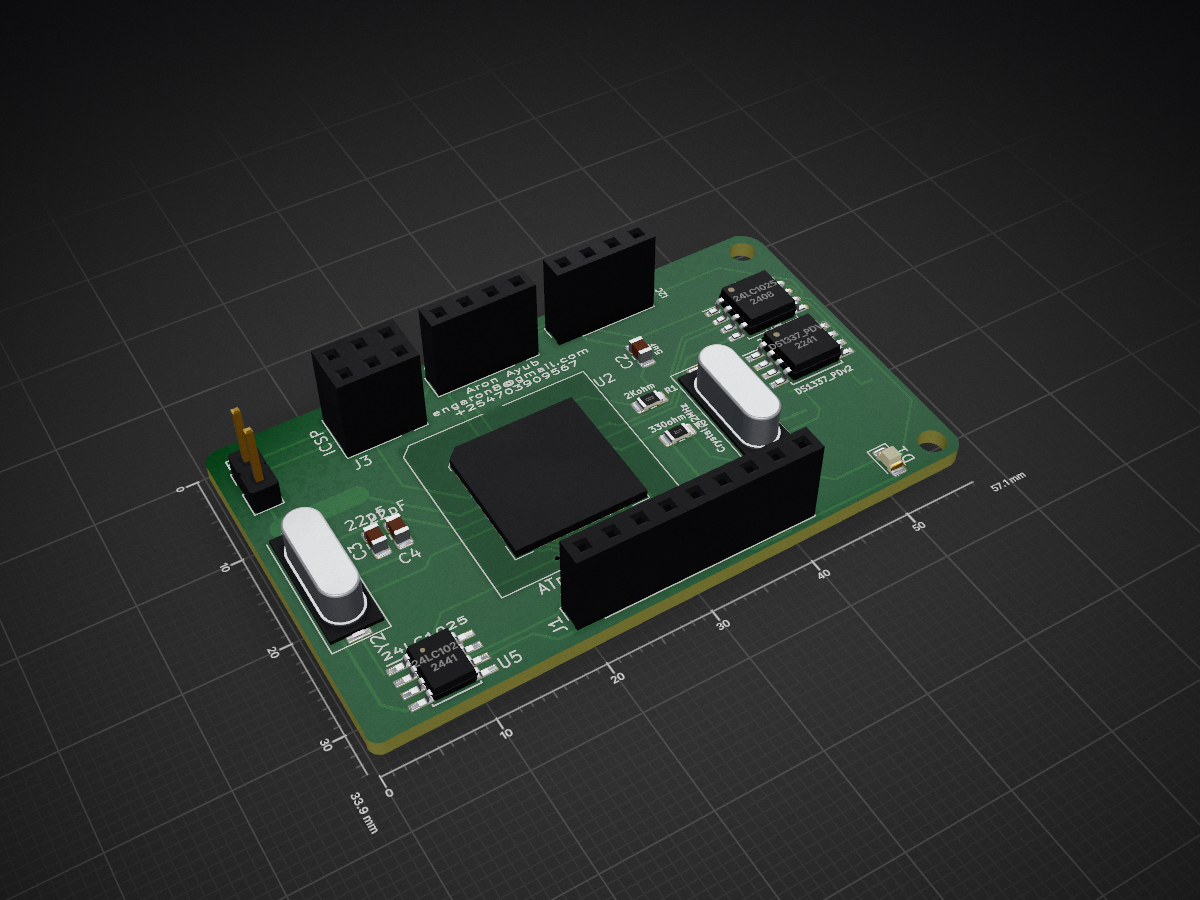
2 layers57 × 33.9 mm
Before3
RecurringNoob/FluxLink
KiCad PCB diff engine with an interactive board viewer and RAG-powered chat over git history. Covers components, nets, ERC, power tree, differential pairs, grounding, impedance, and BOM.
17 parts
 RecurringNoob/FluxLink
KiCad PCB diff engine with an interactive board viewer and RAG-powered chat over git history. Covers components, nets, ERC, power tree, differential pairs, grounding, impedance, and BOM.
After3 is an open-source printed circuit board by RecurringNoob, from the RecurringNoob/FluxLink repository on GitHub. It is a 2-layer board of 57 × 33.9 mm with 17 parts on 30 nets, routed with 305 tracks and 11 vias.
It is built around the ATMEGA328P-PU and 24LC1025-I/P. Its parts include 4 ICs, 4 connectors, 3 capacitors, 2 resistors and 2 crystals. It belongs with the AVR (ATmega, ATtiny) boards of this library.


Semantic PCB diff review with a natural-language chat interface.
FluxLink combines two tools into one workflow: FluxDiff — a structured diff engine for KiCad .kicad_pcb files — and a RAG-powered chat layer that lets engineers query board changes in plain English. Review diffs visually in the interactive board viewer, then ask questions about what changed and why.
| Layer | What it does |
|---|---|
| FluxDiff | Compares two KiCad board files semantically — components, nets, routing, ERC, power tree, differential pairs, grounding, impedance, and BOM |
| Board Viewer | Flask + React/Vite frontend: side-by-side / toggle / overlay view with interactive findings markers |
| FluxLink Chat | RAG pipeline over git history — embeds diff summaries into a FAISS vector store, answers natural-language questions via OpenAI with cited sources |
System requirement: KiCad must be installed and kicad-cli must be on your PATH.
pip install fluxlinkOr from source:
git clone https://github.com/your-org/fluxlink.git
cd fluxlink
pip install -e .
Optional dependencies:
| Package | Purpose |
|---|---|
pyyaml | Stackup config in YAML format (falls back to JSON if absent) |
faiss-cpu | Required for the chat / RAG sub-system |
openai | Required for embeddings and chat completions |
# Print report to stdout, write output/ directory
fluxlink before.kicad_pcb after.kicad_pcb

# With impedance analysis
fluxlink before.kicad_pcb after.kicad_pcb --stackup stackup.yaml

# Open the interactive board viewer after diffing
fluxlink before.kicad_pcb after.kicad_pcb --viewer
The board viewer runs at http://localhost:5000. When the Vite dev server is running on port 5173, the viewer redirects there automatically.
# 1. Set credentials
export FLUXDIFF_REPO_PATH=/path/to/kicad/repo
export OPENAI_API_KEY=sk-...

# 2. Ingest git history into the vector store
python -m fluxlink.rag.ingest.run_ingest --max-commits 50

# 3. Start the chat API
uvicorn fluxlink.rag.api:app --host 0.0.0.0 --port 8000 --reload

# 4. Open the chat UI at /chat in the board viewerAll files are written to output/ in the working directory.
| File | Description |
|---|---|
output/diff_report.txt | Full text diff report |
output/before.svg / output/after.svg | Board SVGs (viewer backgrounds) |
output/diff_overlay.png | Pixel-level red/green diff image |
output/component_diff.png | Annotated component change markers |
The viewer is a React/Vite frontend served by Flask. Three view modes:
The findings sidebar lists all issues grouped by category (ERC, POWER, DIFF_PAIR, GROUND, IMPEDANCE, BOM, COMPONENT) with severity badges (CRITICAL / WARNING / INFO), free-text search, and severity filtering. Clicking any finding or component change pans and zooms the board to that location.
Keyboard shortcuts:
| Key | Action |
|---|---|
j / ↓ | Next finding |
k / ↑ | Previous finding |
Escape | Clear selection |
The /chat route opens FluxLink Chat — a full-page conversational UI backed by the RAG API.
Ask questions like:
Every answer cites the specific commit ID and file it was sourced from. A collapsible sources panel appears below each assistant message.
POST /chat
Body:    { "query": "What changed in the last commit?" }
Returns: { "answer": "...", "sources": [{ "commit_id": "a1b2c3d", "file_name": "board/main.kicad_pcb" }] }Restrict retrieval to a specific commit, document type, or file:
POST /chat/filtered
{
  "query": "Are there impedance issues?",
  "filters": {
    "commit": "a1b2c3d4e5f6",
    "type": "impedance",
    "file": "board/main.kicad_pcb"
  }
}
All filter keys are optional. Supported document types: summary, component, net, routing, power_tree, diff_pair, grounding, impedance, bom, repo_file.
GET /health
→ { "status": "ok", "documents_indexed": 142 }# Index the last 50 commits
python -m fluxlink.rag.ingest.run_ingest --max-commits 50
# Re-index from scratch
python -m fluxlink.rag.ingest.run_ingest --max-commits 50 --clear
# Include impedance analysis during ingestion
python -m fluxlink.rag.ingest.run_ingest --stackup stackup.yamlIngestion is idempotent — documents are deduplicated by SHA-256 content hash. Running it twice produces the same index.
Impedance analysis uses a per-layer stackup config. If omitted, a default microstrip layer is assumed (0.2 mm dielectric, εr = 4.5, 35 µm copper).
# stackup.yaml
layers:
  F.Cu:
    type: microstrip
    dielectric_thickness: 0.2
    dielectric_er: 4.5
    copper_thickness: 0.035
  In1.Cu:
    type: stripline
    dielectric_thickness: 0.18
    dielectric_er: 4.3
    copper_thickness: 0.035
Pass with --stackup stackup.yaml. Both YAML and JSON are accepted.
Power shorts, missing pull-ups on I2C/open-drain nets, missing bypass caps within 5 mm of IC power pins, under-connected power nets, and floating nets.
Classifies regulators, connectors, batteries, and IC loads into a rail graph. Reports rail contention (CRITICAL), unused regulator outputs (WARNING), and sourceless rails (WARNING).
Detects paired nets by suffix (_P/_N, +/−, _DP/_DN, etc.). Checks length mismatch > 0.5 mm, via count asymmetry, and layer asymmetry per pair.
GND island detection, analog/digital IC mix on a shared GND net, and ADC components without a GND reference within 10 mm.
Microstrip and stripline impedance from trace width and stackup config, compared against targets for critical net types (USB, RF, LVDS, HDMI, Ethernet, MIPI, PCIe).
Groups components by (value, footprint), queries the ERP adapter, and reports out-of-stock (CRITICAL), low-stock (WARNING), or sufficient-stock (INFO). Swap erp_service.fetch_inventory_from_erp() with any real ERP client without touching other modules.
| Variable | Default | Purpose |
|---|---|---|
FLUXDIFF_REPO_PATH | (required) | Path to the KiCad git repository |
OPENAI_API_KEY | (required) | OpenAI API key |
FLUXDIFF_EMBEDDING_MODEL | text-embedding-3-small | Embedding model |
FLUXDIFF_LLM_MODEL | gpt-4o-mini | Chat completion model |
FLUXDIFF_TOP_K | 5 | Documents retrieved per query |
FLUXDIFF_MEMORY_WINDOW | 5 | Conversation turns kept in context |
FLUXDIFF_VECTOR_DB_PATH | ./rag_db | FAISS index storage path |
FLUXDIFF_CORS_ORIGINS | localhost:5173,3000,5000 | Allowed CORS origins (comma-separated) |
| Service | Port | Purpose |
|---|---|---|
| Flask board viewer | 5000 | /api/diff, /api/board/*, serves the React SPA |
| FastAPI RAG chat | 8000 | /chat, /chat/filtered, /health |
| Vite dev server | 5173 | Frontend HMR (proxies /api to Flask) |
fluxlink/
├── cli/main.py                  # Entry point — orchestrates the full pipeline
├── parser/
│   ├── sexp_parser.py           # S-expression tokenizer and AST builder
│   └── pcb_parser.py            # AST → domain objects (PCBData)
├── models/pcb_models.py         # Dataclasses: Pad, Component, Net, Trace, Via, Finding, DiffResult
├── diff/diff_engine.py          # compare_pcbs() — master diff orchestrator
├── analysis/
│   ├── connectivity_graph.py
│   ├── trace_connectivity.py
│   ├── geometry.py
│   ├── erc_checker.py
│   ├── power_tree.py
│   ├── diff_pair.py
│   ├── ground_checker.py
│   └── impedance.py
├── supply_chain/
│   ├── bom_checker.py
│   └── erp_service.py           # Swappable ERP adapter stub
├── visual/
│   ├── kicad_export.py          # kicad-cli → SVG/PNG export
│   ├── image_diff.py            # Pixel-level before/after overlay
│   └── component_diff.py        # Component marker and arrow overlay
├── viewer/server.py # Flask API and SPA serveranalyse_X(pcb: PCBData, ...) -> list[Finding].X_changes: List[str] and X_findings: List[Finding] to DiffResult in pcb_models.py.compare_pcbs() in diff_engine.py.cli/main.py./api/diff in viewer/server.py.DiffSummary, DiffGenerator, and DocumentBuilder under rag/.Replace VectorStore in rag/embedding/vector_store.py. Keep the interface: add_documents(), similarity_search(), clear().
Replace LLMClient.generate_response(prompt: str) -> str in rag/llm/llm_client.py. Update FLUXDIFF_LLM_MODEL.
Replace Embedder.embed_documents() and embed_query() in rag/embedding/embedder.py. If the embedding dimension changes, run --clear before re-ingesting — the FAISS index dimension is fixed at creation time.
Replace ChatMemory in rag/chat/memory.py with a Redis- or DB-backed implementation. Keep the interface: add(user, assistant), get_context() -> str, clear().
| Package | Purpose |
|---|---|
click | CLI argument parsing |
flask + flask-cors | Board viewer API |
fastapi + uvicorn + pydantic | RAG chat API |
openai | Embeddings and chat completions |
faiss-cpu | Vector similarity search |
numpy | Array operations |
opencv-python | Image processing |
cairosvg | SVG → PNG conversion |
python-dotenv | .env file loading |
pyyaml (optional) | YAML stackup config |
kicad-cli (system) | PCB export to SVG/PNG |
MIT
| Qty | Value | Footprint | References |
|---|---|---|---|
| 2 | 22pF | Capacitor_SMD:C_0805_2012Metric_Pad1.15x1.40mm_HandSolder | C3, C4 |
| 1 | 10 | Connector_PinHeader_2.54mm:PinHeader_1x02_P2.54mm_Vertical | BT1 |
| 1 | 24LC1025 | Package_SO:SOIC-8_5.275x5.275mm_P1.27mm | U4 |
| 1 | 24LC1025 | Package_SO:PowerIntegrations_SO-8 | U5 |
| 1 | 2Kohm | Resistor_SMD:R_0805_2012Metric_Pad1.15x1.40mm_HandSolder | R1 |
| 1 | 330ohm | Resistor_SMD:R_0805_2012Metric_Pad1.15x1.40mm_HandSolder | R2 |
| 1 | 5uF | Capacitor_SMD:C_0805_2012Metric_Pad1.15x1.40mm_HandSolder | C2 |
| 1 | ATmega328P-PU | Package_LCC:PLCC-28_SMD-Socket | U2 |
| 1 | Crystal 16Mhz | Crystal:Crystal_SMD_HC49-SD | Y2 |
| 1 | Crystal 32MHz | Crystal:Crystal_SMD_HC49-SD | Y1 |
| 1 | DS1337_PDv2 | Package_SO:SOIJ-8_5.3x5.3mm_P1.27mm | U3 |
| 1 | I2C | Connector_PinSocket_2.54mm:PinSocket_1x04_P2.54mm_Vertical | J2 |
| 1 | ICSP | Connector_PinSocket_2.54mm:PinSocket_2x03_P2.54mm_Vertical | J3 |
| 1 | LED | LED_SMD:LED_0805_2012Metric_Pad1.15x1.40mm_HandSolder | D1 |
| 1 | digital pins | Connector_PinSocket_2.54mm:PinSocket_1x09_P2.54mm_Vertical | J1 |
| 1 | serial | Connector_PinSocket_2.54mm:PinSocket_1x04_P2.54mm_Vertical | J4 |
RecurringNoob/FluxLink
KiCad PCB diff engine with an interactive board viewer and RAG-powered chat over git history. Covers components, nets, ERC, power tree, differential pairs, grounding, impedance, and BOM.

futureshocked/KLP4e_MCU-Datalogger
This is the repository for the "MCU Datalogger" project.

portlandhodl/nyan-keys-hardware
Hardware document for the nyan keys keyboard

the78mole/km271-wifi
A piece of hardware to be installed in a Buderus Logamatic 2107 to provide control and status over WiFi

futureshocked/KicadLikeAPro-Project-3-BACEE
This is one of the PCB projects from the Kicad Like a Pro book. It contains a two and four layer board that implements an Arduino clone with external EEPROM and a clock.

MacMannes/XVA1-User-Interface
A hardware user interface for the XVA1 virtual analog synthesizer, inspired by the Hydrasynth's layout. The XVA1 (and its FM sibling the XFM2) is built on an Artix-7 FPGA but has no built-in UI — this project adds one.

cclienti/tig-welder
A DIY TIG welder that can be plugged to a traditionnal stick welder or to a high current source

DevMajed/DataLogger-Board
Hardware PCB Design for AVR-based Datalogger using KiCAD

j-hoppe/uTracer11
flipchip probe and host GUI to visualize intenral operation of PDP-11 CPU
It measures 57 × 33.9 mm and has 2 copper layers, 1.6 mm thick.
17 parts, built around the ATMEGA328P-PU and 24LC1025-I/P. The full list of its parts is on this page, with links to each part's symbol and footprint where PCBKit's library has them.
From the RecurringNoob/FluxLink repository on GitHub, at the commit this page was made from: the board is test_boards/after3.kicad_pcb. PCBKit opens the board in the browser, with nothing to install.
Its repository states no licence, so its author keeps all rights: ask RecurringNoob before reusing the design.