

2 layers30.4 × 12.7 mm

 HexFud/PCB-BuisnessCard
I built this electronic badge that can be used for example in hachatons or other IT event if you open the project on KICAD you can also customize the writings.
Buisness card is an open-source printed circuit board by HexFud, from the HexFud/PCB-BuisnessCard repository on GitHub. It is a 2-layer board of 85 × 100 mm with 71 parts on 43 nets, routed with 659 tracks and 149 vias.
It is built around the CH552G and NT3H2111W0FHKH. Its parts include 64 diodes, 3 ICs, 2 switches and 1 inductor. It belongs with the 8051 (CH55x, STC, AT89) boards of this library.
I built this electronic badge that can be used for example in hachatons or other IT event if you open the project on KICAD you can also customize the writings.
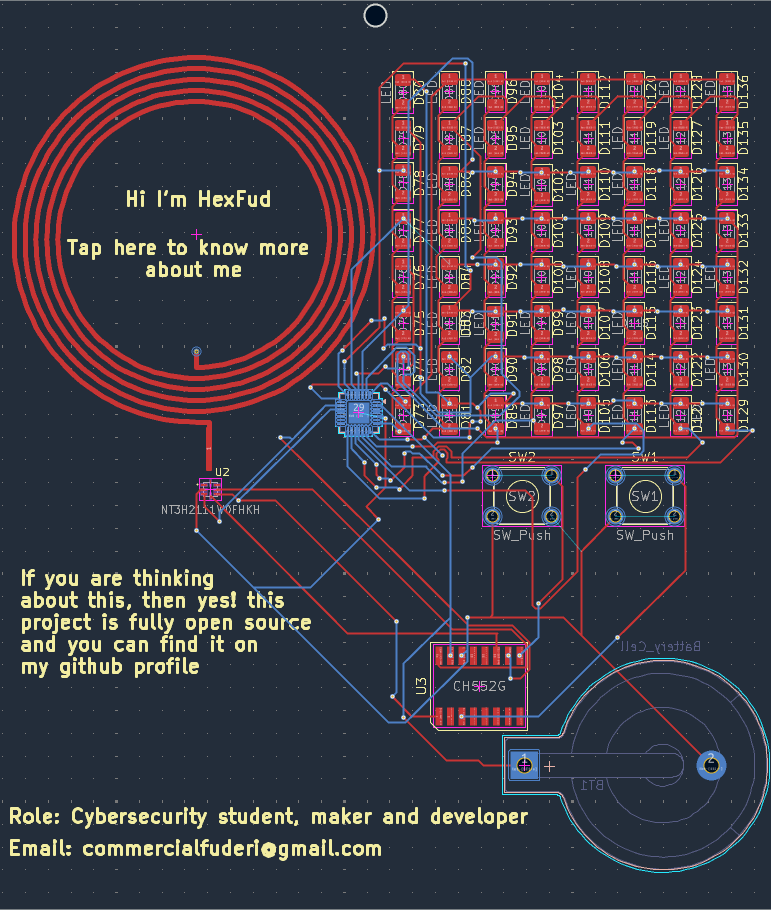
This project consists only of one PCB 85x100mm and other components like the led matrix controller the microcontoller etc. It also has a NFC tag that can be written with the microcontroller and 2 minigames showed on the 8x8 led matrix on the front.
Install Arduino IDE
Add the board package going into File -> Preferences and in the additional board URL you paste this https://raw.githubusercontent.com/DeqingSun/ch55xduino/ch55xduino/package_ch55xduino_mcs51_index.json
Navigate to Tools -> Board -> Boards Manager search ch55xduino and click install
Plug the microcontroller into the pc and select the correct board you are using in my case a CH552
You can now flash the firmware
If you want to bring your own game on the PCB you're welcome! just fork this repository and then if i'll like your work i am going to mention you guys in the original code. Unfortunatley we only have 2 buttons but in the future I can design another PCB with more functions
Ai helped me to build the part of the firmware that controls the LED matrix
| Qty | Value | Footprint | References |
|---|---|---|---|
| 64 | LED | LED_SMD:LED_1206_3216Metric | D100, D101, D102, D103, D104, D105, D106, D107, D108, D109, D110, D111, D112, D113, D114, D115 +48 |
| 2 | SW_Push | Button_Switch_THT:SW_TH_Tactile_Omron_B3F-102x | SW1, SW2 |
| 1 | Battery_Cell | Battery:BatteryHolder_Keystone_103_1x20mm | BT1 |
| 1 | CH552G | gygy:CH552G | U3 |
| 1 | IS31FL3731-QF | Package_DFN_QFN:QFN-28-1EP_4x4mm_P0.4mm_EP2.3x2.3mm | U1 |
| 1 | L | PCB Coils:COIL_GENERATOR | L1 |
| 1 | NT3H2111W0FHKH | gyygg:QFN8P50_160X160X50L40X20N | U2 |


milar111/L.I.P.S.
OpenSource Affordable SipAndPuff device: Linear Interface for Paralysis Support


gowenrw/BSidesDFW_2019_Badge
This is where all the files for the BSidesDFW 2019 Badge will be stored. This includes code and art and cab and fab files. All the things.

It measures 85 × 100 mm and has 2 copper layers, 1.6 mm thick.
71 parts, built around the CH552G and NT3H2111W0FHKH. The full list of its parts is on this page, with links to each part's symbol and footprint where PCBKit's library has them.
From the HexFud/PCB-BuisnessCard repository on GitHub, at the commit this page was made from: the board is PCB_Schemaric-KICAD/Buisness card.kicad_pcb and its schematic PCB_Schemaric-KICAD/Buisness card.kicad_sch. PCBKit opens the board in the browser, with nothing to install.
Its repository states no licence, so its author keeps all rights: ask HexFud before reusing the design.