
2 layers41.9 × 23.9 mm

Password storage for nerds
Pip is an open-source printed circuit board by jnthas, from the jnthas/pinch repository on GitHub, published under the MIT licence. It is a 2-layer board of 43.2 × 24.9 mm with 37 parts on 36 nets, routed with 352 tracks and 32 vias.
It is built around the CH552G, W25Q32JVSSIQ and 74HC595, with the BC847 among its other parts. Its parts include 13 resistors, 6 capacitors, 4 switches, 3 ICs and 1 diode. It belongs with the 8051 (CH55x, STC, AT89) boards of this library.


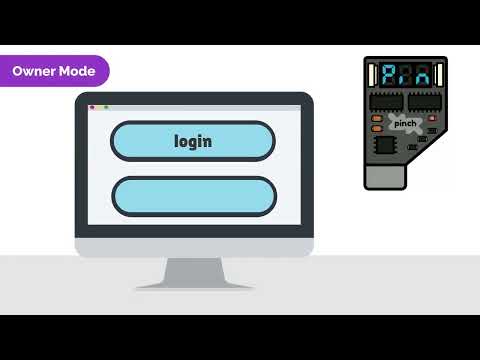

Pinch is an open-source, personal and portable device capable of storing, retrieving and entering your passwords on demand. It is a physical device with no internet access and only works through manual activation. Pinch is the size of a USB flash drive. It has a USB interface, two buttons and a three digit display which are used to select and confirm the desired password. When confirming, simply put the focus on the password field and the Pinch will enter it for you.

Pinch has three modes of operation
| Qty | Value | Footprint | References |
|---|---|---|---|
| 8 | 1K | Resistor_SMD:R_1206_3216Metric | R1, R2, R3, R4, R5, R6, R7, R8 |
| 5 | 0.1uF | Capacitor_SMD:C_1206_3216Metric | C1, C2, C3, C5, C6 |
| 3 | 10K | Resistor_SMD:R_1206_3216Metric | R9, R12, R13 |
| 1 | 330R | Resistor_SMD:R_1206_3216Metric | R10 |
| 1 | 4.7K | Resistor_SMD:R_1206_3216Metric | R11 |
| 1 | 4.7uF | Capacitor_SMD:C_1206_3216Metric | C4 |
| 1 | 74HC595 | Package_SO:SOP-16_3.9x9.9mm_P1.27mm | U1 |
| 1 | BC847 | Package_TO_SOT_SMD:SOT-23 | Q1 |
| 1 | BUTTON_A | libraries:SW_TL3330AF130QG | SW3 |
| 1 | BUTTON_B | libraries:SW_TL3330AF130QG | SW4 |
| 1 | CH552G | Package_SO:SOP-16_3.9x9.9mm_P1.27mm | U3 |
| 1 | FLASH | libraries:SW_Push_45x45mm_H1.5mm | SW1 |
| 1 | G*** | kibuzzard-63727E80 | kibuzzard-63727E80 |
| 1 | G*** | kibuzzard-63728C1B | kibuzzard-63728C1B |
| 1 | G*** | kibuzzard-63728B2A | kibuzzard-63728B2A |
| 1 | G*** | kibuzzard-63728AF8 | kibuzzard-63728AF8 |
| 1 | G*** | kibuzzard-63727E71 | kibuzzard-63727E71 |
| 1 | G*** | kibuzzard-63728AEE | kibuzzard-63728AEE |
| 1 | LED | LED_SMD:LED_1206_3216Metric | D1 |
| 1 | LOGO | libraries:Logo | G*** |
| 1 | NET-2531AB-11 | libraries:Display_2531AB | DS1 |
| 1 | RESET | libraries:SW_Push_45x45mm_H1.5mm | SW2 |
| 1 | USBPCB | libraries:USB-A-PCB | J1 |
| 1 | W25Q32JVSS | Package_SO:SOIC-8_5.23x5.23mm_P1.27mm | U2 |


embedded-pro/e-foc-hardware
hardware to be used with https://github.com/embedded-pro/e-foc


RiddheshVeling/Industrial-Flowmeter-Totalizer-with-Modbus-based-HMI-and-Data-Logging
EXTC Final year project: Industrial flowmeter totalizer with Modbus-based HMI for real-time monitoring and data logging using STM32 and RS485.

gianluca-rainis/Z80DevBoard
An advanced development board for the Z80 microprocessor, powered by an RP2040.

jasonlaguidice/TKL-Split-Keyboard
Board edge fillet plugin used: https://github.com/tywtyw2002/FilletEdge
It measures 43.2 × 24.9 mm and has 2 copper layers, 1.6 mm thick.
37 parts, built around the CH552G, W25Q32JVSSIQ, 74HC595 and BC847. The full list of its parts is on this page, with links to each part's symbol and footprint where PCBKit's library has them.
From the jnthas/pinch repository on GitHub, at the commit this page was made from: the board is pcb/pip/pip.kicad_pcb and its schematic pcb/pip/pip.kicad_sch. PCBKit opens the board in the browser, with nothing to install.
Its repository publishes it under the MIT licence: you may reuse it on that licence's terms (keep the author's notice, and for a copyleft licence share your changes alike).