


2 layers68.8 × 53.6 mm
Relatively Universal ROM Programmer
AndersBNielsen/Relatively-Universal-ROM-Programmer
Hardware to program W27C512 EEPROM or any 24/28/32 pin ROM requiring from 5V to 27V programming voltage.
149 parts257GPL-3.0

An IoT smart parking gate system using Arduino, Python serial communication, and a Dockerized PostgreSQL database.
Parking is an open-source printed circuit board by Freshovsky23, from the Freshovsky23/smart-parking-gate-iot repository on GitHub. It is a 2-layer board of 141.5 × 163.5 mm with 12 parts on 38 nets, routed with 129 tracks and 0 vias.
It is built around the ARDUINO UNO R3. Its parts include 3 resistors, 3 diodes, 2 connectors and 1 switch. It belongs with the AVR (ATmega, ATtiny) boards of this library.
An automated parking entrance system based on Arduino, integrated with a Python backend and a Dockerized PostgreSQL database for real-time event logging.
This project demonstrates a complete IoT pipeline: from physical hardware sensors and human-machine interaction (HMI), through custom PCB design, up to serial data communication and persistent database storage.
Watch the system in action on YouTube:
Click the badge above to watch the project implementation and physical mechanical execution details.
parking_logger.py) listens to the Arduino via USB Serial and processes system events in real time.docker-compose to instantly spin up a PostgreSQL instance for storing entry/exit logs securely.The project has evolved from a breadboard prototype into a robust, custom-designed Arduino Uno Shield created in KiCad. This ensures optimal signal integrity, eliminates loose jumper wires, and makes the system deployment-ready.
The board features optimized power traces (0.50 mm), a precise potentiometer for contrast alignment, and a solid ground plane (GND Copper Zone) on the bottom layer.
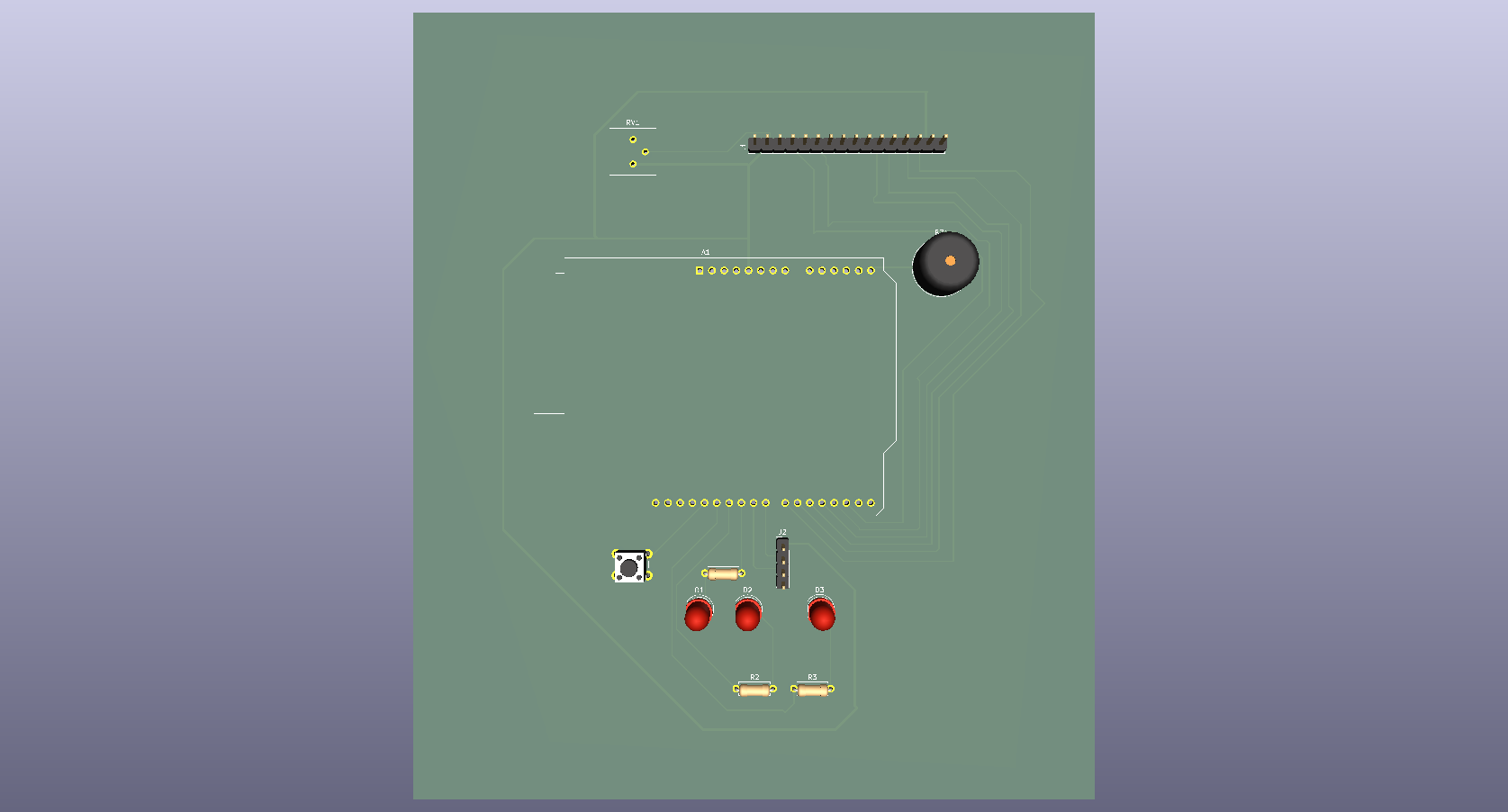
.ino firmware.pyserial, sqlalchemy, psycopg2-binary.| Component | Arduino Pin | Type | Description | Track Width |
|---|---|---|---|---|
| VCC (+5V) | +5V | Power | Main power rail for LCD, Sensor, and Potentiometer | 0.50 mm |
| GND | GND | Power | Common ground plane (Bottom Copper Zone) | Copper Zone |
| LCD RS | D2 | Output | Register Select | 0.25 mm |
| LCD Enable | D3 | Output | Enable Signal | 0.25 mm |
| LCD D4 - D7 | D4, D5, D6, D7 | Output | Parallel Data Lines | 0.25 mm |
| HC-SR04 Trig | D8 | Output | Trigger Pulse | 0.25 mm |
| HC-SR04 Echo | D9 | Input | Echo Pulse | 0.25 mm |
| Red LED | D10 | Output (PWM) | Status Indicator (Entry Blocked) | 0.25 mm |
| Green LED | D11 | Output (PWM) | Status Indicator (Entry Allowed) | 0.25 mm |
| White LED | D12 | Output | Range Warning Indicator | 0.25 mm |
| Push Button | D13 | Input | Gate Close Trigger (Internal Pull-up) | 0.25 mm |
| Buzzer | A5 (SCL) | Output | Audio Alert Signal | 0.25 mm |
| LCD Contrast | RV1 (Pin 2) | Analog | Contrast adjustment connected to LCD Pin 3 | 0.25 mm |
hardware/ to inspect the schematic and PCB layout.simulator-parking.ino in the Arduino IDE and upload it to your board.COM9 or /dev/ttyUSB0).docker-compose up -dConfigure your database connection string and correct COM port inside the script.
Run the Python application to start logging events into PostgreSQL: python parking_logger.py
📂 Repository Structure Plaintext ├── .github/ # GitHub workflows (if applicable) ├── arduino/ # Arduino firmware (.ino code) │ └── simulator-parking.ino ├── backend/ # Python application & logger scripts │ └── parking_logger.py ├── hardware/ # KiCad EDA Project files (Shield Design) │ ├── Parking.kicad_pro │ ├── Parking.kicad_sch │ ├── Parking.kicad_pcb │ ├── Parking_Schematic.pdf │ └── Parking.png # Gorgeous 3D view of the PCB ├── docker-compose.yml # Docker services initialization (PostgreSQL) └── README.md # Documentation 👤 Author Developer: @Freshovsky23
Contact: Heilman.Wiktor23@gmail.com
| Qty | Value | Footprint | References |
|---|---|---|---|
| 3 | 220 | Resistor_THT:R_Axial_DIN0207_L6.3mm_D2.5mm_P7.62mm_Horizontal | R1, R2, R3 |
| 3 | LED | LED_THT:LED_D5.0mm | D1, D2, D3 |
| 1 | Arduino_UNO_R3 | Module:Arduino_UNO_R3 | A1 |
| 1 | Buzzer | Buzzer_Beeper:Buzzer_12x9.5RM7.6 | BZ1 |
| 1 | Conn_01x04_Pin | Connector_PinHeader_2.54mm:PinHeader_1x04_P2.54mm_Vertical | J2 |
| 1 | Conn_01x16_Pin | Connector_PinHeader_2.54mm:PinHeader_1x16_P2.54mm_Vertical | J1 |
| 1 | R_Potentiometer | Potentiometer_THT:Potentiometer_Bourns_3386P_Vertical | RV1 |
| 1 | SW_Push | Button_Switch_THT:SW_PUSH_6mm_H5mm | SW1 |
AndersBNielsen/Relatively-Universal-ROM-Programmer
Hardware to program W27C512 EEPROM or any 24/28/32 pin ROM requiring from 5V to 27V programming voltage.

AlanFord/self-balancing-stick
Dual Axis Reaction Wheel Inverted Pendulum

Edging-Machines/Edging-Machines
This repository is intended to contain as much information as possible about building, designing, prototyping, and using automated edging machines.

PedroCNeves/AC_ChargingStation
A learning project to create an EV AC Charging station based on an Arduino Uno

jonsag/arduTester
An arduino component tester based on https://create.arduino.cc/projecthub/plouc68000/ardutester-v1-13-the-arduino-uno-transistor-tester-dbafb4


ICRS/101
The all-new open source Robotics 101 course from ICRS. It's specifically designed to be run in hackspaces, after school clubs and university societies.

It measures 141.5 × 163.5 mm and has 2 copper layers, 1.6 mm thick.
12 parts, built around the ARDUINO UNO R3. The full list of its parts is on this page, with links to each part's symbol and footprint where PCBKit's library has them.
From the Freshovsky23/smart-parking-gate-iot repository on GitHub, at the commit this page was made from: the board is hardware/Parking.kicad_pcb and its schematic hardware/Parking.kicad_sch. PCBKit opens the board in the browser, with nothing to install.
Its repository states no licence, so its author keeps all rights: ask Freshovsky23 before reusing the design.