
2 layers51.4 × 61 mm

 FeralAI/PicoFightingBoard283
Open source PCB for arcade sticks using Raspberry Pi Pico.
PicoFightingBoard is an open-source printed circuit board by FeralAI, from the FeralAI/PicoFightingBoard repository on GitHub. It is a 2-layer board of 96.1 × 45.2 mm with 25 parts on 49 nets, routed with 196 tracks and 0 vias.
It is built around the SN74LV1T34DBV. Its parts include 4 resistors, 4 connectors and 2 ICs. It belongs with the retro computing and games boards and the RP2040 boards of this library.
Open source PCB for arcade sticks using Raspberry Pi Pico.
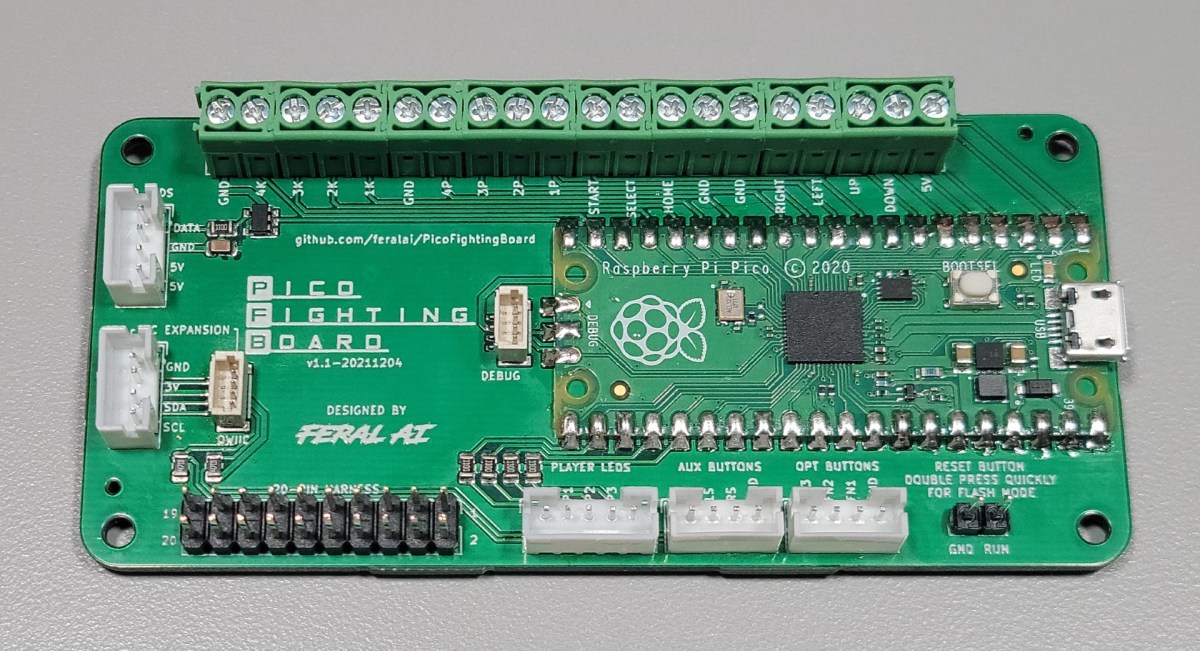
They say imitation is the highest form of flattery. If that's the case then the Brook line of arcade controller boards must be blushing beet red. The Pico Fighting Board uses the same form factor and layout of the Brook PCBs to maintain compatibility with existing arcade stick cases, wiring harnesses, wire management accessories, etc.
The files for PCB production are in the Releases section. The zip file contains the Gerber and drill files, which is all you'll need if you're soldering SMT components yourself. There are also csv files for the BOM (Bill of Materials) and component positioning for SMT assembly service.
The GP2040 gamepad firmware for Pi Pico/RP2040 has a pre-configured build for use with the Pico Fighting Board, providing support for XInput (PC, Android, Raspberry Pi, etc.), DInput (PC/PS3) and Nintendo Switch. Go to the releases and download the GP2040-PicoFightingBoard.uf2. To flash:
RPI-RP2 should appear in your file explorer.GP2040-PicoFightingBoard.uf2 file into the removable drive. This will flash the board.If you want to modify the PCB layout you'll need the free KiCad software installed. KiCad 5.1.9 was used for these instructions.
The libraries folder contains the schematics and footprints required to work with the KiCad source files.
Preferences menu, select Manage Symbol Libraries....Global Libraries tab, click the folder icon.libraries/RP-Pico Libraries and select the MCU_RaspberryPi_and_Boards.lib file.OK to finish.Preferences menu, select Manage Footprint Libraries....Global Libraries tab, click the folder icon.Select Libary dialog, navigate to libraries/RP-Pico Libraries/MCU_RaspberryPi_and_Boards.pretty in this repository.OK to confirm the folder selection.libraries/FeralAI/FeralAI.pretty folder.OK to finish.If you would like to discuss and issues or features with the Pico Fighting Board, please join the OpenStick Pico Fighting Board Discord channel.
Want to help improve the Pico Fighting Board? There are a bunch of ways to contribute!
Pull requests are welcome and encouraged for enhancements, fixes and documentation updates.
If you'd like to make a donation to my open source work, you can

or

| Qty | Value | Footprint | References |
|---|---|---|---|
| 5 | FeralAI:GS_Ground | , , , , | |
| 4 | 330 | Resistor_SMD:R_0805_2012Metric | R1, R2, R3, R4 |
| 4 | Screw_Terminal_01x05 | TerminalBlock_MetzConnect:TerminalBlock_MetzConnect_Type059_RT06305HBWC_1x05_P3.50mm_Horizontal | J5, J6, J7, J8 |
| 1 | FeralAI:GS_Ground_back | ||
| 1 | Conn_01x03_Male | Connector_PinHeader_2.54mm:PinHeader_1x03_P2.54mm_Vertical | RGB LEDS |
| 1 | Conn_01x04_Male | Connector_JST:JST_PH_S4B-PH-K_1x04_P2.00mm_Horizontal | AUX BUTTONS |
| 1 | Conn_01x05_Male | Connector_JST:JST_PH_S5B-PH-K_1x05_P2.00mm_Horizontal | PLEDS |
| 1 | Conn_02x10_Odd_Even | Connector_PinHeader_2.54mm:PinHeader_2x10_P2.54mm_Vertical | 20-PIN HARNESS |
| 1 | LOGO | FeralAI:Ryu_Fireball | G*** |
| 1 | Pico | MCU_RaspberryPi_and_Boards:RPi_Pico_SMD_TH_Clean | U1 |
| 1 | SN74LV1T34DBV | Package_TO_SOT_SMD:SOT-23-5 | U2 |
The 21 most common of 25 parts.


the78mole/km271-wifi
A piece of hardware to be installed in a Buderus Logamatic 2107 to provide control and status over WiFi

ikajdan/katia
A split keyboard with 6 by 3 column staggered keys and 3 thumb keys, based on the Crkbrd design

crgarcia12/electronics-homeassistant-lightscontroll
A smart lighting controller PCB that integrates seamlessly with ESPHome and Home Assistant while maintaining full compatibility with traditional mechanical switches.

novintic/FlukeEmu-FluCom
HW/SW solution for Fluke 9010 mainframe emulation
It measures 96.1 × 45.2 mm and has 2 copper layers, 1.6 mm thick.
25 parts, built around the SN74LV1T34DBV. The full list of its parts is on this page, with links to each part's symbol and footprint where PCBKit's library has them.
From the FeralAI/PicoFightingBoard repository on GitHub, at the commit this page was made from: the board is boards/v1.0/PicoFightingBoard.kicad_pcb and its schematic boards/v1.1a/PicoFightingBoard.kicad_sch. PCBKit opens the board in the browser, with nothing to install.
Its repository states no licence, so its author keeps all rights: ask FeralAI before reusing the design.