
4 layers234 × 84 mm
Main panel
google/mozc-devices
Circuit diagrams and firmware source code for Gboard DIY keyboards
234 parts3kApache-2.0

 Diparsan79/flamepad-blueprint
FLAMExPAD is a minimal 4-key macropad powered by KMK firmware on a Seeeduino XIAO (SAMD21). It features 2 SK6812MINI-E RGB LEDs, a clean 2-layer keymap with Spotlight macros for launching apps, and a compact…
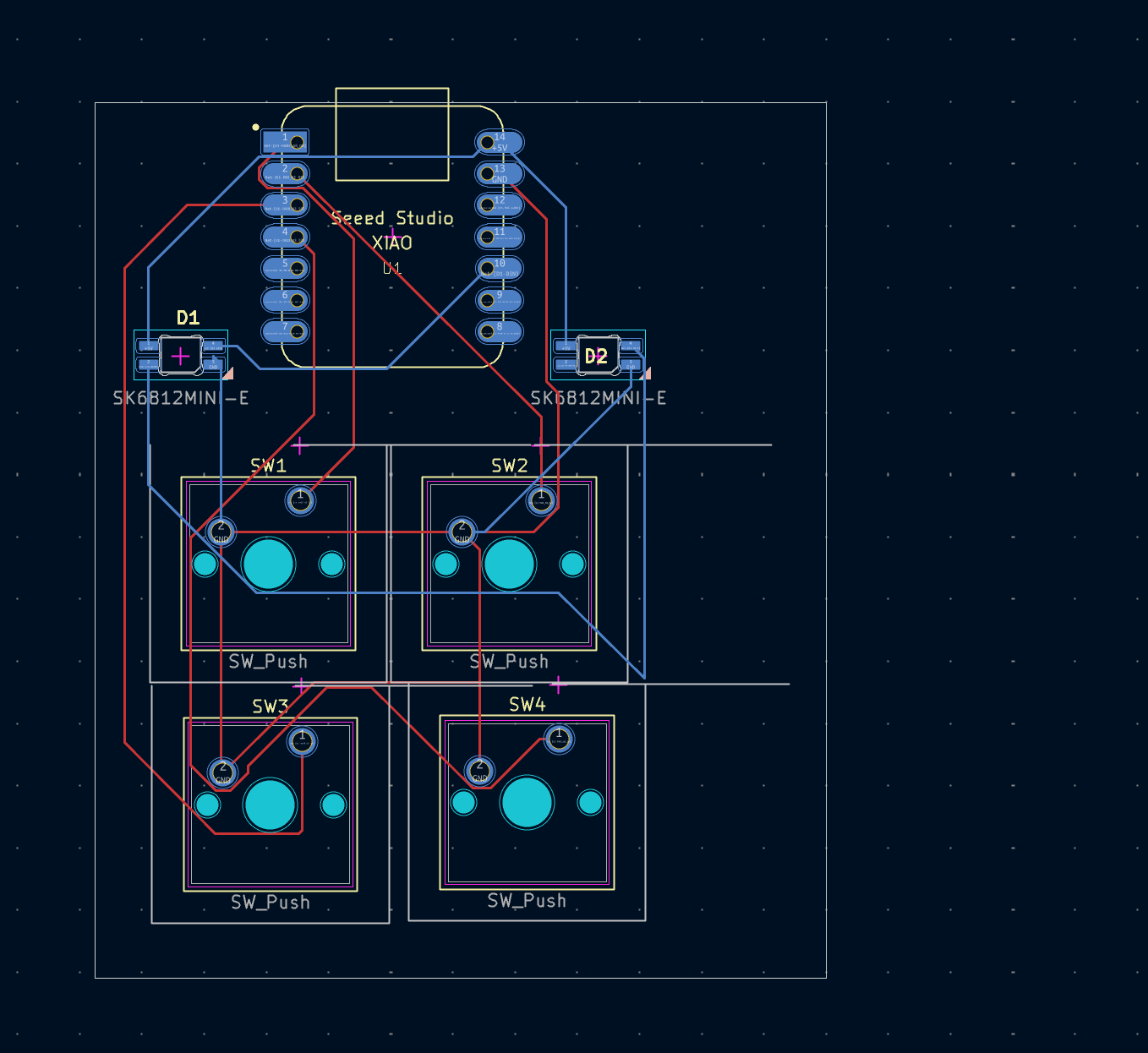
Heckclub is an open-source printed circuit board by Diparsan79, from the Diparsan79/flamepad-blueprint repository on GitHub. It is a 2-layer board of 58.8 × 72.4 mm with 7 parts on 16 nets, routed with 73 tracks and 0 vias.
It is built around the SK6812MINI-E. Its parts include 4 switches, 2 diodes and 1 IC. It belongs with the SAM D and SAM boards of this library.
BUILT TO LAST.
FLAMExPAD is a minimal 4-key macropad powered by KMK firmware on a Seeeduino XIAO (SAMD21). It features 2 SK6812MINI-E RGB LEDs, a clean 2-layer keymap with Spotlight macros for launching apps, and a compact direct-wired design — no diodes, no encoder, no display. Just keys that do things.
Built for the Hackpad Blueprint YSWS by Hack Club.
| Key | Action |
|---|---|
| K1 | Ctrl + `` |
| K2 | F5 |
| K3 | Macro: Open Photo Booth via Spotlight |
| K4 | Tap: Cmd+S · Hold: Momentary Layer 1 |
| Key | Action |
|---|---|
| K1 | Macro: Open Spotify via Spotlight |
| K2 | Macro: Open Visual Studio Code via Spotlight |
| K3 | Macro: Open Brave via Spotlight |
| K4 | Transparent (layer hold passes through) |
All macros follow the pattern:
Cmd+Space→ 200ms delay → type app name → 150ms delay →Enter
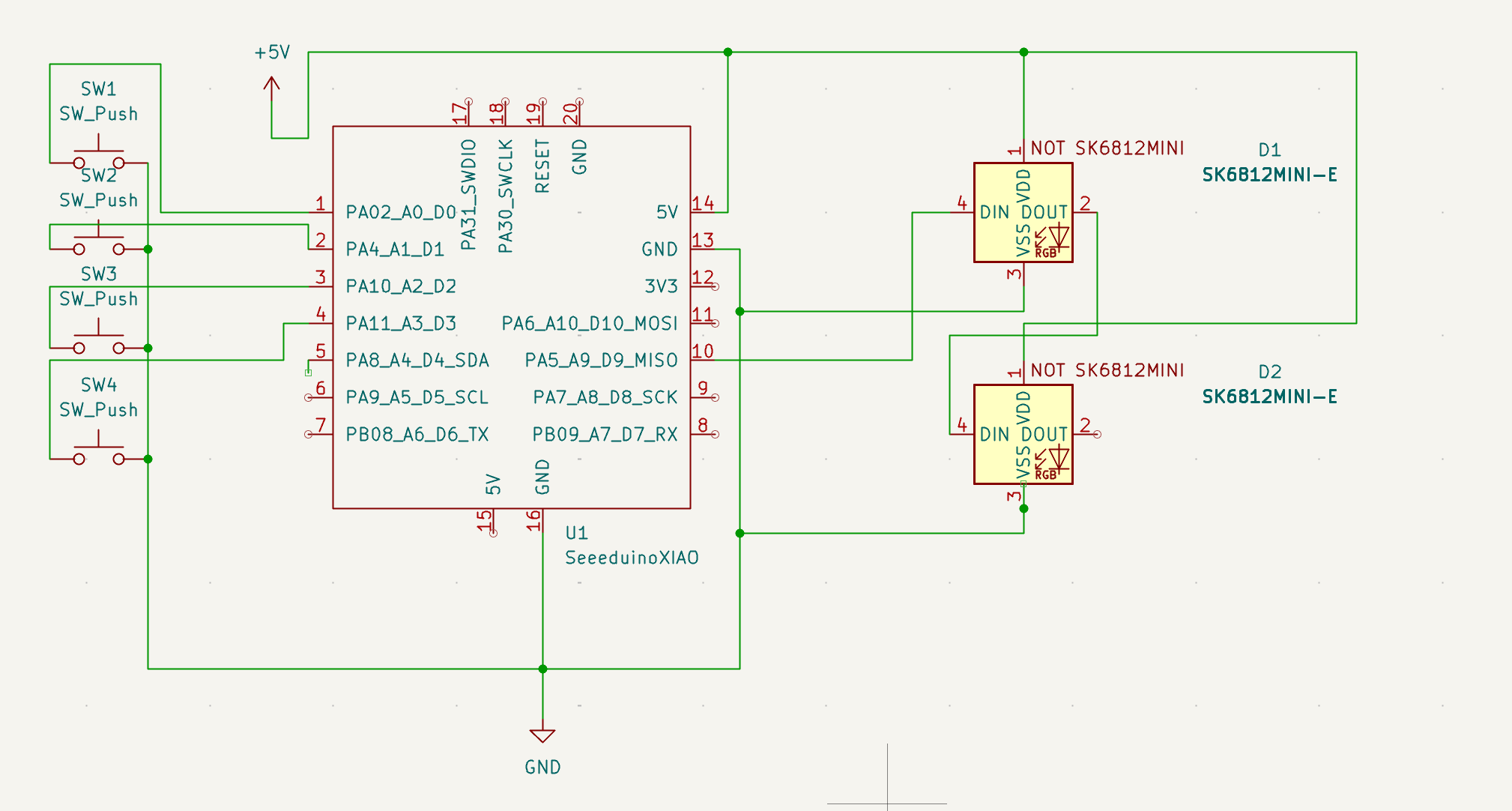
The PCB was designed in KiCad. Direct wiring to the Seeeduino XIAO — no key matrix, no diodes. The two SK6812MINI-E LEDs are daisy-chained from pin D9.
Schematic
PCB Render
| Component | XIAO Pin | GPIO |
|---|---|---|
| SW1 | Pin 1 | D0 (PA02) |
| SW2 | Pin 2 | D1 (PA4) |
| SW3 | Pin 3 | D2 (PA10) |
| SW4 | Pin 5 | D4 (PA8) |
| LED Data (D1 DIN) | Pin 10 | D9 (PA5) |
| LED D1 DOUT → D2 DIN | Daisy-chained | — |
| LED VDD | 5V | — |
| LED VSS | GND | — |
The case was designed in Fusion 360. Two-part design: a top plate and a bottom enclosure.
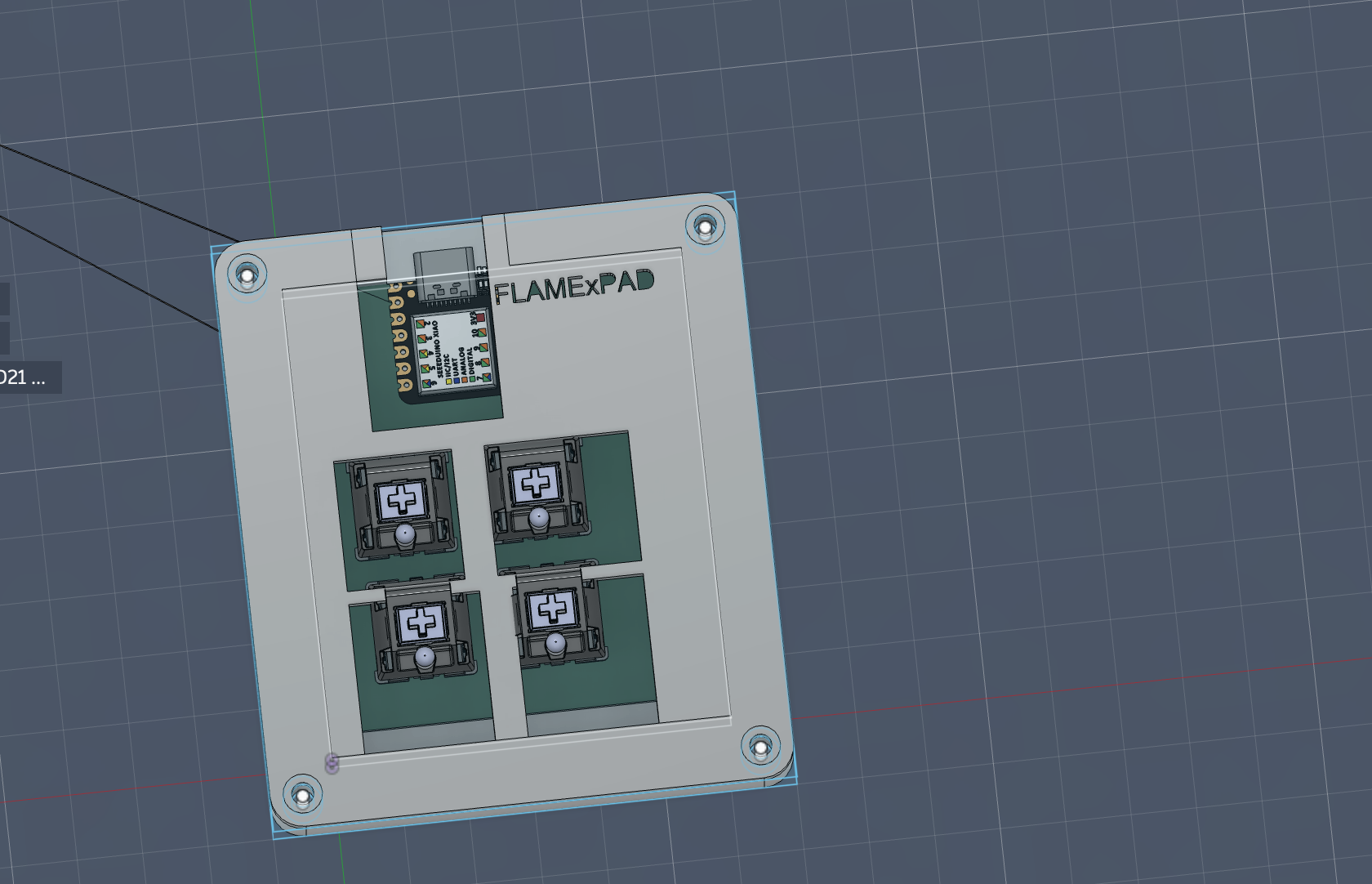
FLAMExPAD runs KMK firmware on CircuitPython. Everything is hardcoded — no VIA, no companion app.
firmware/
├── boot.py     # USB HID device configuration
├── kb.py       # Hardware definition (pins, scanner, RGB pin)
└── main.py # Keymap, layers, macros, RGB configkmk/ folder from KMKfw/kmk_firmware to the root of your CIRCUITPY driveneopixel.mpy from the CircuitPython library bundle into CIRCUITPY/lib/boot.py, kb.py, and main.py from the firmware/ folder to the root of CIRCUITPY| Qty | Component |
|---|---|
| 4x | Cherry MX Switches |
| 4x | Blank DSA Keycaps |
| 2x | SK6812MINI-E RGB LEDs |
| 1x | Seeeduino XIAO (SAMD21) |
| 1x | Custom PCB |
| 1x | Case (2 parts — 3D printed in Fusion 360) |
"If at first you don't succeed, redesign it three more times." — Me, probably at 1 AM
| Qty | Value | Footprint | References |
|---|---|---|---|
| 4 | SW_Push | Button_Switch_Keyboard:SW_Cherry_MX_1.00u_PCB | SW1, SW2, SW3, SW4 |
| 2 | SK6812MINI-E | footprints:SK6812MINI-E_fixed | D1, D2 |
| 1 | SeeeduinoXIAO | footprints:XIAO-Generic-Hybrid-14P-2.54-21X17.8MM | U1 |
google/mozc-devices
Circuit diagrams and firmware source code for Gboard DIY keyboards

Bastardkb/Dilemma
The Dilemma is a vertical stagger low-profile keyboard with mods.

Pwnsat/FlatSat
Flatsat v1.0 is a hardware based platform for aerospace cybersecurity research

adamws/kicad-kbplacer
KiCad plugin for automatic keyboard's key placement and routing

imchipwood/dumbpad
Simple 4x4 numpad with rotary encoder. Powered by QMK via ATmega32u4 Pro Micro

makerforgetech/modular-biped
An open source framework for creating a bipedal modular companion robot.


It measures 58.8 × 72.4 mm and has 2 copper layers, 1.6 mm thick.
7 parts, built around the SK6812MINI-E. The full list of its parts is on this page, with links to each part's symbol and footprint where PCBKit's library has them.
From the Diparsan79/flamepad-blueprint repository on GitHub, at the commit this page was made from: the board is PCB/heckclub.kicad_pcb. PCBKit opens the board in the browser, with nothing to install.
Its repository states no licence, so its author keeps all rights: ask Diparsan79 before reusing the design.