Blog ·
Two ESP32-P4 touch screens, an STM32 and an ESP32: every device that runs in PCBKit
Sergey Alekseev
Until a few days ago PCBKit’s device simulation ran boards we designed for it: Arduino’s ATmega328P, then eleven Doom handhelds on RP2040s, ESP32-S3s and a Teensy. This week the question got harder: can a device that somebody else built, with firmware somebody else wrote and released, run in the page from that release, byte for byte, on a model of its own board? And can the board then be ordered?
The answer for two ESP32-P4 touch screens is yes, with the gaps listed below. Along the way the STM32 and the classic ESP32 joined the simulator, and the gallery now has 43 boards. All of them are at the end of this post.
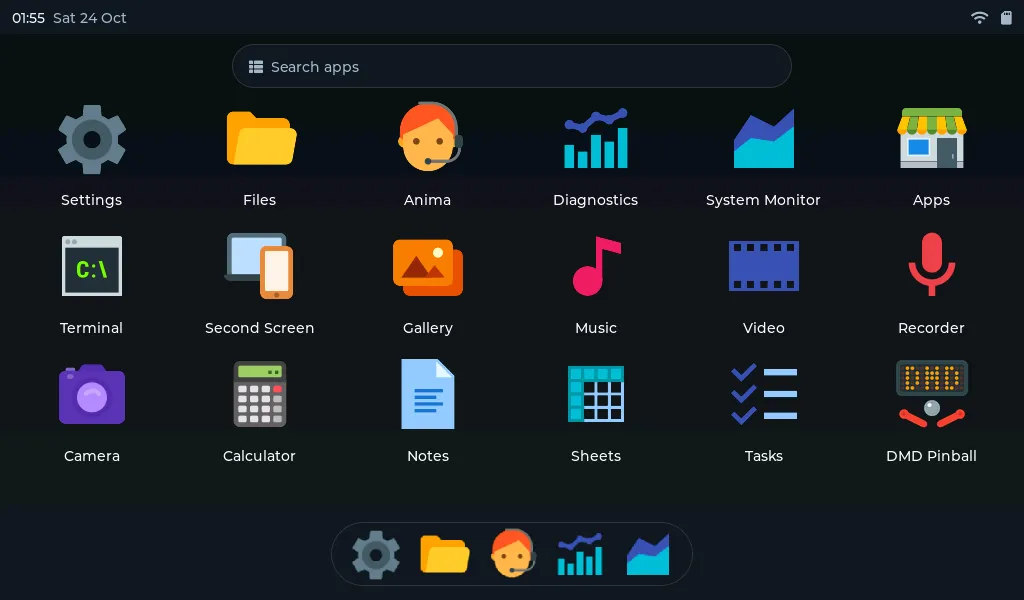
NucleoOS v1.2.189’s launcher, a frame from the simulated panel after the seven steps of its setup wizard. Nothing in it is drawn by PCBKit.
NucleoOS on a 7″ ESP32-P4 board
NucleoOS-P4 is a hobby operating system for Guition’s JC1060P470C: an ESP32-P4 (two RISC-V cores at 360 MHz, 32 MiB of PSRAM in the package), a 7″ 1024 × 600 MIPI-DSI panel, GT911 touch, an ES8311 codec, microSD and an ESP32-C6 for the radio. It is built on ESP-IDF 5.5 and LVGL 9 and has a launcher, a file manager, music, notes, a terminal, a WebAssembly runtime, games and more. Its author publishes a factory image and an SD-card archive with every release.
The board in the gallery, p4-touch-7, is our own version of that device: 174 parts on six layers, routed by PCBKit, every assembled part with a JLCPCB code. Press Run and the page downloads the release’s factory image and SD archive, checks both against their SHA-256, and boots them:
- Espressif’s own boot ROM, the second-stage boot loader, the partition table, the OTA data;
- ESP-IDF: PSRAM with its timing tuning, both cores under FreeRTOS SMP, esp_timer;
- the JD9165 panel over DSI, the GT911 on I²C, the codec, I²S at 48 kHz, the USB host stack;
- the SD card, built from the release’s archive as a FAT32 volume;
- the setup wizard, then the launcher, drawn through the P4’s pixel-processing accelerator and copied to the panel by DMA.
You tap the screen with the mouse. In a headless Chrome on our dev host (32 cores, a software GPU) the first picture appears 3.6 to 4.5 seconds after Run, at 0.96 s of device time. The device runs at about half of real time while NucleoOS draws (the wizard’s transitions, the launcher opening) and at real time when it idles. Natively the same model runs at 2.3 to 3 times real time, so most of the gap is WebAssembly in one worker.
What does not work, as the firmware itself reports it:
- No radio. The ESP32-C6 is held in reset: we do not model a Wi-Fi radio, and we will not fake one. NucleoOS’s setup says “This board has no Wi-Fi radio” and its network page shows its own demo mode. So no web desktop and no app installs over Wi-Fi.
- No RTC it can read. NucleoOS talks to an RX8130 at address 0x14. Guition’s schematic fits an RX-8025T at 0x32, and our board a DS3231 at 0x68. The clock starts unset.
- No camera, no Ethernet. The die temperature reads a fixed 40 °C.
The real firmware found nine bugs in our P4 model that our own tests had not. Two cores read the shared system timer “from the future” and FreeRTOS looped forever. A store did not break the other core’s reservation at once, so both cores could take one spinlock. The PPA’s fill colour came out brown. The GT911 lost a finger’s release when the host cleared its status mid-read, so the finger stayed glued to the screen. Each one is fixed with a test.
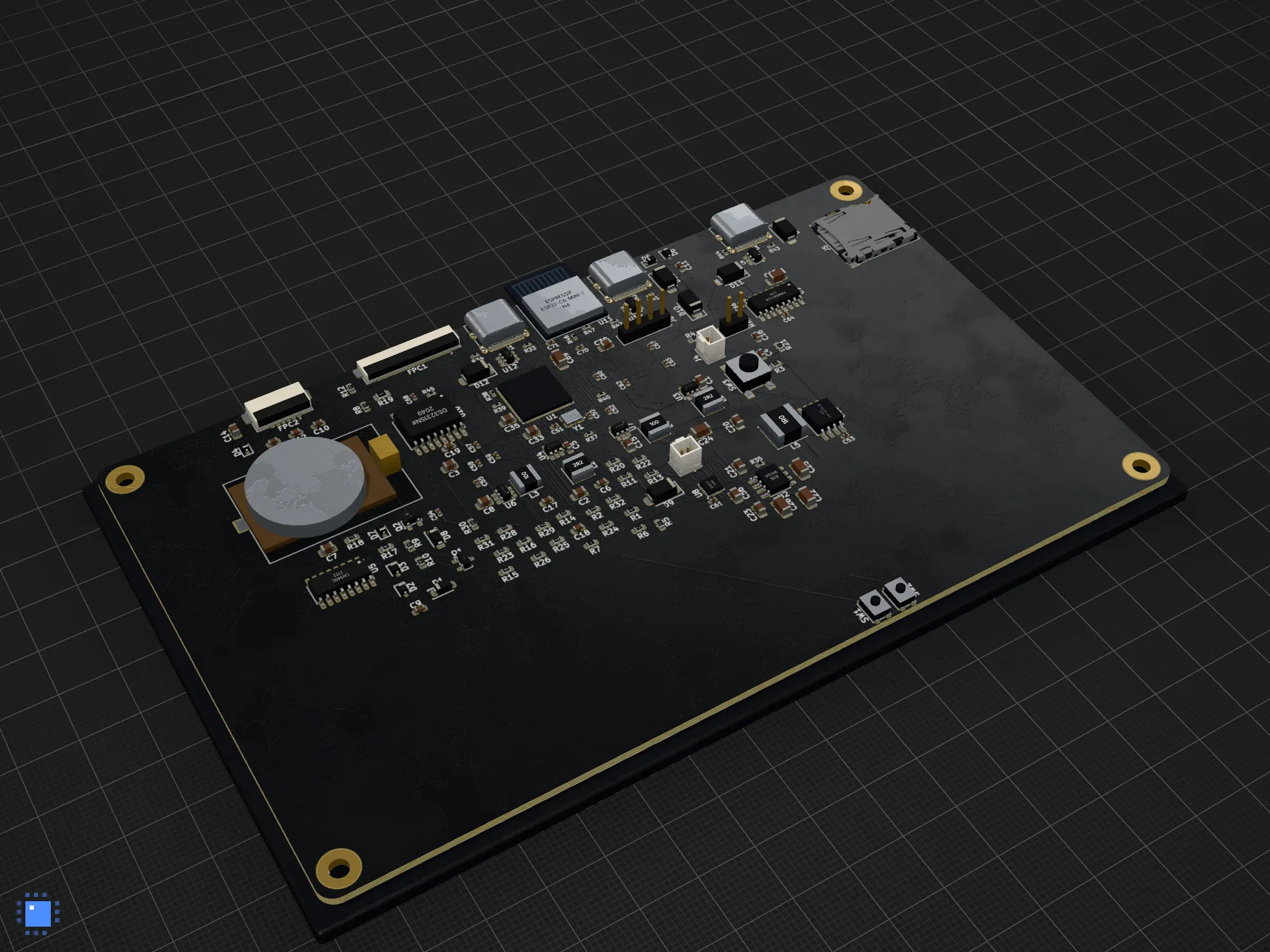
p4-touch-7: the ESP32-P4, an ESP32-C6 module, three USB-C ports, a DS3231 with its cell, microSD, the panel’s and the touch screen’s FPC connectors.
PocketJS on Waveshare’s 7B, rebuilt from its schematic
The second P4 device is Waveshare’s ESP32-P4-WIFI6-Touch-LCD-7B, running PocketJS. This time the board is Waveshare’s, read from the schematic and the assembly drawing they publish. Each section of the schematic went into the design: power ORed from two USB-C ports, the battery charger, the CH343P with its automatic boot, the P4 and 32 MB of flash, the display’s supplies and charge pumps, the codec and its amplifier, the microphones, the C6, RS-485, CAN and the headers. The assembly drawing gave the positions of all 397 parts (one point is 0.2 mm, checked on two connectors’ pitch). Parts JLCPCB did not stock were replaced, and each substitution is listed in the board’s README.
The result: 293 components, 206 nets, six layers, 3993 track segments and 852 vias. It checks with
0 errors and exports for JLCPCB without --force. Routing it took a 300 s budget: with the
default 60 s the router stalled at 8 to 12 unrouted nets around the P4’s 0.35 mm pins.
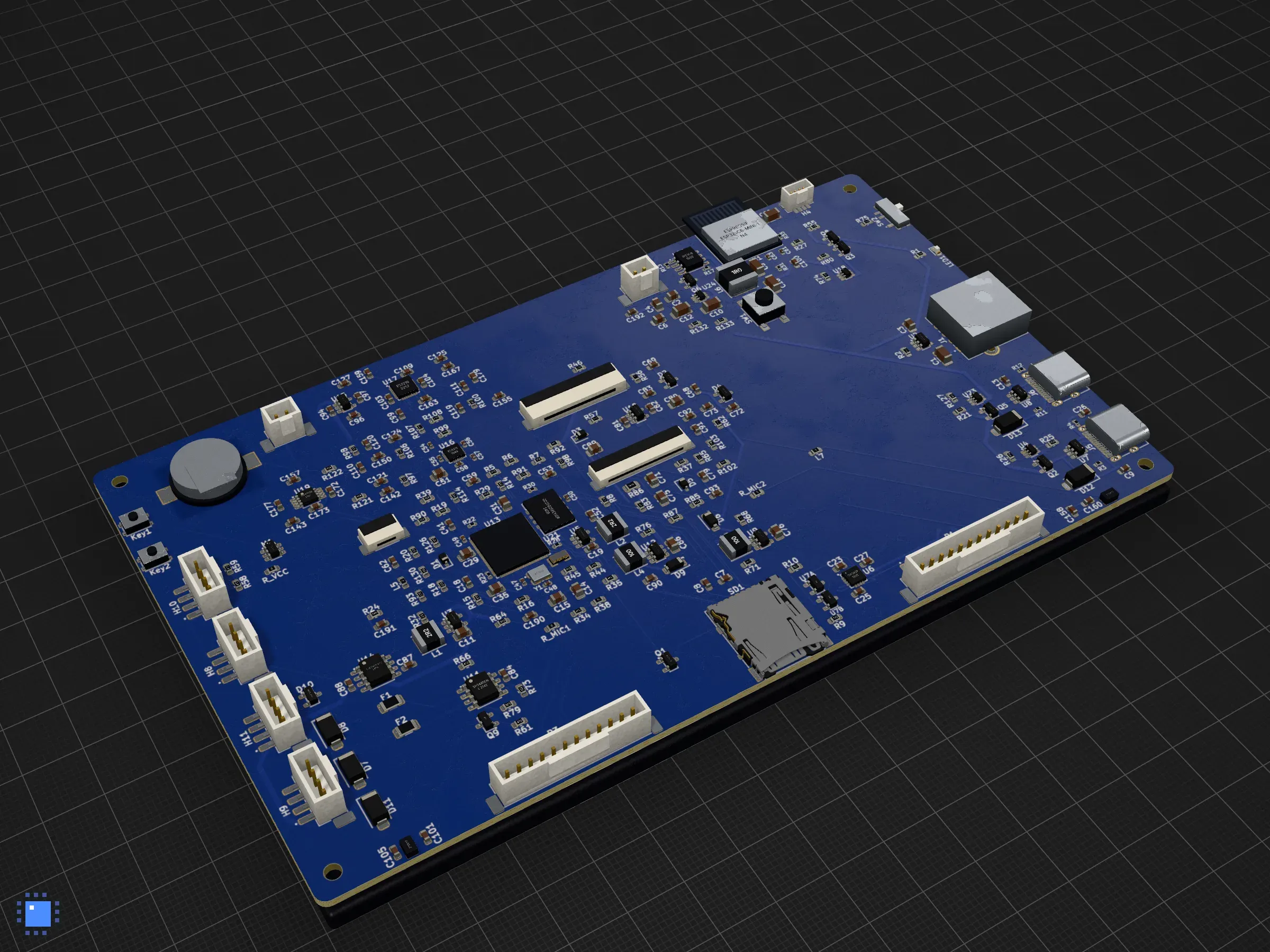
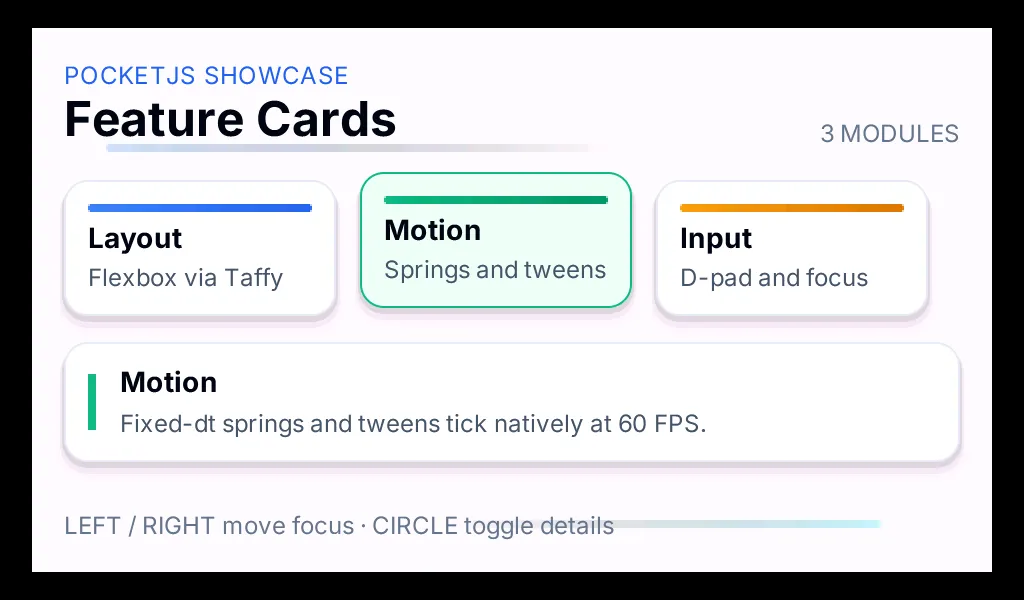
PocketJS has no published ESP32-P4 image (its P4 host is an unmerged pull request), so we built the pull request’s head exactly as its CI does, in Espressif’s own Docker image, and published the 2.3 MB image as a release of our boards repository with PocketJS’s MIT licence. The design names that image by URL and SHA-256 and holds no binary. In the page: the ROM, the boot loader, the EK79007 panel, the GT911, and PocketJS’s stock Feature Cards app, drawn by the P4’s filler, blender and scaler. Tap a card and it takes the focus while its details slide open on a spring, at about 30 frames per second of device time. Every pixel of it is PocketJS’s: the cards, the text and the motion come from the app, and PCBKit models the chip, the panel and the touch controller it runs on.
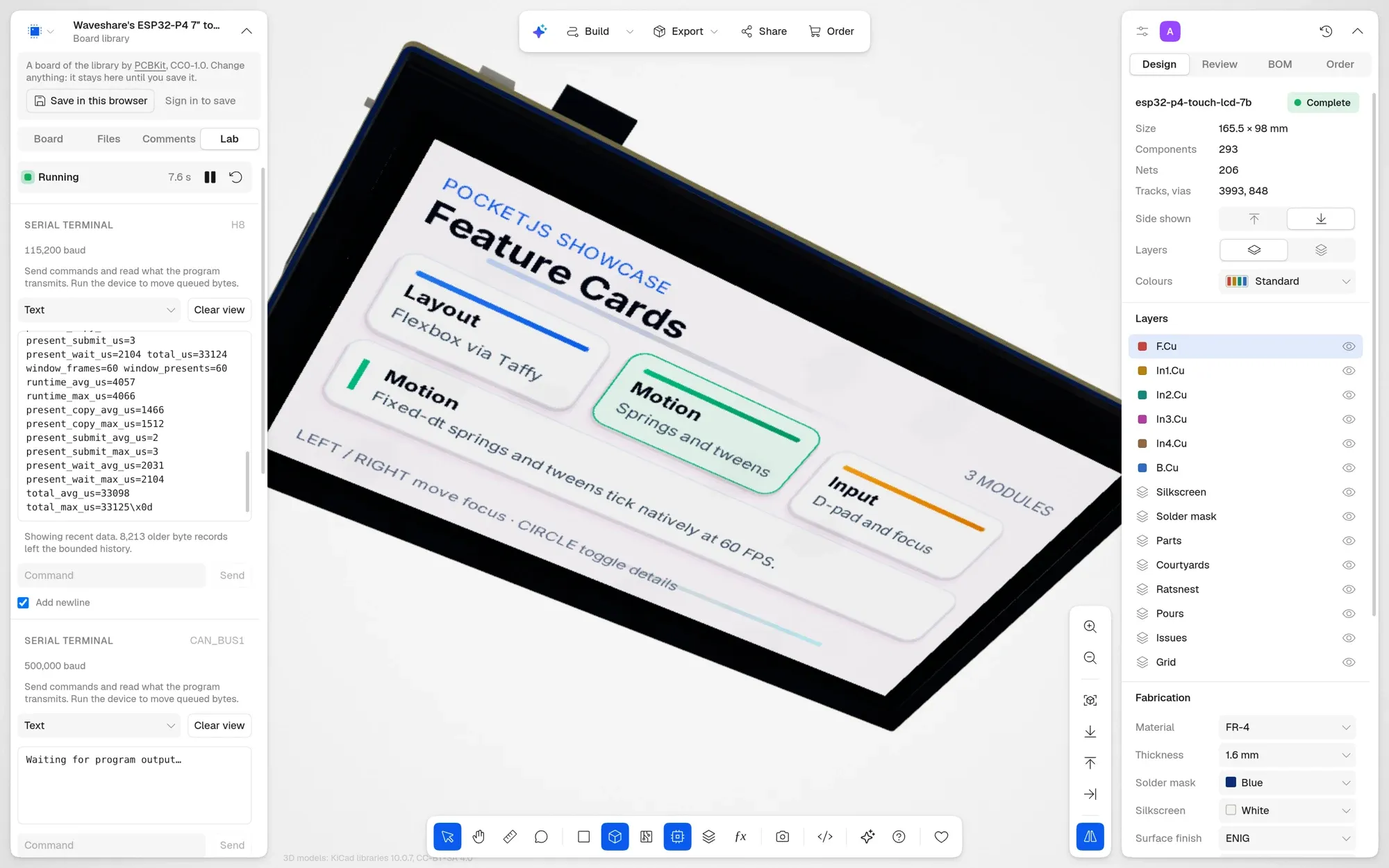
The 7B in the app, after a tap on Motion: the screen in 3D is the simulated panel.
The same release has PocketJS’s Music (“Now Playing”) and its original Chrome demo for this host. We tried its Cover Flow launcher too: it runs, but on the P4 its perspective deck is drawn in software, about 2 seconds a frame, so it is not on the board.
STM32 and ESP32
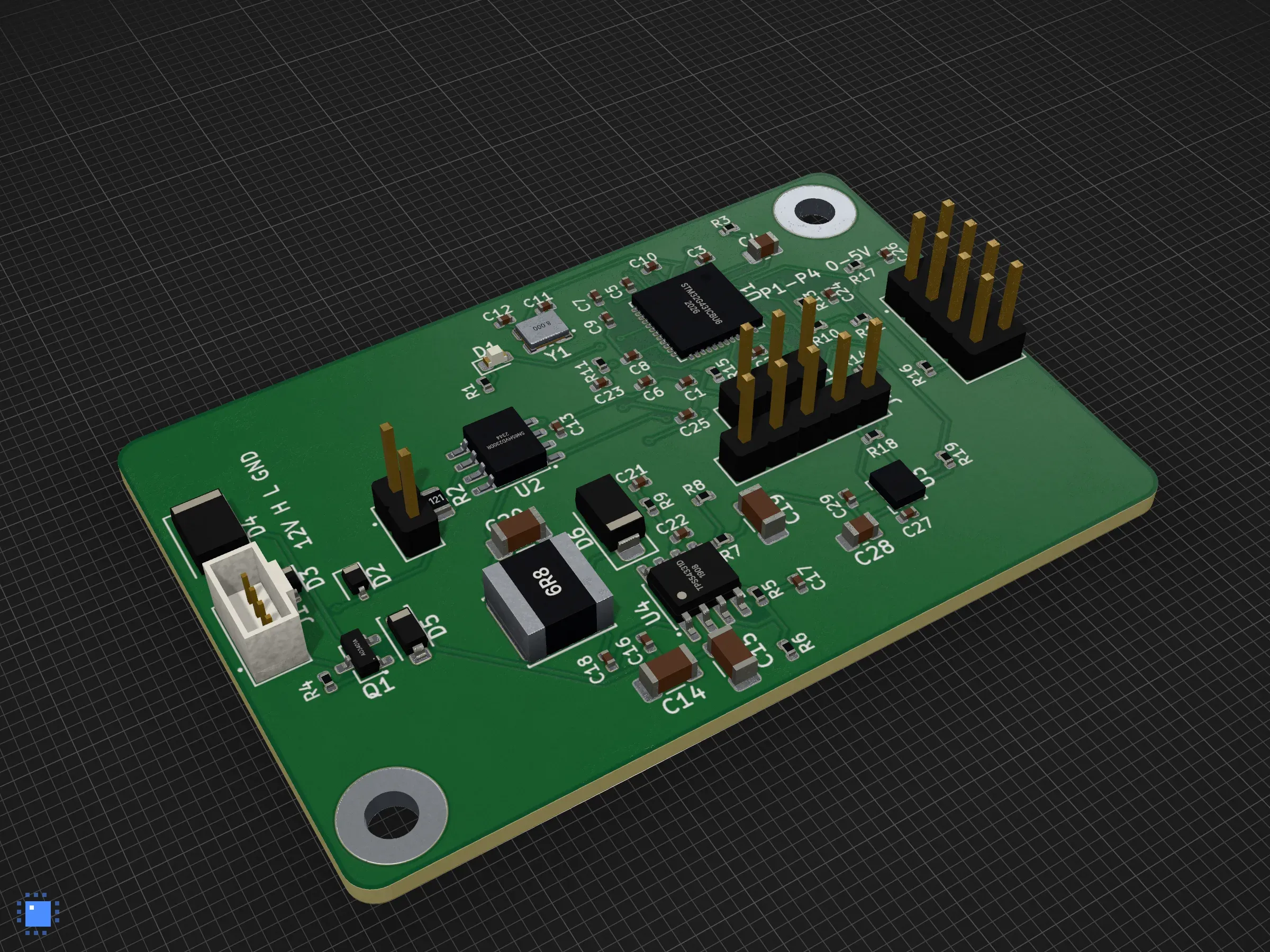
Until this week our STM32 was one hand-written model of the F411 with GPIO, SPI and a UART. Now there is one STM32 engine over chip descriptions, which runs the F103, F401, F411, G030 and G431. It covers clocks with their limits, timers, ADCs with DMA, UARTs, SPI, I²C, bxCAN and FDCAN. ST’s own HAL programs build in the browser in about 2 seconds and run unchanged. The classic ESP32 has its two LX6 cores, ROM boot, the GPIO matrix, LEDC, the ADCs, SPI with DMA, RMT and TWAI, driven by ESP-IDF’s own low-level headers. Radios, deep sleep and the system boot loaders are refused, and the model names the register or function it refused instead of guessing.
Two boards show this off:
- can-node: an STM32G431 reads four 0–5 V inputs and an ICM-42688-P and sends frames 0x100 to 0x102 at 100 Hz on its CAN bus through an SN65HVD230. A script plays the robot that drives the inputs and moves the IMU.
- thermostat: an ESP32-WROOM-32E with an SHT40, an SSD1306 and three relays for a 24 V AC furnace. A script plays the room, which the furnace warms from 18 to 19.9 °C in 5 s at 60× time-lapse while the OLED follows it live.
The models also caught firmware mistakes the way silicon would: GPIOB written with its clock off on the F103, PWR touched before its clock was enabled on the G431.
What broke this week
Two things broke without anyone noticing, and a sweep of the gallery in production found both.
- The firmware download. The page fetches a release from GitHub through our server (GitHub serves releases without CORS). In development the dev server answered that address itself. In production the server looked for a file first and answered the app’s own page: 6958 bytes of HTML instead of a 2.3 MB image. Both P4 boards refused to run, correctly, since the size did not match. That is fixed and has a test.
- Doom on the STM32F411. The new STM32 engine renamed the F411’s model and dropped the old header its program used. The board kept its own copy of the old part sheet, so its demo stopped starting. Its program now uses ST’s CMSIS registers, and Doom’s title screen comes up at 36.7 s of device time, as before. That board’s Doom runs on an emulated RISC-V computer whose RAM is a serial PSRAM chip, so it is slow by design.

One more problem is still open. Parts are now chosen from JLCPCB’s whole catalogue instead of a
fixed list. For 26 of the boards below, the sockets that Arduino Nanos and display modules plug
into find no match yet, so their fabrication export needs --force until that is fixed.
All 43 boards
Every board opens running at its link, except the five examples, which have no program to run. The designs, KiCad files and programs are in github.com/pcbkit-io/boards.
Devices
| Board | Chips | Layers |
|---|---|---|
| 7″ ESP32-P4 touch screen running NucleoOS | ESP32-P4, ESP32-C6, ES8311, CH340C, IP5306, DS3231 | 6 |
| Waveshare’s ESP32-P4 7″ touch board, running PocketJS | ESP32-P4, ESP32-C6, ES8311, ES7210, CH343P, IP5306, GD25Q256 | 6 |
| CAN sensor node on an STM32G431 | STM32G431, SN65HVD230, ICM-42688-P, TPS54331 | 2 |
| 24 V AC thermostat on an ESP32 | ESP32-WROOM-32E, SHT40, SSD1306, ULN2003A, LM2596 | 2 |
Doom (the eleven handhelds, in detail)
| Board | Chips | Layers |
|---|---|---|
| Doom handheld | RP2350 (Pimoroni Pico Plus 2), ILI9341 | 2 |
| Doom on a CH32V003 | CH32V003, W25Q128, APS6404L, PCD8544 | 2 |
| Doom on a Pico and an OLED | RP2040 (Raspberry Pi Pico), SSD1309 | 2 |
| Doom on an ESP32-C3 | ESP32-C3, ST7789 | 2 |
| Doom on a bare RP2040 | RP2040, W25Q128, ST7735 | 4 |
| Doom on an STM32F411 | STM32F411, W25Q128, APS6404L, ST7789 | 4 |
| Doom on a Pico Plus 2 carrier | RP2350, ILI9341, PCM5102A | 2 |
| Doom on a bare RP2350 | RP2350, W25Q128, APS6404L, ST7789 | 4 |
| Doom on an ESP32-S3 | ESP32-S3, ILI9341 | 4 |
| Doom on a 4.3″ RGB panel | ESP32-S3, MCP23017 | 4 |
| Doom on a Teensy 4.1 | i.MX RT1062 (Teensy 4.1), ILI9488 | 4 |
Arduino (the ATmega328P model)
| Board | Chips | Layers |
|---|---|---|
| Weather station | Arduino Nano, SHT31, SSD1306 | 2 |
| CO₂ monitor | Arduino Nano, SCD40, SSD1306 | 2 |
| Thermostat | Arduino Nano, SHT31, SSD1306 | 2 |
| LCD runner | Arduino Nano, HD44780 | 2 |
| Egg catcher | Arduino Nano, SSD1306, MCP73831, MT3608 | 2 |
| Snake | Arduino Nano, SSD1306 | 2 |
| Pong | Arduino Nano, SSD1306 | 2 |
| Flappy bird | Arduino Nano, SSD1306 | 2 |
| Breakout | Arduino Nano, SSD1306 | 2 |
| Falling blocks | Arduino Nano, SSD1306 | 2 |
| Dice | Arduino Nano, SSD1306 | 2 |
| Simon | Arduino Nano, SSD1306 | 2 |
| Magic drawing screen | Arduino Nano, SSD1306 | 2 |
Lab: Arduino Nano boards with sensors, displays and servos you can change while they run
| Board | Chips | Layers |
|---|---|---|
| Air quality meter | ATmega328P, SHT31, SCD40, MAX7219 | 2 |
| Servo controller | ATmega328P | 2 |
| Serial command device | ATmega328P | 2 |
| LED ring | ATmega328P | 2 |
| Stopwatch | ATmega328P, MAX7219 | 2 |
| Reaction game | ATmega328P, MAX7219 | 2 |
| Greenhouse controller | ATmega328P, SHT31, SCD40, MAX7219 | 2 |
| Servo sequencer | ATmega328P | 2 |
| Pedestrian crossing | ATmega328P, MAX7219 | 2 |
| Message scroller | ATmega328P, MAX7219 | 2 |
Examples: boards to look at, change and order
| Board | Chips | Layers |
|---|---|---|
| 555 blinker | NE555 | 2 |
| LED bar | 74HC595 | 2 |
| USB-C serial adapter | CH340 | 2 |
| USB audio DAC | PCM2704 | 4 |
| Robot controller | ESP32 | 4 |
What is next
The ESP32-C6 and H2, so the P4 boards’ co-processor runs its own firmware too, without a radio.
Coupled differential pairs at fine-pitch pins: the router leaves the P4’s DSI and CSI pairs as two
separate tracks today. A routing budget that grows with the board instead of a fixed 60 seconds.
And the sockets in the parts selection, so every board in the gallery can be ordered again without
--force.