2 layers44.5 × 24.1 mm
GoWin Electrical
zharfanw/gowin
Produk pertanian penanam biji jagung hasil kolaborasi UASC Manufacturing x @zhargorist x Rian x Gowin X Udin
7 parts

 zharfanw/gowin
Produk pertanian penanam biji jagung hasil kolaborasi UASC Manufacturing x @zhargorist x Rian x Gowin X Udin
GoWinElectricalv2 is an open-source printed circuit board by zharfanw, from the zharfanw/gowin repository on GitHub. It is a 4-layer board of 35.6 × 96.5 mm with 23 parts on 42 nets, routed with 278 tracks and 28 vias.
It is built around the LM324, HCPL-3120(AT) and XH2.54-4PWT, with the IRF3205 and XH2.54-7PWT among its other parts. Its parts include 2 resistors, 2 ICs, 1 capacitor, 1 diode and 1 transistor.


Dokumentasi Elektronik Produk pertanian Gowin (Dropper Biji Jagung).
Secara general sistem elektrik Gowin
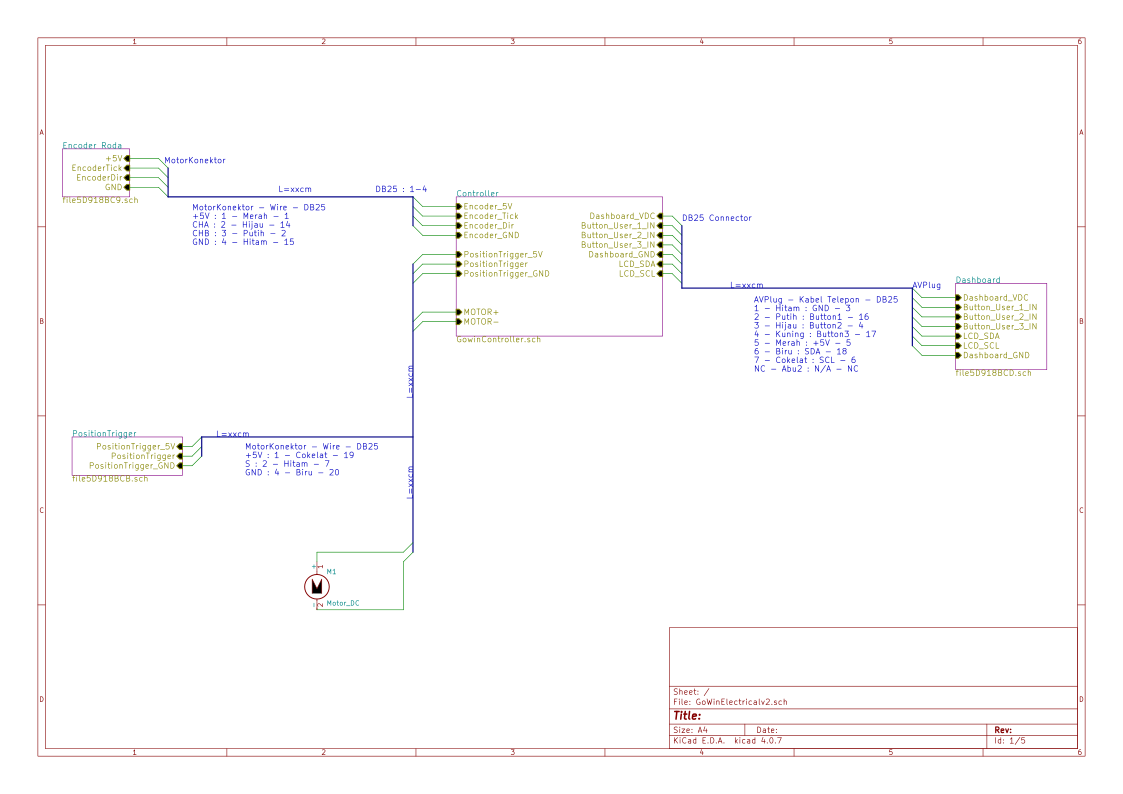 Dibawah ini adalah rangkaian di dalam kotak elektronik
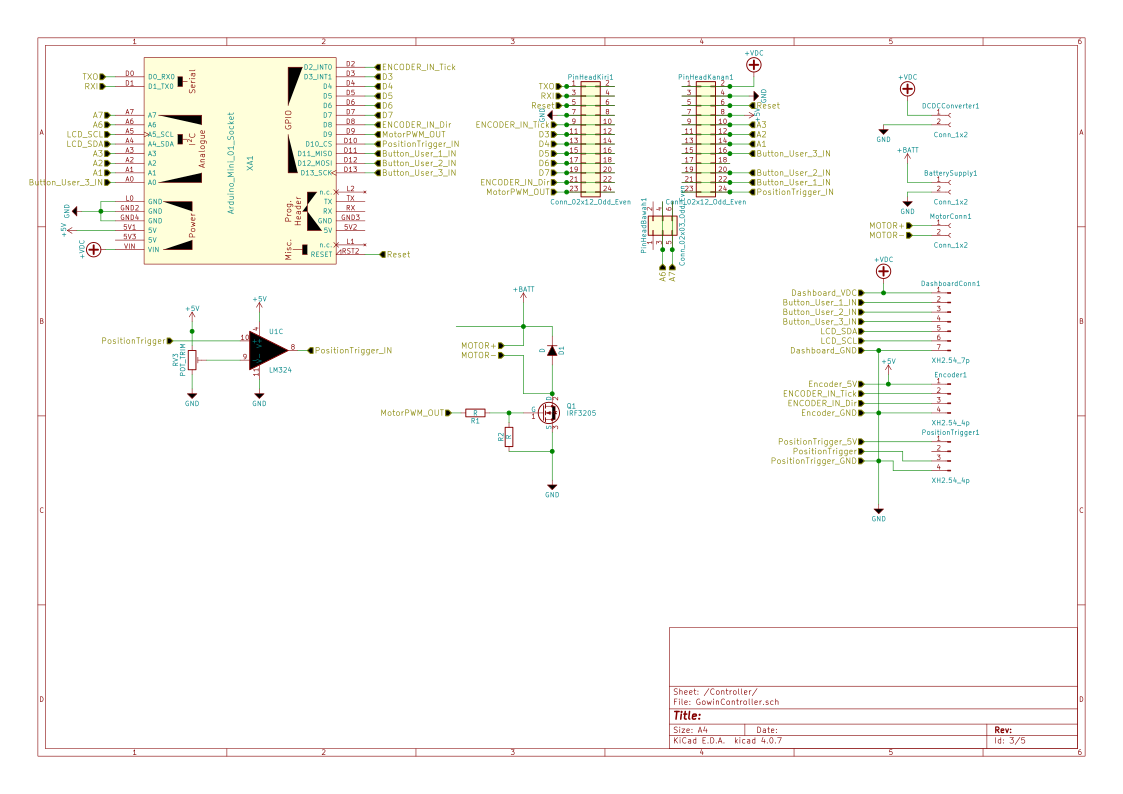 Rangkaian Elektronik dalam bentuk PDF bisa klik disini
Program Alat bisa klik disini Kemudian program untuk test hardware bisa klik disini
Kontrol, Kotak Elektronik, dan Instrument
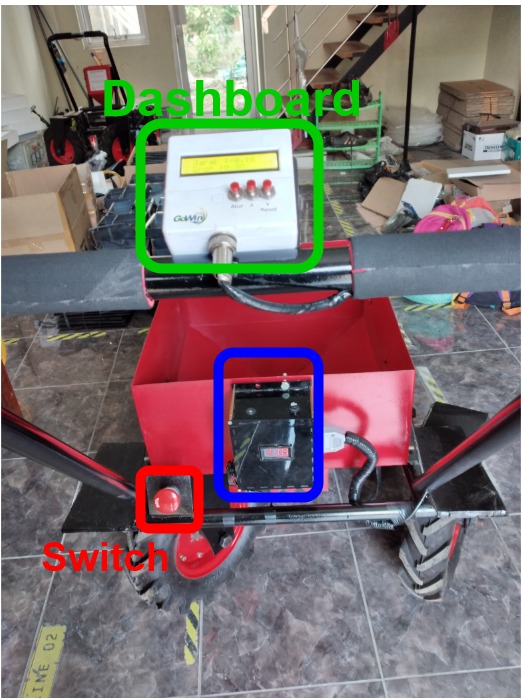
Dropper dan encoder

Konektor kabel Dropper biji

Putar tombol switch disebelah kotak elektronik hitam. Pastikan indikator tegangan menyala !
Kemudian perhatikan tampilan pada lcd, dan tunggu muncul tulisan "Gowin" maka alat mulai beroperasi. Dan ketika ada tulisan "Jarak" dan "Drop" maka peralatan telah berjalan.
Untuk melakukan reset, maka tekan tombol "reset" pada display.
Untuk melakukan pengaturan, tekan tombol "Atur". Untuk mengubah parameter kalibrasi "Tick/Biji" bisa tekan tombol ( up ) atau tombol ( down ). Satuan yang digunakan merupakan centimeter. Dan untuk mengubah parameter yang ingin diatur, tekan lagi tombol "Atur".
Untuk kembali beroperasi, tekan tombol ( u) dan tombol ( down ) bersamaan
UASC Manufacturing
| Qty | Value | Footprint | References |
|---|---|---|---|
| 3 | Conn_1x2 | TerminalBlocks_Phoenix:TerminalBlock_Phoenix_MPT-2.54mm_2pol | BatterySupply1, DCDCConverter1, MotorConn1 |
| 3 | POT_TRIM | Potentiometers:Potentiometer_Trimmer_Bourns_3296W | RV1, RV2, RV3 |
| 2 | Conn_02x12_Odd_Even | Pin_Headers:Pin_Header_Straight_2x12_Pitch2.54mm | PinHeadKanan1, PinHeadKiri1 |
| 2 | R | Resistors_THT:R_Axial_DIN0204_L3.6mm_D1.6mm_P5.08mm_Horizontal | R1, R2 |
| 2 | XH2.54_4p | Pin_Headers:Pin_Header_Straight_1x04_Pitch2.54mm | Encoder1, PositionTrigger1 |
| 1 | Arduino_Mini_01_Socket | Arduino:Arduino_Mini_Socket | XA1 |
| 1 | CP | Capacitors_THT:CP_Radial_D12.5mm_P5.00mm | C1 |
| 1 | Conn_02x03_Odd_Even | Pin_Headers:Pin_Header_Straight_2x03_Pitch2.54mm | PinHeadBawah1 |
| 1 | D | Diodes_THT:D_5W_P10.16mm_Horizontal | D1 |
| 1 | HCPL3120 | Housings_DIP:DIP-8_W7.62mm | U2 |
| 1 | IRF3205 | TO_SOT_Packages_THT:TO-220-3_Vertical | Q1 |
| 1 | LM324 | Housings_DIP:DIP-14_W7.62mm_Socket_LongPads | U1 |
| 1 | XH2.54_7p | Pin_Headers:Pin_Header_Straight_1x07_Pitch2.54mm | DashboardConn1 |
The 20 most common of 23 parts.
zharfanw/gowin
Produk pertanian penanam biji jagung hasil kolaborasi UASC Manufacturing x @zhargorist x Rian x Gowin X Udin

fishrockz/kicad_robot
after mush messing around i think i have got this so others can use it...


stancecoke/BionX_Minimal_Translator
Drive your BionX motor with a no-name battery and a Kunteng LCD-display without any further BionX-components


jayanta525/dual-h-bridge
Dual H-Bridge Controller with IRF3205 and IR2104 MOSFET Driver, and with ATMega328P-AU PWM Controller

It measures 35.6 × 96.5 mm and has 4 copper layers, 1.6 mm thick.
23 parts, built around the LM324, HCPL-3120(AT), XH2.54-4PWT and IRF3205. The full list of its parts is on this page, with links to each part's symbol and footprint where PCBKit's library has them.
From the zharfanw/gowin repository on GitHub, at the commit this page was made from: the board is circuit/GoWinElectricalv2/GoWinElectricalv2.kicad_pcb. PCBKit opens the board in the browser, with nothing to install.
Its repository states no licence, so its author keeps all rights: ask zharfanw before reusing the design.