2 layers59.2 × 52.9 mm

 tstrube/SplittoDogu6
Split Ergo Keyboard with Encoders and OLED screens running QMK
SplittoDogu is an open-source printed circuit board by tstrube, from the tstrube/SplittoDogu repository on GitHub. It is a 2-layer board of 173 × 111.3 mm with 57 parts on 76 nets, routed with 743 tracks and 32 vias.
It belongs with the keyboards and input boards and the AVR (ATmega, ATtiny) boards of this library.
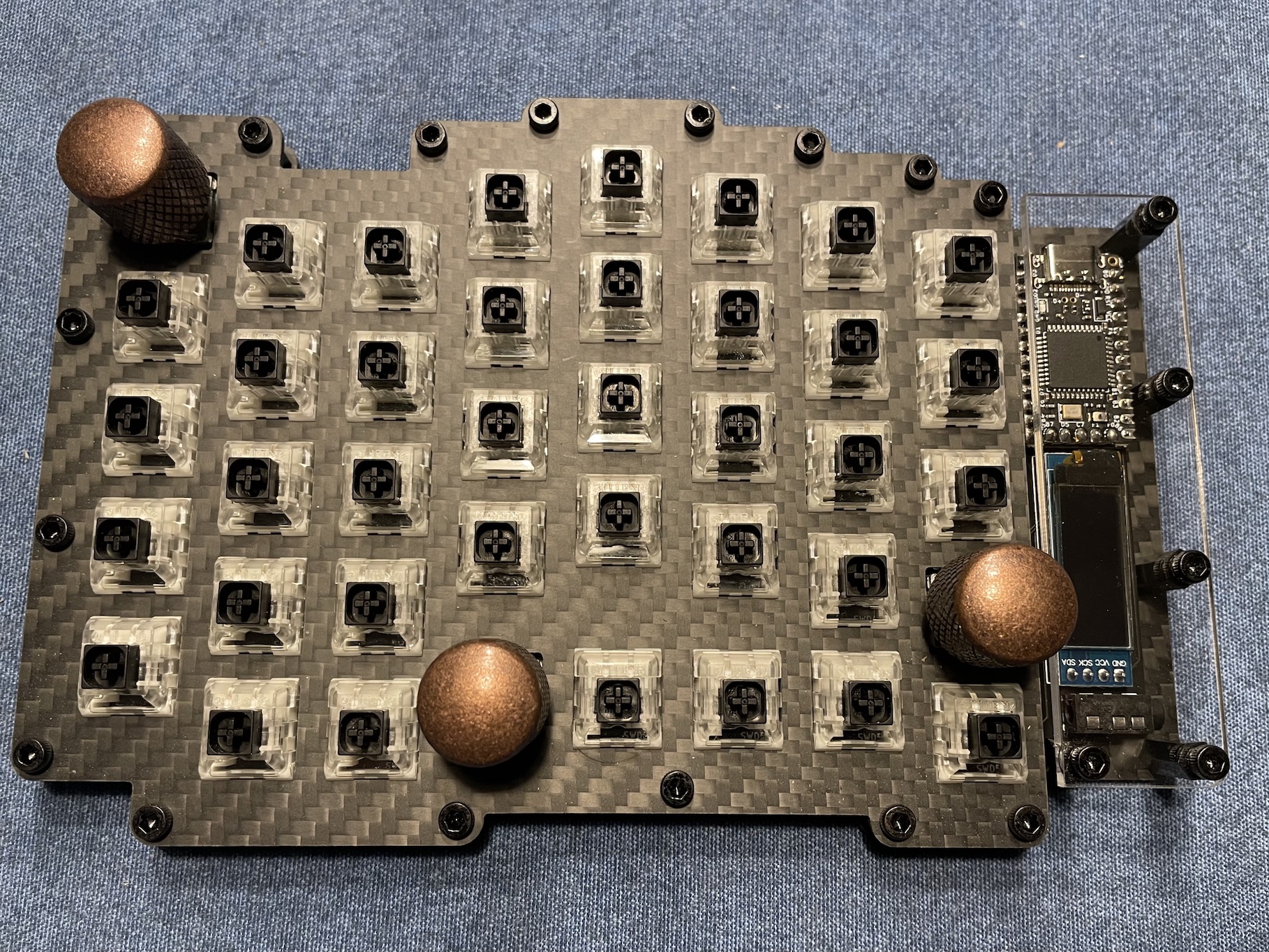
Custom split ergo/ortho keyboard with screens and encoders.
My initial idea was to create a keyboard specifically for my hands, where I could reach all the keys I need for programming without moving my hands, using only my fingers.
After discovering QMK and learning about its capabilities, I wanted to add encoders and a screen. This is the result.
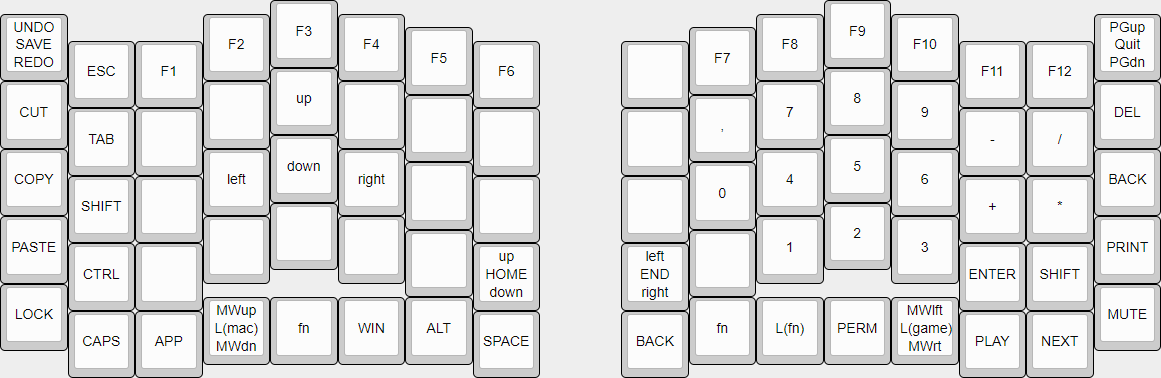
It’s a split keyboard with encoders for arrow keys, mouse wheel, page up/down, and undo/redo.
One of the two screens shows the active layer and the status of Num and Caps Lock. The other screen is for Bongo Cat...
It’s also possible to use just one side. (Gaming or Macro Keyboard)
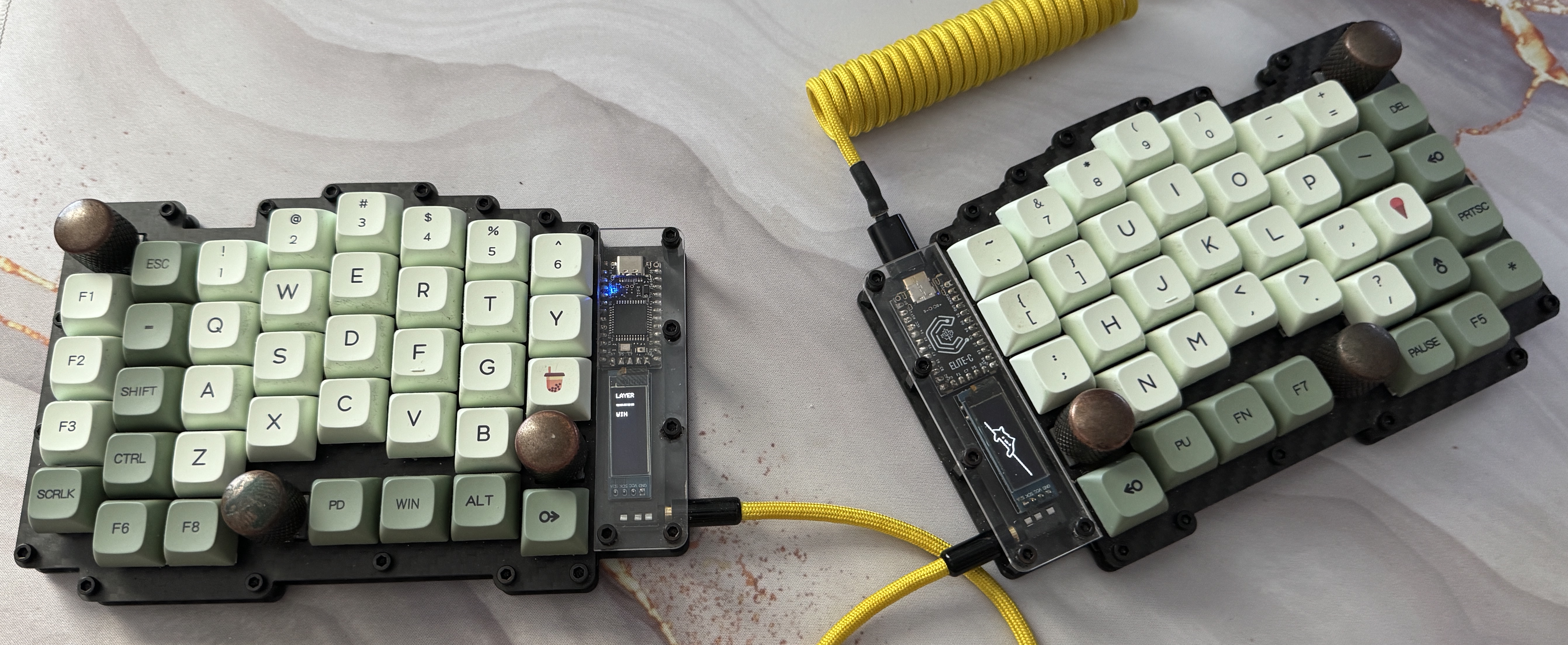
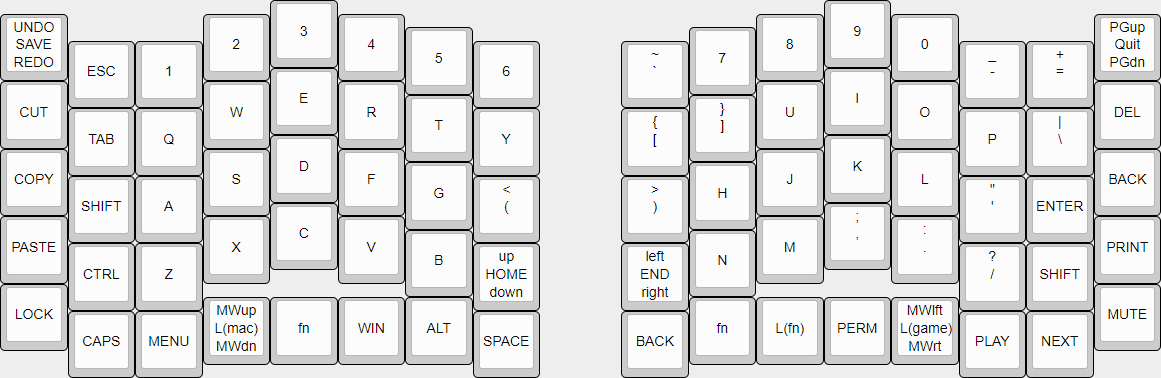
There are two nearly identical default layouts—one for Windows and the other for macOS.
The differences are key combinations for undo/redo and other hotkeys.
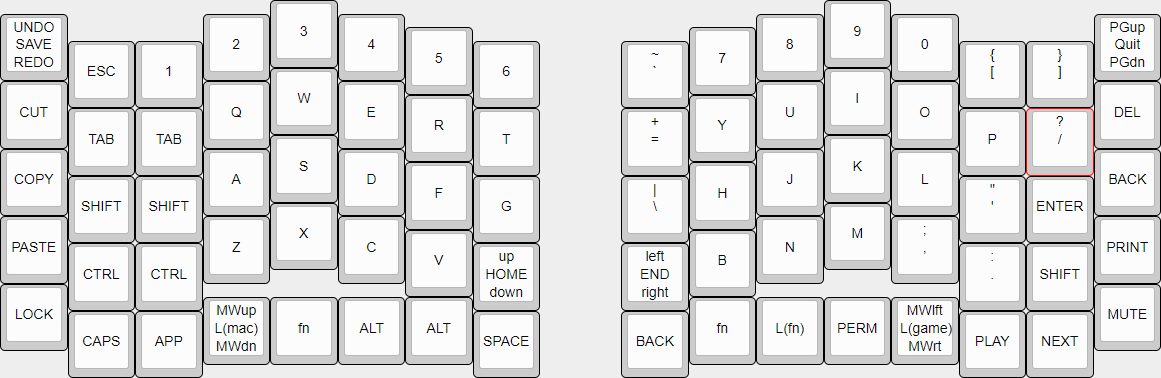
There is also a gaming layer, which shifts most buttons on the left half to the right by one row.
This moves WASD to the optimal position.
The last layer, FN, is for F1–F12, arrow keys, and the number pad.
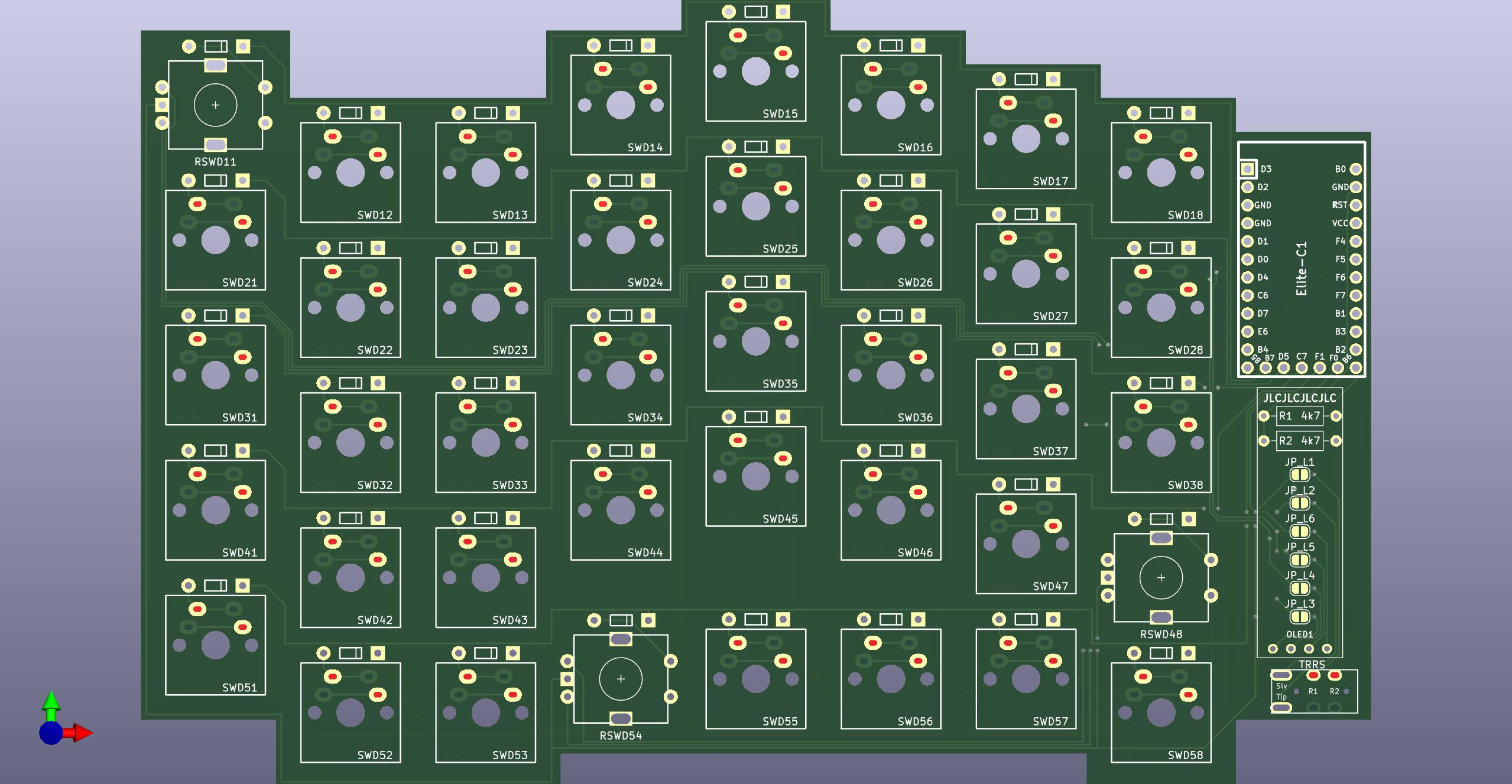
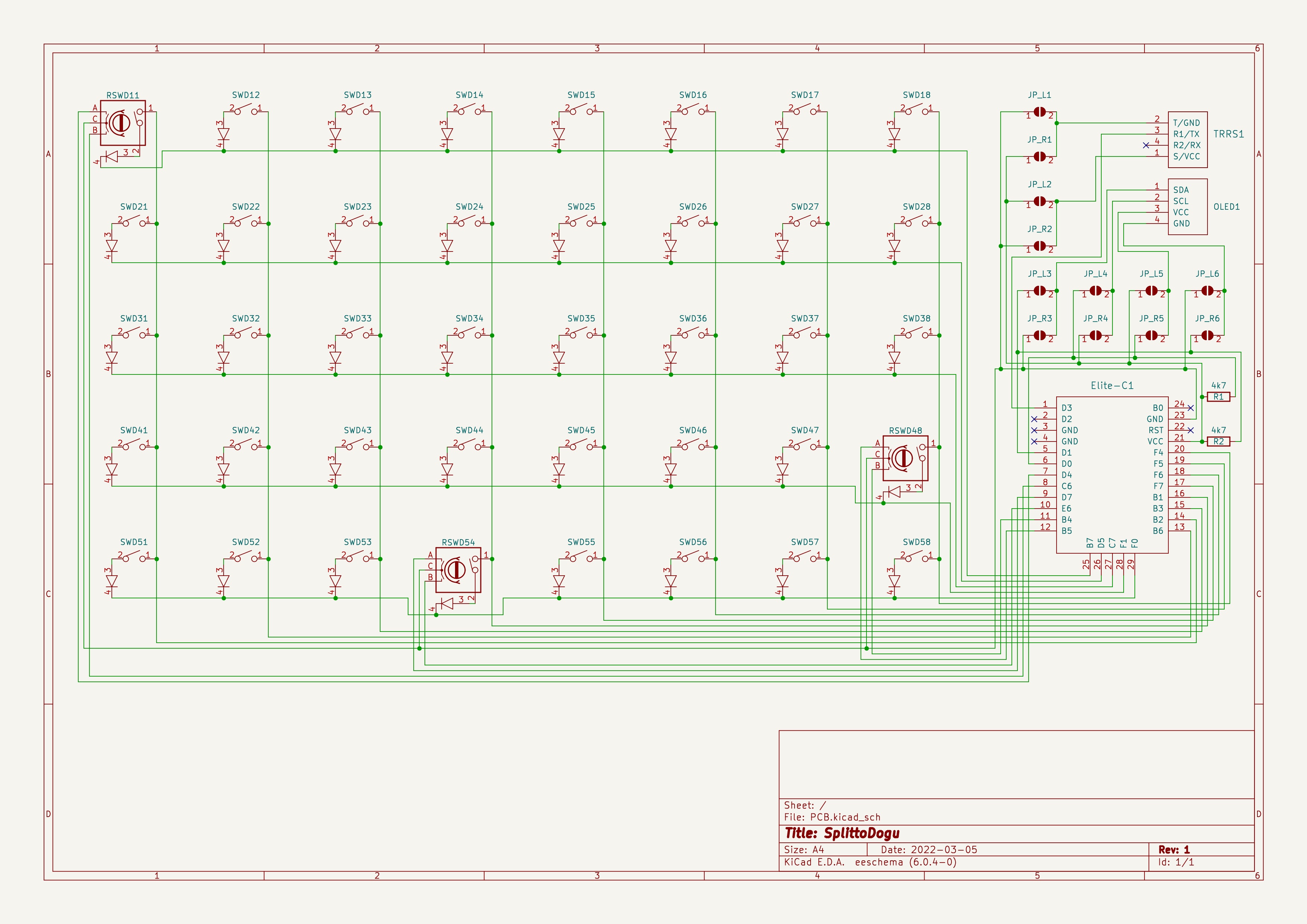
This is the first PCB I ever created. It’s designed so it can be used for both the left and right sides.
A row of solder jumpers and a few resistors are located behind the OLED screen.
Shorting the jumpers on one side defines which side the board is used for:
JP_L1 to JP_L6 for the left side, JP_R1 to JP_R6 for the right.
The Elite-C must be flipped depending on the side. (See images)
The case is a simple sandwich-style design with a clear part covering the controller and screen.
For the keyboards I built, I used CNC-cut carbon fiber plates. (Purely for aesthetics)
The main case uses 8 mm standoffs, while the clear top uses 11 mm. (See BOM)
A list of all parts used and their approximate prices as of March 2022.
I'm sharing this in June 2025.
Started programming when I was 12.
Started working with electronics when I was 15.
Built my first 3D printer in 2013.
Built my first drone in 2014.
This project was originally created in March 2022.
It was a way to explore a new field.
I’ve been developing internal software tools at my company since 2015.
In January 2023, I transitioned into a hardware and software prototyping role at the same company.
That shift was unplanned, but a happy coincidence.
| Qty | Value | Footprint | References |
|---|---|---|---|
| 37 | MX_Diode | timo:MX | SWD12, SWD13, SWD14, SWD15, SWD16, SWD17, SWD18, SWD21, SWD22, SWD23, SWD24, SWD25, SWD26, SWD27, SWD28, SWD31 +21 |
| 12 | SolderJumper_Open | timo:SolderJumper_Open | JP_L1, JP_L2, JP_L3, JP_L4, JP_L5, JP_L6, JP_R1, JP_R2, JP_R3, JP_R4, JP_R5, JP_R6 |
| 3 | RotaryEncoder_Switch_Diode | timo:RotaryEncoder_Switch_Diode | RSWD11, RSWD48, RSWD54 |
| 2 | 4k7 | Resistor_THT:R_Axial_DIN0207_L6.3mm_D2.5mm_P10.16mm_Horizontal | R1, R2 |
| 1 | Elite-C | timo:Elite-C | Elite-C1 |
| 1 | OLED | timo:OLED | OLED1 |
| 1 | TRRS | timo:TRRS-PJ-320A | TRRS1 |
It measures 173 × 111.3 mm and has 2 copper layers, 1.6 mm thick.
57 parts. The full list of its parts is on this page, with links to each part's symbol and footprint where PCBKit's library has them.
From the tstrube/SplittoDogu repository on GitHub, at the commit this page was made from: the board is PCB/PCB.kicad_pcb and its schematic PCB/PCB.kicad_sch. PCBKit opens the board in the browser, with nothing to install.
Its repository states no licence, so its author keeps all rights: ask tstrube before reusing the design.


tapioki/cephalopoda
Low profile split ergonomic mechanical keyboards

rgoulter/keyboard-labs
Repo with my PCB designs and keyboard firmware

freeDSP/freeDSP-aurora
freeDSP ADAU1452 with 8 analog input, 8 analog outputs, S/P-DIF I/O, ADAT I/O, USB Audio Class2, WiFi, Bluetooth
