Notifier v1 is an open-source printed circuit board by tobiwan88, from the tobiwan88/desk_notifier repository on GitHub, published under the MIT licence. It is a 4-layer board of 50 × 36 mm with 46 parts on 52 nets, routed with 506 tracks and 63 vias.
It is built around the ESP32-S3-WROOM-1-N8R2, BME688 and SHT40-AD1B-R2, with the TLV62569DBV and USBLC6-2SC6 among its other parts. Its parts include 12 capacitors, 12 resistors, 5 ICs, 2 connectors and 1 diode. It belongs with the lEDs and displays and sensors and measurement boards and the ESP32 boards of this library.
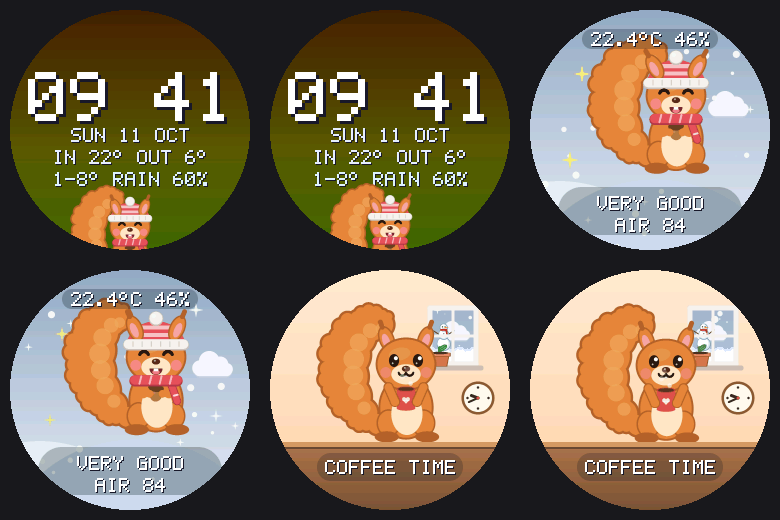
A small desk display on an ESP32-S3. A round 240x240 GC9A01 screen turns through three animated pages: a clock with today's forecast for Munich, a cute squirrel that shows the indoor air quality from a BME688 sensor, and the squirrel's day at home, which follows the clock (coffee in the morning, laptop, lunch, reading, sleep). When the air gets bad the squirrel stays on screen and asks you to open a window until you press a button.
It started as the esp_eyes project (animated eyes on two displays) and was cut down to one display. The git history keeps the old work.
What is in this repo
One repo holds the whole product: firmware, the custom board and the 3D-printed case.
Runs on the ESP32-S3 custom board (DESK_BOARD_NOTIFIER_V1) with a GC9A01, a BME688 and an SHT40; flashed and checked on a real board (sensors, display, Bluetooth setup).
Board notifier-v1 (KiCad 10, 4 layers, 50 x 36 mm, JLCPCB assembly)
Generated, routed and gate-checked, fab package builds. Not ordered yet: human review in KiCad, JLC placement preview and the display pinout check are still open (ORDER.md).
Case (Fusion, 3D printed PLA, two parts, snap-fit)
ESP32-S3 only. The board uses an ESP32-S3-WROOM-1-N8R2, because C61 and C5 modules had no stock at JLCPCB. The earlier ESP32-C61 breadboard setup is no longer built or tested. The case is still untested (below).
The case is untested. No part of it has been printed. The display module has no 3D model, so the pocket, window and plug alignment rest on assumed dimensions (header 2.54 mm, pin row 3.0 mm above the PCB edge, glass centre 26.5 mm above it, PCB plus glass 5.74 mm). Print display_dummy.stl and coupon_m1.stl first and compare. The SHT40 height (1.0 mm) is also an assumption. The cover needs one support and the USB-C collar may sit about 0.7 mm short of the connector.
Display orientation is unconfirmed. The image is mirrored on X by default (DESK_LCD_MIRROR_X); flip it in menuconfig if your panel shows it backwards. The pin order of the display module on the board's socket is also still to be checked against a real module.
The air score is not BSEC. It is a simple estimate from humidity and gas resistance and needs a few minutes of warm-up. The sensor reads a little warm next to the board, so indoor temperature is slightly high.
No firmware security by default. The HTTP API, the pet page and OTA are open unless you set a token (auth token), the connection is plain HTTP, and the device is meant for a trusted home network. Do not expose it to the internet.
Weather and time need the internet (Open-Meteo, SNTP). Without it the clock stays unset and the weather items disappear. The place defaults to Munich (change it with POST /api/weather or weather at <lat> <lon>), holidays are Bavarian, and the texts are English.
Pictures are stored but not shown yet, there is one display, and the project is tuned to a single 240x240 round panel at 10 frames per second on a chip without an FPU.
The hardware generators overwrite KiCad edits. Change hardware/gen/*.py, not the KiCad files, then re-run the pipeline. The router needs tools that hardware/tools/setup_tools.sh downloads, and its result differs between runs.
Development on macOS. The scripts and notes assume macOS and a local ESP-IDF install in ~/esp/esp-idf.
What works today
Rotating pages with fades, 10 frames per second. See docs/pages.md.
Clock: time (set over the internet), date, indoor and outdoor temperature, today's low, high and chance of rain.
Air: a squirrel mascot whose mood shows the air level (very good, good, okay, bad), with temperature, humidity and score.
Day: the squirrel at its desk at home, doing what fits the time and weekday. The room's climate changes it (stuffy air: it yawns or opens the window; too warm, too cold, too dry, too humid; a sudden smell), so does the weather (umbrella, cocoa, thunder), and special days decorate the room (birthday, anniversary, Christmas, Advent, Halloween, Oktoberfest, ...). The real weather shows in the window, the real time on the wall clock. The scene is never random, but little things are: blinks, glances, a wave, a bird on the windowsill, a ladybug on the desk, a shooting star, a paper plane, a rare golden acorn. The moon shows its real phase, rainbows follow rain, a window-sill plant grows with good air day after day, and a wall calendar counts down to birthdays.
Pet page at http://<device>.local/pet: feed it, have a coffee break or a party together, pet it, play, water the plant, say good night, give it gifts. Daily visits grow a friendship (five heart levels, never lost) with more reactions and visitors, and squirrel coins for the shop (six things a day: hats, places, things for the room, friends, seasonal specials); the squirrel picks its own outfit.
Bad-air alert: the air page stays on, snoozed for 15 minutes by the button or by POST /api/ack. Without an alert the button shows the next page.
Web page at http://<device>.local/ and a small HTTP API.
Wi-Fi, over-the-air updates, and a serial console.
Picture upload (the clip format from esp_eyes) is stored but not shown yet.
Planned: pictures that stay on screen until acknowledged, Bosch BSEC2 for a proper IAQ value.
What you need
Dev setup (works today), or the custom board in hardware/ once it is built:
ESP32-S3 board with 8 MB flash and PSRAM (the notifier-v1 board, or an S3 dev board with the same pins)
GC9A01 round display, 240x240, SPI
BME688 breakout (I2C)
A push button (optional)
USB cable
The squirrel
The squirrel's mood follows the indoor air quality. What it wears follows the weather outside (Open-Meteo, Munich by default):
Outside
Squirrel
below 8 °C
knitted hat and scarf
25 °C or more
ice cream
sunny, daytime
sunglasses
drizzle, rain, thunder
umbrella
wind of 30 km/h or more
glides under the umbrella, tail streaming
Items stack (cold, rainy and windy gives hat, umbrella and gliding). Preview every look on your computer with uv run python tools/preview_pages.py out/ after scripts/check.sh --quick.
Wiring
Signal
GPIO
Note
Display SCL / SDA
6 / 5
Display DC / RST / CS
3 / 2 / 4
Display VCC / GND
5V / GND
BME688 SDA / SCL
22 / 23
3V3, not 5V. Address 0x77 or 0x76, both are tried
Button
24
other leg to GND
Details: docs/wiring.md. Pins can be changed in idf.py menuconfig under "Desk notifier".
If the picture is mirrored, flip DESK_LCD_MIRROR_X / DESK_LCD_MIRROR_Y there.
source scripts/idf-env.sh
cd firmware
idf.py -p /dev/cu.usbserial-XXXX flash monitor
Connect to Wi-Fi
Open the serial console and run wifi "<name>" <password>. The device reboots and joins your network. It is then reachable as desk-<last 6 MAC digits>.local. The timezone is set in menuconfig (DESK_TZ, default Central Europe).
API
By default the API needs no password (change with the console command auth token).
sh
curl http://desk-xxxxxx.local/api/sensor # temperature, humidity, pressure, gas, score
curl http://desk-xxxxxx.local/api/status # uptime, memory, Wi-Fi, sensor state
curl -X POST http://desk-xxxxxx.local/api/ack # snooze the alert
curl http://desk-xxxxxx.local/api/weather # the last forecast
curl -X POST http://desk-xxxxxx.local/api/page -d '{"page":"day"}'# clock, air, day or next ("weather" still works)
curl -X POST http://desk-xxxxxx.local/api/weather -d '{"lat":48.137,"lon":11.575,"place":"Munich"}'# change the place
curl -X POST --data-binary @firmware.bin http://desk-xxxxxx.local/api/ota
It is a simple estimate, not Bosch BSEC. 25 points come from humidity (best at 40 %) and 75 from the gas resistance compared with the highest value seen recently. It needs about 3 minutes to warm up and a stretch of clean air to be meaningful. The sensor also reads a little warm because it sits next to the board.
For developers
scripts/check.sh runs the host tests (C++23, sanitizers), the Python tests and the firmware build. --quick skips the build. uv run python tools/preview_pages.py draws all pages as GIFs on your computer (after a host build). Pure logic lives in firmware/components/*/core and is tested on the PC. See CLAUDE.md for the layout.
Hardware and case
Board: open hardware/notifier-v1/notifier-v1.kicad_pro with hardware/open.sh. Regenerate with hardware/tools/pipeline_v1.sh, check with scripts/hw-check.sh, order steps in hardware/notifier-v1/ORDER.md, design notes in hardware/PLAN.md. Needs KiCad 10 (source scripts/kicad-env.sh).
Case: print files and notes in hardware/mechanics/ (PLA, 0.2 mm layers, Bambu Lab plate included). Print the fit coupon first.
Firmware: idf.py build in firmware/ (target ESP32-S3). Wi-Fi, time zone and name can be set from a phone over Bluetooth: setup/.
License
MIT. The BME68x driver in firmware/components/sensor/third_party is from Bosch Sensortec (BSD-3-Clause).
ESP32-S3 desk dashboard board that plugs straight into a 3.5" MSP3526 capacitive touch display. USB-C powered, with a light sensor, SHT40 temperature/humidity sensor and a 41.5 × 35 mm 2-layer PCB
Open-source Art-Net / sACN (E1.31) → DMX512 gateway for ESP32 / ESP32-S3 / Ethernet. Live web UI shows all 512 channels in real time, flags console conflicts, and drives galvanically-isolated DMX.
A tiny plug-in board for the rev E phone-companion board. It stands upright in a notch in rev E's sensor end, between the two gas sensor cans, and pokes 4.5 mm out through a slot in the case face, so its tip sits in the…
🚧 WIP – not yet manufactured or tested. KiCad PCB (one per door) connecting Hörmann series 4 garage door operators (ProMatic/SupraMatic, BUS/RJ12) to Loxone via ESP32-S3 and Wi-Fi.
It measures 50 × 36 mm and has 4 copper layers, 1.6 mm thick.
What parts does the Notifier v1 use?
46 parts, built around the ESP32-S3-WROOM-1-N8R2, BME688, SHT40-AD1B-R2 and TLV62569DBV. The full list of its parts is on this page, with links to each part's symbol and footprint where PCBKit's library has them.
Where can I download the Notifier v1 KiCad files?
From the tobiwan88/desk_notifier repository on GitHub, at the commit this page was made from: the board is hardware/notifier-v1/notifier-v1.kicad_pcb and its schematic hardware/notifier-v1/display.kicad_sch. PCBKit opens the board in the browser, with nothing to install.
Can I use the Notifier v1 design in my own project?
Its repository publishes it under the MIT licence: you may reuse it on that licence's terms (keep the author's notice, and for a copyleft licence share your changes alike).