

2 layers103.8 × 50 mm
Galagino pcb set
harbaum/galagino
A Galaga, Pac-Man and Donkey Kong arcade emulator for the ESP32
26 parts558

 TLDSJPWORK/ESP32_CAN-FD_GWCombiBoard
ESP32開発ボード と MCP2518 + MCP2562FD CAN FD Busモジュール x2 を接続するための実験用基板、ESP32CAN-FDGWCombiBoardの資料です。
ESP32 CAN FD GWCombiBoard is an open-source printed circuit board by TLDSJPWORK, from the TLDSJPWORK/ESP32_CAN-FD_GWCombiBoard repository on GitHub, published under the CC-BY-4.0 licence. It is a 2-layer board of 94 × 85 mm with 12 parts on 44 nets, routed with 242 tracks and 44 vias.
It is built around the ESP32-DEVKITC-VE and XDDB-1809-0816. Its parts include 10 connectors and 1 IC. It belongs with the ESP32 boards of this library.
ESP32開発ボード と MCP2518 + MCP2562FD CAN FD Busモジュール x2 を接続するための実験用基板、ESP32_CAN-FD_GWCombiBoardの資料です。
双方向Gatewayサンプルを収録しています。通常CAN(500 kbit/s)とCAN FD(公称500 kbit/s、BRS時データ2 Mbit/s)の双方向転送を確認しています。試験条件と確認範囲はサンプルの説明を参照してください。
DB9のみ実装した販売状態の実物写真です。その他の部品は未実装です。
| 表面 | 裏面 |
|---|---|
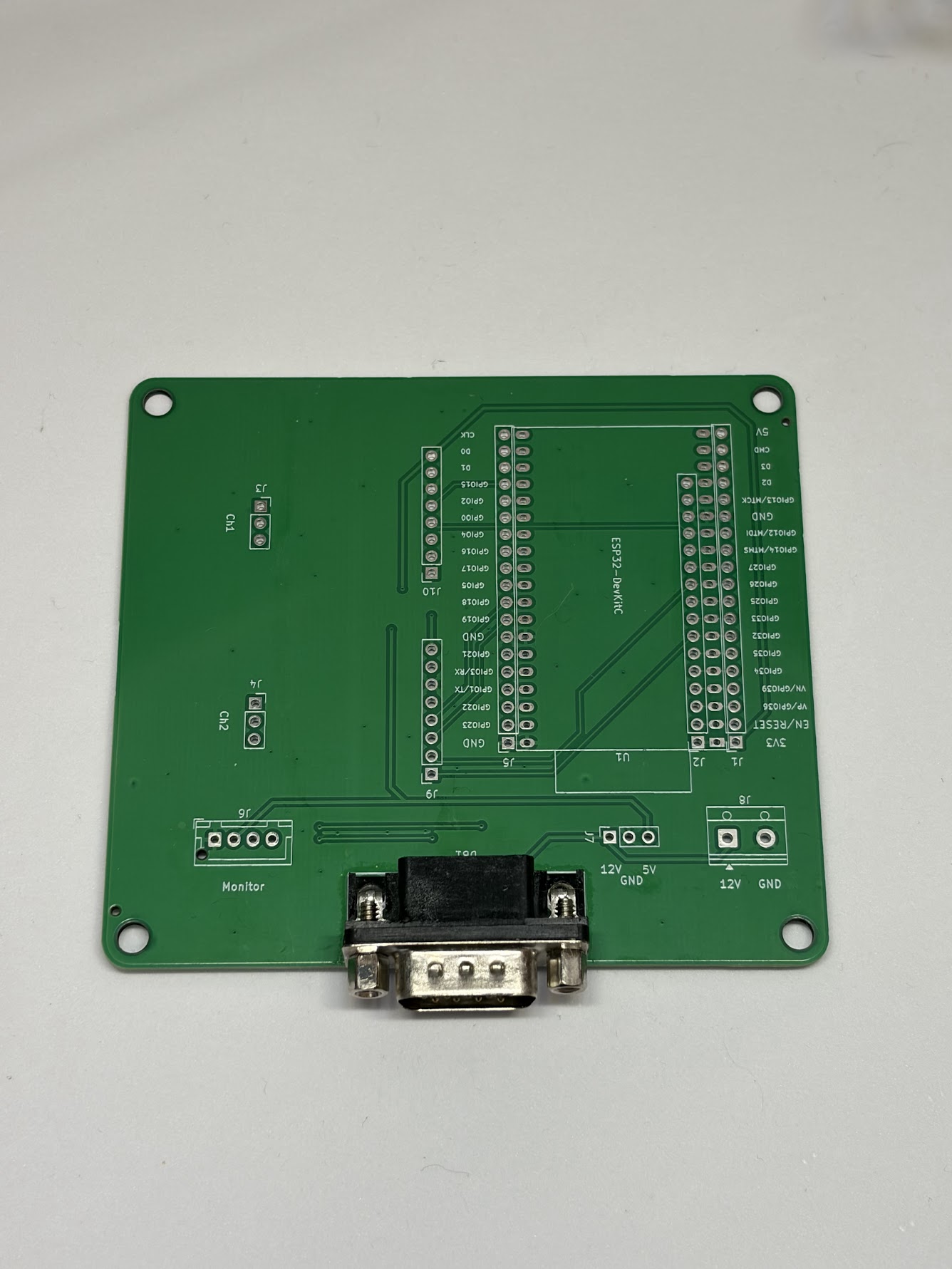 | 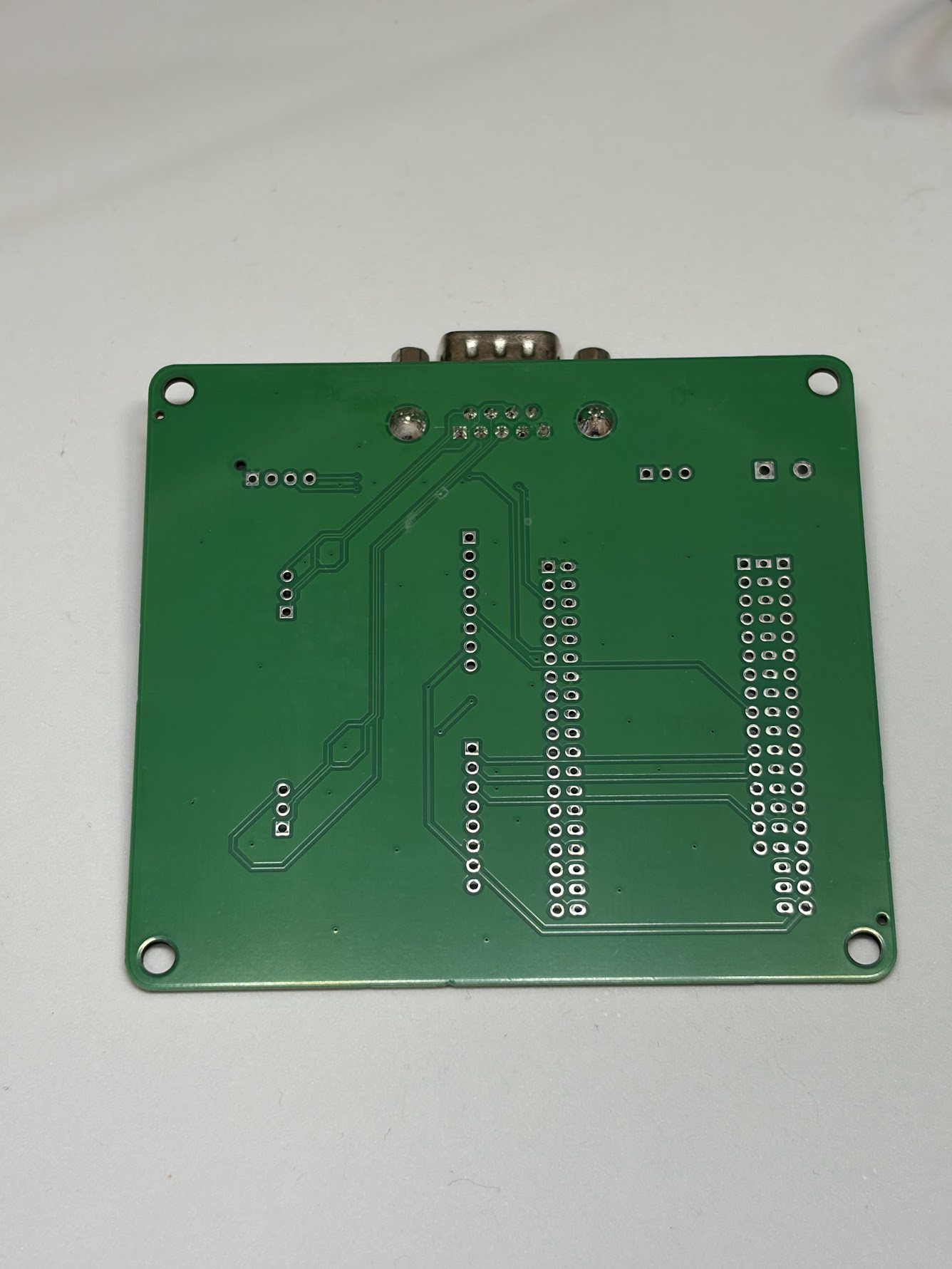 |
DB9は実装済みです。ESP32、CANモジュール、表示器、DC/DCなどは用途に応じて別途実装をお願い致します。
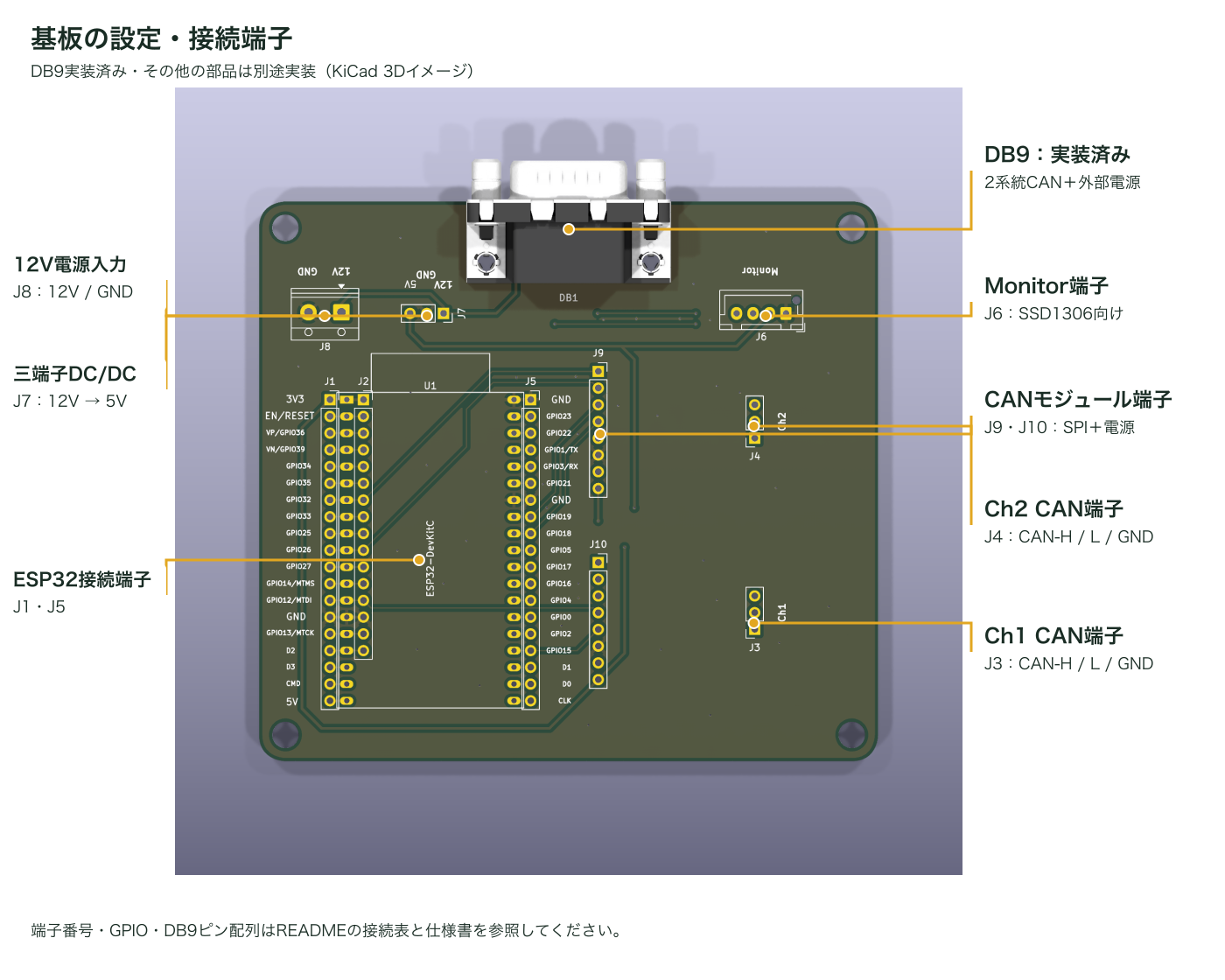
| 接続部 | 使い方 |
|---|---|
| J1・J2・J5 | ESP32開発ボードを接続します。3V3・5V・GNDと端子番号を合わせて取り付けます。 |
| J9・J10 | CAN FDモジュールの8ピン端子を接続します。モジュールの動作電圧ジャンパは3.3Vに設定して下さい |
| J3(Ch1)・J4(Ch2) | 各CANモジュールのCAN側端子を接続します。1番=CAN-H、2番=CAN-L、3番=GNDです。 |
| J6(Monitor) | SSD1306表示器用。1番=GND、2番=5V、3番=GPIO22、4番=GPIO21です。表示器側の端子順も確認してください。 |
| J7 | BP5293-50を接続します。1番=12V入力、2番=GND、3番=5V出力です。 |
| J8 | 外部電源入力。1番=12V、2番=GNDです。 |
| DB1(DB9・実装済み) | 販売時に実装済みです。2系統のCAN信号と外部電源をまとめて接続します。配列は仕様書を参照してください。 |
CANの終端抵抗はCANモジュール側で設定し、各バスの両端で有効にします。外部電源とUSB給電は併用しない前提です。詳しい実装手順は組立ガイドを参照してください。
外部電源とUSB給電は併用しない前提です。部品定格は組立例全体の動作保証範囲ではありません。
販売内容物はDB9コネクタ実装済みの基板1枚です。その他の部品は別途購入し、はんだ付けして実装する構成です。 必要な部品と取付方法は組立ガイドを参照してください。
ESP32開発ボードとCAN FDモジュール2枚を取り付け、DB9ケーブルを接続した組立例です。Monitor端子から表示器へ配線し、3Dプリントした上下筐体に収めています。本例ではUSB給電を前提としたため、筐体を一部切断し、USBをESP32に挿せるようにしております。
| モジュールを取り付けた状態 | 筐体に収めた状態 |
|---|---|
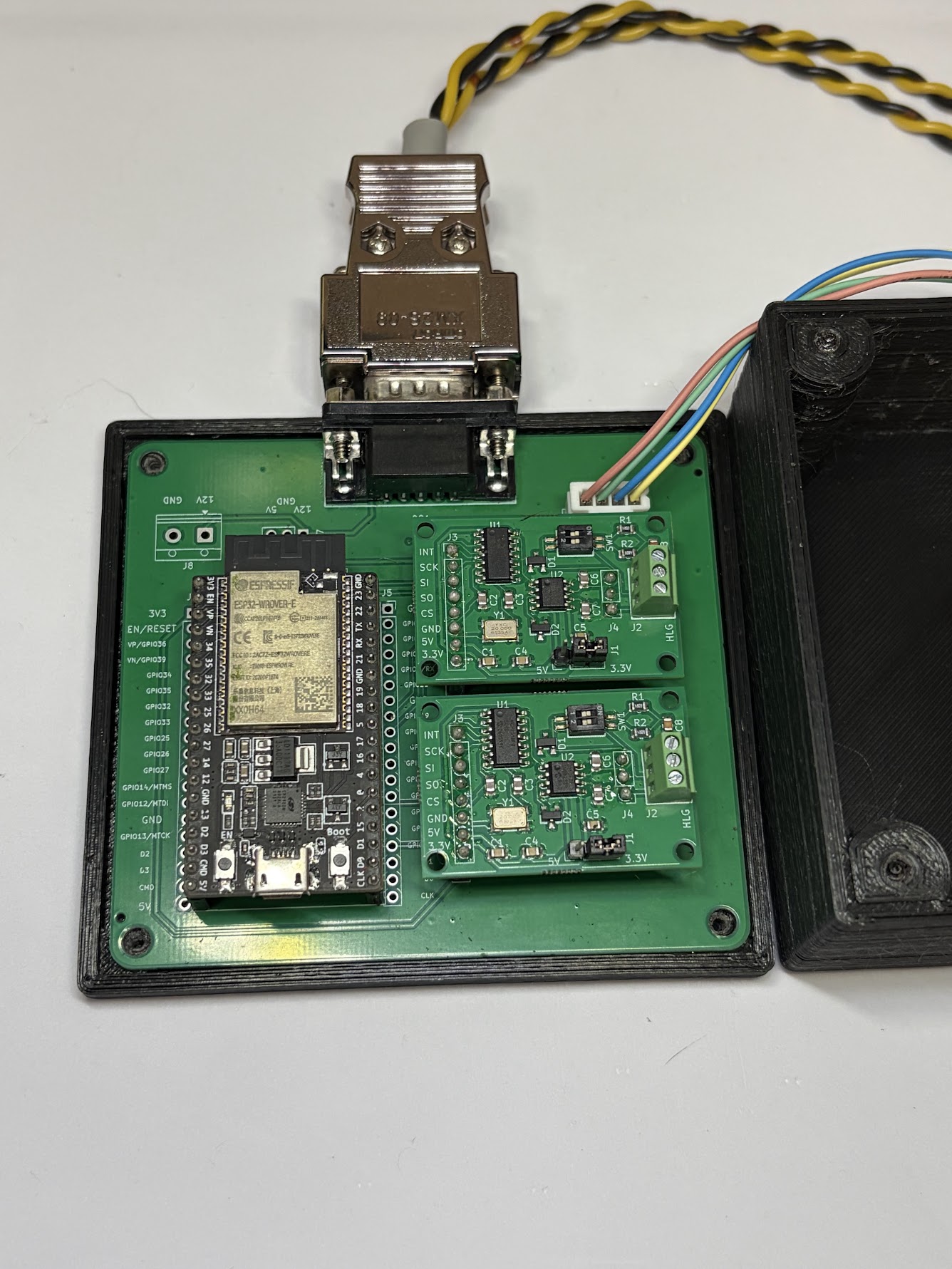 | 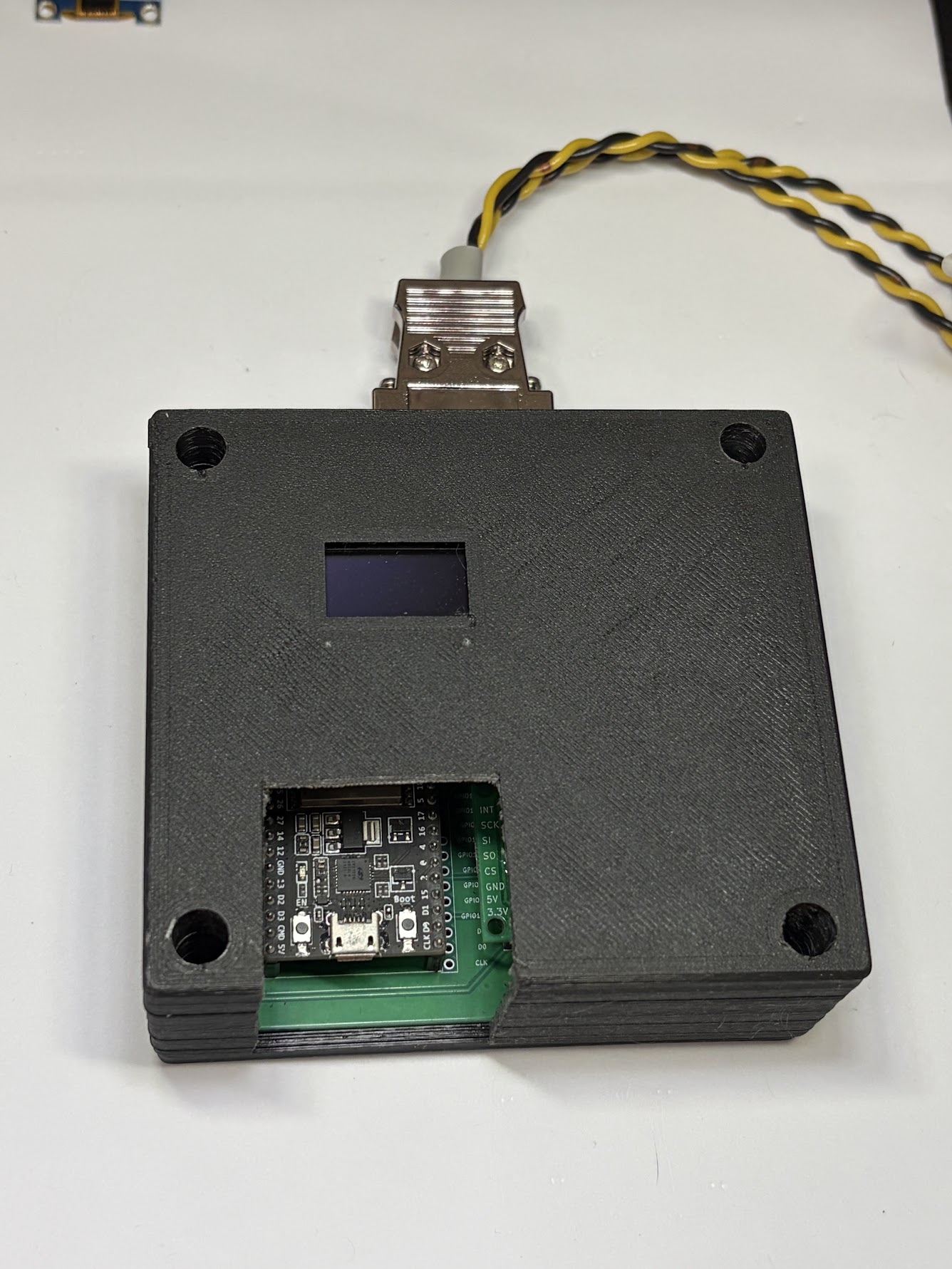 |
写真のESP32、CAN FDモジュール、表示器、ケーブル、筐体は販売品に含まれません。部品の向きは組立ガイド、筐体データはこちらを参照してください。
回路図PDFも用意しております。基板の表裏写真、接続説明図、組立例を上記に掲載しています。
スイッチサイエンス様にて委託販売中
本プロジェクトのオリジナル設計・製造データ・筐体データ・資料はCC BY 4.0で公開します。出典表示:JP WORKS / TLDSJPWORK、ESP32 CAN-FD GateWay CombiBoard。変更した場合は変更内容を明示してください。第三者の素材・ライブラリはそれぞれの利用条件に従います。
| Qty | Value | Footprint | References |
|---|---|---|---|
| 2 | Conn_01x03_Socket | Connector_PinSocket_2.54mm:PinSocket_1x03_P2.54mm_Vertical | J3, J4 |
| 2 | Conn_01x08_Socket | Connector_PinSocket_2.54mm:PinSocket_1x08_P2.54mm_Vertical | J9, J10 |
| 2 | Conn_01x19_Pin | Connector_PinSocket_2.54mm:PinSocket_1x19_P2.54mm_Vertical | J1, J5 |
| 1 | Conn_01x03_Pin | Connector_PinSocket_2.54mm:PinSocket_1x03_P2.54mm_Vertical | J7 |
| 1 | Conn_01x04 | Connector_JST:JST_XH_B4B-XH-AM_1x04_P2.50mm_Vertical | J6 |
| 1 | Conn_01x16_Pin | Connector_PinSocket_2.54mm:PinSocket_1x16_P2.54mm_Vertical | J2 |
| 1 | ESP32-DevKitC | esp32:ESP32-DevKitC | U1 |
| 1 | Screw_Terminal_01x02 | TerminalBlock_RND:TerminalBlock_RND_205-00012_1x02_P5.00mm_Horizontal | J8 |
| 1 | XDDB-1809-0816 | easyeda2kicad:DB9-TH_LD09P33E4GV00LF | DB1 |
harbaum/galagino
A Galaga, Pac-Man and Donkey Kong arcade emulator for the ESP32

RParkerE/OpenSilicon
OpenSilicon enables DIY semiconductor fabrication with open-source guides for building IC equipment at home. The project includes BOMs, 3D files, firmware, and PDKs, supporting makers and researchers in chip fabrication.

cole8888/SRNE-Solar-Charge-Controller-Monitor
Read data from SRNE solar charge controllers.


ste2425/PSP-Bluetooth-AVConnector
An AV-Out Breakout library for the PSP. Providing Kicad symbols and footprints to interface with the PSP 2/3K AVOut socket (also known as the TVOut socket)

It measures 94 × 85 mm and has 2 copper layers, 1.6 mm thick.
12 parts, built around the ESP32-DEVKITC-VE and XDDB-1809-0816. The full list of its parts is on this page, with links to each part's symbol and footprint where PCBKit's library has them.
From the TLDSJPWORK/ESP32_CAN-FD_GWCombiBoard repository on GitHub, at the commit this page was made from: the board is hardware/kicad/ESP32_CAN-FD_GWCombiBoard.kicad_pcb and its schematic hardware/kicad/ESP32_CAN-FD_GWCombiBoard.kicad_sch. PCBKit opens the board in the browser, with nothing to install.
Its repository publishes it under the CC-BY-4.0 licence: you may reuse it on that licence's terms (keep the author's notice, and for a copyleft licence share your changes alike).