Open-source ESP32-S3 voice assistant: offline wake word with TinyML (TensorFlow Lite Micro + ESP-NN), Whisper speech-to-text, local LLM (Ollama, Gemma, Qwen) or Groq, streaming TTS. A DIY Spanish-speaking smart speaker with measured results.
NEO Lite is an open-source printed circuit board by techmiguel, from the techmiguel/neo-robot repository on GitHub, published under the MIT licence. It is a 2-layer board of 31 × 43 mm with 35 parts on 54 nets, routed with 297 tracks and 89 vias.
It is built around the ESP32-S3-WROOM-1-N16R8, MAX98357AETE+T and TLV1117LV33DCYR, with the BSMD1206-110-6V, TPSC476K016R0350 and TYPE-C-31-M-12 among its other parts. Its parts include 10 resistors, 9 capacitors, 4 connectors, 3 ICs and 2 switches. It belongs with the audio and music and home automation and IoT boards and the ESP32 boards of this library.
NEO — open-source ESP32-S3 voice assistant with an offline wake word and a local LLM
NEO is a DIY smart speaker built around an ESP32-S3. You say "Hola NEO": a
15 KB TinyML model (TensorFlow Lite Micro, int8) recognizes the wake word on the
chip, offline. Then you ask anything, hands-free. A Python server on your PC transcribes
the question with Whisper, answers it with a local LLM (Ollama: Gemma, Qwen) or the
cloud (Groq), and talks back through the speaker with streaming text-to-speech.
It is a privacy-friendly, hackable Alexa / Google Home alternative you can build on a
breadboard for the price of a few modules, and every number in this README was measured
on the real board, with the raw data in the repo.
mermaid
flowchart TB
    subgraph board["ESP32-S3 board"]
        direction LR
        mic["INMP441 mic"] --> ww["Wake word 'Hola NEO'<br/>TFLite Micro + ESP-NN"] --> vad["VAD<br/>300 ms pre-roll"]
        spk["DAC + amp<br/>speaker"]
    end
    subgraph server["Python server: your PC or Hugging Face Spaces"]
        direction LR
        stt["STT<br/>faster-whisper / Groq"] --> intent{"Intent"}
        intent -- command --> api["Weather, crypto,<br/>news, rates"]
        intent -- question --> llm["LLM<br/>Ollama / Groq"]
        api --> tts["TTS by fragments<br/>edge-tts / Piper"]
        llm -- tokens --> tts
    end
    vad -- "PCM 16 kHz, WebSocket" --> stt
    tts -- "PCM, streamed" --> spk
Highlights
Offline wake word on a microcontroller. A CNN on MFCC features, quantized to int8
and accelerated with Espressif's ESP-NN SIMD kernels: 0.32–0.40 s per inference,
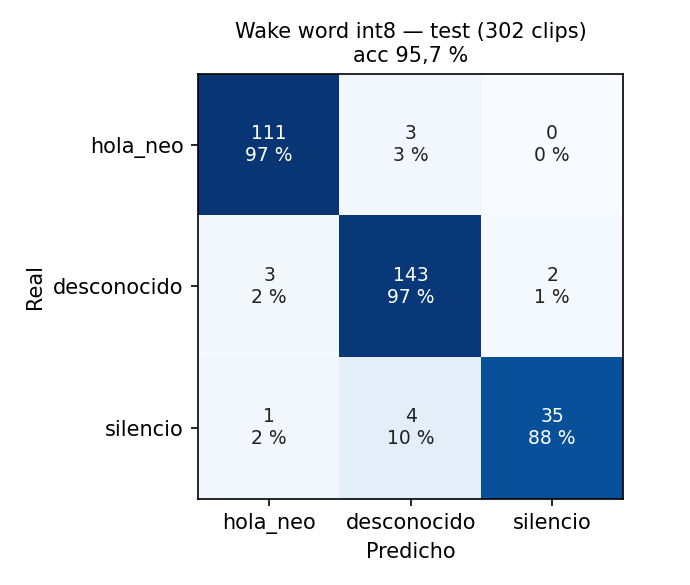
~1.1 s from the end of "Hola NEO" to NEO answering. Test accuracy 95.7 %; the full
training pipeline is included.
Local-first. The board talks to your PC on the LAN; if it is not there, it falls
back to a cloud deployment. The server can run fully local (faster-whisper + Ollama)
or on free cloud tiers (Groq + edge-tts).
Streaming responses. The LLM's tokens are cut into phrases, each one is synthesized
and sent as soon as it is ready, and the firmware starts playing after 256 ms of buffered
audio, without waiting for the full reply.
Commands without an LLM. Weather, crypto prices, tech news and Cuban informal
exchange rates are answered by keyword intent detection and real APIs: faster, cheaper
and no hallucinations.
Robust on bad networks. Prerecorded phrases tell you when WiFi, the server or the
internet is down. WiFi sleeps after 10 min idle and the CPU drops to 80 MHz while the
wake word keeps listening.
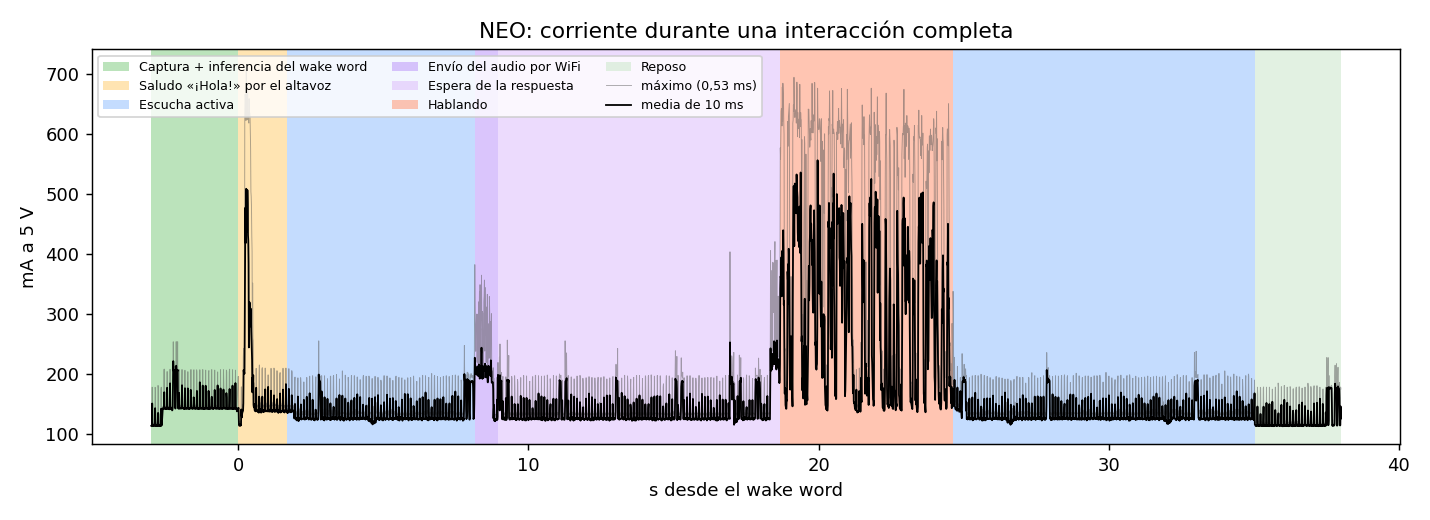
Measured, not claimed. Word error rate, latency per pipeline stage, wake word
confusion matrix and power draw per state, from 31-phrase sessions read to the board.
Quick start
You need the hardware, a PC on the same network (Windows, macOS or Linux) and
about 30 minutes.
The command APIs are optional: OPENWEATHER_API_KEY, NEWSAPI_KEY and ELTOQUE_API_KEY
(free tiers; CoinGecko needs no key). Every variable is explained in
servidor/.env.example.
bash
python -m src.server.ws_server --perfil nube # or --perfil local
The server listens on ws://0.0.0.0:8765. Note your PC's LAN IP address.
2. Firmware
Install PlatformIO (VS Code extension or pip install platformio).
bash
cd neo-robot/firmware
cp src/config_local.example.h src/config_local.h   # Windows: copy; set NEO_SERVIDOR_HOST to your PC's IP
pio run -e esp32dev --target upload
pio device monitor -e esp32dev
The first build downloads the ESP32 toolchain and TensorFlow Lite Micro and takes a few
minutes. Without config_local.h the firmware builds with a placeholder IP (192.168.1.100)
and no cloud fallback.
3. First boot
NEO has no WiFi yet, so it opens an access point called NEO-Config. Join it from
your phone and open http://192.168.4.1.
Enter your WiFi name and password. NEO saves them, connects, and finds the server.
Say "Hola NEO", wait for the greeting and ask, in Spanish: "¿Cuál es la capital de
Japón?", "¿Va a llover mañana en La Habana?", "¿Cuánto vale el bitcoin?".
No wake word? Press the BOOT button briefly to ask without it. The model was trained on
two voices; if it does not wake for yours, train it on your voice.
Troubleshooting
Symptom
Fix
Could not install package 'links2004/WebSockets' on Windows
The path is too long for Windows (260 characters). Clone to a short path such as C:\neo.
This chip is ESP8266, not ESP32-S3 while flashing
Another board is on the default port. Pass it explicitly: --upload-port COM8 (the Freenove shows up as USB-Enhanced-SERIAL CH343 in pio device list).
Serial log full of ASSOC_TOOMANY
Your access point (often a phone hotspot) has no free client slots. Disconnect a device.
time: missing unit in duration "-1" from Ollama
Use OLLAMA_KEEP_ALIVE=-1m, with a unit.
NEO hears the wake word but misses the start of your question
Wait for the greeting to finish. The VAD calibrates the background noise for 0.5 s after it.
The first answer takes minutes with the local profile
Ollama is loading the model from disk; later answers are fast. Keep it loaded with OLLAMA_KEEP_ALIVE=-1m.
Wiring, pin tables and the mistakes to avoid are in docs/hardware.md.
A compact custom PCB (NEO Lite, 31 × 43 mm, USB-C, ready for JLCPCB assembly) is in
hardware/neo-lite/, designed in KiCad 9 but not yet fabricated.
What you can ask
NEO speaks Spanish. After the wake word it detects the intent of the transcription:
Intent (keywords)
Answer
Source
clima, "qué tiempo hace", temperatura, pronóstico
Current weather (default city: La Habana)
OpenWeatherMap
dólar, euro, tasa, El Toque
Informal Cuban peso (CUP) exchange rates
El Toque API
bitcoin, ethereum, cripto
Crypto price
CoinGecko
noticias, titulares
Tech news (Apple, Google, Nvidia, OpenAI…), one headline per outlet
NewsAPI
hola, "qué tal"
Greeting
—
anything else
Free answer in NEO's voice: a stranded alien traveller, curious, with dry humour, ≤ 20 words
LLM
Adding a command is a Python class on the server (servidor/src/commands/); the firmware
does not change.
Measured results
All numbers come from the board. Method, raw data and analysis are linked.
Wake word "Hola NEO", CNN int8 on the ESP32-S3, two speakers
(experiments, metrics)
Metric
Value
Test accuracy (int8, 302 clips)
95.7 %
True / false positive rate per window (threshold 0.7618)
95.6 % / 0.6 %
Inference time with ESP-NN kernels
0.32–0.40 s (2.6 s with the reference kernels)
End of "Hola NEO" → confirmed, on the board
1.1 s median (1.11 s on 24/10, n = 4; 1.09 s on 25/10, n = 5)
Conversation, 31 phrases read to the board, same audio sent to every server variant.
Word error rate ignores accents. Latency runs from the end of the recording to the first
audio of the reply, median (p90).
* The 25/10 run exposed that gemma4:e2b re-processes the system prompt on every question
(~37 tokens/s on a laptop i5): the 409-token prompt cost ~8 s. The local profile now uses
a 139-token prompt (2.7–3.3 s in Ollama, not yet re-measured end to end). Streaming saves
~1.9 s once answers are long enough to split; edge-tts costs ~1.9 s per call from Cuba.
On the board, add 1.5 s of end-of-speech silence and ~0.6 s of WiFi upload.
The model ships in the firmware (firmware/src/models/) and was trained on two speakers.
The recordings are not published (they are people's voices), but the pipeline is:
bash
cd firmware
pio run -e dataset_capture --target upload               # firmware that streams clips over serial
pip install -r tools/requirements_dataset.txt
python tools/capture_dataset.py --port COM8              # guided recording per class
pip install -r tools/requirements_train.txt
python tools/train_model.py                              # trains, quantizes to int8, exports TFLite
python tools/gen_vocabulario.py --umbrales models/umbrales.json
python tools/tflite_to_header.py                         # writes src/models/*.h
pio run -e esp32dev --target upload
tools/vocabulario.json (classes, phrases, thresholds) is the single source of truth for
capture, training and inference. The experiments behind the current model (cross-validation,
leave-one-speaker-out, negative speech) are in
firmware/models/experimentos/.
Other firmware environments
pio run -e …
Purpose
esp32dev
Full firmware: wake word, WebSocket, audio, OLED
hw_test
Checks OLED, microphone, speaker and button
loopback_test
Plays the microphone through the speaker
wake_word_test
Wake word inference without the server
dataset_capture
Records training clips over serial
demo_ojos / demo_bocina
Eyes animation / speaker playback demos
consumo_logger
Power logger on an ESP8266 + INA219
Benchmark your own setup
The server includes the validation panel used for every number above: it relays the board's
audio to several server variants (models, providers, streaming on/off), scores the
transcriptions against the corpus and reads the latency from the board's serial log.
bash
cd servidor
python -m src.benchmark.panel --variante "gemma=local,OLLAMA_MODEL=gemma4:e2b" --variante "nube=nube"
Only the wake word runs on the chip. A multi-command local classifier would need a
dataset per phrase and a reflash per change. Commands live on the server and grow without
touching the firmware; the cost is that every question needs the network.
Keywords before the LLM. Common commands skip the LLM: faster, free and
deterministic. The LLM only gets free-form questions.
Two I2S buses. Microphone and DAC each get their own peripheral; no time multiplexing.
Inference buffers in internal SRAM. PSRAM access with WiFi active tripped the watchdog.
One voice. NEO always speaks with edge-tts es-CU-ManuelNeural, including its
prerecorded phrases; Piper only answers when edge-tts is unreachable.
Failure modes
Every message below is prerecorded in the firmware, so NEO can say it without a server.
Situation
What NEO does
Server unreachable (LAN and cloud)
Says "No encuentro mi servidor", and "Ya estoy conectado y listo" when it is back
WiFi down
Says it cannot connect; the wake word keeps working
No internet on the server
The server sends sin_internet; NEO says "No puedo acceder a internet ahora"
Empty transcription
"No te entendí, ¿me lo repites?" and listens again
Server silent for 30 s
"Está tardando demasiado, inténtalo otra vez"
edge-tts unreachable
The server answers with Piper (different voice)
LLM drifts into another script (qwen2.5:3b → Chinese)
The server asks again once, then strips non-Latin text
Wake word false positive
NEO greets, hears nothing for 10 s and goes back to rest
Security and limitations
The WebSocket has no authentication; it assumes a trusted LAN. Add a token or TLS
before exposing the server. API keys live in servidor/.env (gitignored).
Spanish only: STT, prompts and voice.
Short memory: the last 5 exchanges per WebSocket session, in RAM.
USB power: speaking peaks at ~0.8 A at 5 V; a single boosted 18650 cell browns out.
No OTA updates yet; flash over USB.
The local profile is slower and less accurate than the cloud one on a laptop CPU.
Contributing
Issues and pull requests are welcome; see CONTRIBUTING.md. Run the tests
before sending changes:
It measures 31 × 43 mm and has 2 copper layers, 1.6 mm thick.
What parts does the NEO Lite use?
35 parts, built around the ESP32-S3-WROOM-1-N16R8, MAX98357AETE+T, TLV1117LV33DCYR and BSMD1206-110-6V. The full list of its parts is on this page, with links to each part's symbol and footprint where PCBKit's library has them.
Where can I download the NEO Lite KiCad files?
From the techmiguel/neo-robot repository on GitHub, at the commit this page was made from: the board is hardware/neo-lite/kicad/NEO_Lite.kicad_pcb and its schematic hardware/neo-lite/kicad/NEO_Lite.kicad_sch. PCBKit opens the board in the browser, with nothing to install.
Can I use the NEO Lite design in my own project?
Its repository publishes it under the MIT licence: you may reuse it on that licence's terms (keep the author's notice, and for a copyleft licence share your changes alike).
This project transforms a 1998 Furby into an interactive and advanced desktop assistant using a Raspberry Pi W. It incorporates OpenAI and Whisper for natural language processing, primarily relying on Google Cloud Text…
Everything is generated from design.py — do not hand-edit the board and then regenerate, you will lose the edit. If you do route by hand in KiCad, stop using the pipeline for that board and say so in docs/DECISIONS.md.
A small web studio of fast, elegant, install-free music tools. Every tool is plain HTML, CSS and vanilla JavaScript with the Web Audio API — no build step, no dependencies, no accounts, works offline after first load.