2 layers126.3 × 71.1 mm

 Super87380/custom-keyboard
75% keyboard I made for hackclub KEEB
Custom keyboard is an open-source printed circuit board by Super87380, from the Super87380/custom-keyboard repository on GitHub. It is a 2-layer board of 345 × 129.4 mm with 346 parts on 203 nets, routed with 2,222 tracks and 240 vias.
Its parts include 167 diodes, 89 switches, 83 capacitors and 2 resistors. It belongs with the keyboards and input boards and the RP2040 boards of this library.
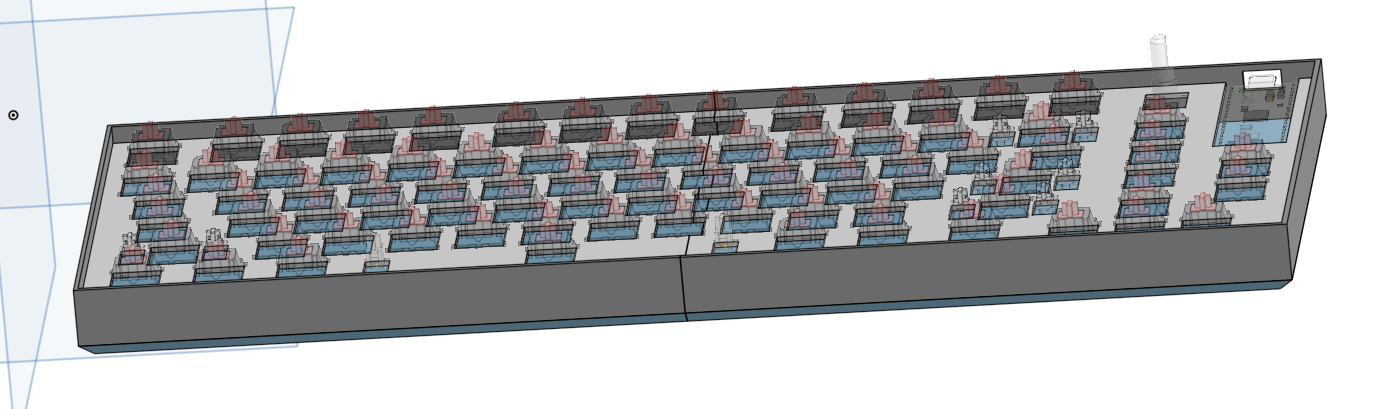
This is a custom 75% mechanical keyboard with 3 macro keys that I designed every part for, from the PCB to the firmware.
A while before finding out about Hack Club I wanted to make my own mechanical keyboard. After finding out how much it would cost I got de motivated and gave up on the idea. Later I was watching YouTube when the creator mentioned Hack Club and how they help teenagers get experience in engineering. I was looking through the programs running when I saw KEEB. With the opportunity to get the keyboard funded by Hack Club/KEEB it was the perfect chance for me to make the keyboard I had wanted to before.
I started this project by brainstorming ideas for different layouts, sizes, and features. My original idea was a 75% keyboard with a screen, 1 macro key, and a rotary encoder. The idea soon evolved into what it is now. After brainstorming I used keyboard layout editor and photopea to design the layout and matrix wiring digitally. I then made the first schematic and PCB in KiCad with a screen and 1 macro key. After I finished the schematic and PCB I realized I wanted to add backlighting for late night gaming/programming sessions and more macro keys, so I added sk6812 mini-e LED's under each switch and removed the screen for 2 more macro keys. After I finished with the electronics I designed a case and plate in Onshape, I found this pretty challenging as it was my first time using Onshape; I can definitely improve the case a lot. I then made the firmware, I chose to sue KMK because I have more expierence with python and have made a macropad with KMK already.
| Sl No. | Name | Notes | Quantity | Price Per Unit | Cost | Shipping | Link |
|---|---|---|---|---|---|---|---|
| 1 | PCB | Manufactured by JLCPBC (minimum 5, order through JLclone desktop app - saves money) | 1 | $25.50 | $25.50 | $15.00 | JLCPCB |
| 2 | Diode (1N4148) | Diodes to prevent ghosting (need 84, minimum 100) | 100 | $0.0295 | $2.95 | $13.54 | LCSC |
| 3 | Resistor (0805W8F5600T5E) | For start and end of LED data signals (only need 2, minimum of 100) | 100 | $0.0028 | $0.28 | Included* | LCSC |
| 4 | Capacitor (CC0603KRX7R7BB104) | Decoupling capacitors for LED's (need 83, multiples of 50) | 100 | $0.0142 | $1.42 | Included* | LCSC |
| 5 | LED (SK6812MINI-E) | LED's for backglow of the keyboard (order in multiples of 5) | 85 | $0.0651 | $5.53 | Included* | LCSC |
| 6 | Raspberry Pi Pico W (with headers) | The microcontroller for the keyboard (already owned) | 1 | $0.00 | $0.00 | $0.00 | PiShop |
| 7 | Switches | Mechanical keyboard switches (pack of 100) | 100 | $0.20 | $20.00 | $0.00 | Amazon |
| 8 | Keycaps | Keycaps for the switches | 1 | $10.09 | $10.09 | $0.00 | AliExpress |
| 9 | Rotary Encoder | Rotary encoder for volume and play/pause media (already owned) | 1 | $0.00 | $0.00 | $0.00 | DigiKey |
| 10 | Rotary Encoder Knob | Knob for the rotary encoder, 3D printed | 1 | $0.00 | $0.00 | $0.00 | — |
| 11 | Case + plate | 3D printed | 1 | $0.00 | $0.00 | $0.00 | — |
| 12 | Stabilizers | 7x 2u, 1x 6.25u | 1 | $12.05 | $12.05 | $0.00 | Walmart |
| 13 | USB C Cable | Aviation style, coiled | 1 | $7.56 | $7.56 | $0.00 | Amazon |
| 14 | Type C to Micro USB | For connecting the USB C cable to the pico | 1 | $1.78 | $1.78 | $0.00 | Amazon |
Additional Notes: Items from Amazon may have shipping charges; Amazon Prime is used so shipping costs are not included.
All LCSC items share a combined shipping fee of $13.54 USD. PCB shipping is estimated at $15.00 USD. Total shipping: $28.54 USD.
This was made possible through the funding of Hack Club and KEEB, opensource firmware and software, everyone who helped with my questions in the slack, 3D models from grabcad, tutorials on YouTube, and inspiration from other KEEB github repos.
| Qty | Value | Footprint | References |
|---|---|---|---|
| 84 | 1N4148 | Diode_THT:D_DO-35_SOD27_P7.62mm_Horizontal | D1, D2, D10, D11, D12, D13, D14, D15, D16, D17, D18, D19, D20, D21, D22, D23 +68 |
| 83 | C_Small | Capacitor_SMD:C_0603_1608Metric_Pad1.08x0.95mm_HandSolder | C1, C2, C10, C11, C12, C13, C14, C15, C16, C17, C18, C19, C20, C21, C22, C23 +67 |
| 83 | MX_SK6812MINI-E_LCSC | PCM_marbastlib-mx:LED_MX_6028R_1 | LED1, LED2, LED10, LED11, LED12, LED13, LED14, LED15, LED16, LED17, LED18, LED19, LED20, LED21, LED22, LED23 +67 |
| 72 | SW_Push | PCM_marbastlib-mx:SW_MX_1u_MODEL | SW1, SW2, SW10, SW11, SW12, SW13, SW16, SW17, SW18, SW19, SW20, SW21, SW22, SW23, SW24, SW25 +56 |
| 7 | SW_Push | PCM_marbastlib-mx:SW_MX_1.25u_MODEL | SW14, SW73, SW74, SW75, SW76, SW77, SW78 |
| 4 | MountingHole | MountingHole:MountingHole_3.2mm_M3_DIN965_Pad_TopBottom | H1, H2, H3, H4 |
| 3 | SW_Push | PCM_marbastlib-mx:SW_MX_1.5u_MODEL | SW32, SW45, SW79 |
| 2 | MX_stab | PCM_marbastlib-mx:STAB_MX_2.25u_MODEL | S2, S5 |
| 2 | Resistor | Resistor_SMD:R_0805_2012Metric | R1, R2 |
| 1 | MX_stab | PCM_marbastlib-mx:STAB_MX_2u_MODEL | S3 |
| 1 | MX_stab | PCM_marbastlib-mx:STAB_MX_2.75u_MODEL | S1 |
| 1 | MX_stab | PCM_marbastlib-mx:STAB_MX_6.25u_MODEL | S4 |
| 1 | RaspberryPi_Pico | Module:RaspberryPi_Pico_Common_THT | A1 |
| 1 | RotaryEncoder_Switch | PCM_marbastlib-various:ROT_Alps_EC11E-Switch | SW15 |
| 1 | SW_Push | PCM_marbastlib-mx:SW_MX_1.75u_MODEL | SW46 |
It measures 345 × 129.4 mm and has 2 copper layers, 1.6 mm thick.
346 parts. The full list of its parts is on this page, with links to each part's symbol and footprint where PCBKit's library has them.
From the Super87380/custom-keyboard repository on GitHub, at the commit this page was made from: the board is PCB/custom_keyboard.kicad_pcb and its schematic PCB/custom_keyboard.kicad_sch. PCBKit opens the board in the browser, with nothing to install.
Its repository states no licence, so its author keeps all rights: ask Super87380 before reusing the design.

DIaLOGIKa-GmbH/modular-nerf-target
A hex-based modular system to build custom nerf gun targets

GuavTek/beat_sequencer
A MIDI sequencer for percussion using a RP-PICO, WS2812 LEDs, and cherry style keyboard switches


Project-Touchscape/Touchscape-PCB
PCB designs for sensors, drivers, routing, and communication


Cyber-Professionals-Enthusiast-Club/DC-34-Mech-SAO
Kicad 6 design files for the CPEC DEFCON 34 Badge SAO pluggin weapon and power ups.