

2 layers140.5 × 30 mm
Type e
google/mozc-devices
Circuit diagrams and firmware source code for Gboard DIY keyboards
16 parts3kApache-2.0

 SukkoPera/OpenC16Cart34
Open Hardware 16/32/64 Kb Cartridge for the Commodore 16, 116 and Plus/4
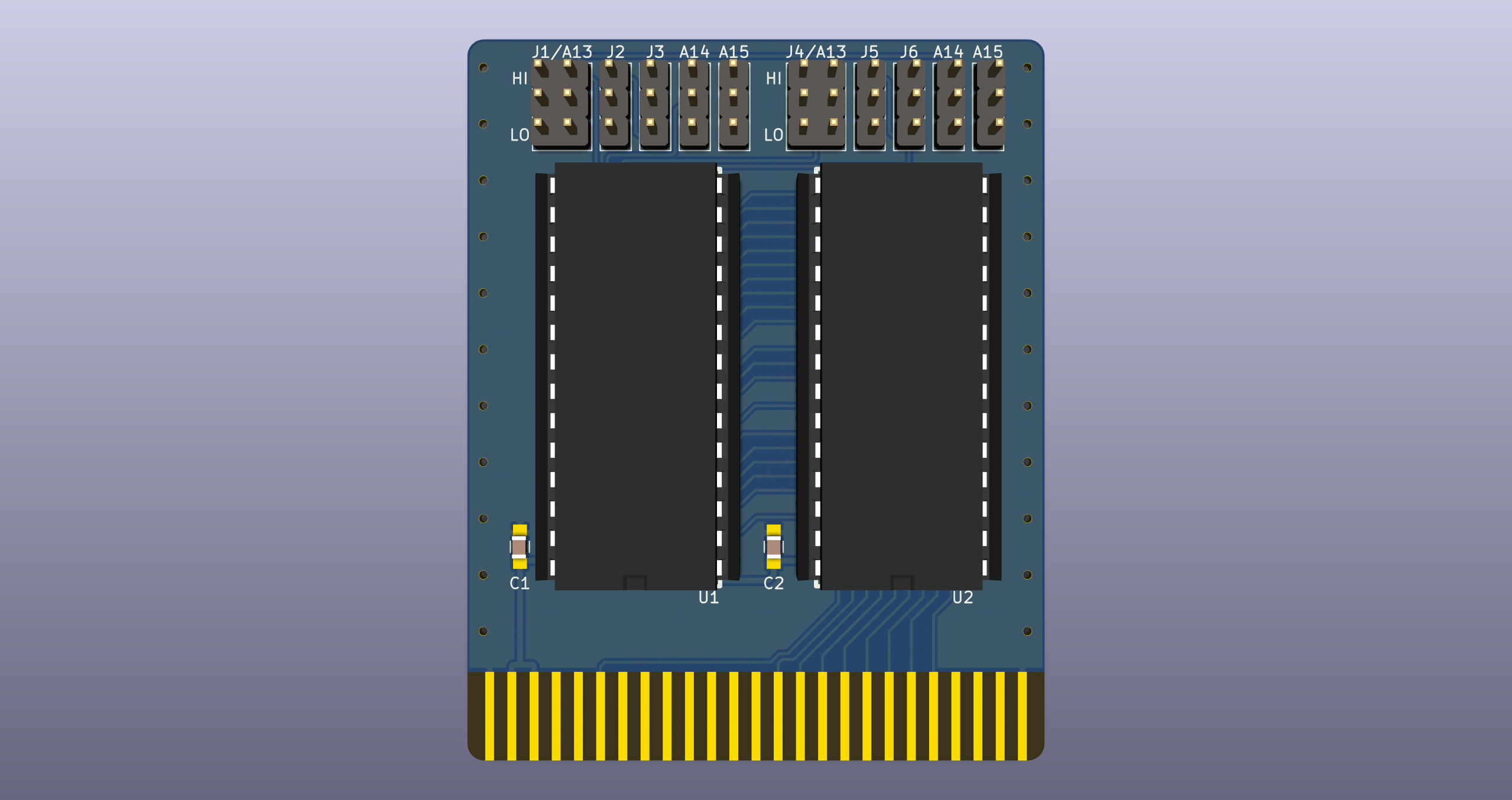
OpenC16Cart is an open-source printed circuit board by SukkoPera, from the SukkoPera/OpenC16Cart repository on GitHub. It is a 2-layer board of 52 × 65 mm with 16 parts on 36 nets, routed with 568 tracks and 39 vias.
Its parts include 11 connectors, 2 capacitors and 2 ICs. It belongs with the retro computing and games boards of this library.
OpenC16Cart is an Open Hardware 8/16/32 KB Cartridge for the Commodore 16, Plus/4 and the rest of the Commodore 264 family.
Like all the other Commodore 8-bit systems, the Plus/4 had a cartridge port for ROM-based software. Because the computer did not do well in the marketplace, however, very few were released. - Bo Zimmerman
One day I decided to fix my old Commodore 16. I found out about Diag264 and, since I knew that C16 carts weren't exactly common (I have never seen one "in the flesh"!), I was somewhat surprised to learn that people are deliberately destroying genuine carts to use them as donors to build a Diag264.
Since I had already built an Open Hardware cartridge for the Commodore 64, I thought that one for the C16 could not be much different, and so this project was born.
Since I did not own a cartridge, I set out to find images of PCBs of real cartridges on the Net, only to find out that those are rare as well. In the end I found a couple of top+bottom images, and started to reverse engineer the design from those. With the help of some service manuals, I came up with OpenC16Cart. I then expanded it to have the ability of using bigger (E(E))PROMs which could store multiple ROM images.
C16 ROMs are normally 16 or 32 Kb (see list below). OpenC16Cart supports both, 8 KB might or might not work, I'm not aware of any carts of this size.
For the 16 KB configuration, only use the LO ROM. If you are using 64 KB (E)EPROMS, you can store up to 4 images, which you can select using the A14 and A15 jumpers above the LO ROM:
| ROM Image # | A14 | A15 |
|---|---|---|
| 1 | L | L |
| 2 | H | L |
| 3 | L | H |
| 4 | H | H |
For the 32 KB configuration, use both the LO and HI ROMs. 32 Kb ROM are usually distributed as two 16 Kb chunks, and one goes on each ROM, in corresponding positions. In this case you will also be able to switch among 4 different images, by moving the A14/A15 jumpers on BOTH ROMs.
The cartridge also has some more jumpers, named J1-J6, which are there because the cart I used as "inspiration" had them, but I don't really know whether they have any useful purpose:
I'm not aware of any carts using different settings at the moment, so it is recommended to keep them as described above.
Only a handful official cartridges seem to have been released:
(The above list is courtesy of C64 Wiki)
OpenC16Cart is Open Hardware. If you make any modifications to the board, please contribute them back.
Since the project is open you are free to get the PCBs made by your preferred manufacturer, however in case you want to support the development, you can order them from PCBWay through this link:

You get cheap, professionally-made and good quality PCBs, I get some credit that will help with this and other projects. You won't even have to worry about the various PCB options, it's all pre-configured for you!
Also, if you still have to register to that site, you can use this link to get some bonus initial credit (and yield me some more).
Again, if you want to use another manufacturer, feel free to, don't feel obligated :).
If you need help or have questions, you can join the official Telegram group.
| Qty | Value | Footprint | References |
|---|---|---|---|
| 8 | CONN_01X03 | OpenC16Cart:Pin_Header_Straight_1x03-ModSilkS | J2, J3, J5, J6, J11, J12, J21, J22 |
| 2 | C | Capacitors_SMD:C_0805_HandSoldering | C1, C2 |
| 2 | CONN_02X03 | OpenC16Cart:Pin_Header_Straight_2x03-ModSilkS | J1, J4 |
| 1 | 27512 - HI ROM | OpenC16Cart:dil_28-600_socket_ThinSilkS | U2 |
| 1 | 27512 - LO ROM | OpenC16Cart:dil_28-600_socket_ThinSilkS | U1 |
| 1 | C16-Exp-Port | OpenC16Cart:C16_Cart_Conn | J7 |
| 1 | LOGO | w_logo:Logo_copper_OSHW_6x6mm | G*** |
It measures 52 × 65 mm and has 2 copper layers, 1.6 mm thick.
16 parts. The full list of its parts is on this page, with links to each part's symbol and footprint where PCBKit's library has them.
From the SukkoPera/OpenC16Cart repository on GitHub, at the commit this page was made from: the board is OpenC16Cart.kicad_pcb. PCBKit opens the board in the browser, with nothing to install.
Its repository states no licence, so its author keeps all rights: ask SukkoPera before reusing the design.
google/mozc-devices
Circuit diagrams and firmware source code for Gboard DIY keyboards

conorpp/u2f-zero
U2F USB token optimized for physical security, affordability, and style

rusefi/rusefi
rusefi - GPL internal combustion engine control unit

VoronDesign/Voron-Hardware
Cool Hardware designed by the Voron Design group

hoglet67/RGBtoHDMI
Bare-metal Raspberry Pi project that provides pixel-perfect sampling of Retro Computer RGB/YUV video and conversion to HDMI

hackclub/OnBoard
💡 Join 1,000 teenagers and make your first PCB with a $100 grant!

