2 layers127.5 × 62 mm
Avionics project
TUSI-KHU/2026-nura-avionics
Embedded flight controller for the 2026 NURA competition.
75 parts2Apache-2.0
 stefphd/SBBMicro
Source code for the self-balancing-bike microcontroller unit
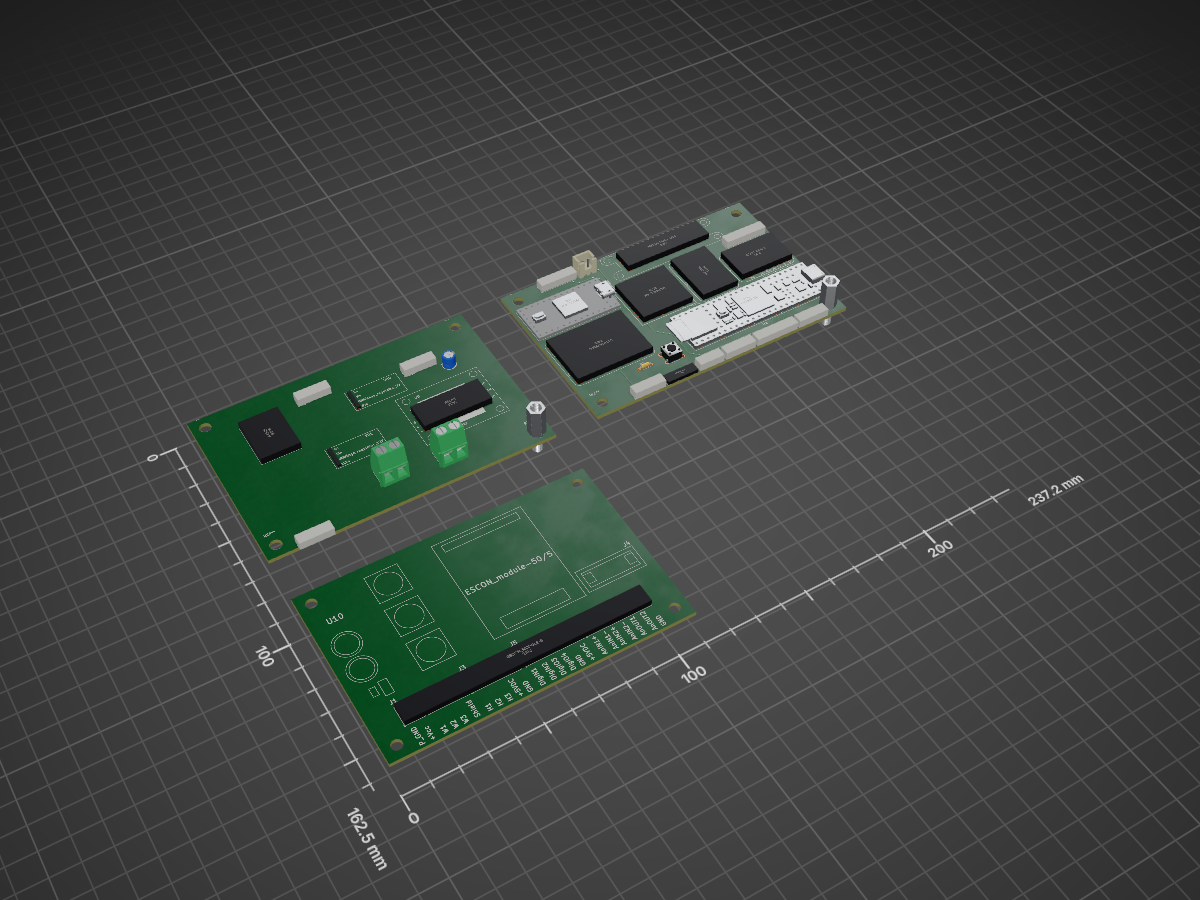
SBBMicro is an open-source printed circuit board by stefphd, from the stefphd/SBBMicro repository on GitHub. It is a 2-layer board of 237.2 × 162.5 mm with 38 parts on 145 nets, routed with 192 tracks and 0 vias.
It is built around the TEENSY 4.1, LIS3MDL and A4988, with the ISM330DHCX among its other parts. Its parts include 13 connectors, 11 ICs, 1 capacitor, 1 resistor and 1 diode. It belongs with the NXP (LPC, Kinetis, i.MX RT) boards of this library.


This repository contains the source code for the self-balancing-bike micro-controller unit (Teensy 4.1-based 🚀️). The introduction shows the files and folders contained in this repository and how they are organized, the prerequisites necessary, and the procedures to be used in order to build and upload the code, to generate the documentation, and to automatically generate the control-algorithm code from the Simulink model (using matlab tools).
Windows is officially supported, although compilation is also implemented for Linux. MacOS is NOT supported.
Files:
controlModel.slx: control model implementation in Simulinkgencode.m: MATLAB function for code generation from Simulink modelparams.sldd: Simulink parameters used in controlModel.slxbuild_linux.sh: build shell script for Linuxbuild_win.bat: build shmell script for WindowsDoxyfile: configuration file for documentation generation from source code using doxygenMakefile: makefile for building, uploading and documentation generation using makestartup.m: startup file for MATLAB (just to add necessary path)INSTALL_PREREQ.md: guide for the installation of the pre-requisitesREADME.md: readme fileCode folders:
./include: contains .h files included in source code./src: contains source .c or .cpp files, including main file main.cpp./lib: contains a folder for each used library, with file library.properties for defining the library properties (mandatory for arduino compiling) and .h and .cpp files (possibly contained in folder ./src/)./tools/teensy: contains the core code for the Teensy microcontrollerAdditional folders:
./tools/teensy-windows: build tools for Windows./tools/teensy-linux: build tools for Linux./docs/html: contains the documentation in html (generated automatically from source code using doxygen)./docs/extra: contains extra documentation (user-written), which is included using doxygen./matlab-tools: contains matlab tools usefull for code generation and other stuff./hardware: contains the kicad project files./.vscode: contains VS code property file(s)./.build and .cache: hidden folders created only during compilationNo other dependecies are necessary: all used libraries are already included in ./lib/.
Additional utilities (only recommended):
Makefile; alternativelly, shell or MATLAV scripts can be used./hardwareSee the installation guide for the pre-requisites for details.
Documentation for the source code and the user-defined libraries (but not for other third-party libraries) can be generated from the source using Doxygen with
doxygenor using make
make docGenerated documentation includes only a html version in ./docs/html, with main file index.html. Documentation is also available on https://stefphd.github.io/SBBMicro/.
A latex documentation may be also generated by setting
GENERATE_LATEX = YESin Doxyfile. The latex version will be in ./docs/latex, and can be compiled using latex with
cd ./docs/latex
make
which generates the pdf file ./doc/latex/refman.pdf.
\attention Latex documentation requires having both latex and make installed.
Code generation of the control algorithm is performed via MATLAB/Simulink with the Embedded Coder Toolbox. Other toolboxes may be required. Code generation can be launch with MATLAB using
startup;
gencode
The general usage of this function is
startup;
gencode(modelname,dest_dir);
where modelname is the name of the Simulink model (without the *.slx extension included), while dest_dir is the destination directory: generated code is placed in ./dest_dir/modelname/src. If no modelname is given, the function uses the first *.slx file found in the current directory. If no destination directory is given, the functions uses ./lib. Code generation may be also performed using make, however this may take some time.
\note Toolboxes required by the code generation can be shown by running in MATLAB
startup;
check_toolbox();
\attention For a correct usage in this project the above functions should be run in the main directory, and not in ./matlab-tools/.
Compilation is performed using the arduino-builder. Bash scripts provide simple usage depending on the operative system:
Linux:
./build_linux.shor
bash build_linux.sh\note Tested with Arch-Linux x64.
Windows:
./build_win.bat\note Tested with Windows 10 x64.
MacOS: not implemented yet, however it should be similar to Linux.
Alternatively, one can use ctrl+shift+B to build the code in Visual Studio Code with both Linux and Windows (this makes use of build_linux.sh or build_win.sh depending on the operative system). One may also use make the building and uploading.
\note The above shell scripts perform both the building and the uploading: it is not possible to build or upload only.
One may also use make for the building, uploading and the documentation generation. This allows several operations using similar syntax, so as to perform single operations at a time:
make or make all to build and upload the code.make build to build the code onlymake upload to upload code onlymake clean to clean the build and cache directoriesmake remake to clean, build and upload the codemake rebuild to clean and rebuildmake doc to build the documentationmake cleandoc to clean the documentationmake help to print the Makefile help\note The above commands can be also used at the same time, e.g. make build doc to build and generate the documentation.
As an alternative to make and gencode, the code generation, buiding, uploading and documentation generation may be also performed at the same time from within the MATLAB command window. This employs a MATLAB function name make in ./matlab-tool/. The function must be used inside MATLAB with the following syntax:
make all or just make to generate code from the Simulink model, build and upload
make gencode to generate the code only from the Simulink model. Note that this corresponds to call gencode with no input arguments, i.e. the first *.slx file found is used
make build to build the code
make upload to upload the code
make clean to clean the build and cache directories
make remake to clean, build and upload the code
make rebuild to clean and rebuild
make doc to build the documentation
make cleandoc to clean the documentation
make help to print the help.
\note Note that this function emulates the function gencode and the standard make commands. However, it does not require having make installed but only doxygen for the generation of the documentation.
\note The above commands can be also used at the same time, e.g. make build doc to build and generate the documentation.
\todo Doc: Documentaton for Simuling and code generation??? \todo Make Arduino functions working in Simulink when compiling (maybe declare Arduino functions as external in Simulink, so as the linker links them) \todo To implement brake motor
| Qty | Value | Footprint | References |
|---|---|---|---|
| 2 | Brake mtr JST | Connector_JST_inches:JST_1x04_P2.54 | J1, J12 |
| 2 | Power JST | Connector_JST_inches:JST_1x04_P2.54 | J4, J10 |
| 1 | 100uC | Capacitor_THT:CP_Radial_D5.0mm_P2.50mm | C1 |
| 1 | A4988 | SBBMicro:A4988 | U11 |
| 1 | ArcherM+ | Connector_JST_inches:JST_1x04_P2.54 | U8 |
| 1 | Aux analog JST | Connector_JST_inches:JST_1x04_P2.54 | J2 |
| 1 | Bat in | TerminalBlock:TerminalBlock_bornier-2_P5.08mm | J9 |
| 1 | Brake mtr out | Connector_JST_inches:JST_1x04_P2.54 | J15 |
| 1 | D | Diode_THT:D_DO-34_SOD68_P7.62mm_Horizontal | D1 |
| 1 | ESCON_module-50/5 | SBBMicro:Escon module-50-5 | U10 |
| 1 | Encoder JST | Connector_JST_inches:JST_1x05_P2.54 | J7 |
| 1 | ISM330DHCX | SBBMicro:ISM330DHCX | U4 |
| 1 | LIS3MDL | SBBMicro:LIS3MDL | U5 |
| 1 | MCP4922-AK | SBBMicro:MCP4922-AK | U6 |
| 1 | Mecostrain2038 | SBBMicro:Mecostrain-2038 | U1 |
| 1 | ON/OFF | Button_Switch_THT:SW_PUSH_6mm | SW1 |
| 1 | On/off JST | Connector_JST_inches:JST_1x03_P2.54 | J5 |
| 1 | Power mtr out | TerminalBlock:TerminalBlock_bornier-2_P5.08mm | J16 |
| 1 | R220 | Resistor_THT:R_Axial_DIN0204_L3.6mm_D1.6mm_P5.08mm_Horizontal | R1 |
| 1 | Relay | SBBMicro:Relay | U9 |
| 1 | Steer trq & ang JST | Connector_JST_inches:JST_1x06_P2.54 | J8 |
| 1 | Steer mtr JST | Connector_JST_inches:JST_1x06_P2.54 | J3 |
| 1 | Teensy4.0 | teensy:Teensy40 | U3 |
| 1 | Teensy4.1 | teensy:Teensy41 | U2 |
| 1 | Throttle JST | Connector_JST_inches:JST_1x02_P2.54 | J6 |
| 1 | UltimateGPS | SBBMicro:Ultimate-GPS | U7 |
| 1 | Voltage_regulator_12V | SBBMicro:Voltage-reg_12V | VR1 |
| 1 | Voltage_regulator_5V | SBBMicro:Voltage-reg_5V | VR0 |
The 30 most common of 38 parts.
It measures 237.2 × 162.5 mm and has 2 copper layers, 1.6 mm thick.
38 parts, built around the TEENSY 4.1, LIS3MDL, A4988 and ISM330DHCX. The full list of its parts is on this page, with links to each part's symbol and footprint where PCBKit's library has them.
From the stefphd/SBBMicro repository on GitHub, at the commit this page was made from: the board is hardware/SBBMicro.kicad_pcb and its schematic hardware/HV-schematic.kicad_sch. PCBKit opens the board in the browser, with nothing to install.
Its repository states no licence, so its author keeps all rights: ask stefphd before reusing the design.
TUSI-KHU/2026-nura-avionics
Embedded flight controller for the 2026 NURA competition.

korken89/ovio_core
Work in progress. PCB have arrived for v1.0 of the board and bring-up has started.

brenocq/bldc-motor
High-precision BLDC motor and controller development from scratch (in progress...)

MohamadAminGhanoum/IMU-board
planning to make a module that has small sensors on the pcbs, which will give me motion data, which i will track and recieve on either my phone or computer using the usb-c

thejamesrhodes/IMU-Quantisation-research-project
Research into quantisation effects in MEMS gyroscopes using custom STM32 hardware.

arudhranpk/VECTRON_V1
This is a custom made flight computer designed for sounding rockets.

dmanla/SecureConnectivityDevelopmentPlatform
A development platform which provides secure connectivity and data logging support while maintaining compatibility with Arduino-Mega hardware and software.
