2 layers162.2 × 126.5 mm

 speeed76/steno-keyboard
A 42-key keyboard (3×12 + 6 thumb keys) that works as a normal QWERTY keyboard or as a steno machine that translates chords on the keyboard itself, so the computer needs no Plover install.
Steno qwerty is an open-source printed circuit board by speeed76, from the speeed76/steno-keyboard repository on GitHub. It is a 2-layer board of 251.6 × 86.9 mm with 86 parts on 75 nets.
Its parts include 42 diodes and 42 switches. It belongs with the RP2040 boards of this library.
A 42-key keyboard (3×12 + 6 thumb keys) that works as a normal QWERTY keyboard or as a steno machine that translates chords on the keyboard itself, so the computer needs no Plover install.
| Part | State |
|---|---|
PCB (hardware/) | placed and netlisted, not routed yet. Ergogen generates hardware/ergogen/output/pcbs/steno_qwerty.kicad_pcb; traces still need routing in KiCad |
Firmware (firmware/) | draft, never run on hardware. The steno engine works on a desktop against Plover's real dictionary; USB and matrix code is untested |
Dictionary compiler (tools/build_dictionary.py) | works: Plover main.json → 2.8 MB binary file |
Plover's default dictionary is still ~2.6 MB after compiling to a compact binary format. A standard Raspberry Pi Pico (2 MB flash, ~1 MB free under CircuitPython) cannot hold it. The PCB uses the standard Pico footprint, but fit a module with ≥4 MB of flash (Raspberry Pi Pico 2) or, better, 16 MB.
firmware/stenokb/config.pyRegenerate and check it:
npx ergogen@4.2.1 hardware/ergogen -o hardware/ergogen/output --clean
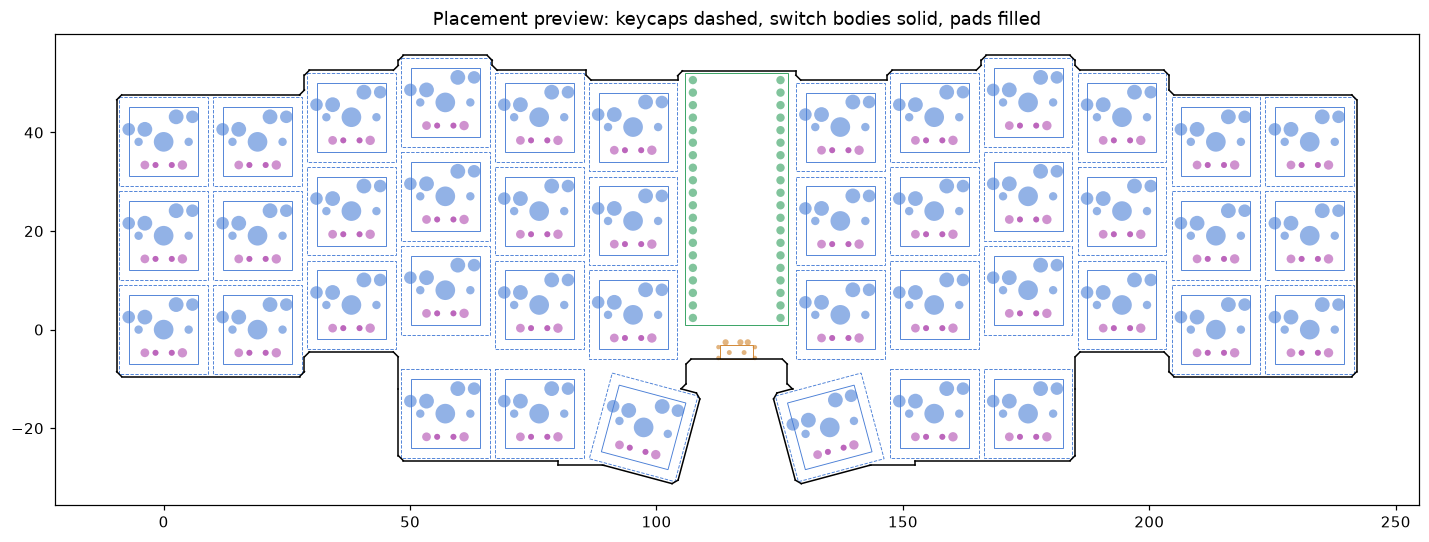
python3 hardware/tools/check_pcb.py hardware/ergogen/output/pcbs/steno_qwerty.kicad_pcb --png docs/pcb-preview.png
check_pcb.py is a quick placement check (single board outline, pads inside
it, no colliding switches/keycaps/Pico/switch), not a substitute for KiCad's DRC.
.kicad_pcb in KiCad 8/9 and route it: by hand, with Freerouting
(export Specctra DSN, route, import SES), or with Quilter.| Qty | Value | Footprint | References |
|---|---|---|---|
| 42 | MX | S1, S2, S10, S11, S12, S13, S14, S15, S16, S17, S18, S19, S20, S21, S22, S23 +26 | |
| 42 | ComboDiode | D1, D2, D10, D11, D12, D13, D14, D15, D16, D17, D18, D19, D20, D21, D22, D23 +26 | |
| 1 | E73:SPDT_C128955 | T1 | |
| 1 | RPi Pico | RPi_Pico | MCU1 |

MKesenheimer/fault-injection-library
Python library to perform fault-injection attacks on microcontrollers


cnlohr/cnhardware
My dumping grounds for all my kicad projects and random hardware bringup.

AudioMorphology/Europi
Opensource sequencer software for Raspberry Pi equipped with Eurorack-compatible hardware


It measures 251.6 × 86.9 mm and has 2 copper layers, 1.6 mm thick.
86 parts. The full list of its parts is on this page, with links to each part's symbol and footprint where PCBKit's library has them.
From the speeed76/steno-keyboard repository on GitHub, at the commit this page was made from: the board is hardware/ergogen/output/pcbs/steno_qwerty.kicad_pcb. PCBKit opens the board in the browser, with nothing to install.
Its repository states no licence, so its author keeps all rights: ask speeed76 before reusing the design.