2 layers208.8 × 393.9 mm
Ferris
pierrechevalier83/ferris
A low profile split keyboard designed to satisfy one single use case elegantly
109 parts1.3k

 sparkfun/SparkFun_Pico_Add_On_Flipper
Hardware design for the SparkFun Pico Add On Flipper Board for XRP
SparkFun Pico Add On Flipper is an open-source printed circuit board by sparkfun, from the sparkfun/SparkFun_Pico_Add_On_Flipper repository on GitHub. It is a 2-layer board of 25.4 × 50.8 mm with 109 parts on 37 nets, routed with 212 tracks and 43 vias.
Its parts include 5 connectors, 2 resistors and 1 switch. It belongs with the microcontroller boards boards and the RP2040 boards of this library.
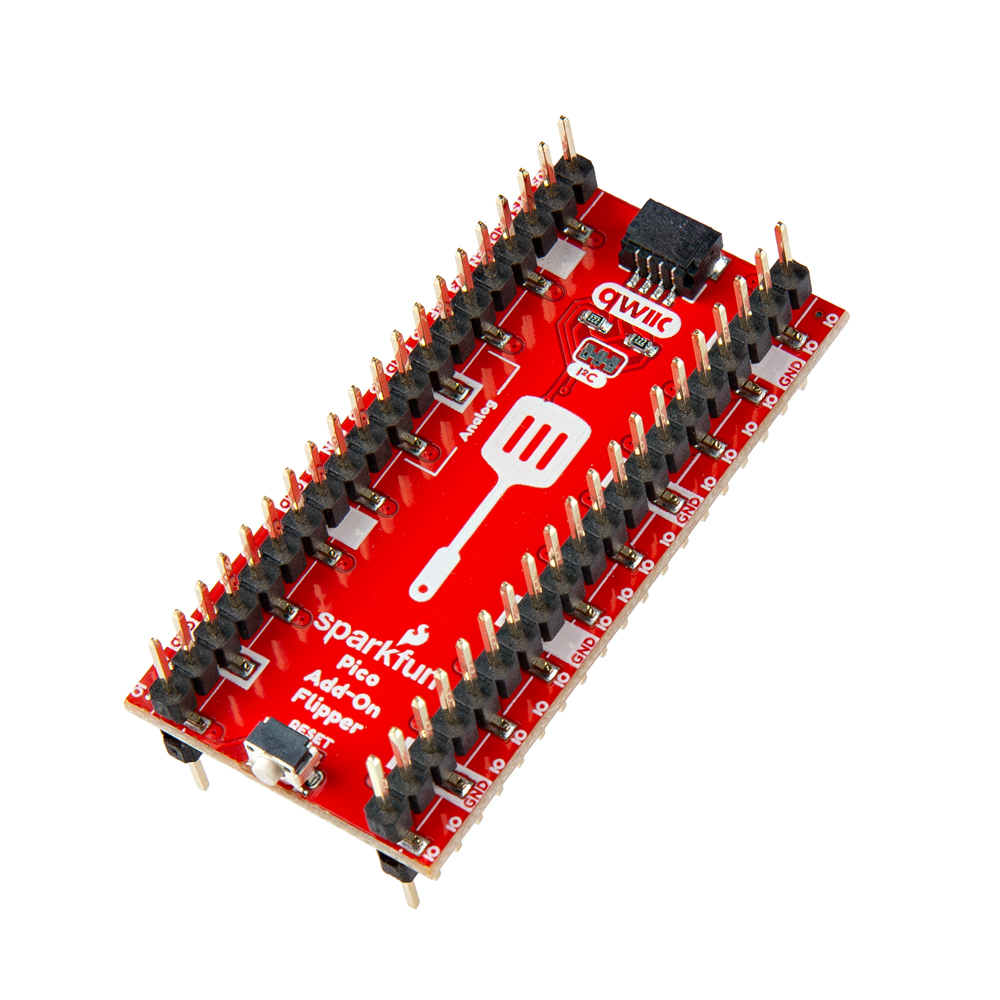
SparkFun Pico Add On Flipper for XRP (COM-28236)
Anyone familiar with the Raspberry Pi Pico development boards, has likely seen the various HAT (Hardware Attached on Top) accessory boards. If you are like us, you've likely run into a simple design limitation with the HATs; they can only be connected in a single orientation!
Whether a HAT is attached above or below a Raspberry Pi Pico, they all have a fixed orientation. At SparkFun, we have come up with at simple solution to this problem, the SparkFun Pico Add-On Flipper for XRP. Our Pico Add-On Flipper takes the standard pin out for any Raspberry Pi Pico development board and flips it over, as if you had physically rotated the board over (facing down).
How is this useful? Say you have a project that uses a Raspberry Pi Pico development board and:
Additionally, we also provide a Qwiic connector and reset button on the edges of the Pico Add-On Flipper that users can easily access.


Need to download or print our hookup guide?
This product is open source!
Please review the LICENSE.md file for license information.
If you have any questions or concerns about licensing, please contact technical support on our SparkFun forums.
Distributed as-is; no warranty is given.
| Qty | Value | Footprint | References |
|---|---|---|---|
| 52 | G*** | kibuzzard-67ABBF88 | kibuzzard-67ABBF88, kibuzzard-67ABBF88, kibuzzard-67ABBF88, kibuzzard-67ABBF88, kibuzzard-67ABBF88, kibuzzard-67ABBF88, kibuzzard-67ABBF88, kibuzzard-67ABBF88, kibuzzard-67ABBF88, kibuzzard-67ABBF88, kibuzzard-67ABBF88, kibuzzard-67ABBF88, kibuzzard-67ABBF88, kibuzzard-67ABBF88, kibuzzard-67ABBF88, kibuzzard-67ABBF88 +36 |
| 16 | G*** | kibuzzard-67ABC17F | kibuzzard-67ABC17F, kibuzzard-67ABC17F, kibuzzard-67ABC17F, kibuzzard-67ABC17F, kibuzzard-67ABC17F, kibuzzard-67ABC17F, kibuzzard-67ABC17F, kibuzzard-67ABC17F, kibuzzard-67ABC17F, kibuzzard-67ABC17F, kibuzzard-67ABC17F, kibuzzard-67ABC17F, kibuzzard-67ABC17F, kibuzzard-67ABC17F, kibuzzard-67ABC17F, kibuzzard-67ABC17F |
| 4 | Conn_01x20 | SparkFun-Connector:1x20_SMD_Pin1RightUp | J1, J2, J3, J4 |
| 4 | Fiducial_0.5mm | SparkFun-Aesthetic:Fiducial_0.5mm_Mask1mm | FID1, FID2, FID3, FID4 |
| 2 | 2.2k | SparkFun-Resistor:R_0603_1608Metric | R1, R2 |
| 2 | G*** | kibuzzard-67A3A317 | kibuzzard-67A3A317, kibuzzard-67A3A317 |
| 2 | G*** | kibuzzard-67A3A2B7 | kibuzzard-67A3A2B7, kibuzzard-67A3A2B7 |
| 2 | G*** | kibuzzard-67AE711B | kibuzzard-67AE711B, kibuzzard-67AE711B |
| 2 | G*** | kibuzzard-67A3A2E9 | kibuzzard-67A3A2E9, kibuzzard-67A3A2E9 |
| 2 | G*** | kibuzzard-67ABB6E7 | kibuzzard-67ABB6E7, kibuzzard-67ABB6E7 |
| 2 | G*** | kibuzzard-67AE6710 | kibuzzard-67AE6710, kibuzzard-67AE6710 |
| 2 | G*** | kibuzzard-67AE7122 | kibuzzard-67AE7122, kibuzzard-67AE7122 |
| 2 | G*** | kibuzzard-67A3A308 | kibuzzard-67A3A308, kibuzzard-67A3A308 |
| 2 | G*** | kibuzzard-67A3A314 | kibuzzard-67A3A314, kibuzzard-67A3A314 |
| 2 | G*** | kibuzzard-67AE7131 | kibuzzard-67AE7131, kibuzzard-67AE7131 |
| 2 | G*** | kibuzzard-67A3A1F6 | kibuzzard-67A3A1F6, kibuzzard-67A3A1F6 |
| 2 | LOGO | SparkFun-Aesthetic:SparkFun_Logo_10mm | G***, G*** |
| 1 | G*** | kibuzzard-67ABB7DF | kibuzzard-67ABB7DF |
| 1 | G*** | kibuzzard-67A3AA74 | kibuzzard-67A3AA74 |
| 1 | I2C | SparkFun-Jumper:Jumper_3_NC-2_Trace | JP1 |
| 1 | LOGO | SparkFun-Aesthetic:qwiic_7mm | G*** |
| 1 | OSHW_Logo | SparkFun-Aesthetic:Creative_Commons_License | G3 |
| 1 | Qwiic_RA | SparkFun-Connector:JST_SMD_1.0mm-4_Black | J5 |
| 1 | SMD_RA_4.5x3.4mm_h3.3mm | SparkFun-Switch:Push_SMD_RA_4.5x3.4mm | SW1 |
pierrechevalier83/ferris
A low profile split keyboard designed to satisfy one single use case elegantly

joshajohnson/Hub16
A macro pad with 16 keys, two rotary encoders, a four port USB hub, and plenty of LEDs!

slu4coder/Minimal-UART-Computer-1-2
Legacy: Version 1 and 2 of my TTL-only CPU featuring UART I/O, an expansion port, 512KB SSD at up to 10MHz clock speed


BerkeleyHCI/PolymorphicBlocks
A Python-based hardware description language for PCBs for higher-level (block-diagram / system-architecture level) PCB design through libraries of directly reusable subcircuit generators.


It measures 25.4 × 50.8 mm and has 2 copper layers, 1.6 mm thick.
109 parts. The full list of its parts is on this page, with links to each part's symbol and footprint where PCBKit's library has them.
From the sparkfun/SparkFun_Pico_Add_On_Flipper repository on GitHub, at the commit this page was made from: the board is Hardware/SparkFun_Pico_Add_On_Flipper.kicad_pcb and its schematic Hardware/SparkFun_Pico_Add_On_Flipper.kicad_sch. PCBKit opens the board in the browser, with nothing to install.
Its repository states no licence, so its author keeps all rights: ask sparkfun before reusing the design.