2 layers50 × 50 mm

 SharKingStudios/Yuzu-Pocket1
A PCB Business card that runs linux!
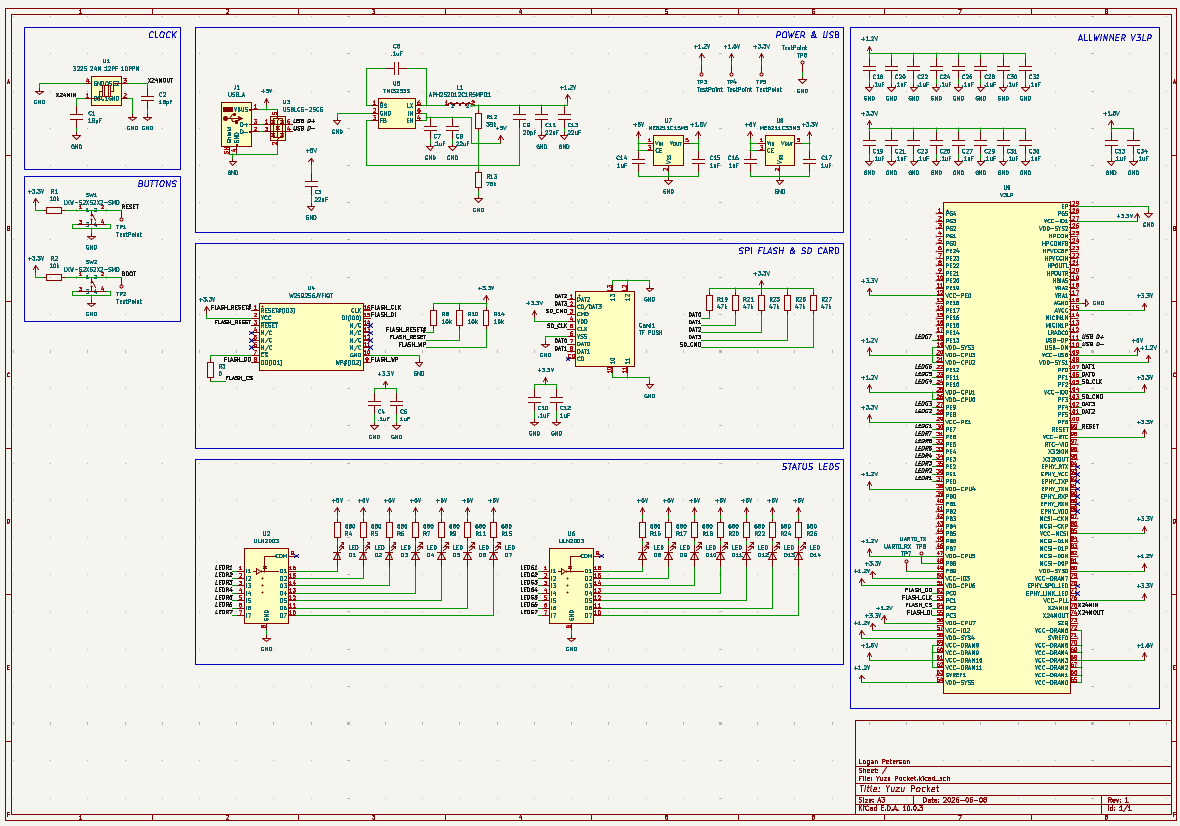
Yuzu Pocket is an open-source printed circuit board by SharKingStudios, from the SharKingStudios/Yuzu-Pocket repository on GitHub. It is a 2-layer board of 88.9 × 50.8 mm with 98 parts on 146 nets, routed with 845 tracks and 107 vias.
It is built around the V3LP, TMI3253S and W25Q256JVFIQ, with the ULN2003, ME6211C15M5G-N and ME6211C33M5G-N among its other parts. Its parts include 35 capacitors, 26 resistors, 14 diodes, 9 ICs and 1 connector.


Visuals because everyone loves eye candy.
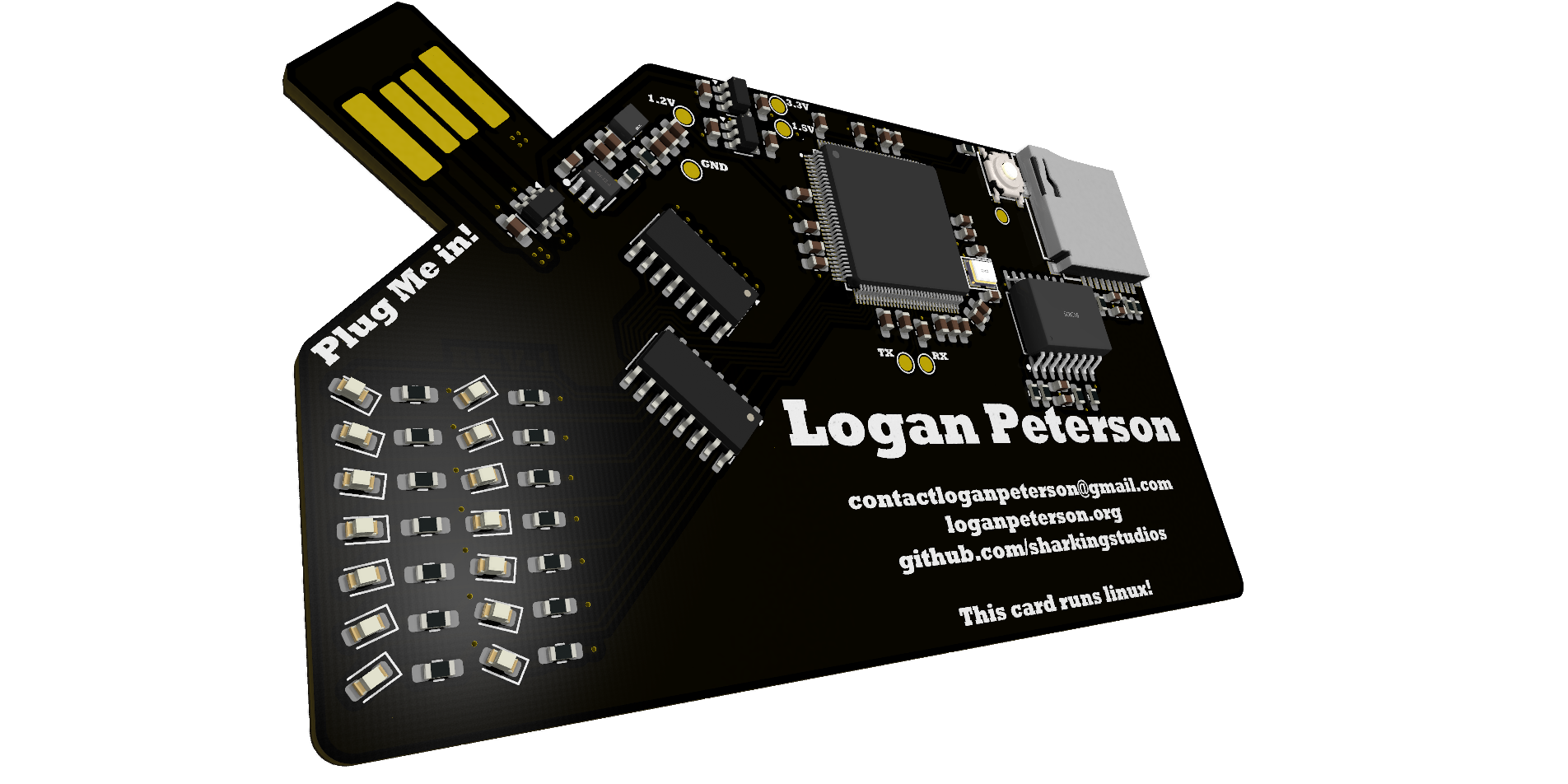
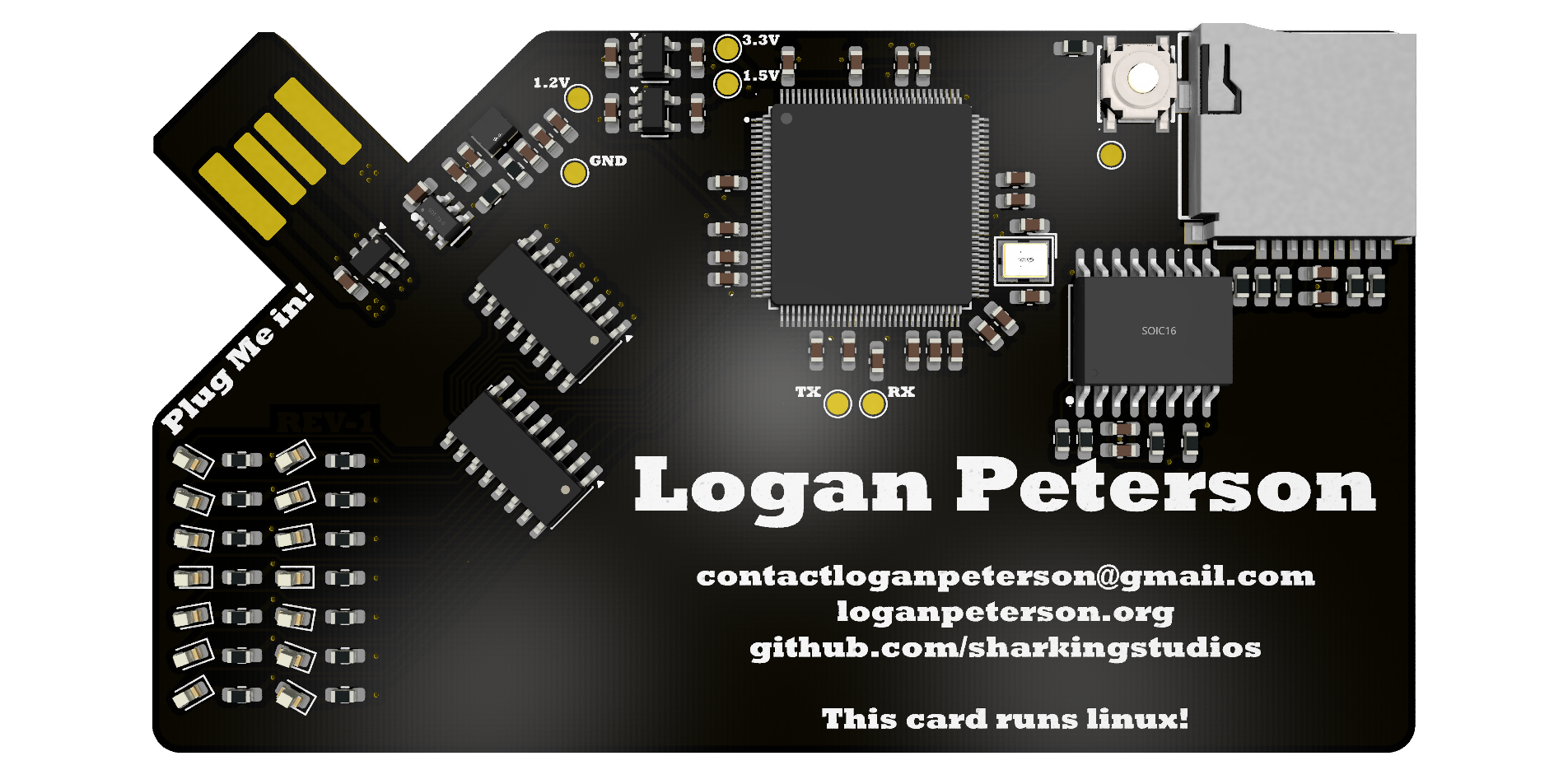
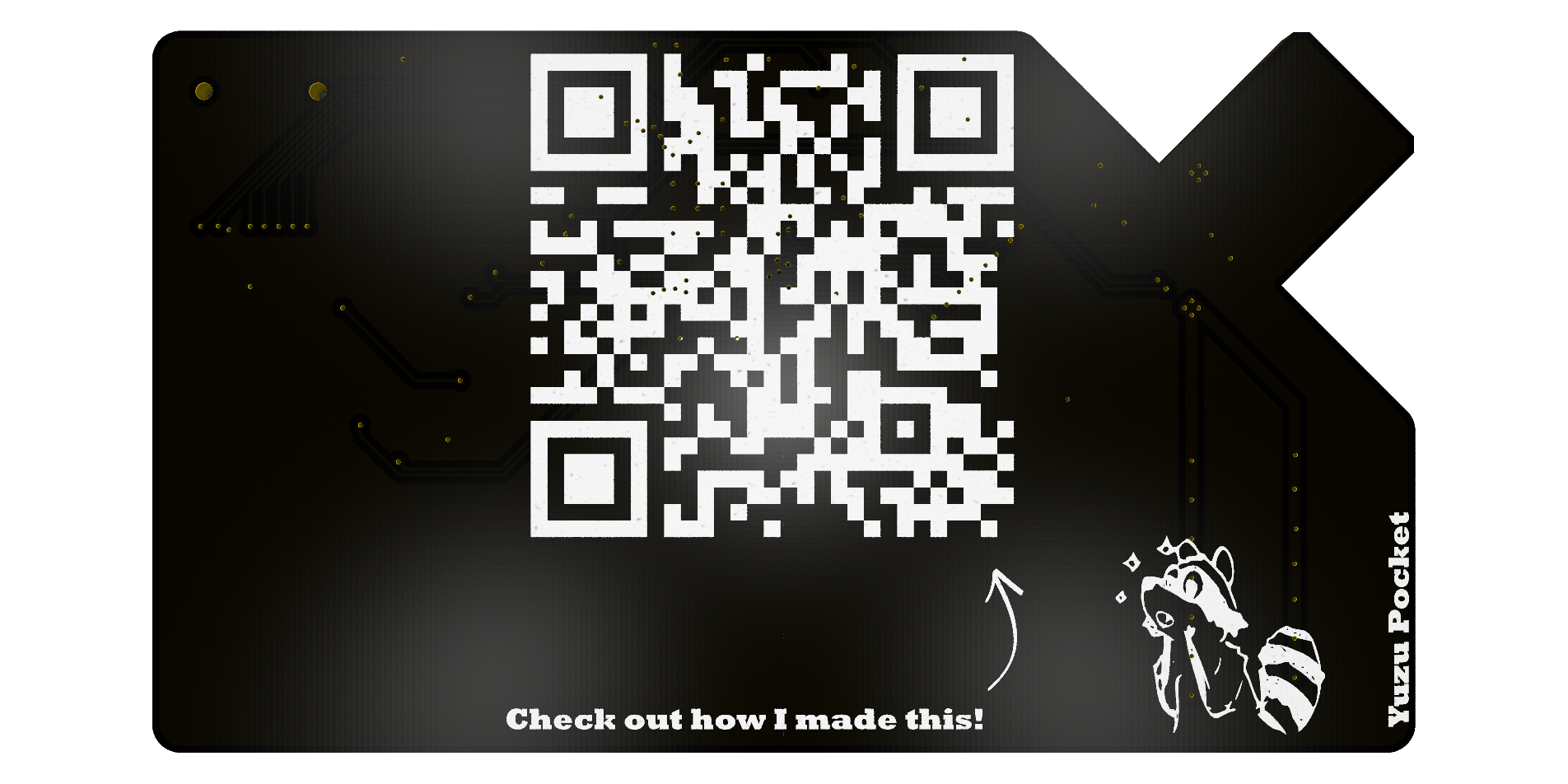
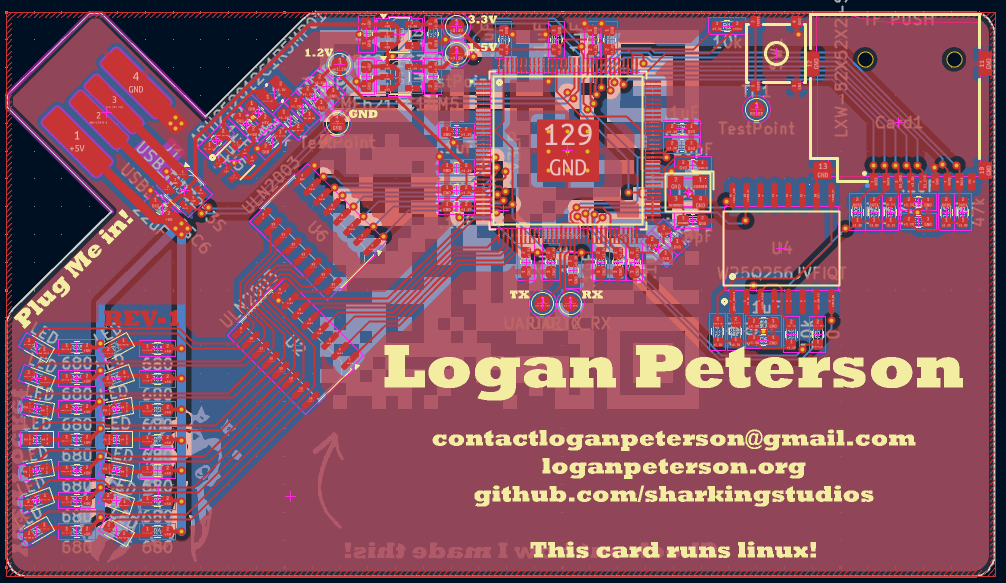
All the processors and storage sit here.
Main characters:
(See BOM.md for full part values, footprints, and sourcing.)
The Yuzu Pocket is a Business Card that runs Linux built around an Allwinner V3LP processor, designed to give important individuals my portfolio with some pizzazz!
It does this using its onboard USB port, integrated right into the PCB copper, to talk to the host computer. To keep things interesting, the board exposes itself as a USB gadget, giving the host multiple points of access into the board.
On startup, the board will connect to the host computer and expose itself as a network device, as well as a mass storage device.
The mass storage that opens acts as the quick menu, and links the user to the more interesting parts of the project, including the hosted webpage at loganpeterson.local that exposes a shell, giving the user direct access into the device (where they can play the integrated terminal games / demos)
At a high level:
loganpeterson.localNo extra special applications are required other than just having a host computer.
Yuzu Pocket is not a microcontroller pretending to be a computer. The Allwinner V3LP contains a 32-bit ARM Cortex-A7 processor and 64 MB of integrated DDR2 RAM, giving the board enough room for:
The firmware is intentionally based on Buildroot rather than a full desktop distribution.
The copper fingers on the edge of the PCB form a USB-A connector. Plugging the card into a computer is intended to provide both power and communication.
The Linux USB gadget configuration can expose several functions over that single connection:
HOW_TO_USE.txt10.0.0.1 as a fallback addressttydhttp://loganpeterson.local:7681/Yuzu Pocket has two storage paths:
| Storage | Capacity | Purpose |
|---|---|---|
| Winbond W25Q256 SPI NOR | 256 Mbit / 32 MB | Compact onboard firmware and persistent assets |
| microSD | Card dependent | Development, recovery, larger Linux images, and experiments |
The initial development image targets microSD because it is easier to rebuild and recover. The final compact image is intended to fit within the 32 MB onboard SPI NOR, using a small kernel and compressed root filesystem.
That storage budget is tight enough to be interesting, but large enough for a fun Linux userspace.
The card includes:
The LEDs are driven through two ULN2003 Darlington transistor arrays. Linux sees them as GPIO-controlled indicators, allowing them to be used for:
Because silent business cards are suspicious.
Firmware lives in Firmware/ and is organized as a Buildroot external tree.
The closest upstream starting point is the Allwinner V3s / Lichee Pi Zero support found in U-Boot and Linux. V3LP is treated as V3s-like for the initial port, with DRAM initialization being the part most likely to require V3LP-specific work.
See the firmware README for build commands, image layout, and current implementation details.
The target is small native Linux software.
This includes:
There is an integration point reserved for
p2r3/bareiron, a compact C Minecraft server experiment. It is not enabled by default yet because upstream requires generated Minecraft registry data before compilation (and I havent gotten to that).
The Yuzu Pocket exists because I wanted a portfolio piece that people would actually remember, rather than another ordinary business card or QR code printed on cardstock (though it has one too!).
It combines my interest in PCB design, embedded systems, and questionable software experiments into something small enough to carry everywhere and hand out to people.
Ideas, fixes, experiments, and constructive criticism are welcome.
Please keep PCB and firmware changes clearly separated. Hardware files live in PCB/; firmware and build integration belong in Firmware/.
This is an open hardware and firmware project under active development.
It includes:
If you overwrite the wrong drive, short a power rail, install a component backward, or release the magic smoke, the business card will be significantly less useful at networking events.

| Qty | Value | Footprint | References |
|---|---|---|---|
| 22 | .1uF | Capacitor_SMD:C_0603_1608Metric_Pad1.08x0.95mm_HandSolder | C10, C18, C19, C20, C21, C22, C23, C24, C25, C26, C27, C28, C29, C30, C31, C32 +6 |
| 14 | 680 | Resistor_SMD:R_0603_1608Metric_Pad0.98x0.95mm_HandSolder | R4, R5, R6, R7, R9, R11, R15, R16, R17, R18, R20, R22, R24, R26 |
| 14 | LED | LED_SMD:LED_0603_1608Metric | D1, D2, D3, D4, D5, D6, D7, D8, D9, D10, D11, D12, D13, D14 |
| 6 | 1uF | Capacitor_SMD:C_0603_1608Metric_Pad1.08x0.95mm_HandSolder | C6, C12, C14, C15, C16, C17 |
| 5 | 47k | Resistor_SMD:R_0603_1608Metric_Pad0.98x0.95mm_HandSolder | R19, R21, R23, R25, R27 |
| 5 | TestPoint | TestPoint:TestPoint_Pad_D1.5mm | TP1, TP3, TP4, TP5, TP6 |
| 4 | 10k | Resistor_SMD:R_0603_1608Metric_Pad0.98x0.95mm_HandSolder | R1, R8, R10, R14 |
| 4 | 22uF | Capacitor_SMD:C_0603_1608Metric_Pad1.08x0.95mm_HandSolder | C3, C8, C11, C13 |
| 3 | LOGO | LOGO | G***, G***, G*** |
| 2 | 18pF | Capacitor_SMD:C_0603_1608Metric_Pad1.08x0.95mm_HandSolder | C1, C2 |
| 2 | ULN2003 | Package_SO:SOIC-16_3.9x9.9mm_P1.27mm | U2, U6 |
| 1 | 0 | Resistor_SMD:R_0603_1608Metric_Pad0.98x0.95mm_HandSolder | R3 |
| 1 | 20pF | Capacitor_SMD:C_0603_1608Metric_Pad1.08x0.95mm_HandSolder | C9 |
| 1 | 3225 24M 12PF 10PPM | easyeda2kicad:CRYSTAL-SMD_4P-L3.2-W2.5-BL | U1 |
| 1 | 39k | Resistor_SMD:R_0603_1608Metric_Pad0.98x0.95mm_HandSolder | R12 |
| 1 | 78k | Resistor_SMD:R_0603_1608Metric_Pad0.98x0.95mm_HandSolder | R13 |
| 1 | APH252012C1R5MP01 | easyeda2kicad:IND-SMD_APH252012C3R3MP01 | L1 |
| 1 | LXW-52X52X2-SMD | easyeda2kicad:SW-SMD_4P-L5.2-W5.2-P5.80-LS6.4 | SW1 |
| 1 | ME6211C15M5 | Package_TO_SOT_SMD:SOT-23-5 | U7 |
| 1 | ME6211C33M5 | Package_TO_SOT_SMD:SOT-23-5 | U8 |
| 1 | TF PUSH | easyeda2kicad:TF-SMD_TF-PUSH | Card1 |
| 1 | TMI3253S | easyeda2kicad:SOT-23-6_L2.9-W1.6-P0.95-LS2.8-BL | U5 |
| 1 | UART0_RX | TestPoint:TestPoint_Pad_D1.5mm | TP7 |
| 1 | UART0_TX | TestPoint:TestPoint_Pad_D1.5mm | TP8 |
| 1 | USBLC6-2SC6 | Package_TO_SOT_SMD:SOT-23-6 | U3 |
| 1 | USB_A | easyeda2kicad:USB_A_PCB_Edge_receptacle | J1 |
| 1 | V3LP | easyeda2kicad:LQFP-128_L14.0-W14.0-P0.40-LS16.0-BL-EP5.6 | U9 |
| 1 | W25Q256JVFIQT | easyeda2kicad:SOIC-16_L10.3-W7.5-P1.27-LS10.3-BL | U4 |


kaemori/calcwriter_blueprint
An external board that emulates inputs to the keypad matrix of a Sharp EL-W531S II Scientific Calculator.

OHNope/sc035hgs-esp32-p4x-camera-adapter-mod
本仓库在 ESP32-P4XMIPICameraSubV1.1KiCAD(Espressif 官方相机转接板的 KiCad 转换版)基础上,修改为 SC035HGS 相机模组用的转接板。基础工程(导入修复、检查结果)的说明见它的 README。


rajeev2705/PROJECTS
Welcome to my PCB projects repository! This space is dedicated to documenting my journey in designing, creating, and improving printed circuit boards (PCBs).

slopus/codex-keybored
A 100% vibe-coded hardware build: Fusion 360, six-layer KiCad PCB, STM32 firmware, and live JLC factory handoff.
It measures 88.9 × 50.8 mm and has 2 copper layers, 1.6 mm thick.
98 parts, built around the V3LP, TMI3253S, W25Q256JVFIQ and ULN2003. The full list of its parts is on this page, with links to each part's symbol and footprint where PCBKit's library has them.
From the SharKingStudios/Yuzu-Pocket repository on GitHub, at the commit this page was made from: the board is PCB/Yuzu Pocket.kicad_pcb and its schematic PCB/Yuzu Pocket.kicad_sch. PCBKit opens the board in the browser, with nothing to install.
Its repository states no licence, so its author keeps all rights: ask SharKingStudios before reusing the design.