2 layers58.4 × 22.6 mm

 seiken-dev/TinyStick
TS USB is an open-source printed circuit board by seiken-dev, from the seiken-dev/TinyStick repository on GitHub, published under the BSD-3-Clause licence. It is a 2-layer board of 26 × 18 mm with 19 parts on 28 nets, routed with 163 tracks and 20 vias.
It is built around the CH340E, ME6217C33M5G and 1N5819WS, with the CD4053BE and NSR0320MW2T1G among its other parts. Its parts include 5 resistors, 4 capacitors, 4 diodes, 2 connectors and 1 IC.


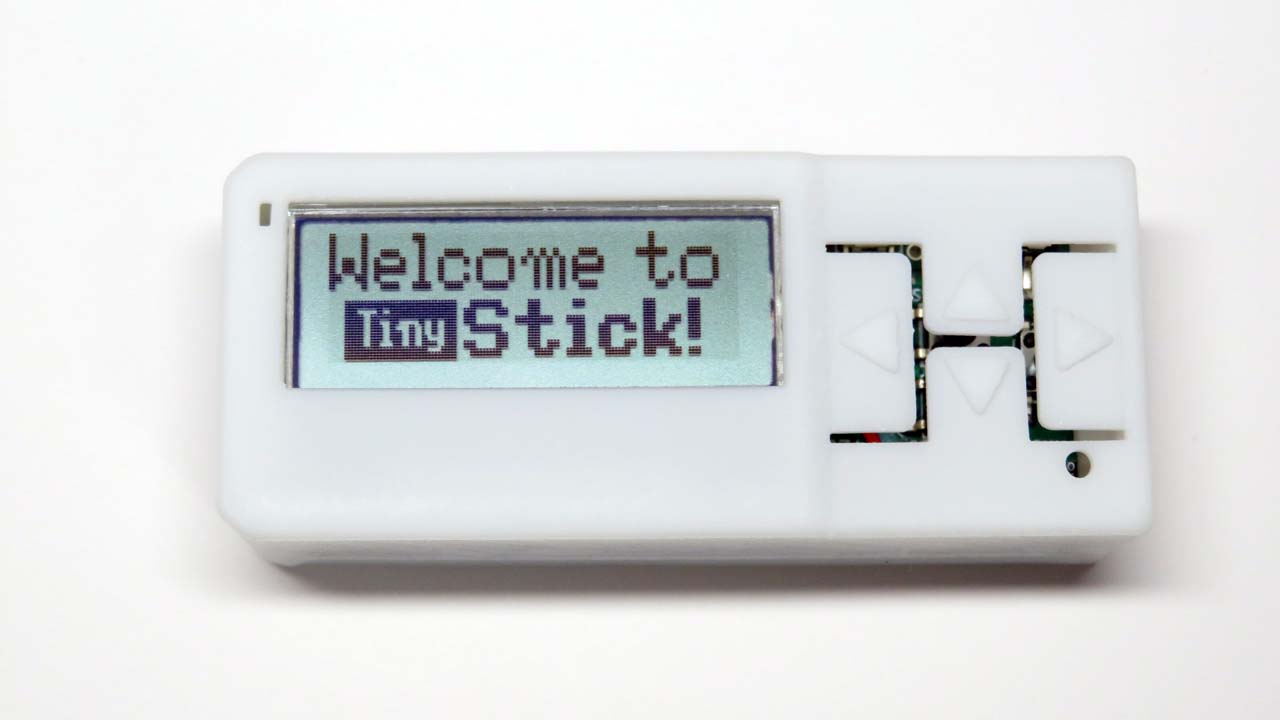
TinyStickは、ATtiny3217(32KB Flash, 2KB SRAM, 256B EEPROM)を搭載した、Arduino互換の開発キットです。消費電流は約4.5mA(クロック10MHz。スリープ時は0.1mA未満)と小さく、コイン電池で長期間動作します。プログラムの書き込みは、付属のUSBシリアル変換基板(CH340E搭載)で行います。詳しくは、 tinystick.jpをご覧ください。
TinyStickのプログラミングは、PlatformIOで行います。Arduino IDEは、2.3版ではTinyAVR用のボードマネージャーの定義が読み込めない等の理由で推奨しません。(→参考)
プロジェクトのルートにある設定ファイルです。重要な項目について説明します。
board_build.f_cpu = 10000000
CPUクロックを設定します。初期値は10MHz、最大は20MHzです。必ず5の倍数にしてください。そうしないとシリアル通信が文字化けします。また5MHzにすると、I2Cが正常に動作しません。記述しないと16MHzになります。
main.cpp
メインプログラムで、初期化、タイトル表示、サイドボタン(Button5)によるデモの切り替え、長押しによるバックライトのオンオフを処理します。
TinyStickDef.h
共通の#define、ピン定義です。
TinyStick.h .cpp
ボタン、圧電ブザーのクラス、スリープ関連のグローバル関数です。
TinyLCD.h .cpp
バックライト付きLCD AQM1248Aに、ビットマップまたは文字を表示するクラスです。文字は、拡大・ボールド・白黒反転・縦・プロポーショナル表示に対応しています。
font8x8.h
8x8ドットフォントです。0x20から0x7Fまでの英数記号です。
TinyApp.h .cpp
複数のアプリを切り替えるときは、このクラスの派生クラスを作成してmain.cppに定義するだけで、サイドボタン(Button5)で切り替えられます。
I2Cbase.h .cpp
本体内蔵の加速度センサ(LIS2DH12)と、M5StickC用のENV Hat(SHT30)の基底クラスです。
octave.h
ドレミの周波数を定義したファイルです。
playDigit.h .cpp
2桁の整数値をドレミの音程で鳴らす関数です。
app/
6つのデモアプリです。TinyAppの派生クラスです。
EnvHat.h .cpp
ENV Hatで温度/湿度を表示します。Button1で次のアプリに切り替えます。装着されていないときはスキップします。
KitchenTimer.h .cpp
キッチンタイマーです。最大99分。スタートすると、分をEEPROMに保存します。
AccelDemo.h .cpp
加速度センサのデモです。傾けると玉が転がります。
FontTest.h .cpp
8x8ドットフォントをダンプします。Button1で拡大、Button2,3でスクロールします。
Tetris.h .cpp
お馴染みのゲームで、縦向きで遊びます。
Maze3D.h .cpp
Line関数を利用した3次元迷路です。
一定時間のスリープが出来ます。いずれかのボタンを押すと、スリープから復帰します。
enum SleepTimeの時間しか設定できません。| Qty | Value | Footprint | References |
|---|---|---|---|
| 2 | 0.1u | Capacitor_SMD:C_0402_1005Metric | C3, C4 |
| 2 | 10u | Capacitor_SMD:C_0603_1608Metric | C1, C2 |
| 2 | 470 | Resistor_SMD:R_0603_1608Metric | R4, R5 |
| 2 | 5.1K | Resistor_SMD:R_0402_1005Metric | R1, R2 |
| 2 | LED | JSB01_Lib:LED0603-RD_GREEN | D2, D3 |
| 1 | 1N5819WS | JSB01_Lib:SOD-323_L1.8-W1.3-LS2.5-RD | D4 |
| 1 | 2.7K | Resistor_SMD:R_0603_1608Metric | R3 |
| 1 | CD4053B | JSB01_Lib:SOIC-16_L9.9-W3.9-P1.27-LS6.0 | CD4053B |
| 1 | CH340E | JSB01_Lib:MSOP-10_L3.0-W3.0-P0.50-LS5.0 | CH340E |
| 1 | Conn_01x06_Pin | JSB01_Lib:PinHeader_1x06_P2.54mm | J2 |
| 1 | ME6217C33 | JSB01_Lib:SOT-23-5_L3.0-W1.7-P0.95-LS2.8 | U3 |
| 1 | NSR0320MW2T1G | JSB01_Lib:SOD-323_L1.8-W1.3-LS2.5-RD | D1 |
| 1 | Slide | JSB01_Lib:SW-SMD_SSSS211603 | SW1 |
| 1 | USB_C_Receptacle_USB2.0 | JSB01_Lib:USB-C-SMD_TYPE-C-16P-1 | J1 |
It measures 26 × 18 mm and has 2 copper layers, 1.6 mm thick.
19 parts, built around the CH340E, ME6217C33M5G, 1N5819WS and CD4053BE. The full list of its parts is on this page, with links to each part's symbol and footprint where PCBKit's library has them.
From the seiken-dev/TinyStick repository on GitHub, at the commit this page was made from: the board is KiCad/TS_USB.kicad_pcb and its schematic KiCad/TS_Core.kicad_sch. PCBKit opens the board in the browser, with nothing to install.
Its repository publishes it under the BSD-3-Clause licence: you may reuse it on that licence's terms (keep the author's notice, and for a copyleft licence share your changes alike).

TheEccentricGenius/INK4u_Board
An UNO form factor board with a AVR128DA28 processor.


lennartquerter/euro-rack-synth
Lenimal Github for DIY for a Eurorack Synth


Tomoshibi-technology/RCJ-Japan2024-Circuit
RoboCup JapanOpen 2024とEindohoven 2024に向けての回路開発

4f48/quill-stm32wl
An Adafruit Feather-sized STM32 development board with integrated 868 MHz LoRa radio.
