Skip to the content
2 layersRing illuminator, the printed circuit board in 3D

Ring illuminator

plertvilai/IPAX7

In situ Plankton Assemblage eXplorer

Copper layers
2
Thickness
1.6 mm
Parts
24
Nets
22
Pads
84
Tracks, vias
70, 0
Routed
Yes
KiCad
KiCad 5 (file 20171130)
Created
10 Mar 2020
Updated
12 Jan 2023

Overview

Ring illuminator is an open-source printed circuit board by plertvilai, from the plertvilai/IPAX repository on GitHub, published under the MIT licence. It is a 2-layer board with 24 parts on 22 nets, routed with 70 tracks and 0 vias.

Its parts include 14 connectors and 10 diodes.

README

README.md

In Situ Plankton Assemblage eXplorer

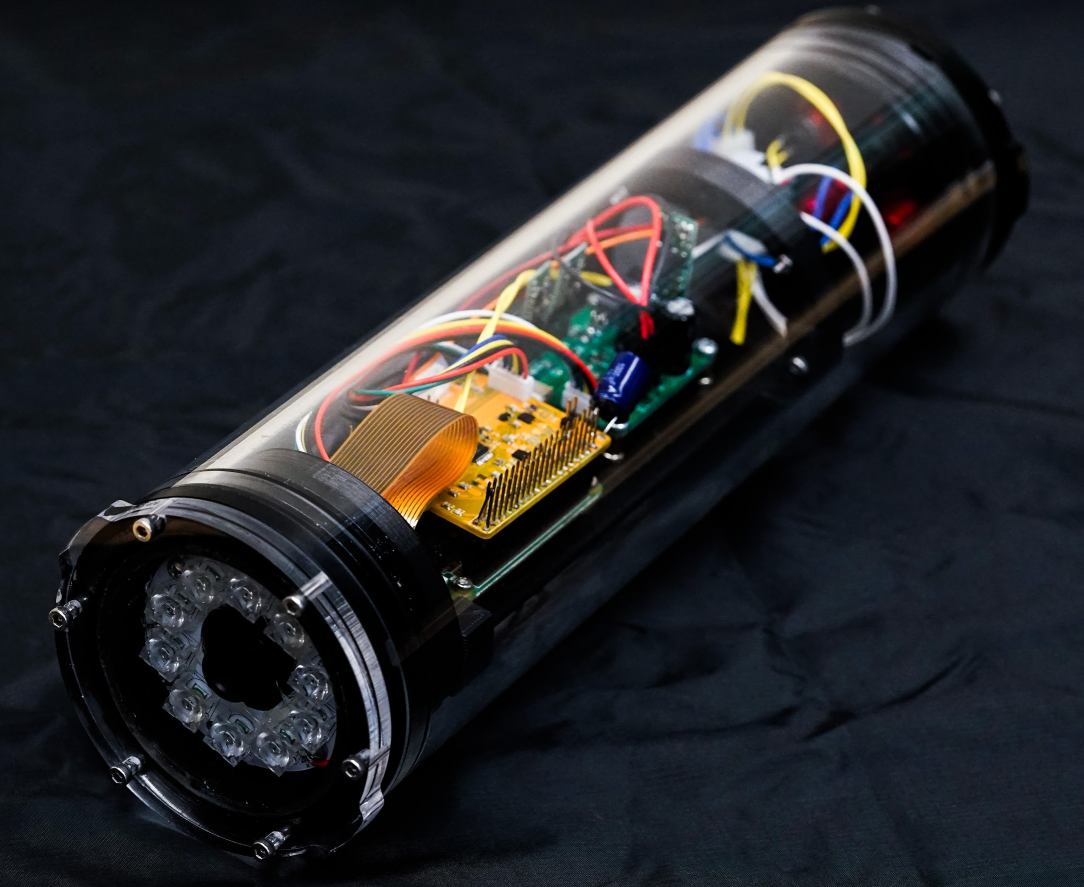
Image of IPAX

This Github repository contains all information necessary to build the In Situ Plankton Assemblage eXplorer (IPAX). Here is a brief introduction to how to utilize the repository.

Detailed Guide

A detail building guide is given in the Building Guide subfolder. Note that this guide is written in HTML format. To read it, simply download the entire folder and use a browser to open the file index.html.

Fabrication Files

There are two folders containing files that are necessary for IPAX fabrication.

  1. Mechanicals contains STL files that can be directly sent to a 3D printer to printout the mechanical parts. A STEP file is also included for users that are interested to develop the system further. The STEP file Assembly Rev02 Revised for BES v3.step contains CAD files of all the parts, including waterproof housing from Bluerobotics that can be opened with a CAD software for further development.
  2. PCBs contains all files for the printed circuit boards in the IPAX. Each subfolder is for each PCB, and the folder fabrication contains Gerber files that can be sent directly to PCB manufacturers. Each subfolder also contains KiCAD files that users can use to develop the PCBs for fit their needs.

Firmware

The folder Firmware contains all software for the IPAX.

Control Board

This subfolder contains Arduino (.ino) files that can be uploaded to the control board of the IPAX.

  1. full_control_alwaysON is the main routine for the control board that set the Raspberry Pi to always ON.
  2. full_control_interval is the main routine for the control board that turns the Raspberry Pi ON only at the specified time.
  3. rtc_set is a temporary code that can be uploaded to the control board to set the real-time clock.

Raspberry Pi

This subfolder contains Python files for the Raspberry Pi on the IPAX.

  1. connectArduino.py is a routine that allows the Raspberry Pi to communicate with the Arduino on the control board.
  2. ipaxClass.py is the library for the IPAX.
  3. ipaxDeploy.py is the main routine for deploying the IPAX.
  4. shutdowncheck.py is the control script that allows the Raspberry Pi to be properly shutdown with an external switch on the housing and the control board.

The configuration subfolder contains all the configuration files needed to configure that Raspberry Pi.

Bill of Materials

The folder BOM contains a single MS Excel file (.xlsx) that contains the detailed bill of materials of the IPAX.

Parts

24
QtyValueFootprintReferences
10Conn_01x01_FemalemyLib:SCREW_4J3, J4, J5, J6, J7, J8, J9, J10, J11, J12
10LEDled:CREE_XTE_Carclo_10mmD1, D2, D3, D4, D5, D6, D7, D8, D9, D10
4Conn_01x01_Femaleconn:large_smd_padJ1, J2, J13, J14

More from plertvilai/IPAX

6
  • 2 layers45.7 × 66 mmNoPour, the printed circuit board in 3D

    NoPour

    plertvilai/IPAX

    In situ Plankton Assemblage eXplorer

    68 parts7MIT
  • 2 layers44.5 × 57.8 mmControlBoard rev05a, the printed circuit board in 3D

    ControlBoard rev05a

    plertvilai/IPAX

    In situ Plankton Assemblage eXplorer

    64 parts7MIT
  • 2 layers44.5 × 57.8 mmControl board, the printed circuit board in 3D

    Control board

    plertvilai/IPAX

    In situ Plankton Assemblage eXplorer

    63 parts7MIT
  • 2 layers37.8 × 50 mmPowerControl, the printed circuit board in 3D

    PowerControl

    plertvilai/IPAX

    In situ Plankton Assemblage eXplorer

    38 parts7MIT
  • 2 layers52.3 × 52.3 mmRing illuminator, the printed circuit board in 3D

    Ring illuminator

    plertvilai/IPAX

    In situ Plankton Assemblage eXplorer

    23 parts7MIT

Similar boards

  • 2 layers56 × 65 mmSeaTalk1, the printed circuit board in 3D

    SeaTalk1

    dotnet/iot

    This repo includes .NET Core implementations for various IoT boards, chips, displays and PCBs.

    24 parts2.4kMIT
  • 2 layers26.2 × 45.5 mmPL18 multiprotocol, the printed circuit board in 3D

    PL18 multiprotocol

    pascallanger/DIY-Multiprotocol-TX-Module

    Multiprotocol TX Module (or MULTI-Module) is a 2.4GHz transmitter module which controls many different receivers and models.

    24 parts1.9kGPL-3.0
  • 2 layers58 × 35.5 mmHat, the printed circuit board in 3D

    Hat

    menloresearch/asimov-1

    v1 of Asimov, an open-source humanoid robot

    24 parts1.4kCERN-OHL-S-2.0
  • 2 layers21.6 × 19.5 mmMicron Logo LED, the printed circuit board in 3D

    Micron Logo LED

    DraftShift/StealthChanger

    Tool changing system for Vorons and other front mount printer motion systems, not just stealthburner.

    24 parts1.2kGPL-3.0
  • 2 layers158 × 11 mmRainbow Matchstick, the printed circuit board in 3D

    Rainbow Matchstick

    VoronDesign/Voron-Hardware

    Cool Hardware designed by the Voron Design group

    24 parts1.1kGPL-3.0
  • 2 layers85.6 × 54 mmTRACED wio1262-carrier, the printed circuit board in 3D

    TRACED wio1262-carrier

    hackclub/OnBoard

    💡 Join 1,000 teenagers and make your first PCB with a $100 grant!

    24 parts915
  • 2 layers36 × 20 mmCombined, the printed circuit board in 3D

    Combined

    adamb314/ServoProject

    Getting the most out of your hobby servo

    24 parts545

Questions

What parts does the Ring illuminator use?

24 parts. The full list of its parts is on this page, with links to each part's symbol and footprint where PCBKit's library has them.

Where can I download the Ring illuminator KiCad files?

From the plertvilai/IPAX repository on GitHub, at the commit this page was made from: the board is PCBs/Ring_illuminator/ring_illuminator.kicad_pcb. PCBKit opens the board in the browser, with nothing to install.

Can I use the Ring illuminator design in my own project?

Its repository publishes it under the MIT licence: you may reuse it on that licence's terms (keep the author's notice, and for a copyleft licence share your changes alike).