2 layers88 × 90.3 mm
Keebdexpansion
emfcamp/Keebdexpansion
A keyboard hexpansion for the Tildagon badge using the solder.party KeebDeck Keyboard. Software for the hexpansion is provided by @sodoku.
30 parts2MIT

 PiStorm/cm4board13
CM4 adapter board for PS32-lite and classic PiStorm
CM4 PiStorm32Lite is an open-source printed circuit board by PiStorm, from the PiStorm/cm4board repository on GitHub, published under the MIT licence. It is a 4-layer board of 114 × 99 mm with 47 parts on 196 nets, routed with 1,199 tracks and 334 vias.
It is built around the TLV62569DBV, SMTSO2020CTJ and NASM0-S6701-TP40. Its parts include 9 capacitors, 8 resistors, 6 connectors, 4 diodes and 1 IC. It belongs with the computers and single-board computers and interfaces and adapters boards and the Raspberry Pi (Linux) boards of this library.


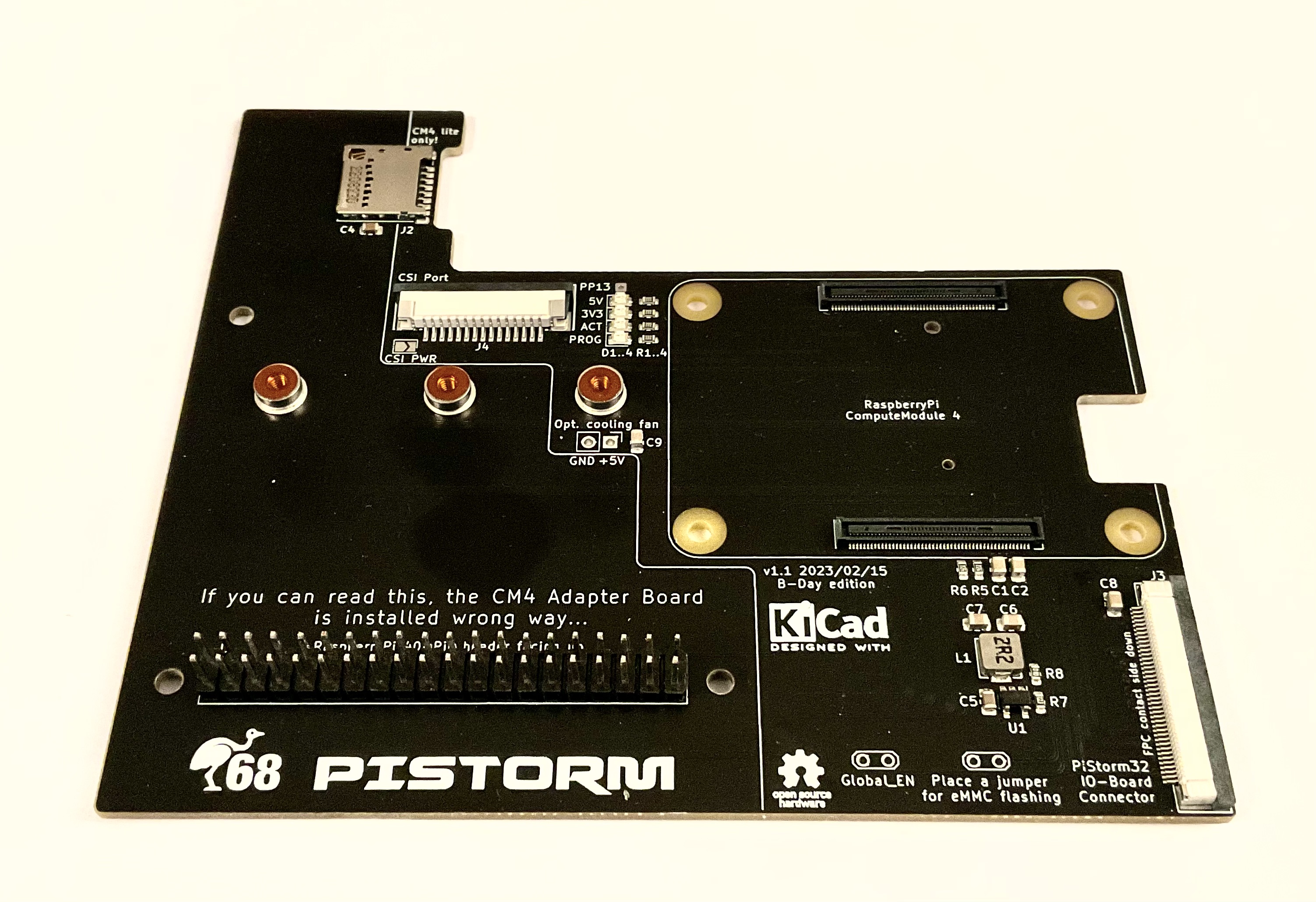
This is the v1.1 "B-Day edition" of CM4 adapter board designed especially for PiStorm32-Lite. The adapter has following features
For building of CM4 version of PiStorm32-lite you need following components
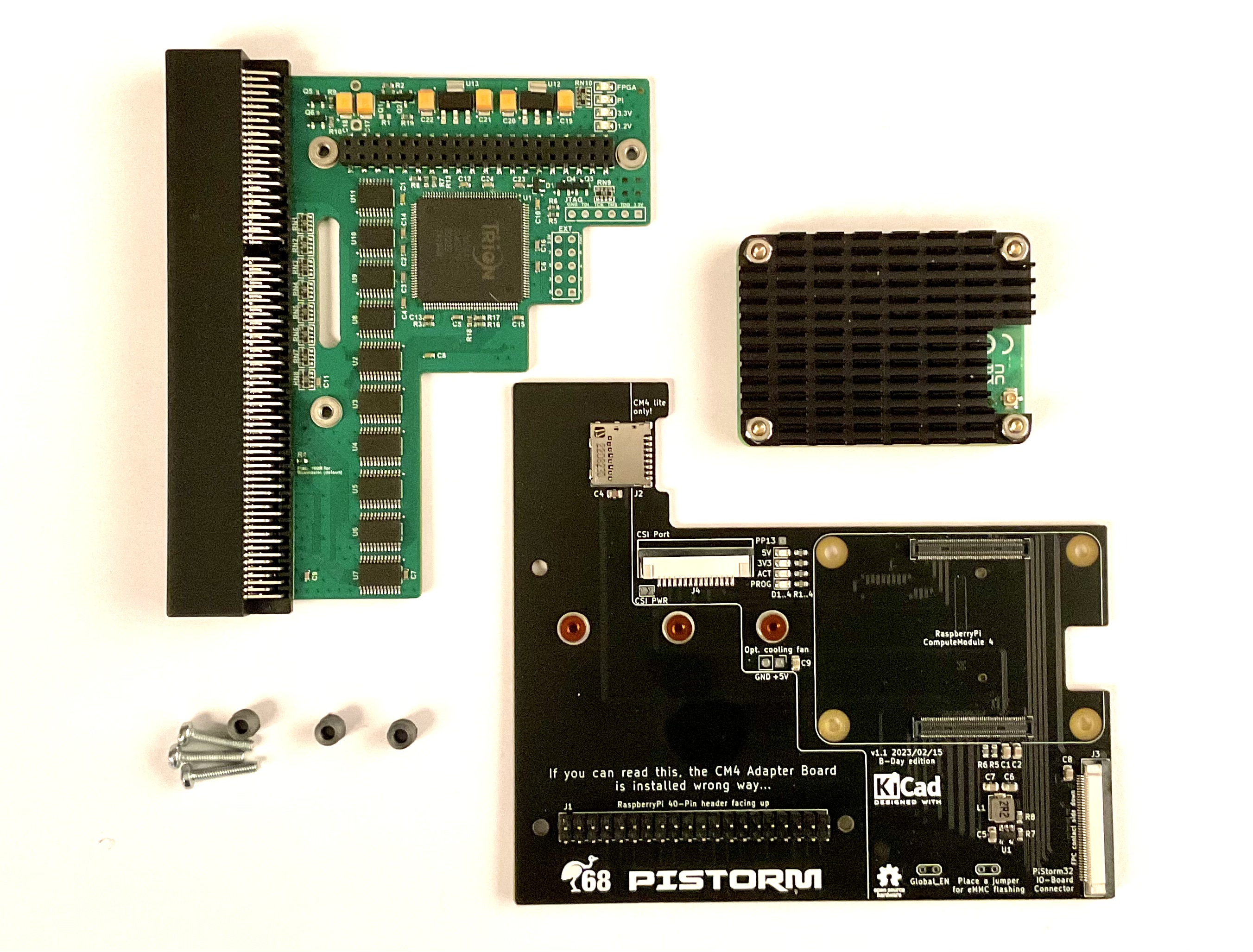
The heatsink is in case of CM4 mandatory! The module has to small PCB area to dissipate the heat from the BRCM2711 alone. Not using heatsink will not damage your CM4 but it will almost immedaitely heat up to 80°C and throttle. If you decide to print the spacers by yourself, use for your safety a material which is a bit more heat resistant than commonly used PLA.
If you need to attach a CM4 heatsink with fan, solder either wires or 2x1 pin header in the "opt. cooling fan" position. If you are using a fan with PWM control, followi instructions of the supplier on how to connect it to a system providing the power only, without PWM pulsing or tacho signal. If you are using IDE LED as indicator of microSD or eMMC on CM4, solder the LED controller of your choise to the PP13 pad. This pad has the same meaning as on RaspberryPi 3 boards. Inactive state results in a 3.3V on that pin, active microSD/eMMC lits the "ACT" LED on and the voltage on PP13 drops to about 2V.
Subsequently connect the 40-pin connector of PiStorm32-Lite with pinheader of the CM4 Adapter board. The top sides of both boards are placed face-to-face to each other. Carefully insert the spacers and tighten the boards together using the M2,5 screws. The assembled PiStorm should look like this
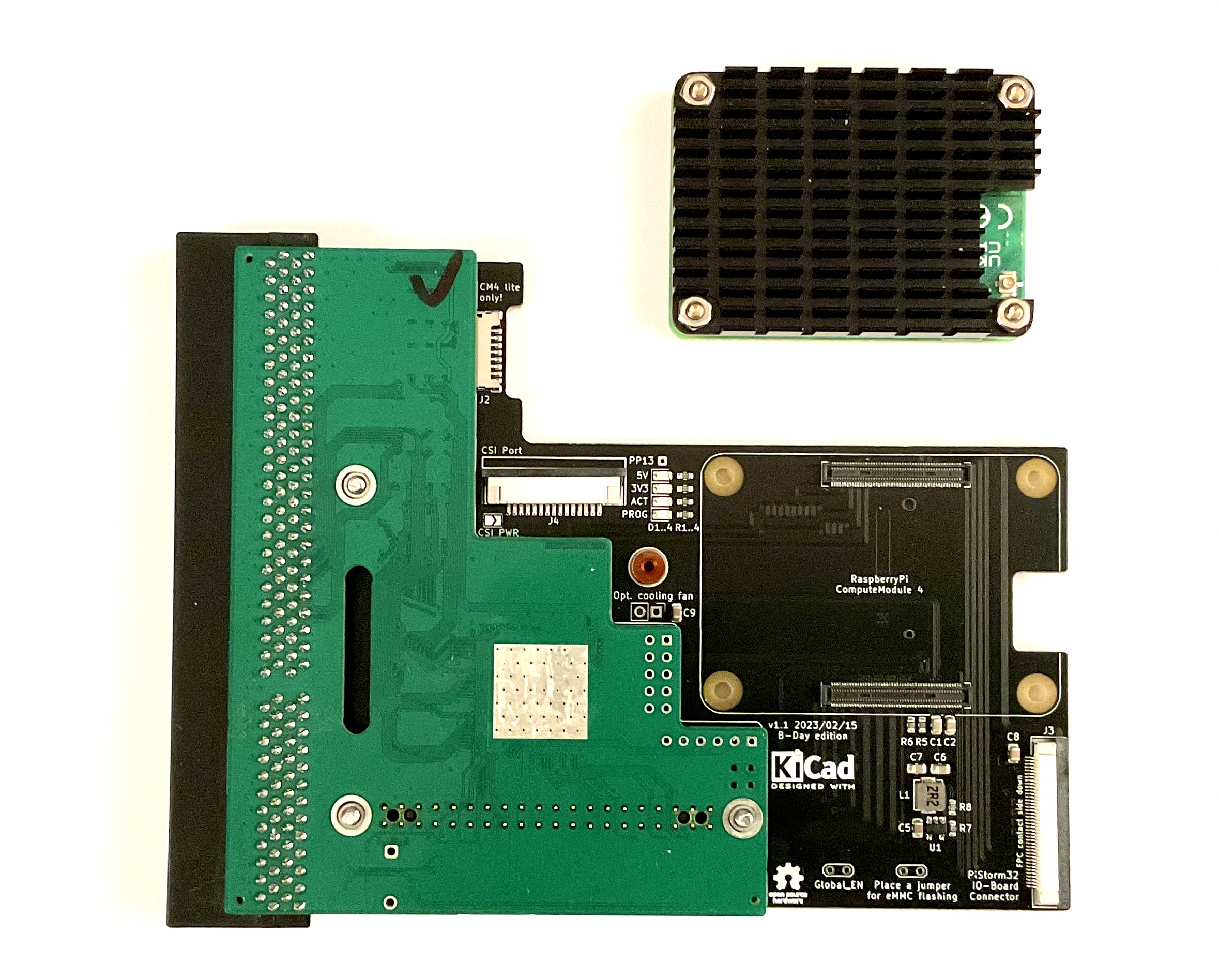
Finally, plug the CM4 into the socket on CM4 Adapter board. Your PiStorm32-Lite with RaspberryPi Compute Module 4 is now ready and can be installed in your Amiga.
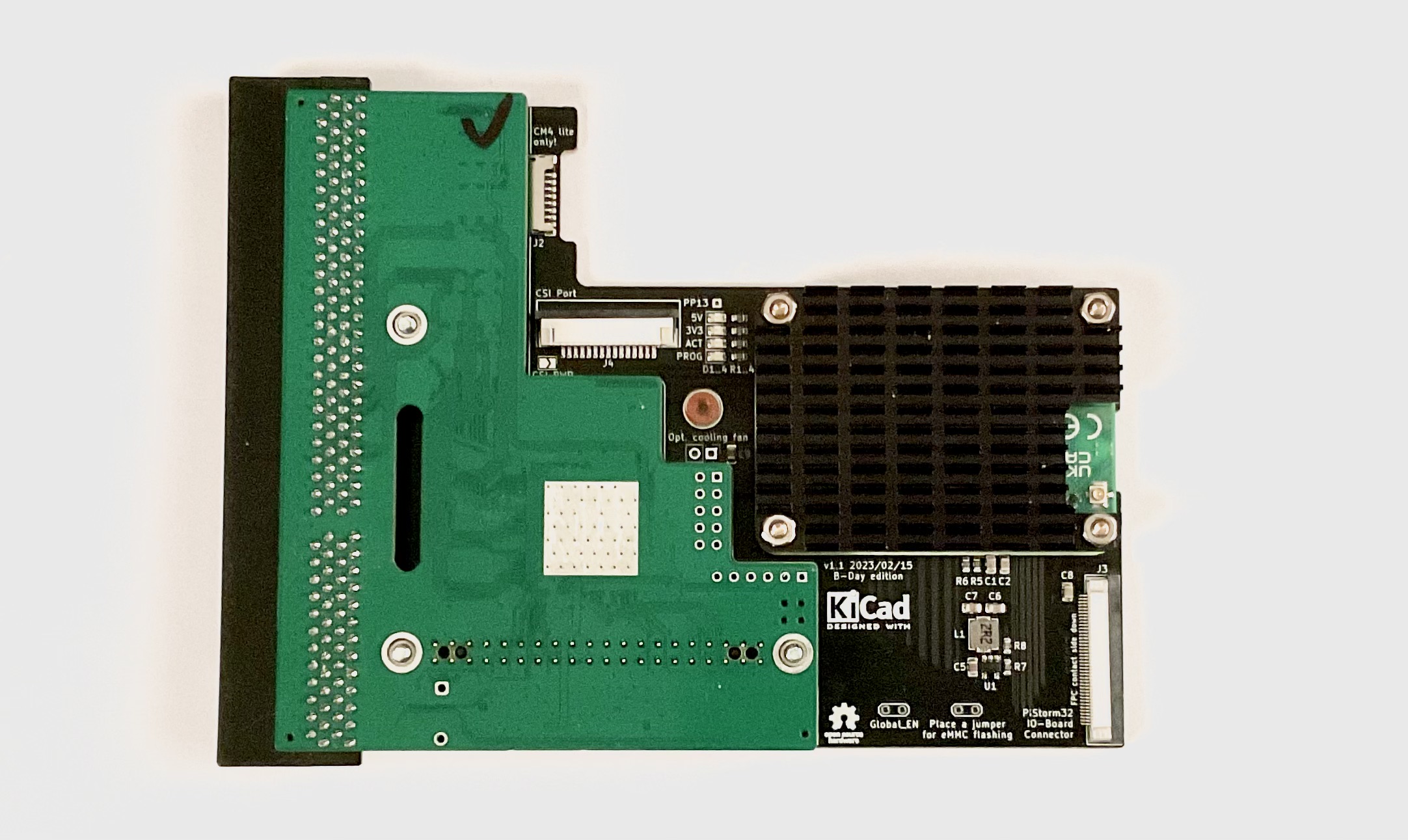
NEVER EVER attempt to fix CM4 to the CM4 Adapter board using the four screws without small spacers provided by the manufacturer of the heatsink. These circa 1mm tall spacers are made of a hard rubber which prevents bendig of CM4 board and reduces the pressure exposed to the CM4. Tightening CM4 without the hard rubber spacers will most likely damage CM4 board and the CM4 Adapter board.
Please follow the installation manuals provided with your CM4 heatsink precisely.
Please note the 40-pin header on CM4 adapter board is installed "upside-down", i.e. the top of the CM4 adapter corresponds to bottom side of regular RaspberryPi.
If HDMI output is wished, an IO board needs to be connected to the CM4 adapter board using 40-pin FPC cable.
TBD...
| Qty | Value | Footprint | References |
|---|---|---|---|
| 7 | 10u | Capacitor_SMD:C_0805_2012Metric | C1, C2, C3, C6, C7, C8, C9 |
| 5 | LOGO | LOGO | G***, G***, G***, G***, G*** |
| 4 | 2k2 | Resistor_SMD:R_0603_1608Metric | R1, R2, R3, R4 |
| 4 | LED | LED_SMD:LED_0805_2012Metric | D1, D2, D3, D4 |
| 3 | SMTSO2020CTJ | custom:SMTSO20 | H4, H5, H6 |
| 3 | MountingHole | MountingHole:MountingHole_2.7mm_M2.5 | H1, H2, H3 |
| 2 | 2u2 | Capacitor_SMD:C_0805_2012Metric | C4, C5 |
| 2 | 4k7 | Resistor_SMD:R_0603_1608Metric | R5, R6 |
| 2 | Jumper_2_Open | TestPoint:TestPoint_2Pads_Pitch2.54mm_Drill0.8mm | JP1, JP2 |
| 1 | 100k | Resistor_SMD:R_0603_1608Metric | R8 |
| 1 | 22k | Resistor_SMD:R_0603_1608Metric | R7 |
| 1 | 2u2 | custom:IND-SMD_L4.4-W4.2 | L1 |
| 1 | CSI 3V3 supply | Jumper:SolderJumper-2_P1.3mm_Open_TrianglePad1.0x1.5mm | JP3 |
| 1 | ComputeModule4-CM4 | CM4IO:Raspberry-Pi-4-Compute-Module | Module1 |
| 1 | Conn_01x02 | Connector_PinHeader_2.54mm:PinHeader_1x02_P2.54mm_Vertical | J5 |
| 1 | Conn_01x15_MountingPin | custom:FPC-SMD_15P-P1.00_JS_AFA07-S15XXX | J4 |
| 1 | Conn_01x40_MountingPin | custom:FPC-SMD_AFC07-S40FCC00 | J3 |
| 1 | Conn_02x20_Odd_Even | Connector_PinHeader_2.54mm:PinHeader_2x20_P2.54mm_Vertical | J1 |
| 1 | MOLEX 104031-0811 | custom:MOLEX_1040310811 | J2 |
| 1 | NASM0-S6701-TP40 | custom:CONN-SMD_67P-P0.50-V_NXSM0-S67XX-XX40 | CN1 |
| 1 | TLV62569DBV | Package_TO_SOT_SMD:SOT-23-5 | U1 |
| 1 | TestPoint | Connector_Wire:SolderWire-0.1sqmm_1x01_D0.4mm_OD1mm | PP1 |
The 45 most common of 47 parts.
It measures 114 × 99 mm and has 4 copper layers, 1.61 mm thick.
47 parts, built around the TLV62569DBV, SMTSO2020CTJ and NASM0-S6701-TP40. The full list of its parts is on this page, with links to each part's symbol and footprint where PCBKit's library has them.
From the PiStorm/cm4board repository on GitHub, at the commit this page was made from: the board is CM4_PiStorm32Lite/CM4_PiStorm32Lite.kicad_pcb and its schematic CM4_PiStorm/CM4_PiStorm.kicad_sch. PCBKit opens the board in the browser, with nothing to install.
Its repository publishes it under the MIT licence: you may reuse it on that licence's terms (keep the author's notice, and for a copyleft licence share your changes alike).
emfcamp/Keebdexpansion
A keyboard hexpansion for the Tildagon badge using the solder.party KeebDeck Keyboard. Software for the hexpansion is provided by @sodoku.

o7-machinehum/phantomdrive
Seemingly normal USB drive with a hidden security feature


nspired-Hackers/nternet-Link
Wi-Fi, AI chat, and camera module for TI-Nspire calculators. Custom ESP32 PCBs + firmware. (Yes, 'nternet' is intentional, Nspire community naming.)

will127534/MK4001MTD-USB-Bridge
The MK4001MTD is a 4 GB Microdrive originally used in the Nokia N91 music phone and some other devices, like MP3 players or USB drives, back when flash storage was still quite expensive.

zoroseerus/g305lithiummodkit
a modkit for the Logitech G305 so you can use lithium batteries and save some weight