4 layers50 × 50 mm
Iot diagnostic tool
mbabela/secured-vehicle-monitoring
Repository for my bachelor thesis at FEEC BUT
109 parts
 P47Phoenix/Claude-Keyboard
A 25-key macropad companion for Claude Code terminal sessions — the Claude Code Pad. Dedicated hardware for firing CLI shortcuts (accept, reject, allow, arrow keys, commit/PR macros, plan/model cycle) with per-key RGB…
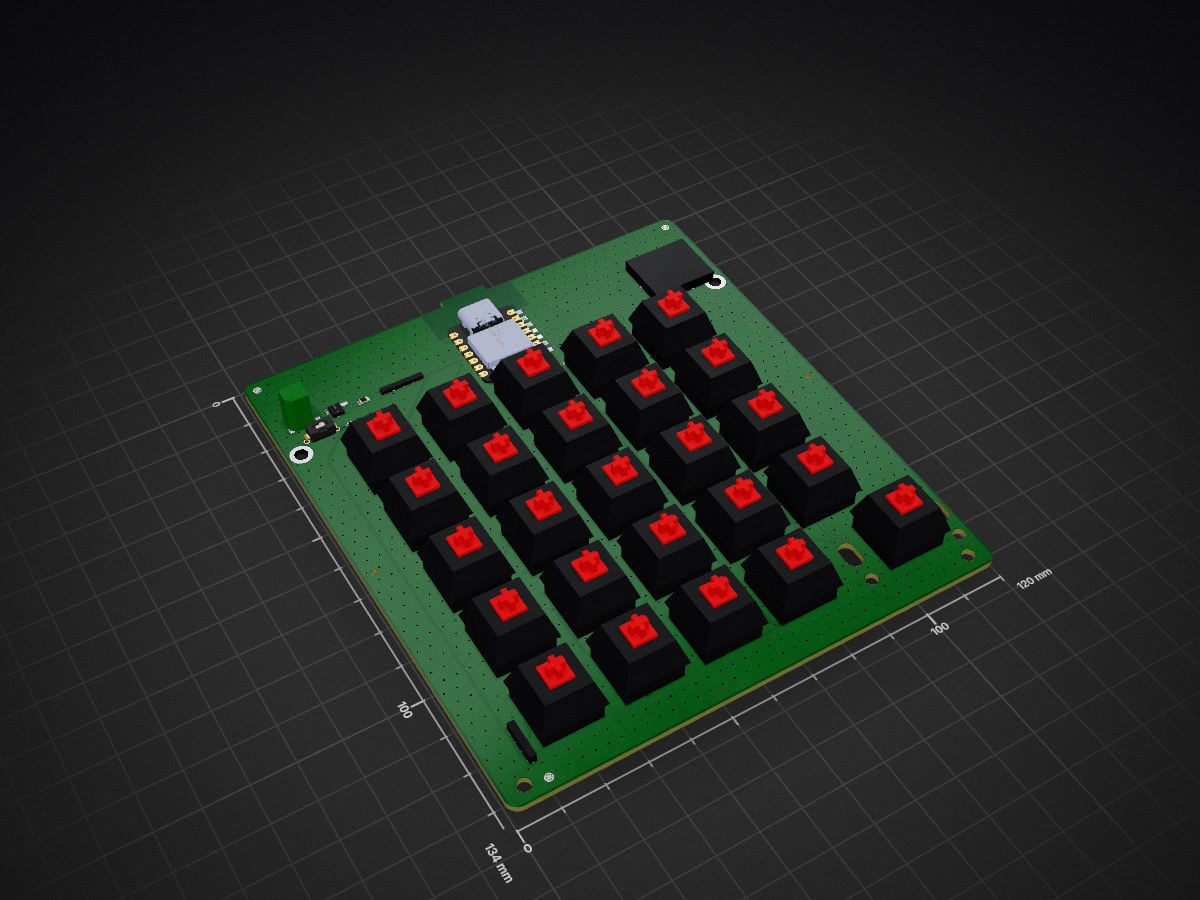
Claude code pad is an open-source printed circuit board by P47Phoenix, from the P47Phoenix/Claude-Keyboard repository on GitHub. It is a 2-layer board of 120 × 134 mm with 137 parts on 78 nets, routed with 1,095 tracks and 1,003 vias.
It is built around the XIAO NRF52840, 1N4148W and SK6812, with the ESD9L3.3S, BZT52C5V1 and DMG3415U-7 among its other parts. Its parts include 50 diodes, 31 capacitors, 25 switches, 3 resistors and 1 IC. It belongs with the nRF52 and nRF5x boards of this library.


A 25-key macropad companion for Claude Code terminal sessions — the Claude Code Pad. Dedicated hardware for firing CLI shortcuts (accept, reject, allow, arrow keys, commit/PR macros, plan/model cycle) with per-key RGB, a rotary encoder, a 2U stabilized Enter, and RFID artisan keycap support.
Wireless multi-host via BLE on a Seeed XIAO nRF52840; firmware runs ZMK.
Design-complete (2026-04-23). Gerbers + case STLs + firmware UF2 are produced, reviewed, and committed. Hardware bring-up + bench verification of the safety thresholds is the next physical step.
| Phase | Scope | State |
|---|---|---|
| 1 | PCB design (schematic, layout, routing, gerbers, BOM, CPL) | Closed (11 cycles) |
| 2 | 3D-printed case + bottom plate (CadQuery, PETG) | Closed (3 cycles) |
| 3 | Firmware (ZMK on nRF52840) | Closed (3 cycles) — west build clean, ztest 10/10 |
| 4 | TinyML callouts | Retired (Cycle 1 arbitration) |
| 5 | RFID figurine keycap base | Retired (post-Phase-3 scope decision) |
| 6 | Integration review | Retired (post-Phase-3 scope decision) |
PN532 NFC header + I²C bus remain on the PCB for any future revisit; firmware can wire them up later without a board respin.
MX_Only_HS), 19.05 mm pitch, Cherry plate-mount 2U stabilizer (slotted housing holes per community canonical footprint).docs/build-guide.md). On-board DMG3415U-7 P-FET reverse-polarity, 500 mA PTC, SPDT slide switch. Charging via the XIAO's USB-C + on-module charger.claude-code-pad/
├── pcb/ # Phase 1 deliverables
│ ├── claude-code-pad.kicad_pro|sch|pcb
│ ├── gerbers/ # 10 layers + drill + job file (fab-ready)
│ ├── bom.csv / cpl.csv # JLCPCB format
│ ├── DESIGN-NOTES.md # design rationale + cycle history + pinout verification
│ └── _gen/ # generator + autoroute pipeline
│ ├── generate.py # schematic + placement source of truth
│ └── autoroute/ # export_dsn + freerouting + import_ses + widen_power + stitch_gnd
├── firmware/
│ ├── zmk/ # Phase 3 primary (nRF52840 + ZMK)
│ │ └── README.md # Hard Requirements for FW-1
│ └── qmk/ # alternate path (RP2040)
├── case/ # Phase 2 (MECH-1, CadQuery)
├── figurines/ # Phase 5 (RFID artisan keycap)
└── docs/
├── build-guide.md # MANDATORY battery requirements + assembly
└── review-log.md # Adversarial review paper trailDesign work is done by persona sub-agents dispatched via Claude's Agent tool, not by the main thread:
claude-code-pad/docs/review-log.md.Full orchestration spec: /var/home/meconnelly/Downloads/claude-code-pad-orchestrated-prompt.md (authoritative for personas, phases, and reviewers).
This repo targets a Bazzite (immutable Fedora atomic) workstation. Package management notes and KiCad / Freerouting / Distrobox conventions are in CLAUDE.md.
org.kicad.KiCad) for GUI + authoritative file reads.kicad distrobox (Podman-backed Fedora 43 toolbox) for kicad-cli automation + the KiCad MCP server (lamaalrajih/kicad-mcp, auto-loaded via .mcp.json).# DRC via kicad-cli (flatpak, matches GUI rule set)
flatpak run --command=kicad-cli org.kicad.KiCad pcb drc \
--output /tmp/drc.rpt pcb/claude-code-pad.kicad_pcb
# Open the PCB in the GUI
flatpak run --command=pcbnew org.kicad.KiCad pcb/claude-code-pad.kicad_pcb
# Re-run Freerouting (from distrobox)
distrobox enter kicad -- python3 pcb/_gen/autoroute/export_dsn.py pcb/claude-code-pad.kicad_pcb
distrobox enter kicad -- java -jar ~/.local/share/freerouting/freerouting.jar \
-de /tmp/claude-code-pad.dsn -do /tmp/claude-code-pad.ses
distrobox enter kicad -- python3 pcb/_gen/autoroute/import_ses.py pcb/claude-code-pad.kicad_pcbIf you want to build one:
claude-code-pad/docs/build-guide.md first — especially the mandatory battery requirements section.claude-code-pad/pcb/gerbers/ and claude-code-pad/pcb/cpl.csv.TBD.
| Qty | Value | Footprint | References |
|---|---|---|---|
| 29 | 100n | claude-code-pad:C_0402_1005Metric | C3, C4, CL1, CL2, CL10, CL11, CL12, CL13, CL14, CL15, CL16, CL17, CL18, CL19, CL20, CL21 +13 |
| 25 | 1N4148W | claude-code-pad:D_SOD-123 | D00, D01, D02, D03, D04, D10, D11, D12, D13, D14, D20, D21, D22, D23, D24, D30 +9 |
| 25 | SK6812 | claude-code-pad:LED_SK6812_MINI-E_plccn4_3.5x2.8mm | LED1, LED2, LED10, LED11, LED12, LED13, LED14, LED15, LED16, LED17, LED18, LED19, LED20, LED21, LED22, LED23 +9 |
| 24 | MX_HS | claude-code-pad:SW_Kailh_HotSwap_MX | SW00, SW01, SW02, SW03, SW04, SW10, SW11, SW12, SW13, SW14, SW20, SW21, SW22, SW23, SW24, SW30 +8 |
| 5 | ESD9L3.3 | claude-code-pad:D_SOD-523 | TVS_ENCA1, TVS_ENCB1, TVS_ENCSW1, TVS_SCL1, TVS_SDA1 |
| 3 | FID | claude-code-pad:Fiducial_1mm_Mask2mm | FID1, FID2, FID3 |
| 2 | 10k | claude-code-pad:R_0402_1005Metric | R_GREV1, R_NTC1 |
| 2 | 1M | claude-code-pad:R_0402_1005Metric | R_VBAT1, R_VBAT2 |
| 2 | 22u | claude-code-pad:C_0805_2012Metric | C1, C2 |
| 2 | 4k7 | claude-code-pad:R_0402_1005Metric | R2, R3 |
| 2 | M3 | claude-code-pad:MountingHole_3.2mm_M3 | H1, H2 |
| 2 | M3 | claude-code-pad:MountingHole_3.2mm_M3_NPTH | H3, H4 |
| 2 | TOOL | claude-code-pad:MountingHole_1.5mm | TP1, TP2 |
| 1 | 470 | claude-code-pad:R_0402_1005Metric | R1 |
| 1 | BZT52C5V1 | claude-code-pad:D_SOD-523 | D_GREV1 |
| 1 | DMG3415U-7 | claude-code-pad:SOT-23 | Q_REV1 |
| 1 | EC11 | claude-code-pad:RotaryEncoder_Alps_EC11E-Switch_Vertical_H20mm | EC1 |
| 1 | JST-PH-2P | claude-code-pad:JST_PH_S2B-PH-SM4-TB_1x02-1MP_P2.00mm_Horizontal | J_BAT1 |
| 1 | JUMPER | claude-code-pad:XIAO_BackPad_Jumper_1x7 | J_XIAO_BP |
| 1 | MF52A2_10k | claude-code-pad:R_Axial_DIN0207_L6.3mm_D2.5mm_P7.62mm_Horizontal | TH1 |
| 1 | MX_HS | claude-code-pad:SW_Kailh_HotSwap_MX_2U | SW44 |
| 1 | NFC | claude-code-pad:PinHeader_1x04_P2.54mm_Vertical | J_NFC1 |
| 1 | PTC_500mA | claude-code-pad:Fuse_0805_2012Metric | F1 |
| 1 | SPDT | claude-code-pad:SW_Slide_1P2T_SS12D00G4 | SW_PWR1 |
| 1 | XIAO_nRF52840 | claude-code-pad:XIAO_nRF52840_Castellated | U1 |
mbabela/secured-vehicle-monitoring
Repository for my bachelor thesis at FEEC BUT


ergonautkb/one
Ergonaut One is an open-source ergonomic wireless split mechanical keyboard designed by Ergonaut Keyboards.


ergonautkb/one-s
Ergonaut One S is an open-source ergonomic wireless split mechanical keyboard designed by Ergonaut Keyboards.


It measures 120 × 134 mm and has 2 copper layers, 1.6 mm thick.
137 parts, built around the XIAO NRF52840, 1N4148W, SK6812 and ESD9L3.3S. The full list of its parts is on this page, with links to each part's symbol and footprint where PCBKit's library has them.
From the P47Phoenix/Claude-Keyboard repository on GitHub, at the commit this page was made from: the board is claude-code-pad/pcb/claude-code-pad.kicad_pcb and its schematic claude-code-pad/pcb/claude-code-pad.kicad_sch. PCBKit opens the board in the browser, with nothing to install.
Its repository states no licence, so its author keeps all rights: ask P47Phoenix before reusing the design.