
6 layers210 × 41 mm
Panel
Ondulab/Sp3ctra_CIS_electronics
Electronic repo for image sensor module for CISYNTH
478 parts3CERN-OHL-S-2.0

Electronic repo for image sensor module for CISYNTH
CIS is an open-source printed circuit board by Ondulab, from the Ondulab/Sp3ctra_CIS_electronics repository on GitHub, published under the CERN-OHL-S-2.0 licence. It is a 6-layer board of 194 × 25 mm with 184 parts on 223 nets, routed with 1,767 tracks and 334 vias.
Its parts include 86 capacitors, 50 resistors, 13 ICs, 10 inductors and 6 switches. It belongs with the sensors and measurement boards of this library.
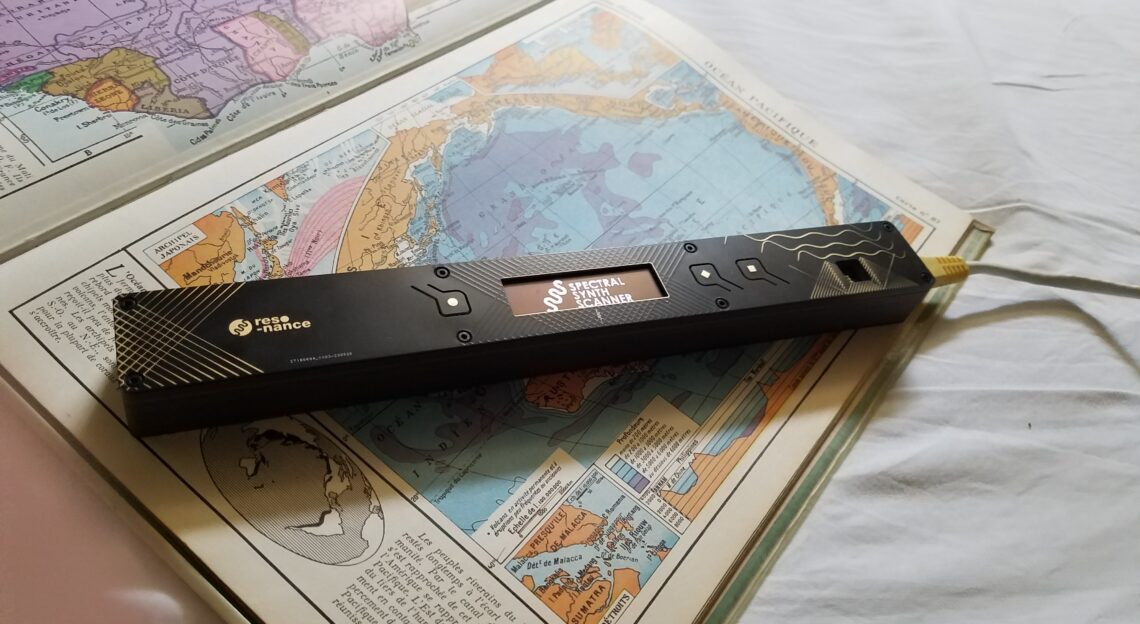
The CYSINTH is an innovative tangible interface for creating music and visuals. Utilizing our CIS instrument, the CISYNTH generates a UDP stream containing thousands of values captured by both the contact image sensor and the inertial measurement unit, transmitted at frequencies of up to 1kHz. This stream can be used to generate music or display image streams in Max/MSP, Pure Data, and our Viewer.
This project is now in an advanced stage of maturity, nearing the product’s commercialization. Please note that while most features are complete, minor adjustments may still be made as we prepare for the final release.
Our device supports Power over Ethernet (PoE), which simplifies cabling and installation by allowing both electrical power and data transfer over a single Ethernet cable.
The integration of an inertial measurement unit enables precise 3D gesture tracking, allowing for detailed interaction.
The CISYNTH device comes with a built-in HTTP server that allows for easy configuration via a web browser. Access the web interface by navigating to the device's IP address (default: 192.168.0.10). Below are the key sections and functionalities of the interface:
DPI (Dots Per Inch):
Configures the resolution of the Contact Image Sensor (CIS). Available options:
OVSP (Oversampling):
Adjusts the oversampling rate to enhance image quality.
LPS (Lines Per Second):
Visualizes the line capture rate. Higher values improve performance but may reduce image quality.
Hand (Left/Right):
Select the dominant hand for accurate calibration.
Start Calibration:
Initiates the calibration process based on the selected settings.
IP Address/Subnet Mask/Gateway:
Allows the configuration of the Ethernet network settings, including:
192.168.0.10)255.255.255.0)0.0.0.0)Destination IP Address (UDP):
Specifies the IP address of the target machine that will receive the UDP data packets.
UDP Port:
Defines the port number for UDP packet transmission (default: 55151).
Note: After modifying network settings, click Apply Network Settings to apply the changes.
To update the firmware via the HTTP interface:
The CISYNTH device is also equipped with an FTP server, allowing file transfers to and from the device. This server can be accessed using any FTP client.
Protocol:
Be aware that this connection is not encrypted, so avoid transmitting sensitive data.
Host:
The IP address of the device should be entered here. By default, this is:
192.168.0.10Port:
You can use the default FTP port (21) unless you have configured the server to use a custom port.
Encryption:
The FTP connection used is non-encrypted (FTP simple).
Authentication Type:
Download our Max examples along with the cis_receive external from Max Patchs and connect the CISYNTH.
Manually configure the network connection:
192.168.0.1255.255.255.00.0.0.0Contributions to this project are welcome. Please submit your pull requests or report issues via GitHub.
For more information on the Spectral Sound Scanner and other innovative projects, visit our website at Réso-nance Numérique.
Sources : Firmware, Bootloader, Electronics, Mechanics, Max Patchs.
| Characteristic | Details |
|---|---|
| Weight | 290g |
| Dimensions | L 264mm x W 32mm x H 21mm |
| Connector | RJ45 Ethernet |
| Power Supply | 12V PoE |
| Max Power Consumption | 10W |
| Display | OLED screen 256x64 |
| Buttons | 3 physical buttons |
| Image Sensor | M118-232C3_V1.51 |
| Inertial Measurement Unit | ICM42688 |
| Operating Temperature Range | 0°C to 40°C |
| Compliance | CE Marking |
Copyright (C) 2018-present Réso-nance Numérique
This program is free software; you can redistribute it and/or modify it under the terms of the GNU General Public License as published by the Free Software Foundation; either version 3 of the License, or (at your option) any later version.
This program is distributed in the hope that it will be useful, but WITHOUT ANY WARRANTY; without even the implied warranty of MERCHANTABILITY or FITNESS FOR A PARTICULAR PURPOSE. See the GNU General Public License for more details.
You should have received a copy of the GNU General Public License along with this program; if not, write to the Free Software Foundation, Inc., 51 Franklin Street, Fifth Floor, Boston, MA 02110-1301, USA.
We would like to extend our sincere thanks to DEVISUBOX for their support and contributions to this project. Their assistance has been invaluable in our development process.
For any questions or inquiries, you can also contact us via email at contact@reso-nance.org. For an opportunity to test our products, please reach out to us.
| Qty | Value | Footprint | References |
|---|---|---|---|
| 33 | C_0002 | DVB_Capacitors_Ceramic:C_0402 | C1, C2, C3, C10, C12, C14, C29, C32, C33, C34, C38, C42, C43, C44, C45, C47 +17 |
| 14 | R_0020 | DVB_Resistors:R_0402 | R1, R4, R10, R11, R22, R32, R33, R36, R39, R42, R43, R47, R50, R53 |
| 10 | C_0044 | DVB_Capacitors_Ceramic:C_0402 | C13, C15, C18, C31, C41, C51, C69, C81, C83, C88 |
| 8 | C_0003 | DVB_Capacitors_Ceramic:C_0603 | C4, C5, C9, C19, C46, C68, C71, C72 |
| 8 | R_0175 | DVB_Resistors:R_0402 | R28, R29, R30, R31, R34, R35, R37, R40 |
| 6 | C_0001 | DVB_Capacitors_Ceramic:C_0402 | C20, C37, C58, C59, C60, C61 |
| 6 | C_0036 | DVB_Capacitors_Ceramic:C_0603 | C7, C11, C16, C30, C63, C64 |
| 6 | C_0040 | DVB_Capacitors_Ceramic:C_1210 | C25, C35, C48, C65, C67, C90 |
| 5 | C_0063 | DVB_Capacitors_Ceramic:C_0402 | C66, C73, C74, C77, C80 |
| 5 | L_0017 | DVB_Inductors:L_0603 | L3, L5, L8, L9, L10 |
| 5 | R_0053 | DVB_Resistors:R_0402 | R16, R18, R21, R48, R49 |
| 4 | C_0043 | DVB_Capacitors_Ceramic:C_0402 | C17, C21, C22, C23 |
| 4 | R_0064 | DVB_Resistors:R_0402 | R2, R20, R24, R41 |
| 3 | C_0028 | DVB_Capacitors_Ceramic:C_0402 | C26, C27, C28 |
| 3 | CircleWhite1mm | DVB_Fiducials:REF_1mm | REF11, REF12, REF13 |
| 3 | CircleWhite1mm | DVB_Fiducials:REF_1mm_Top | REF1, REF2, REF3 |
| 3 | D_0001 | DVB_LED:LED_0603-red | D1, D3, D4 |
| 3 | Q_0002 | DVB_SOT:SOT_323-SC_70 | Q1, Q2, Q3 |
| 3 | R_0001 | DVB_Resistors:R_0402 | R12, R13, R14 |
| 3 | R_0005 | DVB_Resistors:R_0402 | R19, R26, R27 |
| 3 | SW_0003 | DVB_Buttons:PTS810 | SW1, SW2, SW3 |
| 2 | C_0045 | DVB_Capacitors_Ceramic:C_0402 | C75, C76 |
| 2 | L_0010 | DVB_Inductors:L_0603 | L2, L7 |
| 2 | U_0049 | DVB_SOT:SOT_143 | U16, U17 |
| 2 | U_0144 | DVB_SOT:SOT_23-5 | U3, U9 |
| 2 | XO_0004 | DVB_Clock:7M | XO1, XO2 |
| 1 | C_0014 | DVB_Capacitors_Ceramic:C_0402 | C24 |
| 1 | C_0068 | DVB_Capacitors_Ceramic:C_0402 | C39 |
| 1 | C_0080 | DVB_Capacitors_Ceramic:C_0402 | C36 |
| 1 | D_0021 | DVB_Diodes:D_SOD-123 | D2 |
| 1 | F_0002 | DVB_F:F_1206 | F1 |
| 1 | K_0072 | DVB_Connectors:Molex_PicoBlade_53261-1271_1x12-1MP_P1.25mm_Horizontal | K2 |
| 1 | K_0073 | DVB_Displays:OLED256x64-2P1_HOLE_TE_3-2328724-1 | K1 |
| 1 | K_0100 | Connector:Tag-Connect_TC2030-IDC-FP_2x03_P1.27mm_Vertical | K3 |
| 1 | LOGO | DVB_Mechanicals:RESO-NANCE_SSS_LOGO | G1 |
| 1 | LOGO | DVB_Mechanicals:RESO-NANCE_SSS-2_LOGO | G2 |
| 1 | L_0002 | DVB_Inductors:L_5030-Coilcraft | L4 |
| 1 | L_0011 | DVB_Inductors:L_4018-Coilcraft | L1 |
| 1 | L_0018 | DVB_Inductors:L_4018-Coilcraft | L6 |
| 1 | NC | DVB_Resistors:R_0402 | R52 |
| 1 | RJ45_Abracon_ARJP11A-MASA-B-A-EMU2 | Connector_RJ:RJ45_Abracon_ARJP11A-MA_Horizontal | J2 |
| 1 | R_0028 | DVB_Resistors:R_0402 | R5 |
| 1 | R_0030 | DVB_Resistors:R_0402 | R3 |
| 1 | R_0102 | DVB_Resistors:R_0402 | R9 |
| 1 | R_0118 | DVB_Resistors:R_0402 | R38 |
| 1 | R_0121 | DVB_Resistors:R_0402 | R6 |
| 1 | R_0133 | DVB_Resistors:R_0402 | R17 |
| 1 | R_0134 | DVB_Resistors:R_0402 | R15 |
| 1 | R_0170 | DVB_Resistors:R_0402 | R23 |
| 1 | R_0171 | DVB_Resistors:R_0402 | R25 |
| 1 | R_0172 | DVB_Resistors:R_0402 | R44 |
| 1 | R_0173 | DVB_Resistors:R_0402 | R7 |
| 1 | R_0174 | DVB_Resistors:R_0402 | R8 |
| 1 | U_0076 | DVB_SOT:SOT_23-5 | U1 |
| 1 | U_0081 | DVB_DFN:DFN-8-1EP_2x2_P0.5 | U5 |
| 1 | U_0097 | DVB_SSOP:TSSOP_14_4.4x5_P0.65 | U6 |
| 1 | U_0101 | DVB_QFN:QFN-24-1EP_4x4mm_Pitch0.5mm | U14 |
| 1 | U_0131 | DVB_BGA:UFBGA_176 | U2 |
| 1 | U_0133 | DVB_LGA:LGA-16_3x3mm_P0.5mm_LayoutBorder3x5y | U8 |
| 1 | U_0134 | DVB_SSOP:MSOP_16-1EP_3x4_P0.5 | U4 |
| 1 | U_0138 | DVB_SO:SOP-8_5.28x5.23mm_P1.27mm | U7 |
| 1 | U_0139 | DVB_LGA:LGA-14_3x2.5mm_P0.5mm_LayoutBorder3x4y | U10 |
Ondulab/Sp3ctra_CIS_electronics
Electronic repo for image sensor module for CISYNTH

butterstick-fpga/butterstick-hardware
Basic ECP5 based GigE to SYZYGY interface.

bluesatunsw/owr
This repo includes all software necessary to operate the Test Rover Platform that is being designed and developed in the 502 project.

jusdisgi/LightFury
Light Fury Keyboard: Ergo Split with 54 PG1316S keyswitches, 54 LEDs, LCDs, and Roller Encoders.

hlord2000/Sidewalk_Devkit
KiCad hardware design for a compact Nordic Semiconductor devkit built around an nRF54L15 target, nPM1300 power management, and an SX1262 sub-GHz radio front end.

lucask07/covg_clamp
kicad schematic and layout for COVG bath and guard clamps


It measures 194 × 25 mm and has 6 copper layers, 1 mm thick.
184 parts. The full list of its parts is on this page, with links to each part's symbol and footprint where PCBKit's library has them.
From the Ondulab/Sp3ctra_CIS_electronics repository on GitHub, at the commit this page was made from: the board is CIS.kicad_pcb and its schematic CIS.kicad_sch. PCBKit opens the board in the browser, with nothing to install.
Its repository publishes it under the CERN-OHL-S-2.0 licence: you may reuse it on that licence's terms (keep the author's notice, and for a copyleft licence share your changes alike).