2 layers
Strip10
oleksandrstukalenko/autopile
Write hardware like software. atopile is a language, compiler, and toolchain for electronics—declarative .ato files, deep validation, and layout that works natively with KiCad.
20 partsMIT

 oleksandrstukalenko/autopile
Write hardware like software. atopile is a language, compiler, and toolchain for electronics—declarative .ato files, deep validation, and layout that works natively with KiCad.
Grid10x10 is an open-source printed circuit board by oleksandrstukalenko, from the oleksandrstukalenko/autopile repository on GitHub, published under the MIT licence. It is a 4-layer board with 200 parts on 103 nets, routed with 1,056 tracks and 318 vias.
Its parts include 100 capacitors and 100 diodes.





Write hardware like software. atopile is a language, compiler, and toolchain for electronics—declarative .ato files, deep validation, and layout that works natively with KiCad.
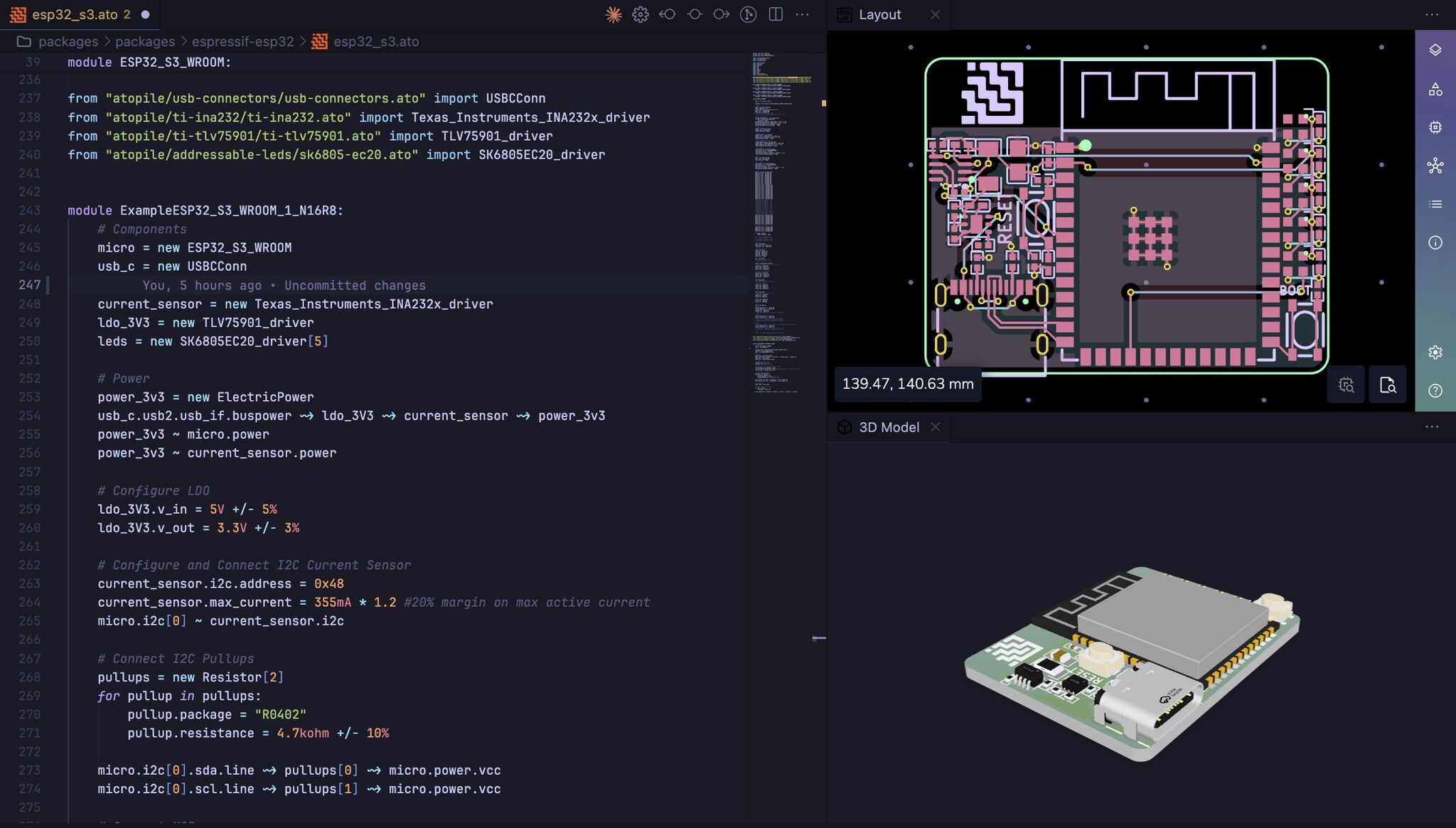
The easiest way is via the editor extension—it installs and manages ato for you:
Advanced setups and CLI installs: https://docs.atopile.io/atopile/guides/install
Install the extension (link above)
In the editor, run “atopile: Open Example” and pick one
Press the ▶ in the ato menu bar to build, or run ato build from the terminal
Open layout when ready
Notes:
.kicad_pcb. Install later when you’re ready for layout: https://docs.atopile.io/atopile/quickstartato is a declarative language for electronics: modules, interfaces, units, tolerances, and assertionsLearn more: https://docs.atopile.io/atopile/essentials/1-the-ato-language
High-level steps:
.ato modules and interfaces compose your systempytest -qMIT. See LICENSE.
| Qty | Value | Footprint | References |
|---|---|---|---|
| 100 | OPSCO_SK6805_EC20:LED-SMD_4P-L2.0-W2.0-BR | LED1, LED2, LED10, LED11, LED12, LED13, LED14, LED15, LED16, LED17, LED18, LED19, LED20, LED21, LED22, LED100 +84 | |
| 100 | 100nF ±10% 50V X7R | Samsung_Electro_Mechanics_CL05B104KB54PNC:C0402 | C1, C2, C10, C11, C12, C13, C14, C15, C16, C17, C18, C19, C20, C21, C22, C100 +84 |
oleksandrstukalenko/autopile
Write hardware like software. atopile is a language, compiler, and toolchain for electronics—declarative .ato files, deep validation, and layout that works natively with KiCad.

oleksandrstukalenko/autopile
Write hardware like software. atopile is a language, compiler, and toolchain for electronics—declarative .ato files, deep validation, and layout that works natively with KiCad.

atopile/atopile
Design circuit boards with code! ✨ Get software-like design reuse 🚀, validation, version control and collaboration in hardware; starting with electronics ⚡️


crgarcia12/electronics-homeassistant-lightscontroll
A smart lighting controller PCB that integrates seamlessly with ESPHome and Home Assistant while maintaining full compatibility with traditional mechanical switches.

m1geo/Quad-AMBE3000
A PCB for four DVSI AMBE-3000R Vocoders for use with WebSDRs/Audio transcoding

Maritime-Hacking-Village/Badge-2025
Public repository for the official MHV 2025 badge.

CYP4502D6/DCJ11CoreBoard
PDP-11 replica project based on the DEC DCJ-11 chipset, utilizing FPGA as bus controller and peripheral emulator, using external SRAM to provide system memory

idank/keyboards
This repo contains pcb and 3d files for keyboards. The keyboards are adaptations of popular open source keyboards with a variety of changes.

Architeuthis-Flux/Temporal-Replay-26-Badge
Community firmware for the Temporal Replay 26 badge
200 parts. The full list of its parts is on this page, with links to each part's symbol and footprint where PCBKit's library has them.
From the oleksandrstukalenko/autopile repository on GitHub, at the commit this page was made from: the board is examples/led_badge/layouts/grid10x10/grid10x10.kicad_pcb and its schematic test/common/resources/fileformats/kicad/v8/sch/test.kicad_sch. PCBKit opens the board in the browser, with nothing to install.
Its repository publishes it under the MIT licence: you may reuse it on that licence's terms (keep the author's notice, and for a copyleft licence share your changes alike).