Skip to the content
PCBKitNew board
2 layers90.3 × 39.1 mmFidget, the printed circuit board in 3D

a pcb with switches that you can fidget with

Size
90.3 × 39.1 mm
Copper layers
2
Thickness
1.6 mm
Parts
16
Nets
23
Pads
64
Tracks, vias
48, 5
Pours
1
Routed
Yes
KiCad
KiCad 8.0 (file 20240108)
Created
28 Jun 2025
Updated
8 Jul 2025

Overview

Fidget is an open-source printed circuit board by obobed, from the obobed/treeboard repository on GitHub, published under the GPL-3.0 licence. It is a 2-layer board of 90.3 × 39.1 mm with 16 parts on 23 nets, routed with 48 tracks and 5 vias.

Its parts include 4 resistors, 4 diodes, 4 switches and 1 IC. It belongs with the RP2040 boards of this library.

README

README.md

Treeboard


A PCB that you can use to play minigames with 4 LEDs, 4 Cherry MX switches and a XIAO RP2040.

Game Modes

Reaction Tester

  • Start: Hold the top left button for 3 seconds (the LEDs will slowly light up as you hold it)
  • How to Play: An LED will turn on within 5 seconds, and you have to press the corresponding button as fast as possible.

Duel

  • Start: Hold the top right button for 3 seconds (the LEDs will slowly light up as you hold it)
  • Players
    • Player 1 uses the left buttons and LEDs
    • Player 2 uses the right buttons and LEDs
  • How to Play
    • Hold the PCB horizontally
    • A mirrored LED pair will light up (eg the top left and top right)
    • The first person who presses that switch wins and whoever gets to 5 wins first has their LEDs flash as celebration

Memory Game

  • Start: Hold the bottom left button for 3 seconds (the LEDs will slowly light up as you hold it)
  • How to Play
    • The LEDs flash a sequence that you have to exactly recreate with the buttons
    • Each time you succeed, the length of the sequence increases
    • If you fail, the LEDs turn on and off 2 times, and if you win, they turn on one by one.

Binary

  • Start: Hold the bottom right button for 3 seconds (the LEDs will slowly light up as you hold it)
  • How to Play
    • The LEDs will show a binary number for 5 seconds
    • When they turn off, you have to input that value using the keyboard
      • Pressing the top left button adds 1
      • Pressing the top right button adds 5
      • Pressing the bottom left button subtracts 1
    • To submit your number, hold the bottom right button for 2 seconds
    • If you got it correct, the LEDs will all flash twice
    • If you got it wrong, they will flash one by one 2 times

Other features

Idle

After 30 seconds with no input, the LEDs will play a slow idle animation

Files

To program the XIAO RP2040, follow this guide and open this file in the Arduino IDE.

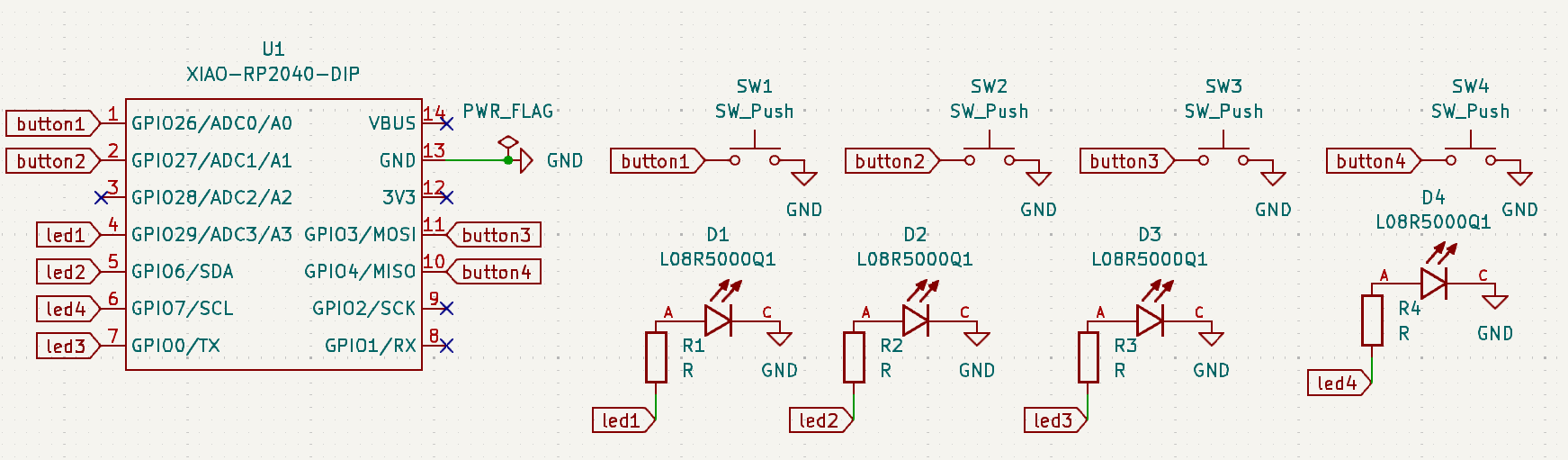
Schematic

Schematic Image

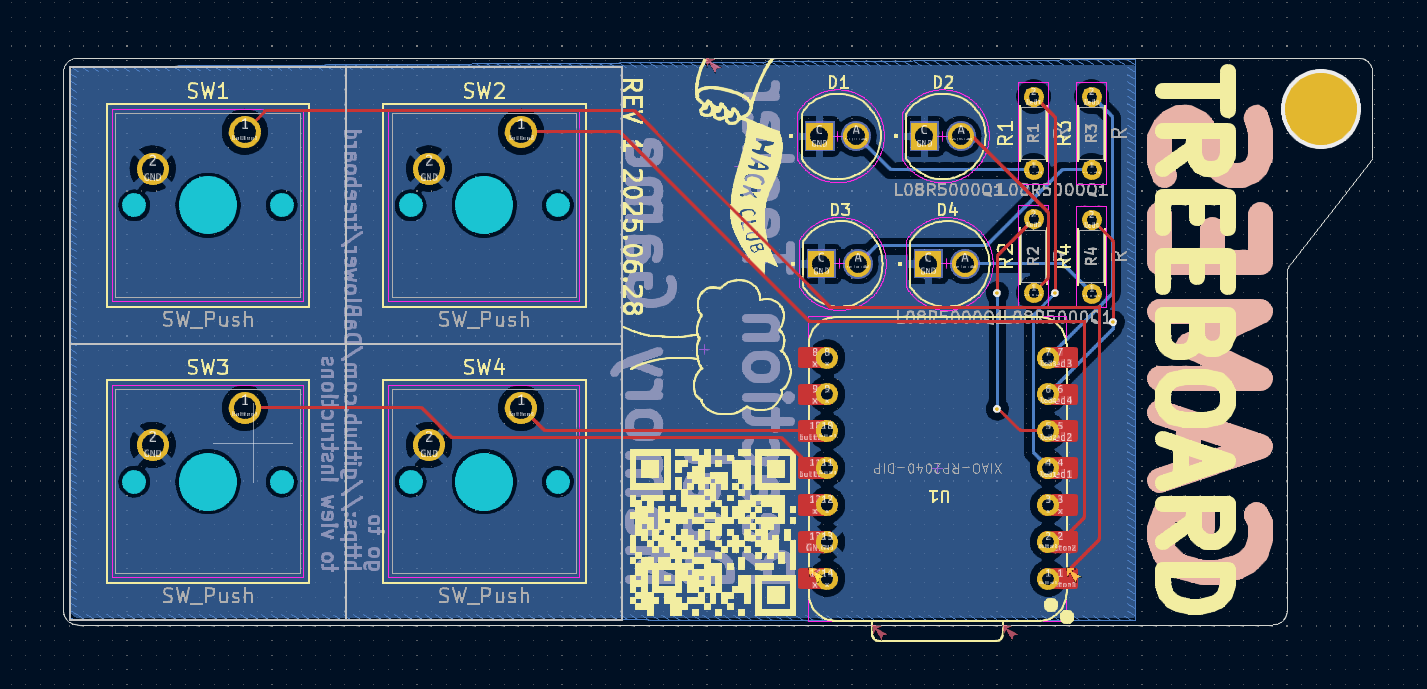
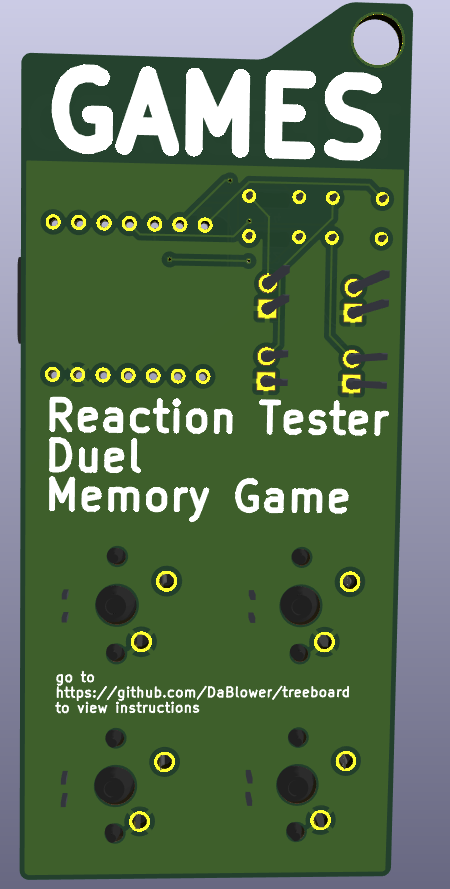
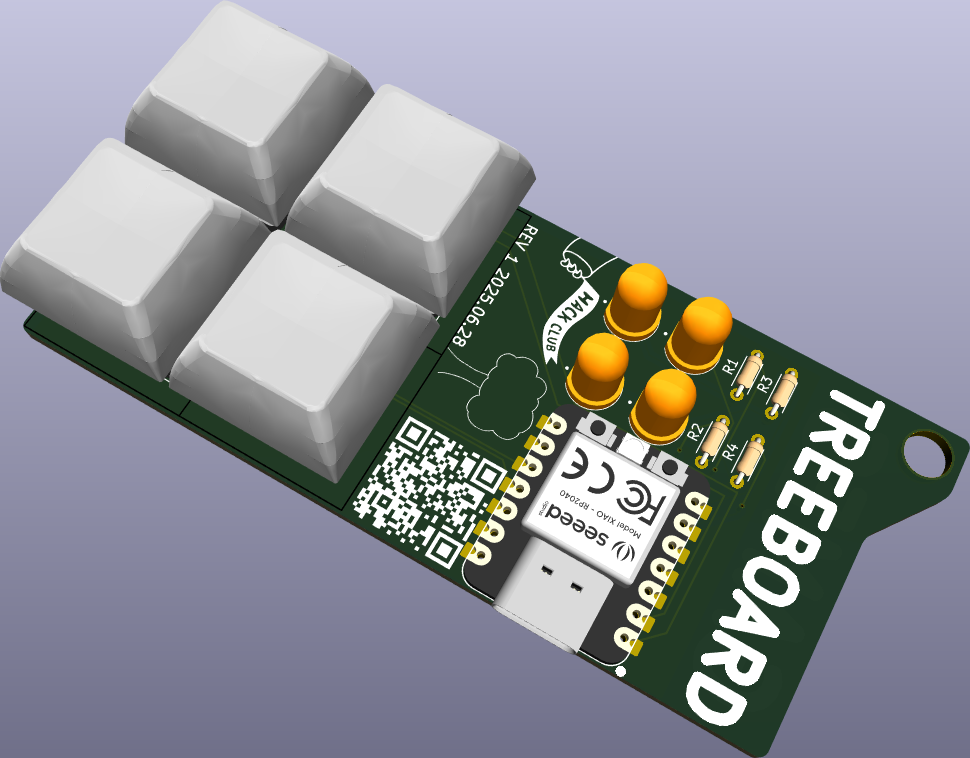
PCB

PCB Image Front 3D PCB Image Back 3D PCB Image

BOM

  • 4 Cherry MX switches
  • 4 LEDs
  • 4 Resistors
  • 1 XIAO RP2040

made by @obob on the Hack Club Slack for the Pathfinder YSWS!

Parts

16
QtyValueFootprintReferences
4L08R5000Q1general:LEDRD254W57D500H1070_3dD1, D2, D3, D4
4RResistor_THT:R_Axial_DIN0204_L3.6mm_D1.6mm_P5.08mm_HorizontalR1, R2, R3, R4
4SW_Pushgeneral:SW_Cherry_MX_1.00u_PCBSW1, SW2, SW3, SW4
3LOGOLOGOG***, G***, G***
1XIAO-RP2040-DIPgeneral:XIAO-RP2040-DIPU1

Questions

How big is the Fidget PCB?

It measures 90.3 × 39.1 mm and has 2 copper layers, 1.6 mm thick.

What parts does the Fidget use?

16 parts. The full list of its parts is on this page, with links to each part's symbol and footprint where PCBKit's library has them.

Where can I download the Fidget KiCad files?

From the obobed/treeboard repository on GitHub, at the commit this page was made from: the board is kicad/fidget.kicad_pcb and its schematic kicad/fidget.kicad_sch. PCBKit opens the board in the browser, with nothing to install.

Can I use the Fidget design in my own project?

Its repository publishes it under the GPL-3.0 licence: you may reuse it on that licence's terms (keep the author's notice, and for a copyleft licence share your changes alike).

Similar boards

  • 2 layers140.5 × 30 mmType e, the printed circuit board in 3D

    Type e

    google/mozc-devices

    Circuit diagrams and firmware source code for Gboard DIY keyboards

    16 parts3kApache-2.0
  • 2 layers41.4 × 14.5 mmU2f zero, the printed circuit board in 3D

    U2f zero

    conorpp/u2f-zero

    U2F USB token optimized for physical security, affordability, and style

    16 parts2.4k
  • 2 layers122 × 37 mmV0-UmbilicalBoard, the printed circuit board in 3D

    V0-UmbilicalBoard

    VoronDesign/Voron-Hardware

    Cool Hardware designed by the Voron Design group

    16 parts1.1kGPL-3.0
  • 2 layers152 × 57.6 mmVideoslotadapter, the printed circuit board in 3D

    Videoslotadapter

    hoglet67/RGBtoHDMI

    Bare-metal Raspberry Pi project that provides pixel-perfect sampling of Retro Computer RGB/YUV video and conversion to HDMI

    16 parts1kGPL-3.0
  • 2 layers36 × 63.4 mmSmart ringfinal layout, the printed circuit board in 3D

    Smart ringfinal layout

    hackclub/OnBoard

    💡 Join 1,000 teenagers and make your first PCB with a $100 grant!

    16 parts915
  • 2 layers60 × 40 mmHASwitchPlate, the printed circuit board in 3D

    HASwitchPlate

    aderusha/HASwitchPlate

    LCD touchscreen for Home Automation

    16 parts738MIT
  • 2 layers21.1 × 26.9 mmDemo, the printed circuit board in 3D

    Demo

    easyw/kicadStepUpMod

    kicadStepUp: ECAD to MCAD FreeCAD WorkBench

    16 parts704