2 layers80 × 50 mm
Thermal Camera
Circuit-Digest/MLX90640-Thermal-Camera
An Open Source Thermal Imaging IR camera that you can build yourserlf
66 parts94
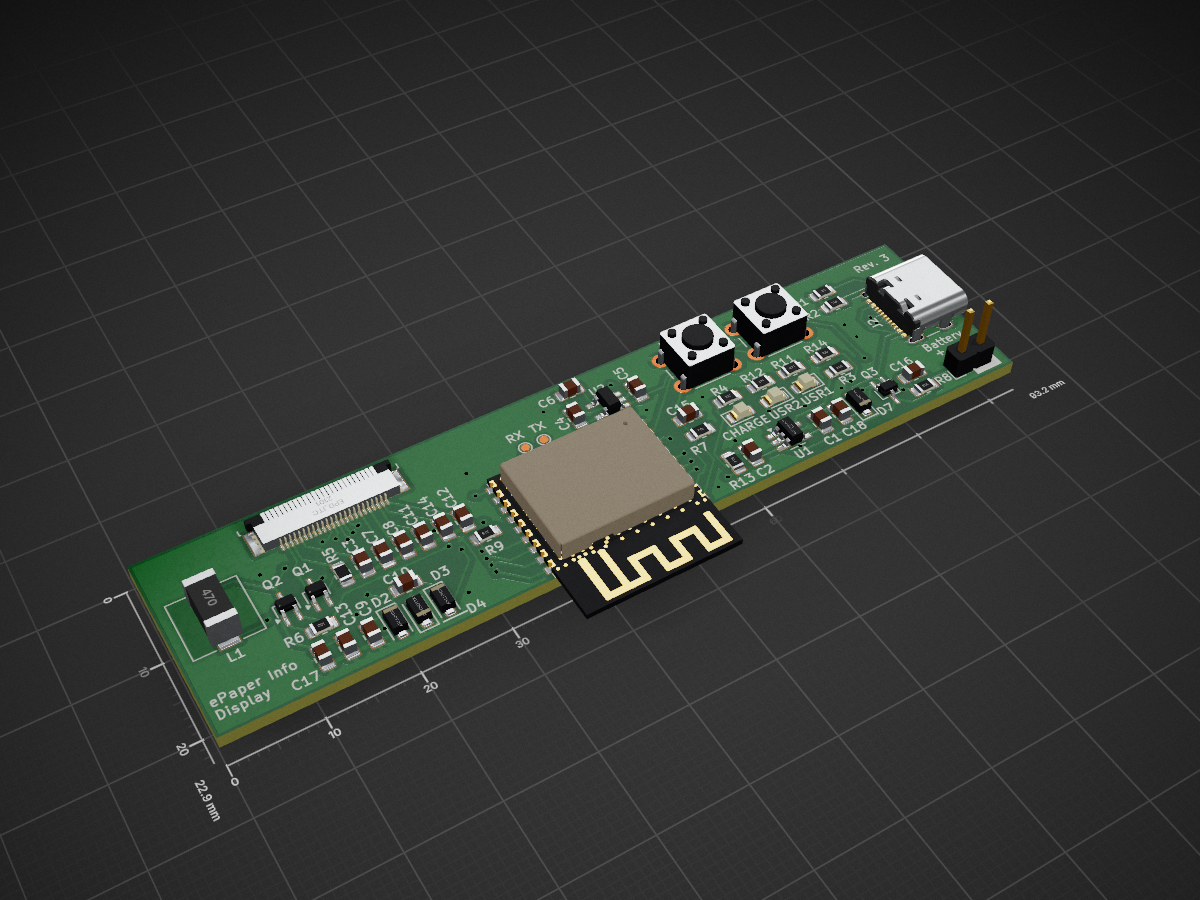
 nrother/ePaperInfoDisplay
A wireless, battery-powered ePaper Display that shows you important information at a glance.
EPaperInfoDisplay is an open-source printed circuit board by nrother, from the nrother/ePaperInfoDisplay repository on GitHub, published under the MIT licence. It is a 2-layer board of 93.2 × 22.9 mm with 52 parts on 48 nets, routed with 409 tracks and 57 vias.
It is built around the ESP32-C3-WROOM-02-H4 and MIC5219-3.3YM5. Its parts include 18 capacitors, 13 resistors, 7 diodes, 3 ICs and 3 transistors. It belongs with the lEDs and displays and power boards and the ESP32 and RISC-V boards of this library.


A wireless, battery-powered ePaper Display that shows you important information at a glance. Inspired by a similiar project by spritesmods.
A 7.4' ePaper Display from PervasiveDisplays is used as the display. It is powered by ESP32-C3 WiFi-enabled microcontroller. The microcontroller wakes up every 24 hours and updates the e-paper display with an 800x480 image downloaded from a server. On the server side, a Python script generates the image, showing a calendar, the weather forecast, and the next appointments.
This repository contains the hardware, firmware and software for the project.
The hardware/ folder contains all schematics and PCB layouts in KiCAD format.
None
The firmware can be found in the firmware/ folder.
It is based on ESPHome.
To get started:
cd firmware/
python3 -m venv .venv
. .venv/bin/activate
pip install -r requirements.txt
cp secrets.example.yaml secrets.yaml
vim secrets.yaml
esphome compile epaperinfodisplay.yaml
esphome upload epaperinfodisplay.yaml
There is a ESPHome-compatible custom component for the e-paper display from Pervasive Displays in esphome/.
This might also be useful outside this project.
The host software is writting in Python using Flask. It must run on some kind of server, like a Raspberry Pi or a NAS.
To get started:
cd software/
python3 -m venv .venv
. .venv/bin/activate
pip install -r requirements.txt
cp config.example.yaml config.yaml
vim config.yaml
flask run --host 0.0.0.0 # make accessible from outside localhost
Weather data is fetched from OpenMeteo.
For this to work you need to specify your location in the config.yaml file.
Calendar appointments are fetched from a CalDAV server.
The example configuration contains the correct path for Baïkal, but any kind of CalDAV server should work.
You might need to find out the correct path for your server.
MIT
| Qty | Value | Footprint | References |
|---|---|---|---|
| 6 | 1uF/25V | Capacitor_SMD:C_0805_2012Metric_Pad1.18x1.45mm_HandSolder | C3, C7, C8, C9, C12, C14 |
| 5 | 10K | Resistor_SMD:R_0805_2012Metric_Pad1.20x1.40mm_HandSolder | R6, R7, R8, R9, R14 |
| 4 | D_Schottky | Diode_SMD:D_SOD-123F | D2, D3, D4, D7 |
| 3 | 1uF | Capacitor_SMD:C_0805_2012Metric_Pad1.18x1.45mm_HandSolder | C5, C15, C18 |
| 3 | LED | LED_SMD:LED_0805_2012Metric_Pad1.15x1.40mm_HandSolder | D1, D5, D6 |
| 2 | 4.7uF | Capacitor_SMD:C_0805_2012Metric_Pad1.18x1.45mm_HandSolder | C1, C2 |
| 2 | 4.7uF/25V | Capacitor_SMD:C_0805_2012Metric_Pad1.18x1.45mm_HandSolder | C10, C13 |
| 2 | 470R | Resistor_SMD:R_0805_2012Metric_Pad1.20x1.40mm_HandSolder | R11, R12 |
| 2 | 5.1k | Resistor_SMD:R_0805_2012Metric_Pad1.20x1.40mm_HandSolder | R1, R2 |
| 2 | Q_PMOS_GSD | Package_TO_SOT_SMD:SOT-323_SC-70_Handsoldering | Q2, Q3 |
| 2 | SW_Push | Button_Switch_THT:SW_PUSH_6mm | SW1, SW2 |
| 2 | TestPoint | TestPoint:TestPoint_Pad_D1.0mm | TP1, TP2 |
| 1 | 0.47uF/25V | Capacitor_SMD:C_0805_2012Metric_Pad1.18x1.45mm_HandSolder | C11 |
| 1 | 0R | Resistor_SMD:R_0805_2012Metric_Pad1.20x1.40mm_HandSolder | R5 |
| 1 | 100K | Resistor_SMD:R_0805_2012Metric_Pad1.20x1.40mm_HandSolder | R13 |
| 1 | 100nF | Capacitor_SMD:C_0805_2012Metric_Pad1.18x1.45mm_HandSolder | C16 |
| 1 | 100nF/16V | Capacitor_SMD:C_0805_2012Metric_Pad1.18x1.45mm_HandSolder | C17 |
| 1 | 1K | Resistor_SMD:R_0805_2012Metric_Pad1.20x1.40mm_HandSolder | R4 |
| 1 | 2.2uF | Capacitor_SMD:C_0805_2012Metric_Pad1.18x1.45mm_HandSolder | C4 |
| 1 | 2k | Resistor_SMD:R_0805_2012Metric_Pad1.20x1.40mm_HandSolder | R3 |
| 1 | 470pF | Capacitor_SMD:C_0805_2012Metric_Pad1.18x1.45mm_HandSolder | C6 |
| 1 | 47uH | Inductor_SMD:L_7.3x7.3_H4.5 | L1 |
| 1 | Conn_01x02_Pin | Connector_PinHeader_2.54mm:PinHeader_1x02_P2.54mm_Vertical | J1 |
| 1 | ESP32-C3-WROOM-02 | Espressif:ESP32-C3-WROOM-02 | 1 |
| 1 | MCP73831-2-OT | Package_TO_SOT_SMD:SOT-23-5_HandSoldering | U1 |
| 1 | MIC5219-3.3YM5 | Package_TO_SOT_SMD:SOT-23-5_HandSoldering | U2 |
| 1 | Q_NMOS_GSD | Package_TO_SOT_SMD:SOT-323_SC-70_Handsoldering | Q1 |
| 1 | USB_C_Receptacle_USB2.0 | Connector_USB:USB_C_Receptacle_GCT_USB4105-xx-A_16P_TopMnt_Horizontal | J2 |
| 1 | ePD_iTC | nr-lib:TE_2-1734592-4_1x24-1MP_P0.5mm_Horizontal | U3 |
Circuit-Digest/MLX90640-Thermal-Camera
An Open Source Thermal Imaging IR camera that you can build yourserlf


relic-se/PicoSynth_Sandbox-hardware
Raspberry Pi Pico digital synthesizer board with I2S stereo audio i/o, MEMS microphones, MIDI i/o, a capacitive keybed, 1602 display, 2 rotary encoders, and LiPo battery. Designed for use with CircuitPython and synthio.

luni64/mmStep
Stepper driver board for the sparkfun MicroMod system. Compatible to DRV8825, A4988 etc.


RavenLRS/Flock
Flock is an inter-craft communication system intended mainly for radio controlled vehicles

It measures 93.2 × 22.9 mm and has 2 copper layers, 1.6 mm thick.
52 parts, built around the ESP32-C3-WROOM-02-H4 and MIC5219-3.3YM5. The full list of its parts is on this page, with links to each part's symbol and footprint where PCBKit's library has them.
From the nrother/ePaperInfoDisplay repository on GitHub, at the commit this page was made from: the board is hardware/ePaperInfoDisplay.kicad_pcb and its schematic hardware/ePaperInfoDisplay.kicad_sch. PCBKit opens the board in the browser, with nothing to install.
Its repository publishes it under the MIT licence: you may reuse it on that licence's terms (keep the author's notice, and for a copyleft licence share your changes alike).