2 layers162.9 × 178.9 mm

 Mvrlex/yet-another-ergo
My first custom ergo unibody keyboard.
Pcb adjusted is an open-source printed circuit board by Mvrlex, from the Mvrlex/yet-another-ergo repository on GitHub, published under the MIT licence. It is a 2-layer board of 274.8 × 109.7 mm with 81 parts on 62 nets, routed with 601 tracks and 2 vias.
Its parts include 40 diodes and 40 switches. It belongs with the keyboards and input boards of this library.
The climax of my split custom keyboard journey. My own custom ergo unibody keyboard. Inspired by the Cantor and Kaly.
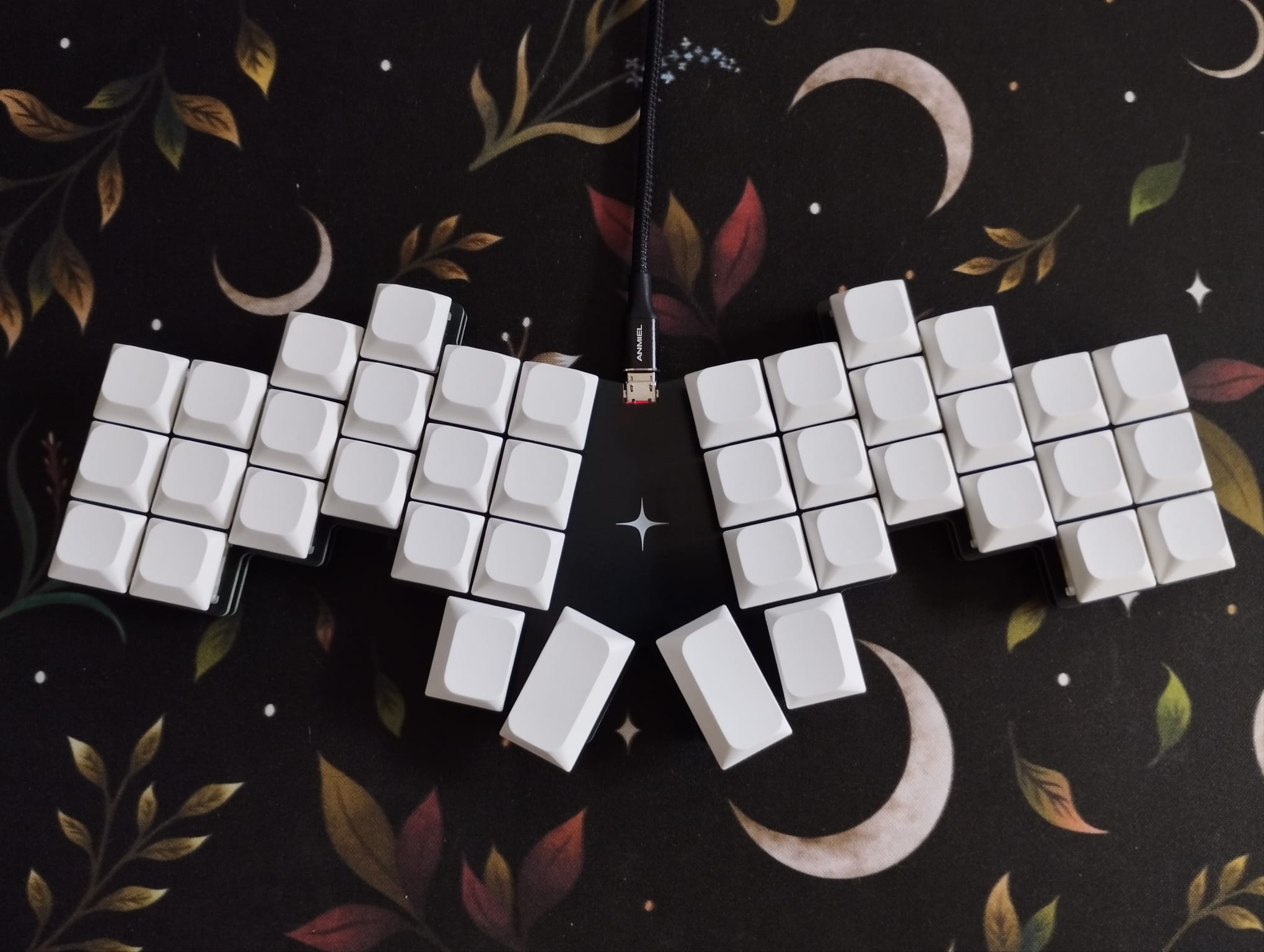
Thanks to FlatFootFox. Without your blog series this would not have been possible.
I created this because I wasn't really satisfied with the available offerings, the closest thing to what I wanted was a Cantor, which I have built, but I wanted to try an even more aggressive stagger, which spurred the creation of yet-another-ergo keyboard.
Working on this was really fun. From designing the board, to creating the PCB and assembling it. Funnily enough the programming part, which I should have been most familiar with, was the most frustrating part. I found a lot of conflicting information online about how to set QMK up and how to use it. It seemed like there is a dozen ways to do the same thing, and using one breaks the other. The minimalist examples didn't really help either. I think I get how QMK works now, but in the end I gave up on creating my keymap in code, and simply used Vial (because Via can't do Tap-Dances?) to set it up. That's why the keymap.json is so barren :D
I like mechanical keyboards, and I like modding and customizing them. After finding my favorite TKL-ish keyboard, the Akko 5075, I started noticing that I made a lot of mistakes when typing. So I set out to learn touch typing. Which was fine, but I soon learned that my hands were not really the problem, but the keyboard layout. The german QWERTZ layout absolutely sucks for programming, pretty much all the symbols are hard to reach and require a modifier key.
I then found Ben Vallacks YouTube channel, and
fell down the rabbit hole of split keyboards. They looked sick, and promised all these
benefits, but they also were incredibly expensive So I went all in and built myself a
Cheapino.
I loved it. Ortholinear keys for sensible finger movements, split design for better
ergonomics, and a thumb cluster to use the thumbs a bit more. However, after trying to use
it for programming I realized that I'm missing a few keys, and the numbers were hard to
type.
So next up was the Silakka54. This is
where I stayed a bit and learned what I liked and what I didn't like. I definitely wanted
a more aggressive stagger, a more compact layout for less finger travel, and a thumb
cluster that did not break my wrists when using it (seriously, wtf). I also would like
for the keyboard to look nice.
This is when I started looking for the perfect keyboard for me, and honestly, the closest thing I found was Kaly a derivative of the Cantor, but I didn't really like the design, I didn't want another split, and I wanted a smaller thumb cluster. So at that point why not just design my own?
No.
After starting the journey of creating my own keyboard I realized that I would not be able to achieve my initial goal of making less mistakes with such a keyboard. Maybe after years of use and a lot of fine-tuning.
I think I will stick with what I have for now. I will try to get used to it. If I can't, I will either go back to my lovely TKL or I will build another custom keyboard similar to the X-Bows Ergo, which I think is a pretty good compromise.
Thank you for reading this far. If you liked my little ramble, please consider starring the project. I do need me some of that internet clout ;)
| Qty | Value | Footprint | References |
|---|---|---|---|
| 40 | ComboDiode | D1, D2, D10, D11, D12, D13, D14, D15, D16, D17, D18, D19, D20, D21, D22, D23 +24 | |
| 40 | MX | S1, S2, S10, S11, S12, S13, S14, S15, S16, S17, S18, S19, S20, S21, S22, S23 +24 | |
| 1 | ProMicro | MCU1 |
It measures 274.8 × 109.7 mm and has 2 copper layers, 1.6 mm thick.
81 parts. The full list of its parts is on this page, with links to each part's symbol and footprint where PCBKit's library has them.
From the Mvrlex/yet-another-ergo repository on GitHub, at the commit this page was made from: the board is pcb/pcb-adjusted.kicad_pcb. PCBKit opens the board in the browser, with nothing to install.
Its repository publishes it under the MIT licence: you may reuse it on that licence's terms (keep the author's notice, and for a copyleft licence share your changes alike).

slu4coder/Minimal-UART-Computer-1-2
Legacy: Version 1 and 2 of my TTL-only CPU featuring UART I/O, an expansion port, 512KB SSD at up to 10MHz clock speed


zynthian/zynthian-hw
Zynthian hardware stuff: PCBs, schemes, parts specifications, pin assignment, ...


BerkeleyHCI/PolymorphicBlocks
A Python-based hardware description language for PCBs for higher-level (block-diagram / system-architecture level) PCB design through libraries of directly reusable subcircuit generators.

ChrisChrisLoLo/idawgz32
A full 32 key mechanical keyboard that can be made for only $5