A simple one-layer PCB "drawer": read a KiCad board, extract the copper traces, and turn them into travel-optimized G-code you can plot on a pen-plotter / small CNC driven by a microcontroller (GRBL — an Arduino running…
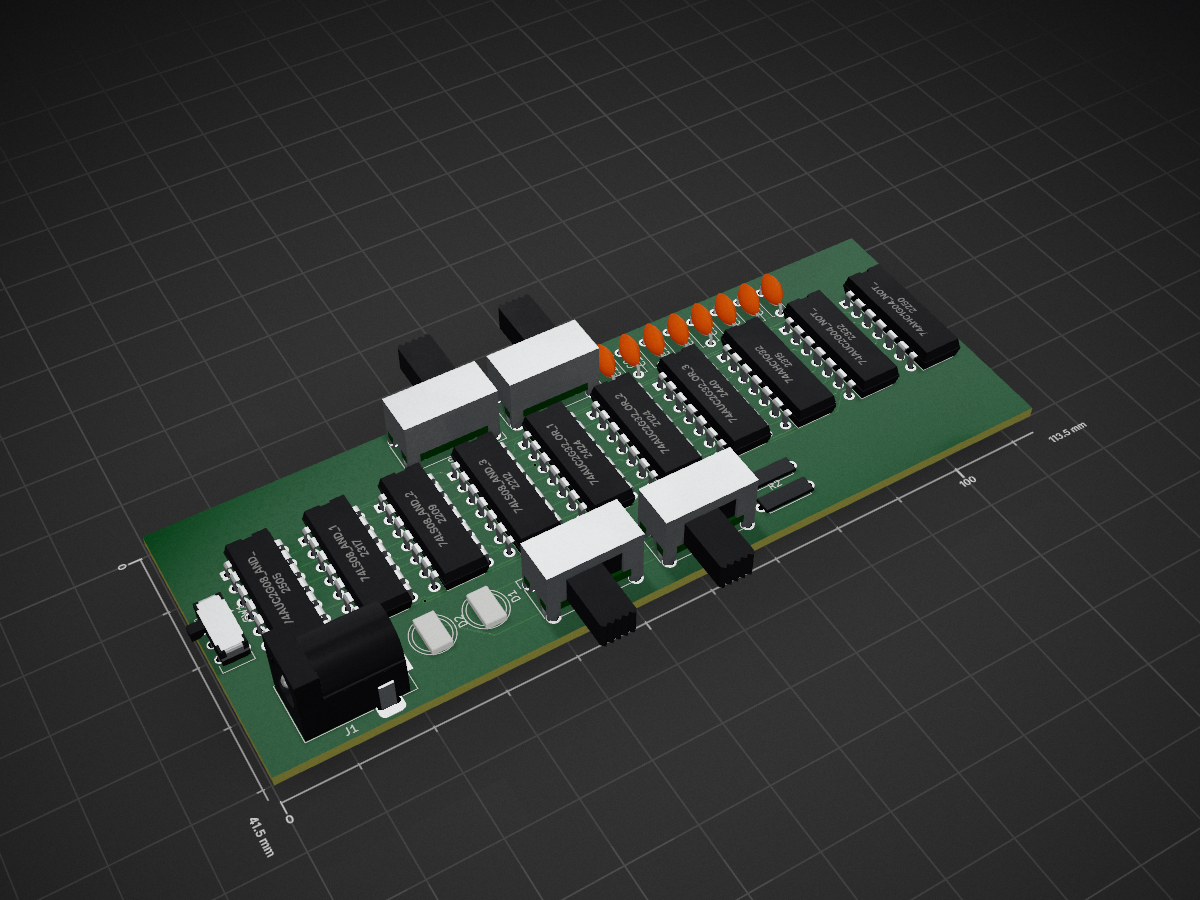
LabExam is an open-source printed circuit board by moi-script, from the moi-script/pcb_ui repository on GitHub. It is a 2-layer board of 113.5 × 41.5 mm with 28 parts on 33 nets, routed with 352 tracks and 7 vias.
It is built around the 74AHC1G32GW. Its parts include 10 ICs, 8 capacitors, 5 switches, 2 resistors and 2 diodes.
A simple one-layer PCB "drawer": read a KiCad board, extract the copper
traces, and turn them into travel-optimized G-code you can plot on a
pen-plotter / small CNC driven by a microcontroller (GRBL — an Arduino running grbl_servo_z).
Aimed at hobby / student mini projects, not professional copper milling.
Pipeline
text
labExam.kicad_pcb
  → pcb_read.py          parse (custom s-expression parser; supports KiCad 10)
  → pcb_draw.py          board preview by copper layer  (labExam_wiring.png)
  → pcb_gcode.py         travel-optimized G-code         (labExam.gcode)
  → pcb_gcode_preview.py verify toolpath, no hardware     (labExam_toolpath.png)
  → pcb_send.py          stream to GRBL over USB serial (--check to validate)
  → Arduino running GRBL 1.1, over USB
pcb_send.py is the CLI streamer and is not what the web app uses. The API
owns the serial port itself:
text
grbl/        the GRBL 1.1 stack: protocol codec, port enumeration, the
             flow-controlled streamer thread, machine state, travel limits,
             and a simulator good enough to develop against
machine.py   the one process-wide Session that owns the port
job.py       streams one board's G-code, with progress, pause, stop
Run
bash
python main.py                # run the whole pipeline, step by step
python main.py --skip-preview # ... without the matplotlib image steps
Each stage also runs on its own — see DOCS.md for full
documentation, status, and roadmap, and HARDWARE.md for the
plotter build (parts list, flashing steps, starter config).
Web API + database (server side of the UI)
server.py is a FastAPI app that wraps this pipeline for the web UI in
../userpage, and drives the machine. It parses uploaded boards, generates
G-code, and stores accounts and routed boards in MongoDB
(mongodb://localhost:27017, database traceworks).
bash
pip install -r requirements.txt
uvicorn server:app --reload --port 8000# needs a local MongoDB
TRACEWORKS_SIM=1 uvicorn server:app --reload --port 8000# ...and no hardware
Board and account endpoints: POST /route (upload a .kicad_pcb → parsed +
routed board), POST /trace (an image → a pen path), /auth/signup ·
/auth/login, /boards/{email}, /board/{id}.
Machine endpoints — the backend runs on the same PC as the browser, so it, not
the tab, owns the COM port:
Endpoint
What it does
GET /machine/ports
serial ports with chip names; suggested only when exactly one candidate exists
POST /machine/connect
{port, baud, email?} → the firmware banner
POST /machine/disconnect
GET /machine/state
the machine snapshot: state, mpos, wpos, job progress
GET /machine/last
?email= → the last port and baud used, or null
WS /machine/ws
the same snapshot pushed at up to 10 Hz, plus console lines
POST /machine/jog
{axis, distance, feed}; refused with the axis named if it would leave the envelope
POST /machine/jog/cancel, /home, /unlock
POST /machine/zero
{axes} — set work zero on X, Y, Z or any combination
POST /machine/command
{line} — one raw line; realtime characters are routed as realtime
POST /machine/estop
realtime soft reset; returns instantly, never waits on the link
POST /machine/run
{board_id, check} — stream a stored board; check brackets it with $C
POST /machine/pause, /resume, /stop
See server.py for the full list and db.py for the Mongo connection. The
reusable entry point is pcb_read.extract_wiring(text).
Requirements
Python 3 and matplotlib for the CLI pipeline. The web API also needs
fastapi, uvicorn, python-multipart, and pymongo (all in
requirements.txt), plus a running MongoDB. (kiutils is intentionally not used —
it does not support the KiCad 10 file format.)
See ../RUNNING.md for running this together with the
frontend in ../userpage.
It measures 113.5 × 41.5 mm and has 2 copper layers, 1.6 mm thick.
What parts does the LabExam use?
28 parts, built around the 74AHC1G32GW. The full list of its parts is on this page, with links to each part's symbol and footprint where PCBKit's library has them.
Where can I download the LabExam KiCad files?
From the moi-script/pcb_ui repository on GitHub, at the commit this page was made from: the board is serverside/labExam.kicad_pcb. PCBKit opens the board in the browser, with nothing to install.
Can I use the LabExam design in my own project?
Its repository states no licence, so its author keeps all rights: ask moi-script before reusing the design.
A simple one-layer PCB "drawer": read a KiCad board, extract the copper traces, and turn them into travel-optimized G-code you can plot on a pen-plotter / small CNC driven by a microcontroller (GRBL — an Arduino running…
A simple one-layer PCB "drawer": read a KiCad board, extract the copper traces, and turn them into travel-optimized G-code you can plot on a pen-plotter / small CNC driven by a microcontroller (GRBL — an Arduino running…
Elixpo’s canonical collection for public build-and-release Chapters, bringing open-source software, reproducible research, hardware, and community contributions into one attributable record.
Update Firmware: Select + Start + Up + Plug in USB | Mode | Button Combo | | --- | --- | | Nintendo Switch Mode | B + Plug in USB | | Xinput | A + Plug in USB |