6 layers56 × 56 mm
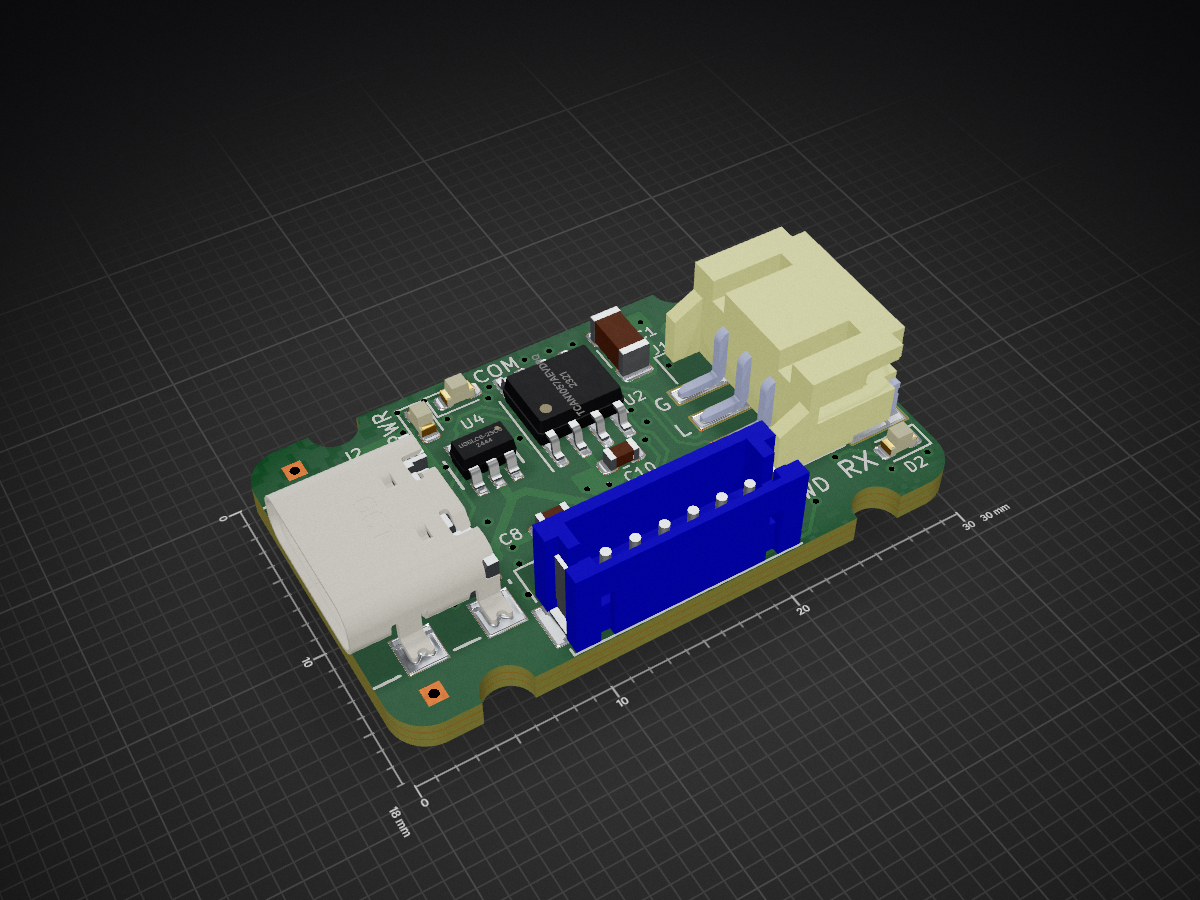
 mjbots/fdcanusb42
fdcanusb adapter
Fdcanusb is an open-source printed circuit board by mjbots, from the mjbots/fdcanusb repository on GitHub, published under the Apache-2.0 licence. It is a 4-layer board of 30 × 18 mm with 36 parts on 62 nets, routed with 373 tracks and 66 vias.
It is built around the STM32G474CEU6, TCAN1057AEVDRQ1 and TLP3317(TP15,F, with the USBLC6-2SC6, B6B-ZR-SM4-TF(LF)(SN) and S3B-PH-SM4-TB(LF)(SN) among its other parts. Its parts include 13 capacitors, 8 resistors, 5 ICs, 5 connectors and 4 diodes. It belongs with the interfaces and adapters boards and the STM32 boards of this library.


The mjcanfd-usb-1x and fdcanusb provide access to a CAN-FD bus using a USB 2.0 full speed connection. They present two possible interfaces:
gs_usb interface compatible with the Linux kernel gs_usb socketcan driverThe designs and firmware are licensed under the Apache 2.0 License.

Pre-assembled hardware can be purchased at https://mjbots.com/products/fdcanusb
To use a device with moteus tools or libraries, first install the relevant udev rule following the instructions in the top of the file:
Second, just use the application. moteus utilities like
moteus_tool, tview, and the python and C++ libraries will
automatically discover any connected devices and use the CDC protocol.
Each command or response is a single newline terminated line, composed
of 7-bit ASCII encoded characters. Every command sent from the client
to the device has a response which consists of an optional command
specific response followed by a final line consisting solely of OK or
ERR <details>.
The device can be in one of two states.
Bus Off: This is the initial state of the device. In this state, no frames may be sent or received, but the device may be configured.
Bus On: In this state frames may be sent and received, but configuration is locked out.
Sample commands are prefixed with > to show the data sent from the
client to the device and < to show the values sent from the device
to the client. Those characters are for illustrative purposes only,
and are not present in actual communications.
The "conf" command is used to read and set configuration values. It has several subcommands.
This emits all current configuration values one after another.
This queries the value of one specific configuration item.
>conf get sample.value
<31235
<OKThis sets the value of one specific configuration itme.
>conf set sample.value 1234
<OKThis loads all persistent configuration from the persistent storage.
>conf load
<OKThis stores all configuration values to persistent storage. They will then be the default when the device is powered on the in the future.
>conf write
<OKReset all configuration values to their "default" state.
>conf default
<OKEnter the "Bus On" state. All configurable values are validated and put into place. This results in an error if the device is already in the "Bus On" state.
Enter the "Bus Off" state. Transmission and reception of CAN messages is halted, and configurable values may be changed.
Send a standard CAN frame. The following format is used.
can std <HEXID> <HEXDATA> <options>
options may be zero or more of the following optionally separated by
spaces.
Send an extended CAN frame. The following format is used.
can ext <HEXID> <HEXDATA> <options>
The allowable options are the same as for can std.
Just like std or ext, but auto-detect the ID type.
Report the current mode and status of various flags.
>can status
<mode:BUSON
<OKWhen in the "Bus On" state, the device may spontaneously emit the following lines upon receipt of valid CAN frames or other errors.
A CAN frame has been received.
<rcv <HEXID> <HEXDATA> <flags>flags may be zero of more of the following separated by spaces:
The following items may be configured.
can.bitrate - The bitrate used for the CAN frame (or header only if bitrate switching is used.
can.fd_bitrate - The bitrate used for the data and CRC field when bitrate switching is used.
can.sample_point - The sample point for the nominal part of the CAN frame. moteus requires 0.666, some other systems default to 0.75, 0.8, or 0.87.
can.fd_sample_sample - The sample point for the data (BRS) part of the CAN frame. moteus requires 0.666, other systems may require alternate settings.
can.automatic_retransmission - When true/non-zero, frames will be retried until acknowledged.
can.fdcan_frame - By default, send frames in FDCAN mode
can.bitrate_switch - By default, switch to the can.fd_bitrate
for the data and CRC fields.
can.restricted_mode - Only transmit acknowledgements.
can.bus_monitor - Transmit nothing.
can.termination - Enable the onboard terminator
can.autostart - Enter BusOn immediately at power-on
can.autorecover - Automatically recover from bus off events
can.global.std_action
can.global.ext_action
can.global.remote_std_action
can.global.remote_ext_action
can.filter.N.id1 - first ID
can.filter.N.id2 - second ID or bitmask
can.filter.N.mode
can.filter.N.type
can.filter.N.action
To use the device with a socketcan driver on Linux, the normal socketcan utilities can be used. For instance, to bring up an interface compatible with moteus (not usually required because moteus tools and libraries will by default use the CDC interface), you would do:
ip link set can0 up type can \
  bitrate 1000000 dbitrate 5000000 \
  sjw 10 dsjw 5 \
  sample-point 0.666 dsample-point 0.666 \
  fd on
Then, all messages received can be displayed with:
candump can0To build the firmware on an Ubuntu 22.04 or newer system.
sudo apt install curl openocd
./tools/bazel build //...
To flash:
./flash.py| Qty | Value | Footprint | References |
|---|---|---|---|
| 8 | 0.1uF | Capacitor_SMD:C_0603_1608Metric | C2, C4, C6, C7, C8, C9, C10, C12 |
| 4 | 220 | Resistor_SMD:R_0603_1608Metric | R5, R6, R7, R8 |
| 3 | 1uF | Capacitor_SMD:C_0603_1608Metric | C5, C11, C13 |
| 3 | Conn_01x01 | TestPoint:TestPoint_THTPad_1.0x1.0mm_Drill0.5mm | J3, J4, J5 |
| 2 | 5.1k | Resistor_SMD:R_0603_1608Metric | R3, R4 |
| 2 | GREEN | LED_SMD:LED_0603_1608Metric | D1, D3 |
| 2 | RED | LED_SMD:LED_0603_1608Metric | D2, D4 |
| 1 | 10uF | Capacitor_SMD:C_1206_3216Metric | C1 |
| 1 | 110 | Resistor_SMD:R_1206_3216Metric | R2 |
| 1 | 330 | Resistor_SMD:R_0603_1608Metric | R1 |
| 1 | 4.7uF | Capacitor_SMD:C_0603_1608Metric | C3 |
| 1 | B6B-ZR-SM4-TF(LF)(SN) | fdcanusb:B6B-ZR-SM4-TFLFSN | SWD1 |
| 1 | Conn_01x03 | fdcanusb:JST_S3B-PH-SM4-TB(LF)(SN) | J1 |
| 1 | STM32G474CEU6 | fdcanusb:UFQFPN-48_7X7X0P55MM | U1 |
| 1 | TCAN1057AEVDRQ1 | fdcanusb:SOIC-8_3.9x4.9mm_P1.27mm | U2 |
| 1 | TLP3317 | fdcanusb:TLP3317 | U3 |
| 1 | TLV70233DSER | fdcanusb:DSE0006A | U5 |
| 1 | USB4110-GF-A | fdcanusb:USB4110-GF-A_GCT | J2 |
| 1 | USBLC6-2SC6 | fdcanusb:SOT23-6L_STM | U4 |
It measures 30 × 18 mm and has 4 copper layers, 1.6 mm thick.
36 parts, built around the STM32G474CEU6, TCAN1057AEVDRQ1, TLP3317(TP15,F and USBLC6-2SC6. The full list of its parts is on this page, with links to each part's symbol and footprint where PCBKit's library has them.
From the mjbots/fdcanusb repository on GitHub, at the commit this page was made from: the board is hw/fdcanusb.kicad_pcb and its schematic hw/can.kicad_sch. PCBKit opens the board in the browser, with nothing to install.
Its repository publishes it under the Apache-2.0 licence: you may reuse it on that licence's terms (keep the author's notice, and for a copyleft licence share your changes alike).


RSXLX/sunny-the-growing-sunflower-lamp
SUNNY — The Growing Sunflower Lamp | A personal lamp with customizable exteriors, traceable fabrication, and a local creative workspace.

CornellMarsRover/KiCad
This folder serves as the central repository for all KiCad PCB designs across multiple years. Each subfolder corresponds to a specific design cycle and contains all associated board files, schematics, and documentation.


