Skip to the content
PCBKitNew board
2 layersPlace footprints test ref linear flipped, the printed circuit board in 3D

Place footprints test ref linear flipped

MitjaNemec/PlaceFootprints52

This plugin will place footprints with the following geometry:

Copper layers
2
Thickness
1.6 mm
Parts
66
Nets
130
Pads
130
Tracks, vias
0, 0
Routed
Not yet
KiCad
KiCad 7.99 (file 20231231)
Created
14 Jan 2022
Updated
8 Apr 2026

Overview

Place footprints test ref linear flipped is an open-source printed circuit board by MitjaNemec, from the MitjaNemec/PlaceFootprints repository on GitHub, published under the GPL-2.0 licence. It is a 2-layer board with 66 parts on 130 nets.

README

README.md

KiCad Place Footprints plugin

This plugin will place footprints with the following geometry:

  • in a line (Linear)
  • in square matrix (Matrix)
  • around a circle (Circular)

Apart from the pattern, there are two main ways to use the plugin. The components for placement are selected either by consecutive reference numbers or by the same ID on different hierarchical sheets.

Installation

The preferred way to install the plugin is via KiCad's PCM (Plugin and Content Manager). Installation on non-networked can be done by downloading the latest release and installing in with PCM with Install from file option

Basic Use

Consecutive Reference Numbers

If you want to place the footprints by consecutive reference numbers within a sheet, you have to:

  • select a footprint which is first in the sequence to be placed
  • run the plugin (Tools/External Plugins/Place Footprints)
  • select Reference nr
  • select which parts to place by their reference number
  • choose which footprint in the sequence you want to place
  • select the arrangement (linear, matrix, circular)
  • select place dimension (step in x and y axes in linear and matrix mode and angle step and radius in circular mode)
  • run the plugin (click Ok)

Equivalent Parts in Hierarchical Sheets

If you want to place the footprints by same ID across hierarchical sheets of the same level, you have to:

  • select a footprint which is first in the sequence to be placed
  • run the plugin (Tools/External Plugins/Place Footprints)
  • select Sheet nr
  • select the hierarchical level by which the footprints will be placed (in complex hierarchies) from the top box of the window
  • choose from which sheets you want the footprints to place from the next box down
  • select the arrangement (linear, matrix, circular)
  • select place dimension (step in x and y axes in linear and matrixc mode and angle step and radius in circlar mode)
  • optionally set additional rotation of every n-th footprint (useful in matrix layout if you need to rotate footprint in every other row to ease layout)
  • run the plugin (click Ok)

Visual Examples

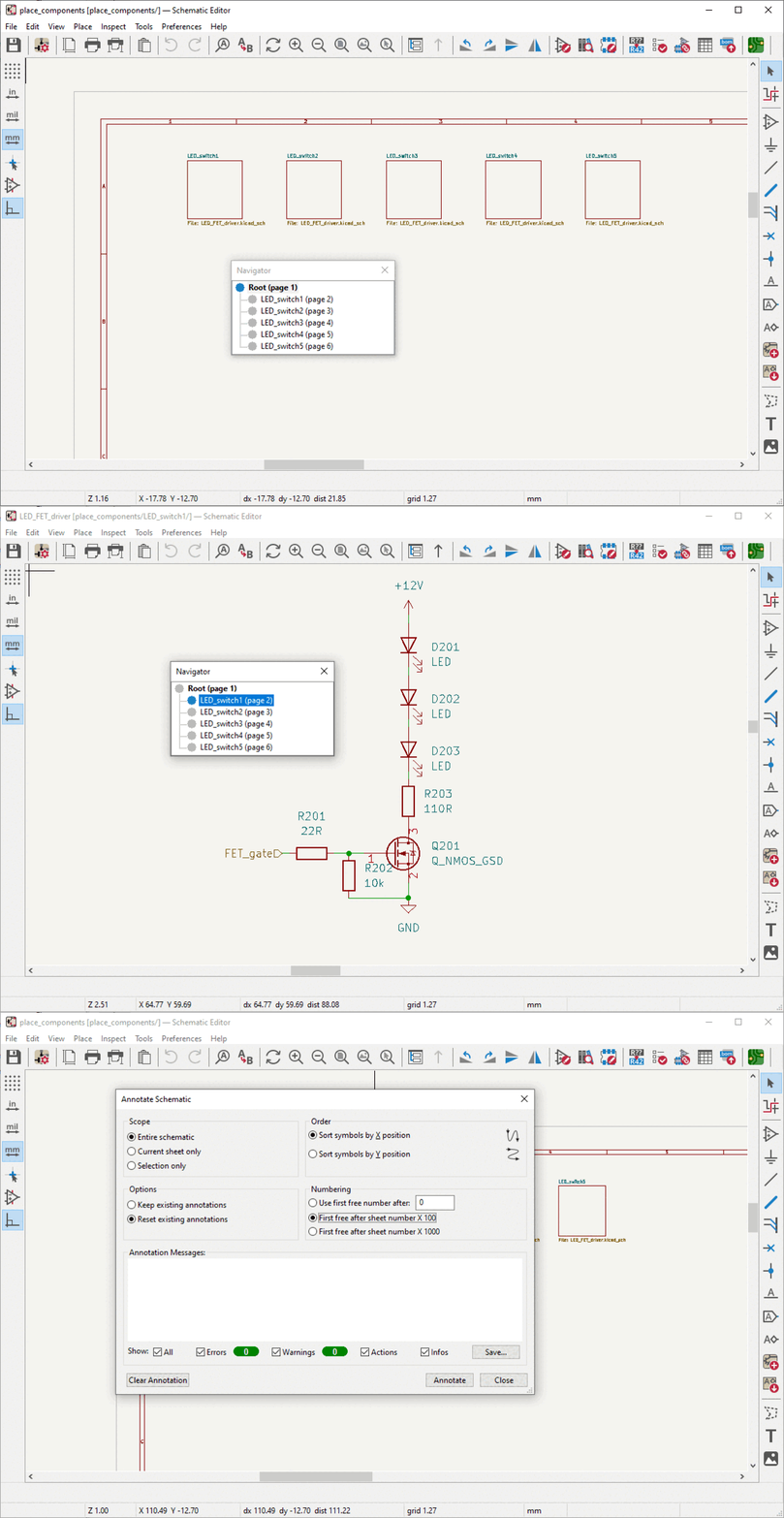
Schematic used in examples

Example of a basic hierarchical schematic

Hierarchical Schematic

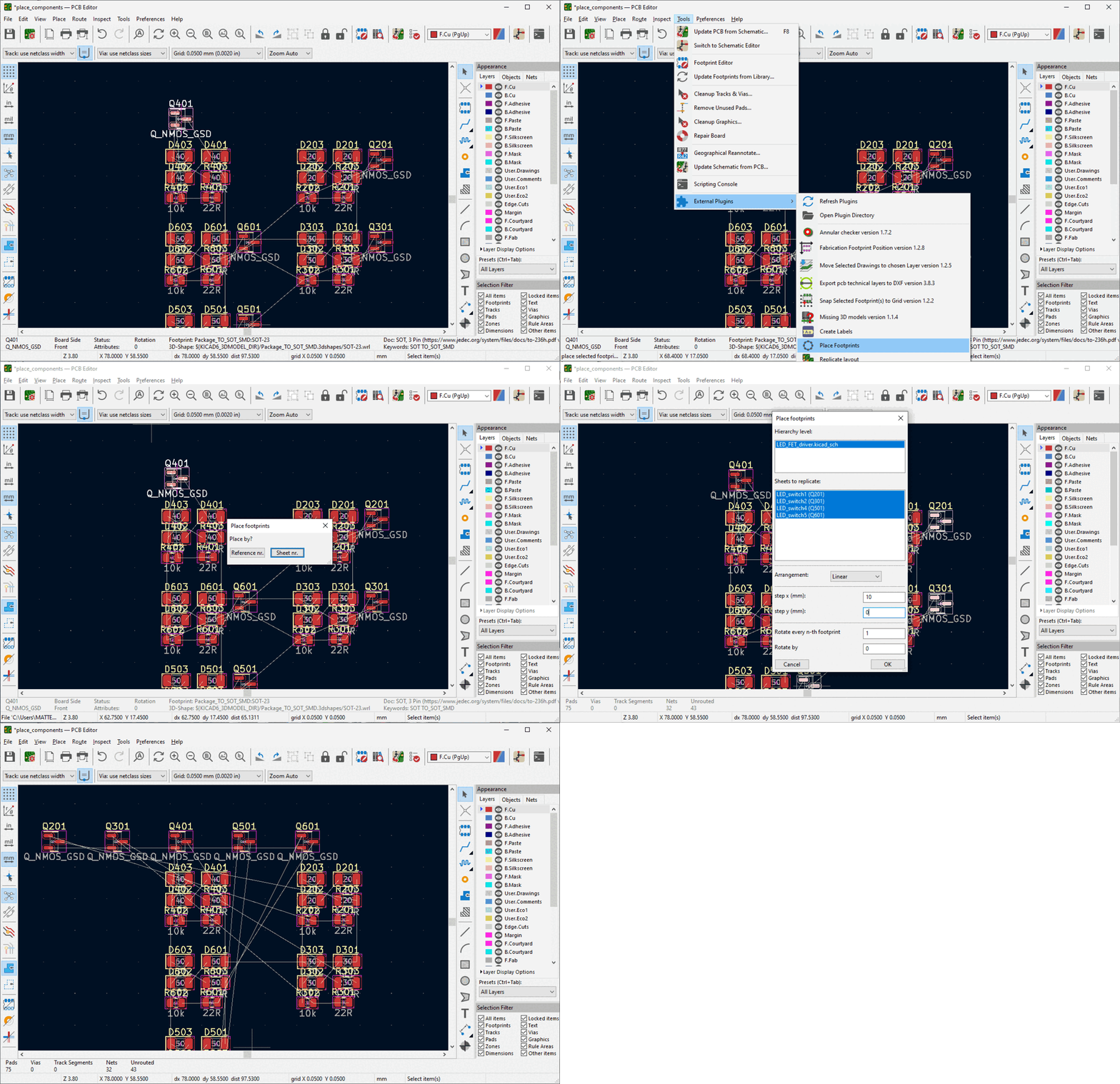
Place by Sheet

Example of placing the MOSFET from each sheet in a linear placement

Place by sheet ID

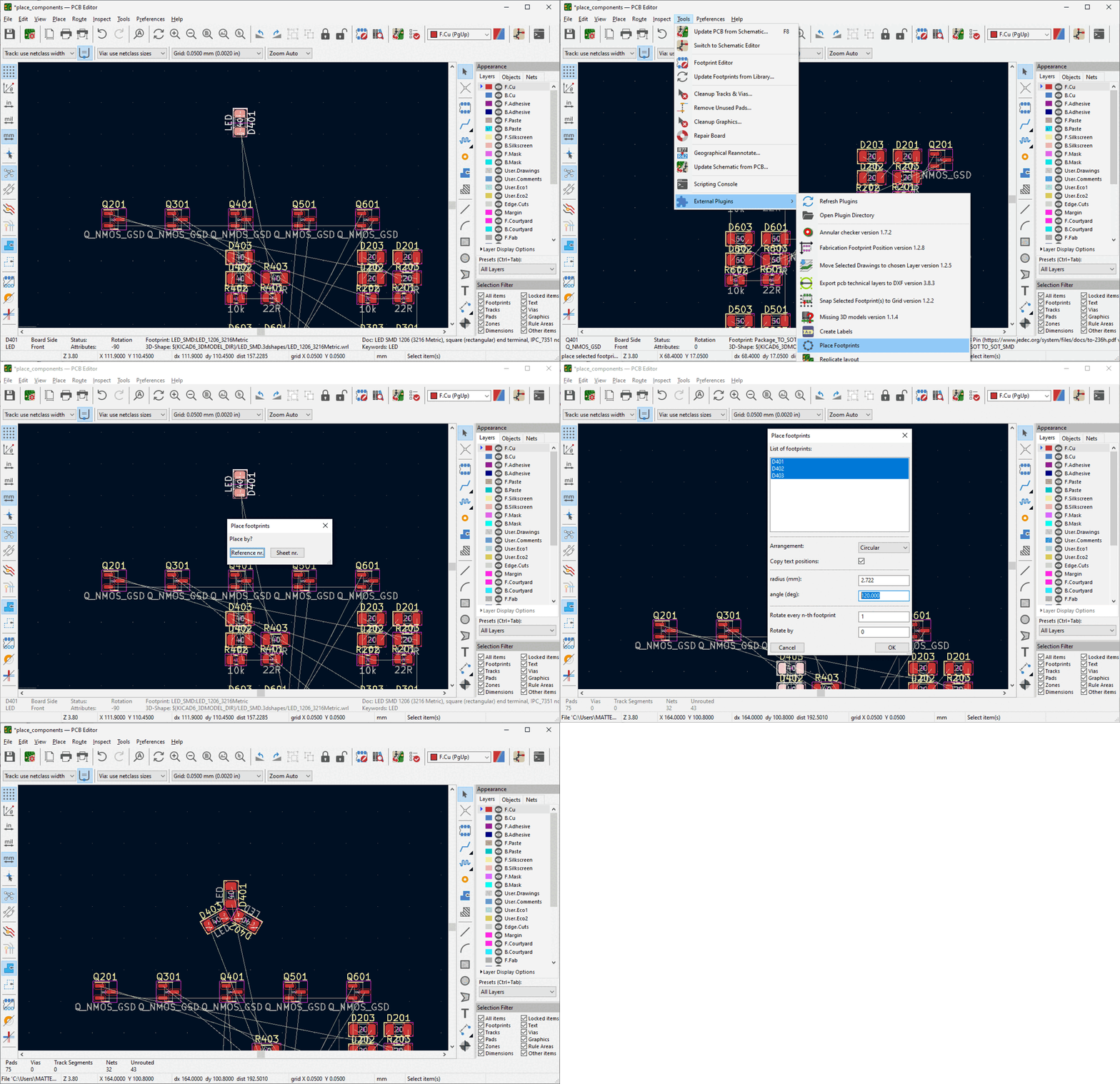
Place by Reference

Example of placing the LEDs from a single sheet in a circular placement

Place by reference number

Notes

  • As seen in the MOSFET example above, you don't need to pick the first item in a pattern but remember that all the other items will be referenced to it. It is usually easier to start by placing the first (lowest numbered / annotated) component first.
  • If you have a crash with the plugin, you should find a log file in your KiCad project's folder. Please submit it with any issues you open here.
  • There isn't currently an icon for this plugin on the toolbar for the PCB Editor. You need to access it from Tools/External Plugins/Place Footprints.

Author : doc.dr. Mitja Nemec

Date : 2026

Parts

66
QtyValueFootprintReferences
65RResistor_SMD:R_1206_3216MetricR101, R201, R202, R203, R204, R205, R206, R207, R208, R301, R302, R303, R304, R305, R306, R307 +49

The 65 most common of 66 parts.

Questions

What parts does the Place footprints test ref linear flipped use?

66 parts. The full list of its parts is on this page, with links to each part's symbol and footprint where PCBKit's library has them.

Where can I download the Place footprints test ref linear flipped KiCad files?

From the MitjaNemec/PlaceFootprints repository on GitHub, at the commit this page was made from: the board is place_footprints_test_projects/place_footprints_test_ref_linear_flipped.kicad_pcb and its schematic place_footprints_test_projects/Sheet.kicad_sch. PCBKit opens the board in the browser, with nothing to install.

Can I use the Place footprints test ref linear flipped design in my own project?

Its repository publishes it under the GPL-2.0 licence: you may reuse it on that licence's terms (keep the author's notice, and for a copyleft licence share your changes alike).

Similar boards

  • 2 layers126.5 × 83 mmPcb pro controller, the printed circuit board in 3D

    Pcb pro controller

    hackclub/OnBoard

    💡 Join 1,000 teenagers and make your first PCB with a $100 grant!

    66 parts915
  • 2 layers94.6 × 46.1 mmHeaterMeterPI, the printed circuit board in 3D

    HeaterMeterPI

    CapnBry/HeaterMeter

    HeaterMeter and LinkMeter Arduino BBQ Controller

    66 parts557MIT
  • 2 layers56.9 × 35.2 mmAmoeba tp, the printed circuit board in 3D

    Amoeba tp

    mtl/keyboard-pcbs

    Keyboard PCBs

    66 parts485
  • 2 layers82 × 120 mmSample Numeric Keyboard, the printed circuit board in 3D

    Sample Numeric Keyboard

    famichu/MagLev_Switch_MX

    The 3D printable magnetic levitation contactless switch with the linear output hall effect sensor.

    66 parts467
  • 2 layers136.8 × 98.6 mmHillside, the printed circuit board in 3D

    Hillside

    mmccoyd/hillside

    Family of split ergonomic keyboards with three rows of six or five keys and a generous thumb arc

    66 parts448MIT
  • 2 layers115.7 × 95.7 mmFifi split keeb, the printed circuit board in 3D

    Fifi split keeb

    raychengy/fifi_split_keeb

    Fifi Keyboard 🐶 ⌨️

    66 parts334
  • 2 layers95.2 × 57.2 mmDomesdayDuplicator, the printed circuit board in 3D

    DomesdayDuplicator

    Domesday86/DomesdayDuplicator

    High-speed LaserDisc RF sampler

    66 parts325GPL-3.0
  • 2 layers96.5 × 66 mmBumperDuino, the printed circuit board in 3D

    BumperDuino

    Ardumower/ardumower

    Develop an open source robotic lawn mower (HW+SW reference platform)

    66 parts282