2 layers121.5 × 136.5 mm

 milesmuehlbach/keyboard
my keyboard
Keyboard is an open-source printed circuit board by milesmuehlbach, from the milesmuehlbach/keyboard repository on GitHub. It is a 2-layer board of 381 × 104.8 mm with 155 parts on 102 nets, routed with 591 tracks and 3 vias.
Its parts include 74 switches and 68 diodes. It belongs with the keyboards and input boards and the RP2040 boards of this library.
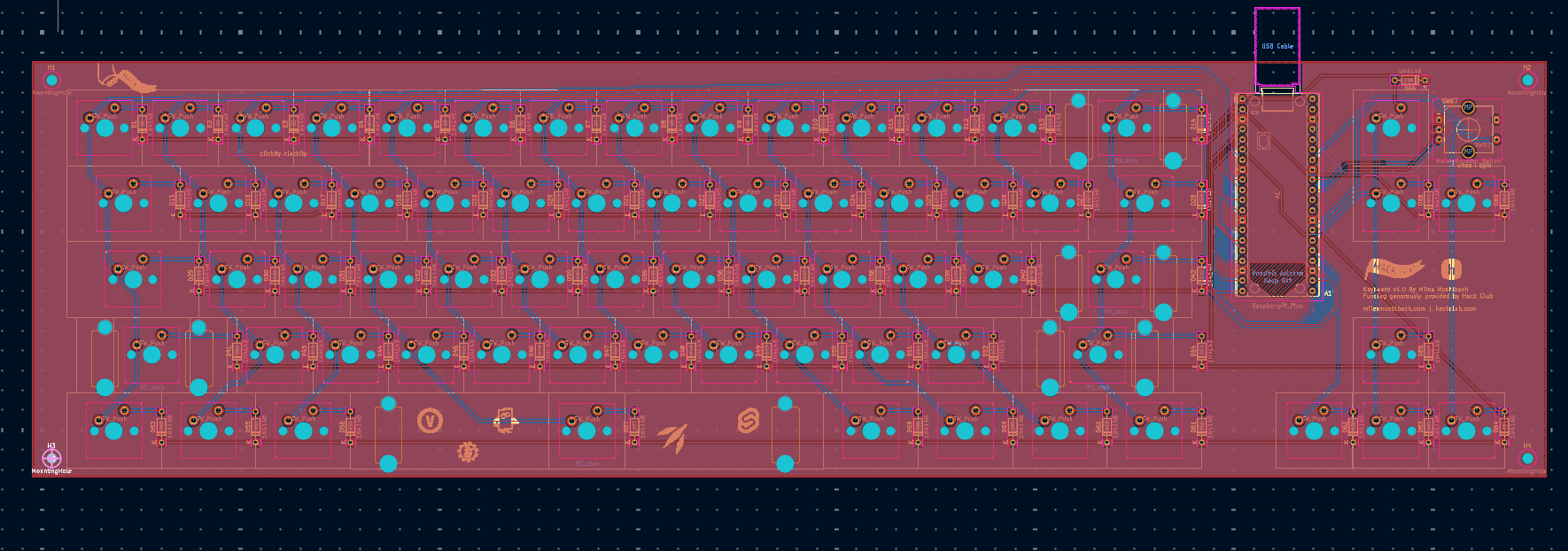
A mechanical keyboard, designed by me, using keeb's tutorial (for basic overview and guidance; once I knew the general direction to take each step it was mostly independent). Mx style switches, in a slightly-larger-than 60% layout, designed with a select few extra keys I deemed important. Additionally features a rotary encoder for volume & media playback.
I built this project because I wanted a good project to get into hardware/pcb design and all of the projects I'd previously thought of were too basic to waste the money + resources on making them real. Someone I knew had done some sort of custom keyboard, but I think it was moreso a scenario of him buying the pcb and the switches and just putting em together, etc, but I thought it was really cool to make your own keyboard so it was kind of in the back of my mind. Either way, I needed a mechanical keyboard and after realizing that it was somewhat attainable I set off to it. I'd messed with KICAD before in the past so I knew that was the way to go, and I was having trouble running fusion on my laptop so onshape it is!
I'm using RMK for firmware, located in firmware/
I built the PCB in KICAD, which is in pcb/
you can also find step files and other various models in
3dmodels/
Make sure the rust toolchain is installed. Install the compilation target for your microcontroller; in our case it's a pi pico 1 so it'll be thumbv6m-none-eabi
Install rmk deps:
cargo install rmkit
cargo install flip-link cargo-make
The firmware is already configured for this specific board layout and pinout, etc.
Build firmware with
cargo make uf2 --releaseYou'll find the compiled uf2 (which can be loaded normally to the pi pico) at target/thumbv6m-none-eabi/release/*.uf2
BOM: BOM.csv, or view it below:
| Item | Price |
|---|---|
| PI Pico Starter Kit | $9.45 |
| PCB (jlcPCB) | $23.30 |
| EC11 Rotary Encoder | $1.99 |
| Through-hole 1N4148 Diodes (100-pack) | $2.99 |
| MX Plate Mount Stabilizers | $9.99 |
| DSA Keycap set | $22.50 |
| Cherry MX Tactile Brown RGB GEN 2 switches (2 packs) | $39.98 |
| M3 brass heat-set inserts (3 mm long; 50-pack) | $5.95 |
| Subtotal | $116.15 |
| Qty | Value | Footprint | References |
|---|---|---|---|
| 68 | 1N4148 | Diode_THT:D_DO-35_SOD27_P7.62mm_Horizontal | D1, D2, D10, D11, D12, D13, D14, D15, D16, D17, D18, D19, D20, D21, D22, D23 +52 |
| 58 | SW_Push | PCM_marbastlib-mx:SW_MX_1u | SW1, SW2, SW10, SW11, SW12, SW13, SW14, SW16, SW17, SW18, SW19, SW20, SW21, SW22, SW23, SW24 +42 |
| 8 | LOGO | LOGO | G***, G***, G***, G***, G***, G***, G***, G*** |
| 7 | SW_Push | PCM_marbastlib-mx:SW_MX_1.25u | SW54, SW55, SW56, SW58, SW59, SW60, SW61 |
| 4 | MX_stab | PCM_marbastlib-mx:STAB_MX_2u | S1, S2, S3, S4 |
| 4 | MountingHole | MountingHole:MountingHole_2.2mm_M2 | H1, H2, H3, H4 |
| 2 | SW_Push | PCM_marbastlib-mx:SW_MX_1.5u | SW15, SW28 |
| 1 | MX_stab | PCM_marbastlib-mx:STAB_MX_6.25u | S5 |
| 1 | RaspberryPi_Pico | Module:RaspberryPi_Pico_Common_THT | A1 |
| 1 | RotaryEncoder_Switch | Rotary_Encoder:RotaryEncoder_Alps_EC11E-Switch_Vertical_H20mm_CircularMountingHoles | SW67 |
| 1 | SW_Push | PCM_marbastlib-mx:SW_MX_1.75u | SW29 |


douggilliland/Retro-Computers
Retro-Computer Designs (Z80, 65C816, etc)

compressionKeyboards/compression4c
This repo contains the files to order a custom PCB for (4c), checkout the zmk layout to build firmware!

peej/rosaline-keyboard
40% staggered through-hole component keyboard PCB for standard 60% cases


It measures 381 × 104.8 mm and has 2 copper layers, 1.6 mm thick.
155 parts. The full list of its parts is on this page, with links to each part's symbol and footprint where PCBKit's library has them.
From the milesmuehlbach/keyboard repository on GitHub, at the commit this page was made from: the board is pcb/keyboard.kicad_pcb and its schematic pcb/keyboard.kicad_sch. PCBKit opens the board in the browser, with nothing to install.
Its repository states no licence, so its author keeps all rights: ask milesmuehlbach before reusing the design.