ArduinoMegaServoShield
michaelshiloh/resourcesForClasses
When should you use a servo motor? Whenever you need to stop at a specific location. All other motors, including stepper motors, do not know where they are.

When should you use a servo motor? Whenever you need to stop at a specific location. All other motors, including stepper motors, do not know where they are.
16PinSocketAPC is an open-source printed circuit board by michaelshiloh, from the michaelshiloh/resourcesForClasses repository on GitHub, published under the AGPL-3.0 licence. It is a 2-layer board of 53.6 × 40.4 mm with 3 parts on 14 nets, routed with 29 tracks and 0 vias.
Its parts include 2 connectors and 1 IC. It belongs with the robots and motor control boards of this library.
Running average, built-in example in Arduino (File -> Examples -> Analog -> Smoothing) tutorial
Another explanation of the running average filter
Great discussion and comparison of three smoothing methods: basic average, running average, and an exponential filter. The running average is the same as above. The exponential filter can be used by installing the Megunolink library (Sketch -> Include Library -> Manage Libraries, search for Megunolink)
Many other filters are available through the library manager. I have not tested these.
Notes
Drawing Machines
Marble Machines
Didi Vardi's Wonderful Mechamisms
Musical Machines
List of inspirational movies collected by Barney Haynes (also here) and shown at his Interface classes. In particular
Inspirational videos collected by J.D. Zamfirescu
Other Projects
Jer Thorp
3.1. Just Landed
3.2. another
Survival Research Labs Machine or industrial art
Matt Heckert Machine and kinetic art, machine sound art, and creator of many early SRL machines
Carl Pisaturo Artist, master machinist, and inventor, Carl documents his process in detail for great learning opportunities. Great examples of complex motions via cables
North Pitney North Pitney’s amazing reconfigurable maze is one of my favorite examples of kinetic art.
Arthur Ganson makes amazing sculptures using wire gears and mechanisms Making wire gears Sample piece: Meditation #1 Search youTube for many other videos of his work
Daniel Rozinin Wooden mirror in which over 800 small blocks of wood are individually rotated slightly to display an image of what the camera captures
Theo Jansen Theo Jansen creates new forms of life using plastic tubing as the basic building material. Wind is their "food", and their "stomach" is made of recycled plastic bottles. Theo’s The art of creating creatures presentation at TED in 2006 includes a wonderful video of his work and a live demonstration of portions of his mechanisms. Search youTube for many other videos of his work
Del’s Beautiful New Wooden Machine An intricate hand-cranked machine demonstrating many types of simple mechanisms: cranks, gears, chains, sprockets, offset gears to change speed, escapements, conversion of rotary motion to linear motion. Thanks to Tristan for bringing this to my attention.
Getting Started with Arduino / Genuino Uno tutorial
Blink tutorial
DigitalReadSerial tutorial
AnalogReadSerial tutorial
Fade tutorial
shows how to use the analogWrite() function
Arduino basics: Intro through Lesson 3 of Adafruit's Arduino tutorial
Photoresistor Instructables
Introduction to the Sparkfun Inventor's Kit for Arduino Experimenter's Guide
Experiment 1: Blinking an LED in the Sparkfun Inventor's Kit for Arduino Experimenter's Guide
Experiment 2: Reading a Potentiometer in the Sparkfun Inventor's Kit for Arduino Experimenter's Guide
Tutorial to Blink Without Delay on the official Arduino website
Another explanation of Blink Without Delay recommended by a student
The same student recommends that in order to understand Blink Without Delay, it is wise to first understand millis()
Very detailed line-by-line explanation of Blink Without Delay, with links to explanations of related concepts every step of the way.
A detailed explanation of Blink Without Delay. I don't like the way he does the circuit, but his explanation is good.
Excellent Adafruit Multitasking Tutorial (highly recommended)
Play a melody and blink an LED
without using delay():
toneMelodyAndBlinkWithoutDelay
Flicker (i.e simulate a candle) multiple LEDs
without using delay():
flickerMultipleNoDelay
A formal State Machine is called a Finite State Machine (FSM). Although you can often get away with being less formal, here is a nice tutorial on FSMs
Adafruit tutorial
Another edge detection tutorial
Adafruit Shift Register tutorial
Arduino Shift Register tutorial
Electronics Tutorials Shift Register tutorial
Sparkfun Shift Register tutorial
YouTube playlist of antique (and ancient) counting and calculating devices with a huge variety of mechanisms
Ken Shirriff details the intricate mechanical systems of the Globus INK – a gorgeous navigation system for soviet spacecraft. It features a rotating globe inside a metal housing, and let Soyuz cosmonauts see their position above Earth.
Simple descriptions of the 6 basic mechanisms
Great book describing how to build Mechanisms
How to build a Crank and Slider mechanism
Pages 272-281 in "Physical Computing: Sensing and Controlling the Physical World with Computers" by Igoe/O'Sullivan
How To Design And Make Automata by Robert Adams
How To Design And Make Simple Automata by Robert Adams (I think this is a different version of the same book above)
Different shaped cams provide different types of reciprocating motion
A nice overview of making your own gears. Don't worry about the specifics (Inkscape etc.) but get the general concept which can be achieved in many different ways and using different tools.
Cardboard Automata pamphlet from The Exploratorium which has a clear diagram of how to use two cams to get alternating rotation
Making Things Move by Dustyn Roberts
Very detailed book on making automata from Cabaret Mechanical Theatre
Free plans from Cabaret Mechanical Theatre
Instructables tagged with the keyword Automata
Nice collection of resources for Cam and Crank toys
Free plans to download and other resources from Dug North, a master automata builder
How to Make Cardboard Automata article on Make: Projects website (which itself is a great resource for all sorts of projects)
Website for an Introduction to Mechanisms course at CMU with a ton of great material
Hackaday (articles on mechanisms)[https://hackaday.com/tag/mechanisms/). Very good.
YouTube channel illustrating a huge range of mechanisms, many of them quite unusual
Twenty different mechanisms demonstrated using Lego
THE SECRET LIFE OF COMPONENTS "A series of youtube guides for designers and makers" by Tim Hunkn. Of special interest in this section of the resource guide are Chain, Hinges, Springs, Glue, Bearings, Sensors, Linkages and Mechanisms, Motors, Screw Types, and Prototypes. That's pretty much all of them except for LEDs, Switches, and Connectors.
Not exactly a clock, but an interesting article
Article in Nature magazine about automata (crosses into robots too)
Re-creation of the famous automata duck
CBS News on Automaton
Jigsaw puzzle solving robot with lots of mechanisms
Interview with brilliant special effects designer at Industrial Light and Magic
Online version of a famous book series called 507 Mechanical Movements
Another version of 507 Mechanical Movements
CAD designs of the mechanisms in 507 Mechanical Movements
Making of a animatronic hand for promoting the Netflix series Wednesday
A book on Ingenious mechanisms
Mechanical Movement for Puppets and Automata by Figures in the Fourth Dimension
A particularly nice example from Figures in the Fourth Dimension
A linkage simulator, to help you determine the lengths of the elements for achieving particular movements
The House of Automata Instagram account
Bare walking mechanism from the House of Automata
20 Mechanical Principles combined in a Useless Lego Machine. Nice depiction of each mechanism but I wish they were separate rather than all combined to make them easier to study
Engineers Illustrated Thesaurus, a classic reference book
Long playlist of videos by animatronic artist Danny Huynh. Some show linkages and placement of servo motors.
When should you use a servo motor? Whenever you need to stop at a specific location. All other motors, including stepper motors, do not know where they are.
Never turn a servo motor by hand! The gears are not designed to sustain the force
If screws are used to mount a servo motor, you should use the rubber grommets correctly. Don't tighten the screws too much or you might distort the servo motor, which could jam the gears.
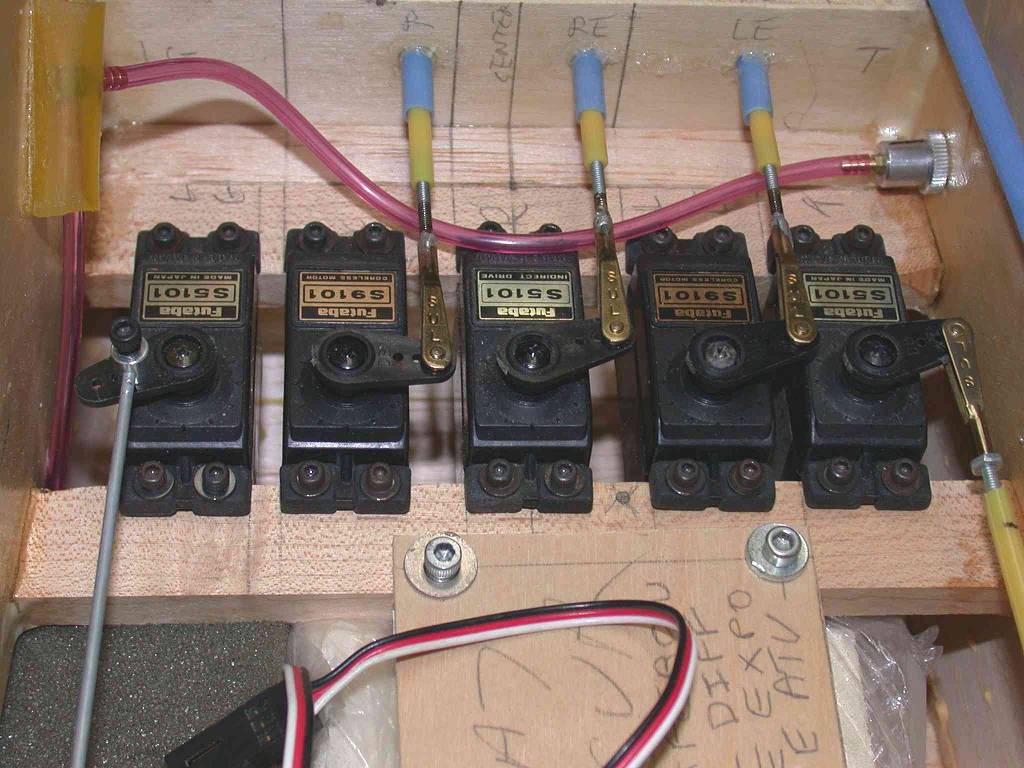
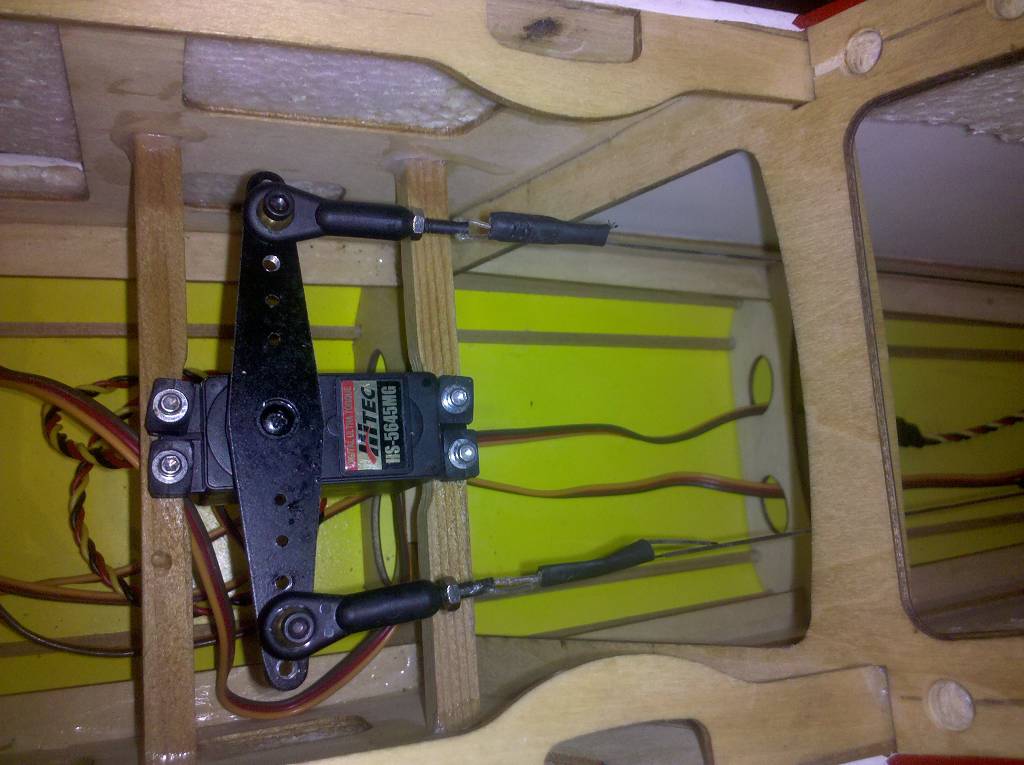
Servo linkage examples in model airplanes:

Example using popsickle sticks to make a linkage. Personally I have a very hard time drilling holes in popsickle sticks. Hopefully you'll do better than me.
Also known as gimbals or two degrees of freedom mechanisms, pan-and-tilt mechanisms allow your object (e.g. eyes, a robot head, or a camera) to be rotated in two perpendicular planes: e.g. turning side-to-side, and turning up and down. There are many tutorials for this but I find that they don't give much detail on the mechanical aspects and focus on the electronics and programming, which you really know how to do by now.
(By the way, you can probably see that if you mounted a gimbal inside of another gimbal you would have three degrees of freedom, so you could rotate in the X, Y, and Z planes.)
Here then are some examples of pan/tilt mechanisms and gimbals to give you some ideas:
This 3D printed example uses a tricky gear mechanism to rotate the head, which is very cool, but not the critical part of a pan-and-tilt mechanism. The critical component is the large upside-down U shaped bracket which holds the head and allows it to rotate left to right, while the bracket itself rotates up and down. This U-shaped bracket is a common feature of most pan-and-tilt mechanisms.
In this tutorial they cut pieces of plastic pipes of different diameters to make the gimbal. You can see again the critical U-shaped bracket in Step 6. A nice feature of this tutorial is the usage of bearings to make an extra smooth gimbal. The motorized weight part of this tutorial is irrelevant for our purposes.
This video shows a different way to rotate in two planes using a universal joint or U-joint. If you look carefully at the U-joint at the 0:37 second mark you will see our ubiquitious U-shaped bracket. This video is much more elaborate and in fact is just a teaser for a lesson that they sell, but it gives you some ideas. Built out of metal hardware, this will be much stronger and much more reliable, but also heavier and will require stronger servos.
Please don't create documentation in PDF or Word format, as these are not visible directly on Github. Use MarkDown (.md files) as described below.
How to create a Github account and your first repository guide
Your account name should be your name (unless for privacy reasons you'd prefer something else) and your repository name could be the course name.
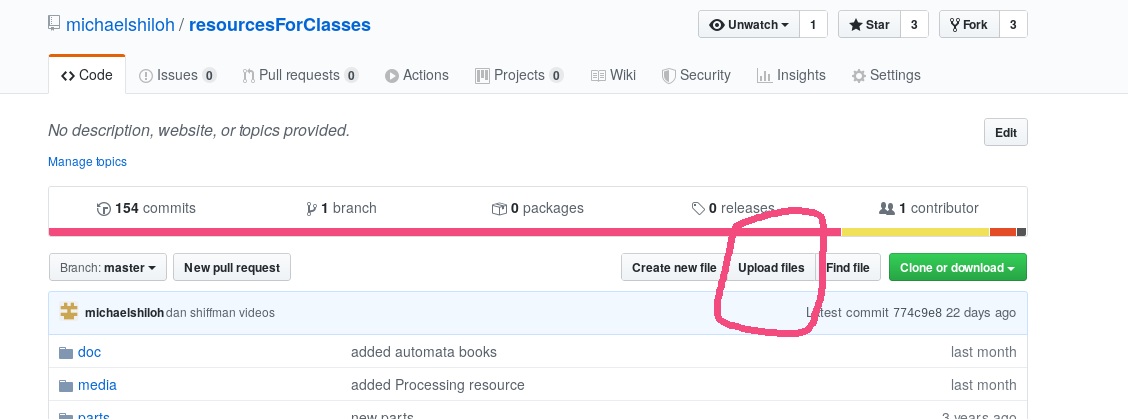
Help! I created my account and repository, but I can't find the button that says "Create new file" or "Upload files". How do I fix this?
Answer: It sounds like you forgot to create a README.md file when you created the repository. See below.
Help! I created a new repository but I forgot to check the box that says "Initialize this repository with a README". How can I create a README file?
Answer: You can either:
Delete your repository and create a new one, this time with the box checked.
Click where it says "README" and then click "Commit new file" at the bottom of the page that comes up. This will create a "README" file.
How to upload a file to Github

How to create a folder in Github
Git doesn't store empty folders, so you can only create a new folder when you have a file to put in it. Also, you can't create a folder when you upload a file. The only way to create a folder is to create a new file, and then to tell Github to put that new file in a new folder:
How to delete a file
How to upload a code file so that Github formats it as code
Use the extension along with the file name. Github recognizes that .ino are code files. Github recognizes many other file extensions as code.
How to organize folders and files in Github (move and rename)
How do I control the appearance of my README.md file?
There are many guides to Github Markdown. I find this particularly useful.
Any file that has the .md extension will be interpreted by Github as a markdown file.
Github cheatsheet
Git and Github resources created by Thais Alvarenga
Version Control with Git lessons by Software Carpentry
How do I create code blocks within in a markdown (.md) file?
You can create fenced code blocks by placing triple backticks ``` before and after the code block. We recommend placing a blank line before and after code blocks to make the raw formatting easier to read.
function test() {
console.log("notice the blank line before this function?");
}Git is best used from the command line. If you're using Mac OS or Linux it's pre-installed. If you're using Windows download the tools from here. You want the 64-bit Git for Windows Setup option. Installation is tricky but this should help. Thanks to Chinonyerem for these!
Including images
Look at the source of this file to see how I did these examples:
16.1. Local (i.e. in this repository) image:
Look at the code for item "How to upload a file to Github" above
16.2. Remote (i.e. elsewhere on the internet) images:

16.3. Controlling the size of the image

A great tutorial on schematics
There are many different symbols for MOSFETs depending on subtle difference that we won't be concerned with.
I suggest that you use these symbols:
![]()
We have both N-channel and P-channel MOSFETs in the lab, but the ones that we use primarily (and the only ones I've discussed in class) are N-channel enhancement mode MOSFETs
Students often assume that the problem is a bad component (including Arduino) or a problem in their computer. While this is possible, in my experience it is rarely the case. The most likely cause is a mistake in your circuit and/or in your program. Suspect those first.
In the suggested sequence below, prioritize tests that are easy to do
Things that are easy to check:
analogWrite() (PWM) on pins 9 and 10,
whether or not there is a servo on those pins.tone() function
will disable analogWrite() (PWM) on pins 3 and 11.pinMode(pin, OUTPUT) for any pin you use as a
digital outputSuggested debugging ~Sequence
Test each component in isolation, preferably with known good code, the best being the built in-examples 1.1. If individual components don't work, remove everything else from your circuit. Once you get that individual component working, add the rest one by one, testing each time 1.1 For motor drivers, test the motor and battery in isolation by connecting the motor directly to the battery
If the problem is intermittent, it is very likely caused by a loose connection. Upload a program that tests that component continously, and carefully wiggle each wire looking at the output. If the output starts fluctuating, then you may be close to the intermittent connection
Clay Shirky's 4 part video series on debugging
Arduino array reference
Arduino array tutorial
Another Arduino array tutorial
Yet another Arduino array tutorial
Hello Processing tutorial
Processing Getting Started tutorial
Processing Coordinate System and Shapes tutorial
Processing Color tutorial
Daniel Shiffman's Learning Processing video tutorials
Examples from Daniel Shiffman's Learning Processing book (also available on Github
Examples from Daniel Shiffman's The Nature of Code book
Pictures made with Processing and the code that made them
Daniel Shiffman’s written tutorial tutorial on objects in Processing
Daniel Shiffman's video tutorial on objects in Processing
A simple Processing class example
"Arduino the Object Oriented way" tutorial
Adafruit guide to excellent soldering
Sparkfun Through Hole Soldering tutorial
Best close up I've ever seen on how to solder pins into a circuit board. It's between 0:17 and 0:28 of this video
Excellent video on how to solder NeoPixels. The only thing I would add is strain relief: I suggest you stick something something stiff, like a piece of cardboard or a craft stick, to the end of the NeoPixel strip that extends a few cm beyond the strip, to which the wire can be glued or ziptied; this removes the strain from the soldered joint and from the very flimsy flexible circuit board from which the NeoPixel strip is made. The video mentions this briefly at the very end, but I would have put this in the main body.
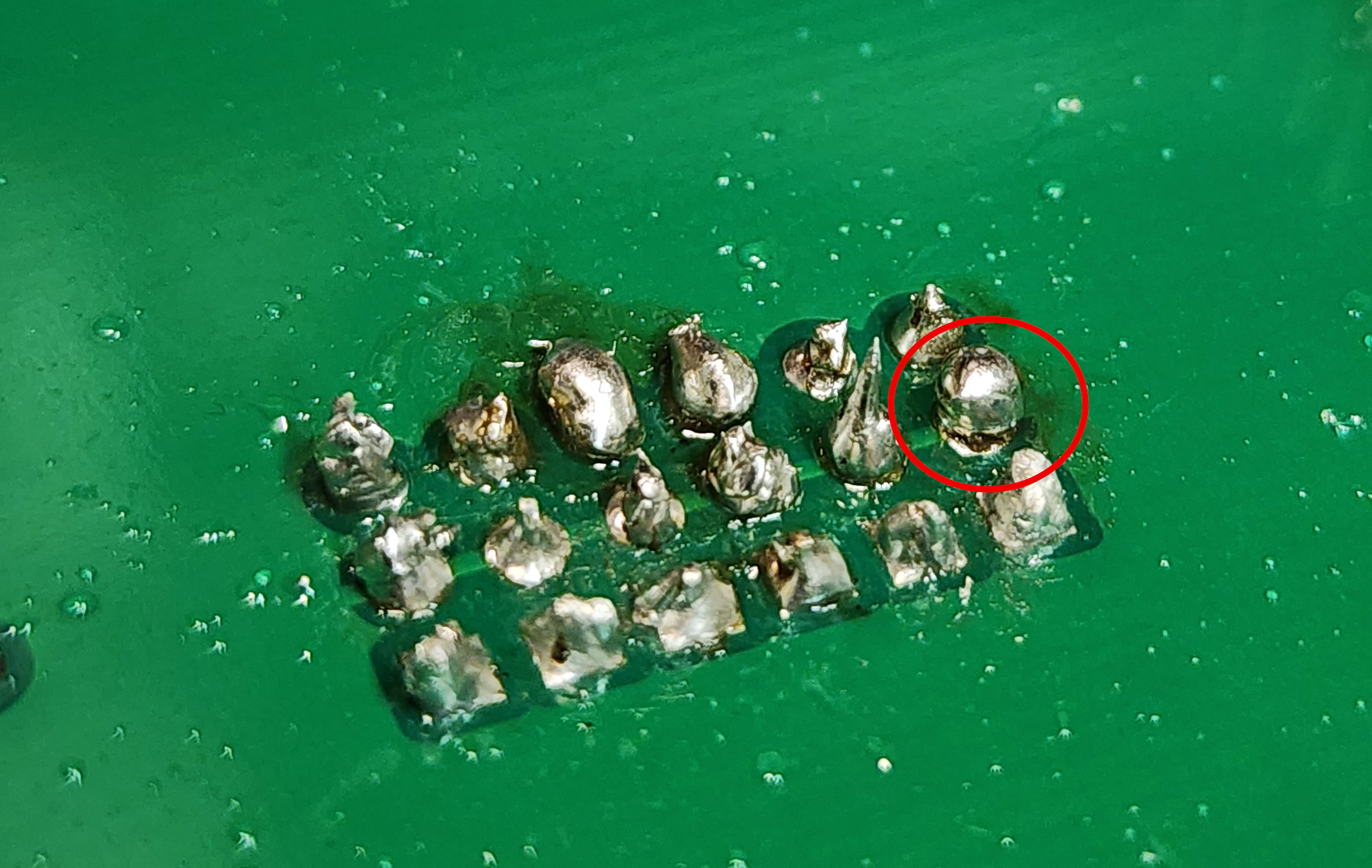
When soldering a wire or pin to a circuit board, you need to make sure that the solder adheres both to wire or pin and to the pad on the circuit board. In the picture below, you can see that the solder on the circled pin has adhered to the pin, but not to the pad. This is evidenced by the almost perfect spherical shape of the solder. In contrast, the solder joint on the pin immediately above has a cononical shape, indicating that the solder has properly adhered both to the pin and the pad.
If this happens, simply reheat the joint, making sure to heat the pad as well. Once you heat the pad, the solder should flow onto it. You may need a tiny bit of fresh solder to encourage to solder to flow onto the pad, but take care not to apply too much.

Sometimes the heat from the soldering iron seems to refuse to get into to the things you're soldering. If this happens, apply the solder directly to the soldering iron tip, where it will start melting. Then you can draw this puddle of solder onto whatever your soldering (wire, circuit board, component, etc.). The puddle of solder will do a better job of transferring heat to whatever your soldering, and the solder should immediately adhere.
Sparkfun's How to Use a Breadboard tutorial.
Adafruit's Breadboards for Beginners tutorial
Download and install Fritzing from fritzing.org
Fritzing’s Getting Started
Getting started with Fritzing’s Project View
Fritzing Designing PCB tutorial
My repository of assorted Fritzing projects
Wifi
Bluetooth
Xbee
433 MHz
Sparkfun Motors and Selecting the Right One tutorial
Adafruit Arduino Lesson 13. DC Motors
Adafruit Arduino Lesson 14. Servo Motors
Adafruit Arduino Lesson 16. Stepper Motors
Adafruit Motor Shield Tutorial
The motor can be configured to be driven by a standard servo motor signal, just like the signal that Arduino delivers.
Your Arduino code is no different from a regular servo! Arduino has no idea that there is a bigger servo motor there. Just as with a regular servo, you need to adjust the angle to whatever is appropriate to your needs. Think about this before you attach anything to the motor.
Instructions
Warnings:

There are other configurations but I recommend that you use the configuration above to make it behave like a "regular" servo motor.
These motors are pretty poorly documented; I lifted these pictures from Amazon so the resolution isn't so great.


Quite decent MOSFET tutorial
Quite good MOSFET tutorial and usage guide
Creating your first post as a Wordpress author
Visit your blog's administratoin page at blogname/wp-admin e.g. http://intro18fall.nyuad.im/wp-admin. Enter the user name and password that you have been given.
In the left hand toolbar hover over "Posts" and select "Create New"
Give a title to your first post, such as "Introducing Myself"
Write the text of your post in the large box below. You might use this opportunity to experiment with some of the formatting options. You can edit your post now as well as later.
When you are satisfied with your post click "Publish"
It is always wise to make sure you post published correctly and appears how you want it. Hover over the blog name (near the home symbol near the upper left corner) and select "visit site".
If you are not happy with your post you can click in "Edit" and make further changes.
Rather than upload a video to a Wordpress blog, it is better to upload video to Vimeo or Youtube and to embed those in your post. Here are instructions.
Laser cut boxes Gallery of Ideas
Laser Cut Like a Boss lecture
Laser cut T-Slot picture
Laser Cut box notes
Detailed instructions for gluing acrylic
General tips for [Working with
CNC panel joinery ideas acrylic](https://makezine.com/2015/10/29/skill-builder-acrylic/)
Free cloud based simple 2D CAD software Vectr. Somewhat limited but easy to learn quickly from built-in tutorials.
Free Open Source 2D CAD software inkscape. Runs on Linux, MacOS, and Windows.
Youtube channel
Image and Pixels tutorials
Computer Vision tutorials](https://www.youtube.com/playlist?list=PLRqwX-V7Uu6aG2RJHErXKSWFDXU4qo_ro)
11.6: Computer Vision: Motion Detection - Processing Tutorial
11.8: Computer Vision: Improved Blob Detection - Processing Tutorial
11.9: Computer Vision: Blob Tracking with Persistence - Processing Tutorial
11.10: Computer Vision: Adding Lifespan to Blobs - Processing Tutorial
The general principles are these:
More specifically:
First, clean up your code, insert meaningful comments, remove unnecessary code, remove unused code that is commented out, indent your code properly, etc. If your code is very long, organize it into functions to make it easier to read. Use meaningful names for functions, variables, and classes. Someone should be able to read your code and understand what it is doing without you having to explain.
Explain briefly the overall goal, but don't confuse with unnecessary details.
Show that you have exhausted all reasonable attempts to solve this on your own. Provide links to reference pages, tutorials, examples, etc. that you used to develop and in your attempt to debug your project. Provide summaries of any relevant Google searches, or discussions that you found on forums.
Explain very clearly the precise steps required to reproduce the problem. Test these instructions yourself before you submit the question.
Describe the attempted solutions you already tried, and what the results were. Again, be specific and clear. Give the reason you thought these attempts might work
Share error messages, screenshots of the failure, etc. Provide as much information as possible.
If your project involves a circuit, share clear photo(s) of your wiring so people can see if you made a mistake.
From Ratto's paper above: Benkler, Y, ‘Freedom in the Commons: Towards a Political Economy of Information’, Duke Law Journal, 52(6), 2003, p. 1245–1277. Agre, P, ‘Toward a Critical Technical Practice: Lessons Learned in Trying to Reform AI’, in Bowker, G, Gasser, L, Star, L and Turner, B, eds, Bridging the Great Divide: Social Science, Technical Systems, and Cooperative Work. Erlbaum, 1997. Dourish, P, Finlay, J, Sengers, P, & Wright, P, ‘Reflective HCI: Towards a critical technical practice’, in CHI’04 extended abstracts on Human factors in computing systems, 2004, p. 1727–1728. Friedman, B, ‘Value-sensitive design’, interactions, 3(6), p.16-23. DOI:10.1145/242485.242493. Flanagan, M, Howe, D, & Nissenbaum, H, Embodying Values in Technology: Theory and Practice. 2005 (draft). Dunne, A, & Raby, F, Design Noir: The Secret Life of Electronic Objects. Birkhäuser Basel, 2001. Papert, S, Mindstorms: Children, Computers, and Powerful Ideas (2nd ed.). Basic Books, 1993. Law, J, After method: mess in social science research. Routledge, 2004. Haraway, D, Simians, Cyborgs, and Women: The Reinvention of Nature (1st ed.). Routledge, 1990. Hayles, N, ‘The Materiality of Informatics’, Configurations, 1(1), 1993, p. 147-170. Hayles, N, How we became posthuman: virtual bodies in cybernetics, literature, and informatics. University of Chicago Press, 1999. Kirschenbaum, M, Mechanisms: New Media and the Forensic Imagination. The MIT Press, 2008. Lamberty, K, ‘Designing, playing, and learning: sustaining student engagement with a constructionist design tool for craft and math’, in Proceedings of the 6th international conference on Learning sciences, 2004, p. 652. Lamberty, K, ‘Creating mathematical artifacts: extending children’s engagement with math beyond the classroom’, in Proceedings of the 7th international conference on Interaction design and children, 2008 p. 226–233. Ratto, M, ‘Critical Making: conceptual and material studies in technology and social life’, paper for Hybrid Design Practice workshop, Ubicomp 2009, Orlando, Florida. Lewin, K, ‘Action research and minority problems’, J Soc. Issues 2(4), 1946, p. 34-46. Argyris, C, Putnam, R, & Smith, D, Action Science: Concepts, methods and skills for research and intervention. San Francisco: Jossey-Bass, 1985. Gaver, B, Dunne, T, & Pacenti, E, ‘Design: Cultural probes’, interactions, 6(1), p. 21-29. DOI:10.1145/291224.291235. Ratto, M, Hockema, S, ‘Flwr Pwr: Tending the Walled Garden’, in Dekker, A & Wolfsberger A (eds) Walled Garden, Virtueel Platform, The Netherlands, 2009.Ratto, op.cit. Latour, B, ‘A Cautious Prometheus? A Few Steps toward a Philosophy of Design’, Keynote lecture for the Networks of Design, meeting of the Design History Society, Falmouth, Cornwall, 3rd September 2008.
Garnet hertz's zine "critical making" (need to upload)
Critical Making website in Holland
Animatronic courses. Seven day free trial available.
Kathleen McDermott's website for her Animatronics course, especially week 2 which covers Motors, Automata & Kinetic Art
INTRODUCTION TO AUTONOMOUS ROBOTS Introduction to Autonomous Robots is an open-access book by Nikolaus Correll, Bradley Hayes, Christoffer Heckman, and Alessandro Roncone. The book focuses on mechanisms, sensors, actuators, and algorithms.
ELEMENTS OF ROBOTICS Springer Published in 2018, Elements of Robotics is an open-access textbook by Mordechai Ben-Ari and Francesco Mondada. The book covers sensors, robot motion, state machines, control, navigation, localization, machine learning, and more.
FOUNDATIONS OF ROBOTICS This open-access book by Damith Herath and David St-Onge is an introductory text providing a high-level overview of many aspects of robotics.
INTRODUCTION TO ROBOTICS Princeton Anirudha Majumdar teaches this course at Princeton University. The course covers feedback control, motion planning, state estimation, and computer vision and uses a Crazyflie quadrotor throughout the course. On the above page, you will find all course materials.
ROBOTICS 501: MATHEMATICS FOR ROBOTICS “ROB 501: Mathematics for Robotics is a graduate-level course at the University of Michigan that introduces applied mathematics for robotics engineers. Topics include vector spaces, orthogonal bases, projection theorem, least squares, matrix factorizations, Kalman filter and underlying probabilistic concepts, norms, convergent sequences, contraction mappings, Newton Raphson algorithm, local vs. global convergence in nonlinear optimization, convexity, linear and quadratic programs”.
Special Topics in Digital Media: Grad Wearables class website
Tutorials and other wearable resources at NYU's Integrated Design & Media (IDM) program
(Actually, topics related to Machine Lab are sprinkled through this document, but I'll try to gather here those particularly relevant to this class)
1940s Vocational Guidance Film: The Machinist and Tool Maker This film is a good overview of some basic machine tools
Interesting article about the US machine tool industry, with a great explanation of machine tools and why they are important
Wonderful movie from the 1950s demonstrating the Milwaukee-Matic, an early Numerically Controlled (NC) machining center. Great way to understand how machine tools remove metal in order to create the desired shape. (NC was a predecessor to CNC. It used paper tape or punched cards to control the operations of the machine.)
Another great 1950s movie, this one from the Monarch Machine Tool Company. There was a certain style to the music of these films chosen, I suppose, to inspire purchase of their machines.
In incredibly detailed (and somewhat tedious) instructional film from the late 40s: Machine Shop Work: An Introduction to Operations on the Vertical Boring Mill. (Sadly no music in this one).
De Re Metallica, a translation of a book in Latin cataloguing the state of the art of mining, refining, and smelting metals, published in 1556
Makerspace at Imperial College's White City Campus (website not known)
Art ex machina article in Wired about AI in art, featuring Merritt Moore dancing with robots
Amit Dror Monkeys
Slides from Tegan's guest lecture on September 30 2020
Ullanta Performance Robotics is a theater troupe in which the actors are autonomous robots.
Robots and Human Actors Take Bows Together (NYTimes)
Oriza Hirata's Robot Theatre: Oriza Hirata is a playwright and director who produced some important and moving plays employing both human and robotic actors. In addition to plays he has written, Hirata has also created android versions of Kenji Miyazawa’s Night on the Galactic Railroad (2013),Franz Kafka’s The Metamorphosis (2014), the Hamburg State Opera’s Stilles Meer (Silent Sea, 2016), and Chekhov’s Three Sisters (2012).
Uncanny Valley. A robot actor in a one-person play. Collaboration between Rimini Protokoll and Thomas Melle.
Karel Čapek. R.U.R. (Rossum's Universal Robots)
Asimov's Runaround
On Stage: Robots as Performers
Shannon, C. E. (1948). A mathematical theory of communication. The Bell Labs
Art and Technology: The Panacea That
Failed Jack Burnham, from The
Myths of Information edited by Kathleen Woodward, Coda Press, 1980
System Technical Journal, Vol. 27
The Machine as Artist: An Introduction Glenn W. Smith 1 and Frederic Fol Leymarie
Survey chapter from "Art and Electronic Media" by Edward A. Shanken
Cybernetics and Serendipity catalog
Analysis of an interactive autonomous robot.
Jean Tinguely
Japanese robot culture : performance, imagination, and modernity Yuji. Sone New York, NY : Palgrave Macmillan 2017
Geminoid Studies Science and Technologies for Humanlike Teleoperated Androids Ishiguro, Hiroshi • 2018 Publisher: Springer Singapore ISBN: 9789811087028
Essays like Heinrich von Kleist’s “On the Marionette Theater” and Edward Gordon Craig’s “The Actor and the Über-marionette” have suggested that [End Page 400] skillful automata might productively replace and surpass the human actor.
Post-human: thinking humanness through robotics Julie-Michelle Morin
** Jennifer Rhee "amigdala"
The Glass Bees by Ernst Juenger
The Invention of Morel by Adolfo Bioy Casares
"Art and Electronic Media" Edward A. Shanken (Phaidon)
"Book for the Electronic Arts" Arjen Mulder and Maaike Post (de Baile V2)
"A Theatre of Machines" A. G. Keller (Macmillan)
Escape Velocity Mark Dery
"Beyond Modern Sculpture" Jack Burnham (George Braziller)
"Edison's Eve" Gaby Wood (Knopf)
"High Techne" R. L. Rutsky (University of Minnesota Press)
Excellent book to help explain why making is a critical part of learning Invent To Learn: Making, Tinkering, and Engineering in the Classroom
Excellent readings in the humanities regarding machine-inclined thinking: CLAIR, Jean and Harald Szeemann. eds. Le Macchine Celibi / The Bachelor Machines. Amsterdam: Stedelijk Museum, 1977.9.
Making Things Move: DIY Mechanisms for Inventors, Hobbyists, and Artists
Practical Electronics for Inventors
Vehicles; Valentino Braitenberg, 1986 A set of mostly thought experiments starting with what you described as the coffee can robots and working into a real discussion of neural behavior.
Systems; Edward A. Shanken (ed), 2015 A large collection of excerpts from articles about Systems and Art. I can heartily recommend anything Ed has written as I think he is one of the few people who 'get' media art. This also holds for articles by Simon Penny (there are a couple in this book), whom I think he is still at UC Irvine but seems to have dropped off the Art Map.
Industrial Culture Handbook www.researchpubs.com
Pranks www.researchpubs.com
Cybernetics Or Control and Communication in the Animal and the Machine
Physical Computing: Sensing and Controlling the Physical World with Computers by Igoe/O'Sullivan
Cabaret Mechanical Movement by Gary Alexander and Aidan Lawrence-Onn ISBN-13: 978-0952872931
Making Simple Automata by Robert Race ISBN-13: 978-1847977441
"How to Build Simple Automata" book (PDF)
"Robots and Art: Exploring an Unlikely Symbiosis" Editors: Herath, Damith, Kroos, Christian, Stelarc (Eds.) ISBN 978-981-10-0319-6
"The Future of the Internet and How to Stop it" by Jonathan Zittrain
"Robotics: A Very Short Introduction" by Alan Winfield ISBN-13: 978-0199695980 especially pg. 39 and 79
"Robo Sapiens: Evolution of a New Species" by Peter Menzel ISBN-13: 978-0262632454
"The Robot in the Garden: Telerobotics and Telepistemology in the Age of the Internet" by Ken Goldberg ISBN-13: 978-0262571548
A robotic performance differs from a robotic installation in that a performance has a beginning and end, and a script
A performance is a series of events created to be witnessed
When interact with a robot, we have a model of the robot, but the robot has no model of us https://en.wikipedia.org/wiki/Theory_of_mind
"Robots don't need to feel, they just need to give the impression they do" - Louise Lepage
What is "Automata" vs. "Autonomous beings"?
What is interactive?
What is a robot? Can a robot be remote controlled or must it be autonomous?
What is performance?
Will we arrive at a place where the fridge worries when the toaster goes missing?
What is it that gives personality? Does a robot need to be anthropomorphic? Consider this
Vehicles: Experiments in Synthetic Psychology 2nd Edition,
Valentino Braitenberg
ISBN-10 : 0262521121
ISBN-13 : 978-0262521123
Entangled: technology and the transformation of performance,
Chris salter
ISBN-13: 978-0262195881
ISBN-10: 0262195887
The Cybernetic Brain,
Andrew Pickering
ISBN-10 : 0226667901
ISBN-13 : 978-0226667904
University of Chicago Press; Illustrated Edition (December 15, 2011)
The Human Use of Human Beings,
Norbert Wiener
ISBN-13 : 978-0306803208
ISBN-10 : 0306803208
Da Capo Press; New edition (March 22, 1988)
The Living Brain,
Grey Walter
ISBN-10 : 0393001539
ISBN-13 : 978-0393001532
W. W. Norton and Company, Inc.; Second Edition (May 17, 1963)
Complexity,
Melanie Mitchell
ISBN-10 : 0199798109
ISBN-13 : 978-0199798100
Oxford University Press; 1st Edition (September 1, 2011)
*Chaos: Making a New Science – Illustrated, *,
James Gleick
ISBN-10 : 978-0143113454
ISBN-13 : 978-0143113454
Penguin Books; 20th Anniversary ed. Edition (August 26, 2008)
Computer Power and Human Reason,
J Weizenbaum
ISBN-10 : 0140179119
ISBN-13 : 978-0140179118
Penguin Science, January 1, 1984
Cybernetics: Second Edition: Or the Control and Communication in the Animal and the Machine,
Norbert Wiener
ISBN-10 : 1614275025
ISBN-13 : 978-1614275022
Martino Fine Books; 2nd ed. Edition (October 2, 2013)
God and Golem, Inc.,
Norbert Wiener
ISBN-10 : 0262730111
ISBN-13 : 978-0262730112
The MIT Press; 7th ed. Edition (March 15, 1966)
Cyborg Manifesto,
In Simians, Cyborgs, and Women: The Reinvention of Nature 1st Edition
Donna Haraway
ISBN-10 : 0415903874
ISBN-13 : 978-0415903875
Routledge; 1st Edition (December 12, 1990)
Turtles, Termites, and Traffic Jams :
Explorations in Massively Parallel Microworlds
Mitchel Resnick
in the NYU online
library
Pimoroni online but very fast shipping
Kris Verdonck A Two Dog Company
Peter Eckersall CUNY
Noh Theatre Samuel Becket Brecht
"Hey Joe" actor waits for voiceover to define him Normally, objects represent themselves. With high tech, objects have 2nd agenda
** Marco Donnarumma and Kristina Anderson Can theatre be a site for practice at the future? Kristina (Technical University Eindhoven) This work is situated in a grey zone: academia, art, theatre, music, design Intelligence is a human word and might be inapplicable to machines "Human" and "Machine" are neither defined nor static
** Karen Barad: analyze humanness through robotics (get book) theatre space is perfect for deconstructing Mori's idealized humanness design driven by normative vision of humanness, or can challenge this
The staging of techo-vulnerability Ruowen Xu Utrecht University r.xu@uu.nl entanglement of critique and technophilia
Chico's broken robots: threatening and strong vs. weak and pathetic Mirja: agent solitude "Human Being at Risk" Mark Coelkelbergh
morse cups
schipp's robot
michael.rau@stanford.edu (or is it rav) viewpoints as a vocabulary for robots mary overlie viewpoints viewpoints ai (git) luminos ai (revised)
https://www.youtube.com/watch?v=t2t4BALBmxg robotic theatre robot theatre https://www.sau.edu/news_and_events/n170404_robot-theatre.html https://www.youtube.com/watch?v=Uo-4RQPEHIk https://robohub.org/robots-robotics-in-theatre-film-and-television/ https://theatre.uta.edu/emotional-robotics-living-lab/ https://www.robottheatre.co.uk/publications https://www.robottheatre.co.uk/ http://techandlaw.net/robots-become-art-interview-mr-yi-wei-keng/ robots.ieee.org/robots
Thomas Riccio University of Texas, Dallas thomasriccio.com Hanson robotics, creators of Sophia robot personalities viseme frubber in-character responses to failure modes
Louise LePage university of york
Helen Root
Irene Echeverria - Altuna
Gobsquat Collective
Petra Goyeinboeck Rob Saunders Creative Robotics Lab University of New South Wales University of Sydney
Machine Movement Lab Louise Phillippe Deters
Tiller Girls "The Performance of Creative Machines" "Accomplice" (knocking robot)
"Robots As Media" syllabus from The New School's Peter Asaro
Mark Dery - documentary and books
ROS, the robot operating system. The ros runs on arduinos and pis. It takes care of all the painful details. The ROS site has a lot of robot platforms that might be good for starter projects.
Directions in Kinetic Sculpture; Peter Selz, 1966 The catalog of a show at the UC Berkeley art museum from that year. "I found some copies on sale at the museum a couple years ago. It is fascinating, both for what was being done and shown here -- dating from the early 20th century to the 60's -- and for wondering why it was not being done and shown in the late 20th century..."
Working Conditions; Hans Haake (Alexander Alberro, ed), 2016 Collected writings of Mr. Haacke. Not so much an art/tech guy but wider in scope with much interesting social commentary. He did kinetic-ish stuff in the 60s and then switched to social systems in 1970. His piece Blue Sail
Gil Weinberg's work on robot musicianship at Georgia Tech.
Heather Knight who is studying with Wendy Ju and is working on robots and theater.
Leonardo magazine
Guy Debord
Jean Baudrillard
| Qty | Value | Footprint | References |
|---|---|---|---|
| 2 | Screw_Terminal_01x07 | TerminalBlock_Phoenix:TerminalBlock_Phoenix_MKDS-1,5-7-5.08_1x07_P5.08mm_Horizontal | J1, J2 |
| 1 | LM556 | Package_DIP:DIP-14_W7.62mm_Socket_LongPads | U3 |
It measures 53.6 × 40.4 mm and has 2 copper layers, 1.6 mm thick.
3 parts. The full list of its parts is on this page, with links to each part's symbol and footprint where PCBKit's library has them.
From the michaelshiloh/resourcesForClasses repository on GitHub, at the commit this page was made from: the board is kicad/IC_sockets/16PinSocketAPC/16PinSocketAPC.kicad_pcb and its schematic kicad/ArduinoShieldHobbyRCAndMotorControl/ArduinoShieldHobbyRCAndMotorControl.kicad_sch. PCBKit opens the board in the browser, with nothing to install.
Its repository publishes it under the AGPL-3.0 licence: you may reuse it on that licence's terms (keep the author's notice, and for a copyleft licence share your changes alike).

michaelshiloh/resourcesForClasses
When should you use a servo motor? Whenever you need to stop at a specific location. All other motors, including stepper motors, do not know where they are.

michaelshiloh/resourcesForClasses
When should you use a servo motor? Whenever you need to stop at a specific location. All other motors, including stepper motors, do not know where they are.

michaelshiloh/resourcesForClasses
When should you use a servo motor? Whenever you need to stop at a specific location. All other motors, including stepper motors, do not know where they are.

michaelshiloh/resourcesForClasses
When should you use a servo motor? Whenever you need to stop at a specific location. All other motors, including stepper motors, do not know where they are.

michaelshiloh/resourcesForClasses
When should you use a servo motor? Whenever you need to stop at a specific location. All other motors, including stepper motors, do not know where they are.

michaelshiloh/resourcesForClasses
When should you use a servo motor? Whenever you need to stop at a specific location. All other motors, including stepper motors, do not know where they are.

michaelshiloh/resourcesForClasses
When should you use a servo motor? Whenever you need to stop at a specific location. All other motors, including stepper motors, do not know where they are.

michaelshiloh/resourcesForClasses
When should you use a servo motor? Whenever you need to stop at a specific location. All other motors, including stepper motors, do not know where they are.


hzeller/rpi-rgb-led-matrix
Controlling up to three chains of 64x64, 32x32, 16x32 or similar RGB LED displays using Raspberry Pi GPIO


atopile/atopile
Design circuit boards with code! ✨ Get software-like design reuse 🚀, validation, version control and collaboration in hardware; starting with electronics ⚡️


hackclub/sprig
🍃 Learn to code by making games in a JavaScript web-based game editor.