Skip to the content
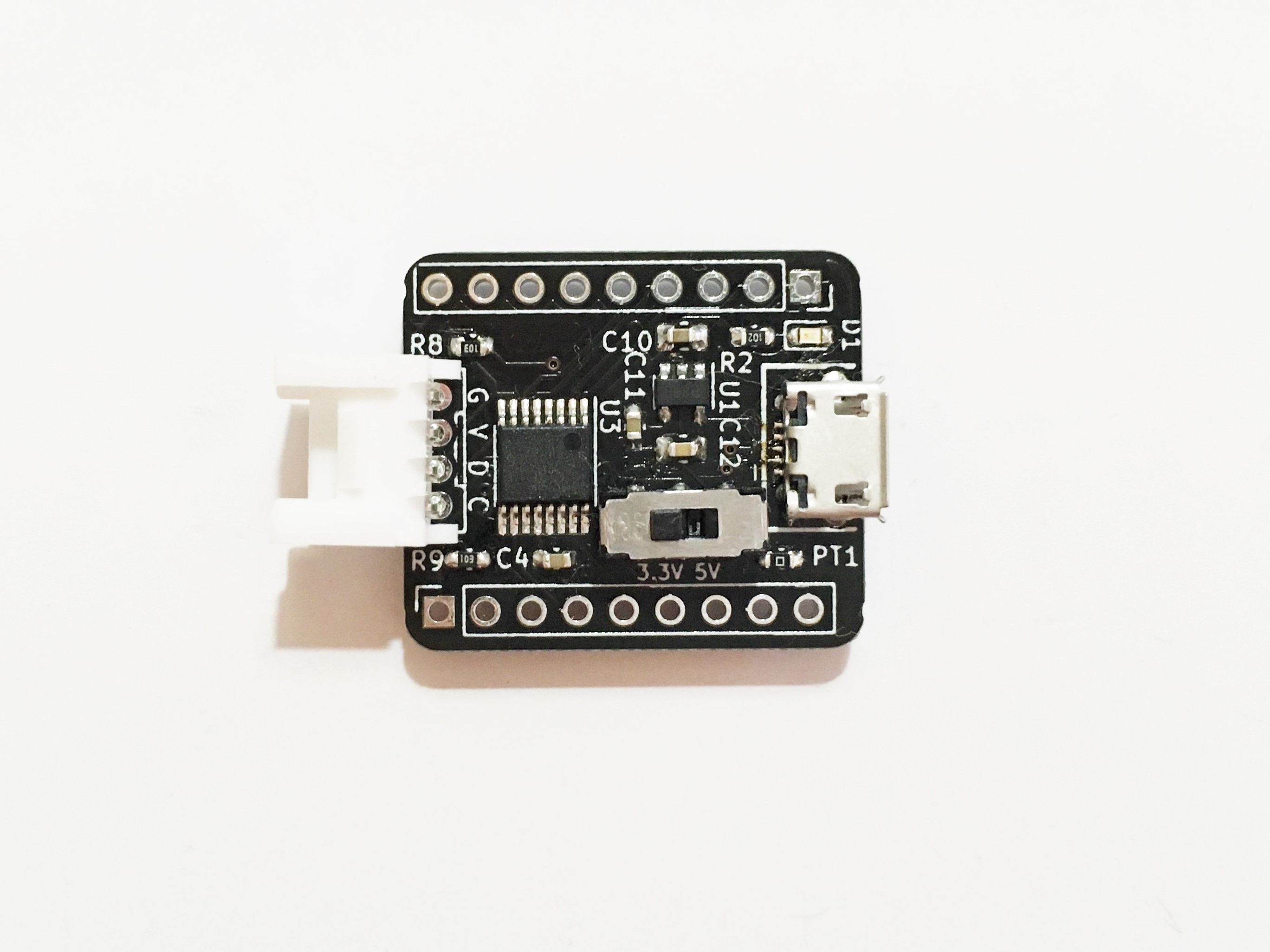
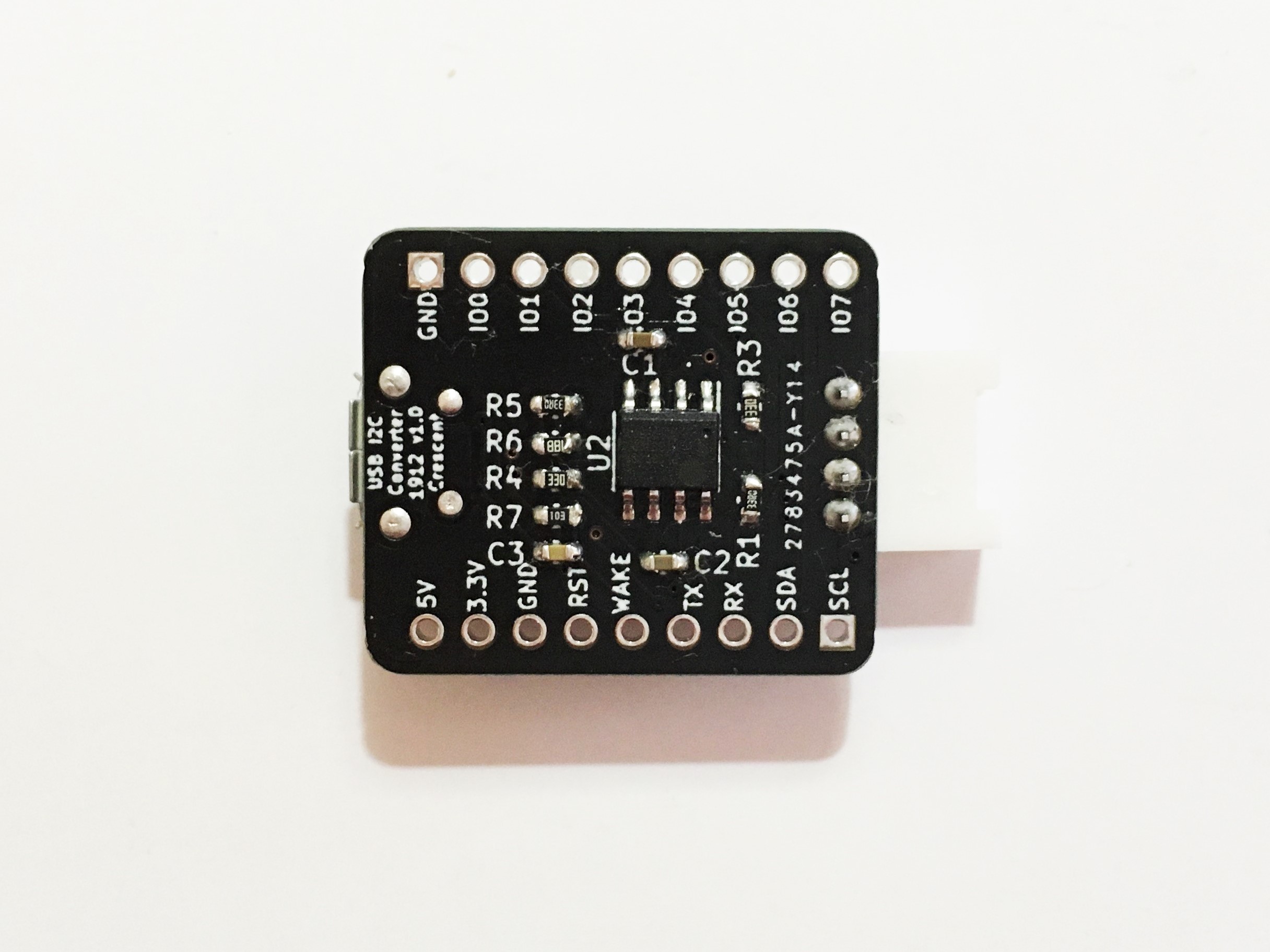
2 layers22 × 26.4 mmConverter, the printed circuit board in 3D

USBSerial I2C Converter

Size
22 × 26.4 mm
Copper layers
2
Thickness
1.6 mm
Parts
26
Nets
27
Pads
102
Tracks, vias
471, 23
Pours
2
Routed
Yes
KiCad
KiCad 5 (file 20171130)
Created
4 Jan 2020
Updated
5 Jul 2024

Overview

Converter is an open-source printed circuit board by meerstern, from the meerstern/USBSerial_I2C_Converter repository on GitHub. It is a 2-layer board of 22 × 26.4 mm with 26 parts on 27 nets, routed with 471 tracks and 23 vias.

It is built around the PL2303SA LF, LD3985M33R and SC18IM704PWJ, with the FEMTOSMDC035F-02 among its other parts. Its parts include 10 resistors, 6 capacitors, 3 ICs, 3 connectors and 1 diode. It belongs with the interfaces and adapters boards of this library.

Main components

4

README

README.md

USBシリアルI2C変換基板

USB Serial I2C Converter

概要

  • USBシリアルをI2Cマスタに変換する基板です
  • シリアルCOMポートを介してPCやRPI等からI2Cデバイスを制御できます
  • I2Cデバイスの動作確認やラピッドプロトタイピングに最適です
  • シリアルCOM変換にPL2303GL、シリアルI2C変換にSC18IM704を使用しています(V2:現行モデル)
  • シリアルCOM変換にPL2303SA、シリアルI2C変換にSC18IM700を使用しています(V1:旧モデル)
  • TeratermやNode-Red、Unity、Python等からシリアルCOMポートを介して容易なコマンドでI2Cデバイスを制御できます
  • I2CはGrove互換コネクタを搭載しています
  • Grove互換コネクタの電源、プルアップ抵抗はスイッチ切り替えで5V/3.3Vに対応しています
    ※USB、I2Cデバイスを接続する前に基板上のシルクを確認してから5V/3.3V切替してください
    ※3.3V専用デバイスに5Vを加えないように注意してください

詳細

  • シリアルI2C変換SC18IM700/SC18IM704のコマンドはデータシート(PDF)を参照してください
  • シリアルI2C変換SC18IM700/SC18IM704のデフォルトボーレートは9600bpsです
  • アドレスの異なる複数のデバイスを接続する場合はI2Cハブを使用してください
  • 基板のピンヘッダを用いることでSC18IM700/SC18IM704単体の変換基板としても使用できます
  • USB5V電源入力側に350mA定格のリセッタブルヒューズを搭載しています
  • 給電可能な電流は3.3Vラインで最大150mA前後、5Vラインで最大350mAです
  • コマンドの応答がない場合はピンセット等でRSTピンとGNDピンを1秒程度短絡してリセットさせてください

USBドライバ

  • Windows版はこちらからダウンロードして使用してください
    ※標準ドライバではNode-Redで動作不具合があるため、最新のドライバに更新し、再起動後に使用してください
  • Mac版は標準でドライバが読み込まれますが、必要に応じてこちらからダウンロードして使用してください
  • Linux版はKernel 2.4.31以降、標準でドライバが組み込まれています

Node-Redサンプルフロー

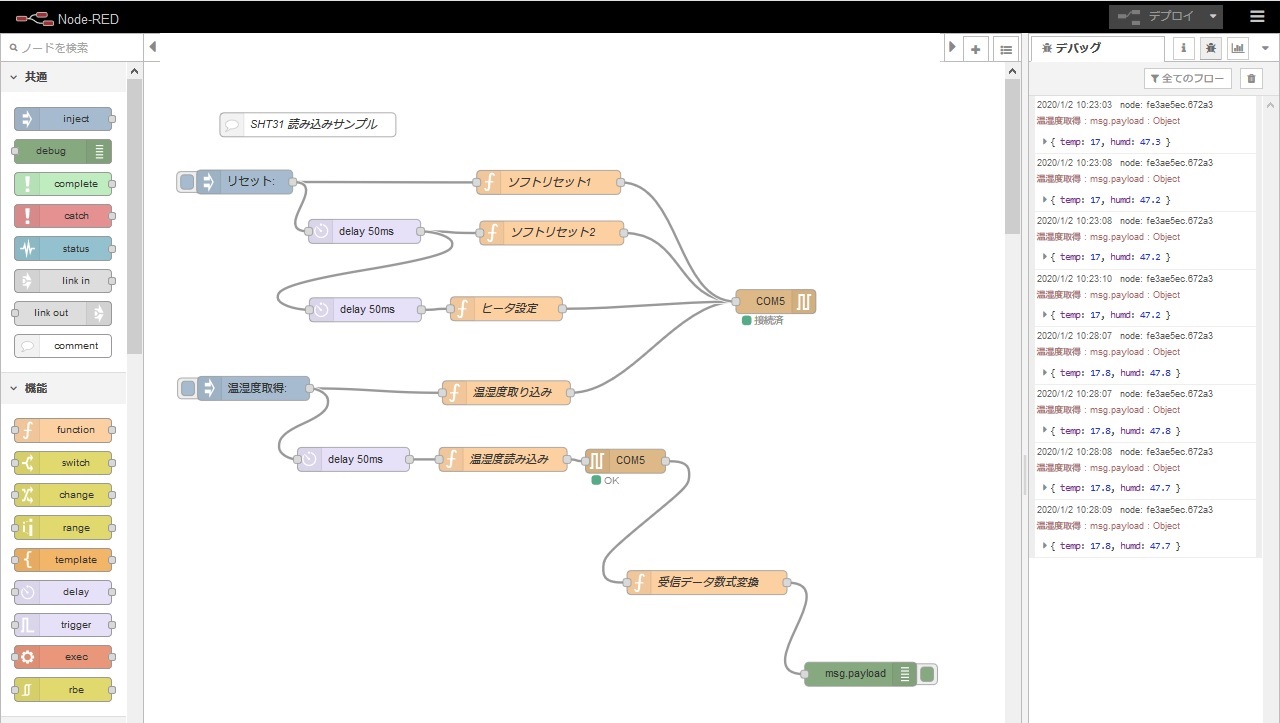
  • シリアルポートフローを使用してGrove温湿度センサSHT31から温度、湿度を読み込むサンプル
  • 温湿度センサ SHT31、I2C接続LCD AQM1602、マルチ環境センサBME280、CO2センサ CCS811、リアルタイムクロック DS1307、AD変換 MCP3425、粒子センサ HM3301、赤外線グリッドセンサAMG8833、I2Cデバイス検索のサンプルコードがあります
    ※詳細はサンプルコードをご確認ください
    ※シリアルポートフローを使用する場合はオンプレミス版Node-Redを使用する必要があります。こちらの記事を参考にしてください

Teratermサンプルマクロ

  • サンプルマクロを実行する際には必ず言語設定を「English」、「Default.lng」に設定してください。正しく送受信されません。

WebシリアルAPIツール

  • WebシリアルAPIを使用したツールを公開しています
  • EdgeもしくはChromeブラウザからアクセスすると簡単にI2Cデバイスと通信できます
  • 対応デバイスは随時追加予定です

変換基板

  • USBシリアルI2C変換基板の外観

※上記写真は試作基板のため、量産版と異なる場合があります

販売サイト

告知

  • SC18IM700、PL2303SAは生産完了のため、23年7月以降はそれぞれ後継機種のSC18IM704、PL2303GLを使用したv2.x基板に変更しました
  • SC18IM700/SC18IM704の基本的なI2Cコマンド等は互換性が維持されています
  • 生産完了に伴い、v1.xモデルの製造及び販売は終了しました

USB Serial I2C Converter

Overview

  • This is a board that converts USB serial to I2C master.
  • Can control I2C devices from PC, RPI, etc. via serial COM port
  • Ideal for I2C device operation verification and rapid prototyping
  • PL2303GL is used for serial COM conversion, and SC18IM704 is used for serial I2C conversion (V2: current model)
  • Control I2C devices with easy commands via serial COM port from Teraterm, Node-Red, Unity, Python, etc.
  • I2C has Grove compatible connector
  • Grove compatible connector power supply and pull-up resistor support 5V/3.3V by switching
  • Before connecting USB or I2C devices, please check the silk on the board and then switch 5V/3.3V.
  • Please be careful not to apply 5V to 3.3V only devices.

Details

  • For serial I2C conversion SC18IM700/SC18IM704 commands, please refer to Datasheet (PDF)
  • The default baud rate for serial I2C conversion SC18IM700/SC18IM704 is 9600bps
  • When connecting multiple devices with different addresses, please use I2C hub
  • Can also be used as a conversion board for SC18IM700/SC18IM704 by using the pin header on the board
  • Equipped with a resettable fuse rated at 350mA on the USB5V power input side
  • The maximum current that can be supplied is around 150mA for 3.3V line, and 350mA for 5V line.
  • If there is no response to the command, short the RST pin and GND pin with tweezers for about 1 second to reset.

USB Driver

  • For Windows version, please download from here.
  • The standard driver has a malfunction with Node-Red, so please update to the latest driver and use it after restarting.
  • The driver is loaded by default in the Mac version, but if necessary, please download.
  • The Linux version has a built-in driver as standard since Kernel 2.4.31

Node-Red Sample Flow

  • Read temperature and humidity from Grove temperature and humidity sensor SHT31 using serial port flow sample
  • Temperature and humidity sensor SHT31, I2C connection LCD AQM1602, multi-environment sensor BME280, CO2 sensor CCS811, real-time clock DS1307, AD conversion MCP3425, particle sensor HM3301, infrared grid sensor AMG8833, sample code for I2C device search is available
  • Please check the sample code for details.
  • If you want to use serial port flow, you need to use the on-premises version of Node-Red. Please refer to this article(Japanese)

Teraterm Sample Macro

  • When running the sample macro, be sure to set the language settings to "English" and "Default.lng". It will not be sent or received correctly.

Web Serial API Tools

  • Publishing tools using Web Serial API
  • Easily communicate with I2C devices when accessed from Edge or Chrome browsers
  • Compatible devices will be added

Announcement

  • Production of SC18IM700 and PL2303SA has been discontinued, so from July 2023 onwards, we have changed to v2.x boards using the successor models SC18IM704 and PL2303GL, respectively.
  • Compatibility of basic I2C commands etc. of SC18IM700/SC18IM704 is maintained.
  • Due to the completion of production, the manufacture and sale of v1.x model has ended.

MIT Lisense

Parts

26
QtyValueFootprintReferences
427Resistor_SMD:R_0603_1608MetricR1, R3, R4, R5
30.1uCapacitor_SMD:C_0603_1608MetricC1, C2, C4
210kResistor_SMD:R_0603_1608MetricR7, R10
210uCapacitor_SMD:C_0805_2012MetricC10, C12
24.7kResistor_SMD:R_0603_1608MetricR8, R9
2Conn_01x09Connector_PinSocket_2.54mm:PinSocket_1x09_P2.54mm_VerticalJ2, J3
10.01uCapacitor_SMD:C_0603_1608MetricC11
11.5kResistor_SMD:R_0603_1608MetricR6
11kResistor_SMD:R_0603_1608MetricR2
1Conn_01x04GroveCon:GROVEJ1
1LD3985M33RPackage_TO_SOT_SMD:SOT-23-5U1
1LEDLED_SMD:LED_0603_1608MetricD1
1MICRO-USB-ZX62R-B-5P-con-hirosemUSB:CONN-10118194-0001LF-FCIM1
1PL2303SAPackage_SO:SOIC-8_3.9x4.9mm_P1.27mmU2
1SC18IM704Package_SO:TSSOP-16_4.4x5mm_P0.65mmU3
1SW_SPDTDPDT_SMD:DPDT_SMDSW1
1femtoSMDC035F-02 Resistor_SMD:R_0603_1608MetricPT1

Similar boards

  • 2 layers86 × 86 mmProduction, the printed circuit board in 3D

    Production

    kerikun11/IR-Station

    Infrared Remote Controller with ESP8266 WiFi-module. You can control your home appliances with your smartphone or laptop.

    128 parts54MIT
  • 2 layers65 × 25 mmWcc, the printed circuit board in 3D

    Wcc

    meerstern/Usb_Camera_Converter

    usb web camera converter with PIC32MZ

    63 parts2
  • 2 layers100 × 50 mmEsp12e devboard, the printed circuit board in 3D

    Esp12e devboard

    EspIt/Hardware

    The EspIt PCB and Schematic

    117 parts
  • 2 layers42.5 × 21 mmPS2USB, the printed circuit board in 3D

    PS2USB

    meerstern/PS2USB_CONVERTER

    PS/2 USB CONVERTER for old computers with USB keyboard

    25 parts9
  • 2 layers60 × 60 mmProjectionball, the printed circuit board in 3D

    Projectionball

    meerstern/ProjectionBallUnit

    ProjectionBall v7.x with RP2040

    76 parts7
  • 4 layers58 × 58 mmRgb matrix, the printed circuit board in 3D

    Rgb matrix

    joh/rgb-matrix

    RGB Matrix with USB and 48-bit colors!

    138 parts3
  • 2 layers45 × 45 mmFlight ctrl v2, the printed circuit board in 3D

    Flight ctrl v2

    MickAvery/flight-controller-design

    Design of my flight controller using KiCAD

    50 parts1

Questions

How big is the Converter PCB?

It measures 22 × 26.4 mm and has 2 copper layers, 1.6 mm thick.

What parts does the Converter use?

26 parts, built around the PL2303SA LF, LD3985M33R, SC18IM704PWJ and FEMTOSMDC035F-02. The full list of its parts is on this page, with links to each part's symbol and footprint where PCBKit's library has them.

Where can I download the Converter KiCad files?

From the meerstern/USBSerial_I2C_Converter repository on GitHub, at the commit this page was made from: the board is PCB_V2/converter.kicad_pcb. PCBKit opens the board in the browser, with nothing to install.

Can I use the Converter design in my own project?

Its repository states no licence, so its author keeps all rights: ask meerstern before reusing the design.