
2 layers333.4 × 149.9 mm

 marvyluvu/ORBITZ
A desktop and portable satellite tracker
ORBITZ is an open-source printed circuit board by marvyluvu, from the marvyluvu/ORBITZ repository on GitHub. It is a 2-layer board of 80 × 67.3 mm with 38 parts on 60 nets, routed with 355 tracks and 38 vias.
It is built around the 74AHCT125D. Its parts include 16 resistors, 6 capacitors, 5 connectors, 3 ICs and 2 switches. It belongs with the Raspberry Pi (Linux) boards of this library.
Desktop satellite, plane, and ISS tracker with a Console-style display and LED halo.
Orbit is a desktop satellite, plane, and ISS tracker with a radar-style display, LED halo, live ADS-B plane data, and GPS aware tracking
I personally love astronomy and being able to stargaze outside with the stars, but I could never catch a satellite or the ISS due to how fast they orbit, so when I heard of FALLOUT by hackclub, I saw this as the perfect opportunity to work and bring my idea to life!!
The brains of the operation is a Raspberry Pi Zero 2W. It:
You can view the full schematic for the ORBITZ PCB below.
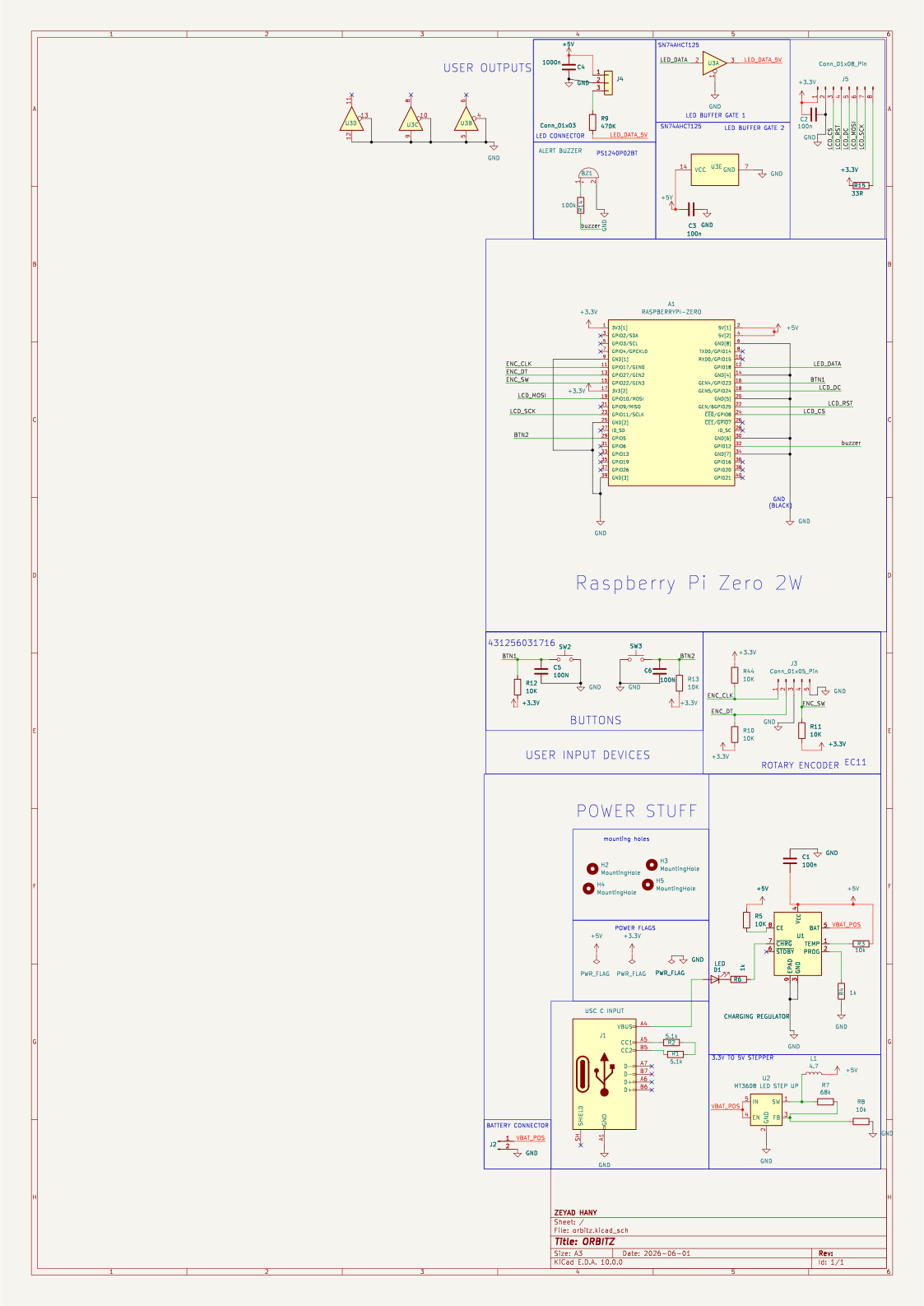
Plug it into usb c, Connect it to wifi, and it shows satellites and planes passing over your location using the rotary dial and the button, you can scroll through targets and select them
If you plug in the USB GPS AND SDR DONGLE, Orbitz will automagically :
Below is what your fully assembled design should look like.
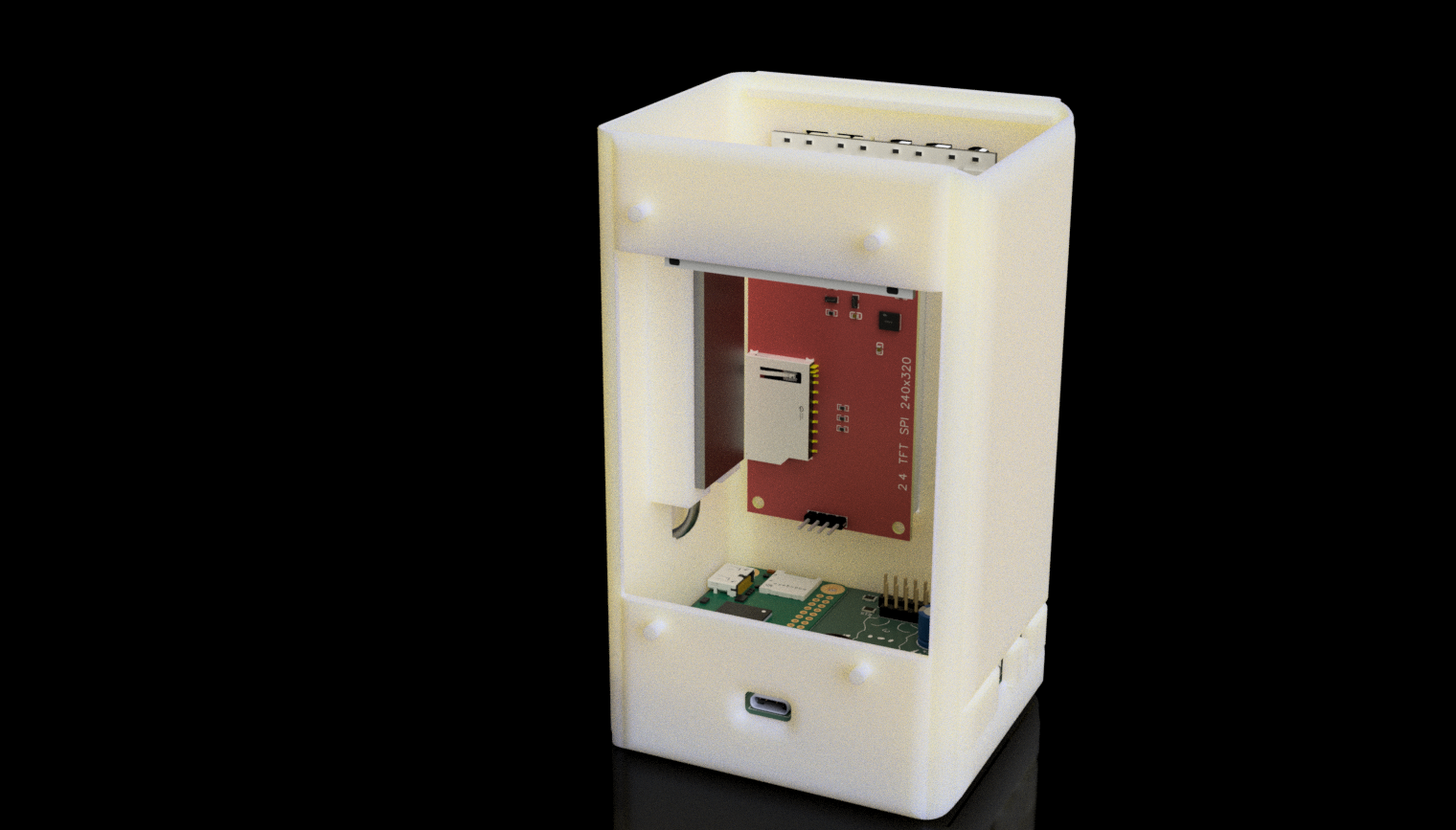
There are two ways to run ORBITZ:
This runs the radar UI in a Pygame window on any PC or Pi, using mock drivers instead of the real display, LEDs, and buttons.
How to run (Windows / PowerShell):
firmware folder.python -m venv .venv.\.venv\Scripts\Activate.ps1pip install -r requirements.txtpython main.pyControls in mock mode:
m + Enter: toggle between PLANES and SATS/ISS modes.j / k + Enter: move selection to next/previous target.q + Enter: quit.On the Pi Zero 2W with the ORBITZ PCB attached:
|
FINAL PCB SCREENSHOTS |
|
PCB |
|
FINAL BUILD |
The full detailed BOM is included in this repository:
You can open this file in Excel, Google Sheets, or any spreadsheet tool. It includes part names, descriptions, quantities, prices, and direct purchase links.
Key components
| Product name | Description | Qty |
|---|---|---|
| Raspberry Pi Zero 2W | Main computer, runs satellite tracking software | 1 |
| 2.4" NO TOUCH ILI9341 | SPI LCD display for Orbitz radar UI | 1 |
| WS2812B LED STRIP | Internal RGB status lighting (1 m) | 1 |
| RTL‑SDR USB dongle | ADS‑B receiver for local aircraft (dump1090) | 1 |
| USB GPS dongle (VK‑172 or similar) | Provides live GPS position via GPSD | 1 |
| Qty | Value | Footprint | References |
|---|---|---|---|
| 6 | 10K | Resistor_SMD:R_1206_3216Metric | R5, R10, R11, R12, R13, R44 |
| 3 | 100n | Capacitor_SMD:C_1206_3216Metric | C1, C2, C3 |
| 2 | 100N | Capacitor_SMD:C_1206_3216Metric | C5, C6 |
| 2 | 10k | Resistor_SMD:R_1206_3216Metric | R3, R8 |
| 2 | 1k | Resistor_SMD:R_1206_3216Metric | R4, R6 |
| 2 | 5.1k | Resistor_SMD:R_1206_3216Metric | R1, R2 |
| 2 | MountingHole | MountingHole:MountingHole_3.2mm_M3 | H2, H3 |
| 1 | 1000n | Capacitor_THT:CP_Radial_D8.0mm_P3.50mm | C4 |
| 1 | 100k | Resistor_SMD:R_1206_3216Metric | R14 |
| 1 | 33R | Resistor_SMD:R_1206_3216Metric | R15 |
| 1 | 4.7 | Inductor_SMD:L_0805_2012Metric | L1 |
| 1 | 470K | Resistor_SMD:R_1206_3216Metric | R9 |
| 1 | 68k | Resistor_SMD:R_1206_3216Metric | R7 |
| 1 | 74AHCT125 | Package_SO:SOIC-14_3.9x8.7mm_P1.27mm | U3 |
| 1 | ALERT BUZZER | Buzzer_Beeper:Buzzer_TDK_PS1240P02BT_D12.2mm_H6.5mm | BZ1 |
| 1 | CHARGING REGULATOR | Package_SO:SOIC-8-1EP_3.9x4.9mm_P1.27mm_EP2.41x3.3mm_ThermalVias | U1 |
| 1 | Conn_01x03 | Connector_PinHeader_2.54mm:PinHeader_1x03_P2.54mm_Vertical | J4 |
| 1 | Conn_01x05_Pin | Connector_PinHeader_2.54mm:PinHeader_1x05_P2.54mm_Vertical | J3 |
| 1 | Conn_01x08_Pin | Connector_PinHeader_2.54mm:PinHeader_1x08_P2.54mm_Vertical | J5 |
| 1 | LED | LED_SMD:LED_1206_3216Metric | D1 |
| 1 | MT3608 LED STEP UP | Package_TO_SOT_SMD:SOT-23-6 | U2 |
| 1 | RASPBERRYPI-ZERO | RaspberryPi_Zero:RASPBERRYPI-ZERO_RPI-ZERO | A1 |
| 1 | USC C INPUT | Connector_USB:USB_C_Receptacle_HRO_TYPE-C-31-M-12 | J1 |
| 1 | batt connector | Connector_JST:JST_PH_S2B-PH-K_1x02_P2.00mm_Horizontal | J2 |
| 1 | selection button | Button_Switch_THT:SW_Tactile_SPST_Angled_PTS645Vx31-2LFS | SW2 |
| 1 | selection button 2 | Button_Switch_THT:SW_Tactile_SPST_Angled_PTS645Vx31-2LFS | SW3 |
It measures 80 × 67.3 mm and has 2 copper layers, 1.6 mm thick.
38 parts, built around the 74AHCT125D. The full list of its parts is on this page, with links to each part's symbol and footprint where PCBKit's library has them.
From the marvyluvu/ORBITZ repository on GitHub, at the commit this page was made from: the board is hardware/orbitz.kicad_pcb and its schematic hardware/orbitz.kicad_sch. PCBKit opens the board in the browser, with nothing to install.
Its repository states no licence, so its author keeps all rights: ask marvyluvu before reusing the design.


byungyoonc/TrueStrike42
TrueStrike42 is a columnar staggered unibody split keyboard designed to maximize performance and minimize finger fatigue.

twasilczyk/waterdrop-esphome
Waterdrop RO system smart Wi-Fi module for Home Assistant

usedhondacivic/ECE-4760-POV-Display
Persistence of vision display. 30 FPS, full RGB color, and 26" diameter. Updates remotely over WIFI.

GLGPrograms/tinyDiskII
Homemade floppy disk emulator for Apple II series computers

joshjetson/phosphor
A full fledged DAW in TUI and GUI flavors: Run it in the terminal or run it as a desktop app (Desktop App Coming Soon..maybe)