
2 layers25.5 × 40 mm
Neck D0 8 1 no servos
lxm/microduck-maker
MicroDuck 创客工具集:3D 装配对照、HD1910 逐关节零位标定与维护;后续统一收录固件。
13 parts4

 lxm/microduck-maker4
MicroDuck 创客工具集:3D 装配对照、HD1910 逐关节零位标定与维护;后续统一收录固件。
MicroDuck Neck D0 8 1 1oz 6up 94p5x96 is an open-source printed circuit board by lxm, from the lxm/microduck-maker repository on GitHub. It is a 2-layer board of 94.5 × 96 mm with 80 parts on 18 nets, routed with 270 tracks and 138 vias.
It is built around the A2007WV-3P. It belongs with the robots and motor control boards of this library.
把 MicroDuck 从装配、标定到日常维护会用到的工具,放进一个持续维护的项目。
工具目录 · 飞特舵机调试 · 标定工具使用说明 · 装配对照 · 下载发布包 · 反馈问题
| 工具 | 用途 | 入口 |
|---|---|---|
| 飞特舵机调试 | USB 串口直连 HD-1910:搜索、微调、反馈曲线、校零与参数备份 | tools/servo-debug |
| 逐关节零位标定 | 单屏 3D 工作台、逐颗标定、回零 / HOME、保持与备份 | tools/calibrator |
| 舵机编号与装配对照 | 飞特 HD-1910 版的 15 颗舵机位置、编号与装配检查 | tools/servo-guide · 在线查看 |
| 零位标定支架 | 6 件 STL、装配参考与代打说明 | tools/zero-fixture |
| 硅胶脚底翻模(正在尝试中) | V7 四种内壁加厚试验模,共用下模,附对比与浇注方法 | 下载模具与使用方法 |
| 颈部舵机连接板 | D0.8.1 原配胶壳短线焊接版:KiCad、板级 3D、单板/六联制造文件与接线说明 | tools/neck-interconnect |
仓库包含标定与装配工具的源码、第三方资源、使用说明和离线验证程序,以及零位标定支架的 STL 打印文件(不含支架 STEP)、颈部连接板的可编辑 PCB 和板级 STEP。支架保留原设计,已知配合问题和来源说明见其目录。颈部板当前收录原配胶壳短线穿孔焊接版,替代端子试装版待验证后单独发布。
基于 kissqy/Microduck-kissqy(d4d21c1),保留原有机器人应用、模型和 ToF 源码,由 MicroDuck Maker 在 Armbian 26.8.1 上适配串口、HAT I²C 和音频。
摄像头版镜像请从 Orange Pi 固件 Actions 的成功构建下载。下方固定发布版 exp.1 早于摄像头适配。
下载 exp.1 完整刷卡镜像(.img.xz) · SHA-256 校验文件 · 刷卡与首次启动说明
这是面向 Allwinner A733、1 GB、PCB V1.5 的实验镜像,已离线校验,尚未验证本发布镜像的实机启动。
电脑安装 Python 3.10+,然后运行:
git clone https://github.com/lxm/microduck-maker.git
cd microduck-maker/tools/calibrator
python3 server.py --demo
打开 http://127.0.0.1:8795/。默认即为模拟模式,可以体验选关节、采样、保存和保持流程,不连接机器人。下载资源均包含在仓库中,不需要 npm 或在线 CDN。
需要另一台电脑访问时,在启动命令后加 --bind 0.0.0.0,然后用浏览器打开 http://服务电脑的IPv4地址:8795/。具体步骤与连接排查见 局域网访问说明。
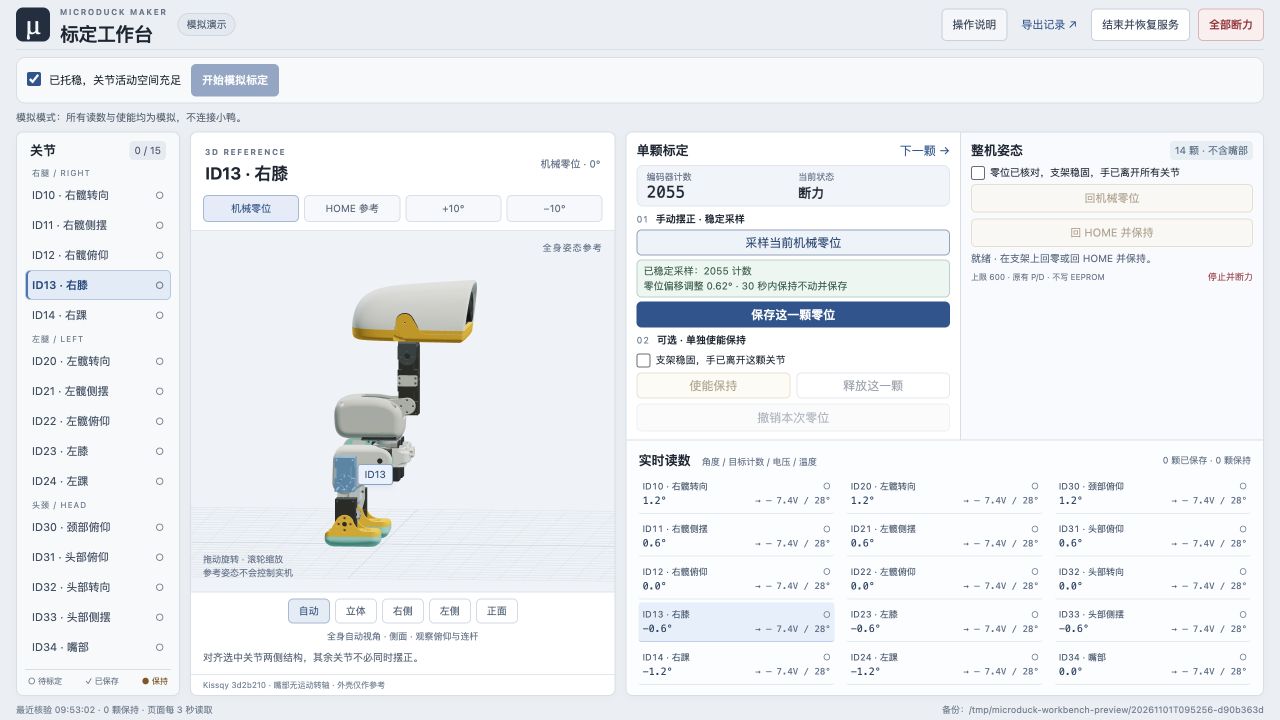
实机标定还需要兼容的板端运行环境与 SSH。先读 适用范围与连接方法,再按 详细操作说明 执行。机械零位和站立 HOME 是不同概念,3D 参考按钮只改变画面。
电脑通过 USB 转 TTL 转接器连接 HD-1910 时,使用 MicroDuck FD 调试工作台。macOS 可双击 tools/servo-debug/启动调试工具.command,或从仓库根目录执行:
zsh tools/servo-debug/启动调试工具.command选择「演示设备」可先体验完整流程;实机使用前按工具说明核对供电、串口与波特率。它与通过 SSH 操作机器人主板的标定工具是两个独立入口。
microduck-maker/
├── tools/
│   ├── servo-debug/      # USB 串口舵机调试工作台与演示设备
│   ├── calibrator/       # 标定网页、板端代理、测试与说明
│   ├── servo-guide/      # 3D 舵机编号与装配对照
│   ├── zero-fixture/     # 零位标定支架 STL 与打印说明
│   ├── silicone-sole-mold/ # 硅胶脚套模具与浇注说明(正在尝试中)
│   └── neck-interconnect/ # 颈部连接板、板级模型与接线/打板说明
├── firmware/             # 按板型维护的固件源码与镜像构建说明
├── docs/                 # 项目维护与发布说明
├── scripts/              # 全仓库离线验证
├── .github/workflows/    # 自动校验
├── LICENSE              # 原创代码的 MIT 许可
└── THIRD_PARTY_NOTICES.md
每个工具在自己的目录内说明依赖、启动方式、兼容范围和来源,能够独立使用。后续新增工具继续放到 tools/<工具名>/,固件按板型放到 firmware/<板型>/。
安装 Python 3.10+ 和 Node.js。Node.js 仅用于 JavaScript 语法校验,不是标定工具的运行依赖。
python3 -m pip install -r tools/servo-debug/requirements.txt
python3 scripts/validate.py
验证包含飞特调试工具的模拟协议、校零与 HTTP 检查,以及标定工具及串口发现/依赖准备的离线测试、3D 引用文件哈希、网页静态资源,以及装配对照的网格、69 个装配变换和 15 个舵机编号、颈部板文件与制造包完整性。验证不连接机器人、不操作串口、不上传程序或改写实机。
当前工作台增加单屏布局与回 HOME 操作;离线测试通过不等同于跨机型实机验收。兼容条件及已知边界见各工具说明。贡献与发布方式见 CONTRIBUTING.md 和 发布说明。
这是独立社区项目,与 Pollen Robotics、飞特及所引用社区项目无官方隶属或背书关系。现有 microduck-servo-guide 仓库和在线页面继续保留,新项目统一收录后续工具源码。
English: A growing collection of MicroDuck maker tools for assembly, servo zero calibration and maintenance. The calibration UI runs locally with an offline demo; hardware mode requires a compatible HD1910 robot environment. Third-party code and model assets retain their own licenses.
| Qty | Value | Footprint | References |
|---|---|---|---|
| 24 | CASE_PILOT_DRAFT | U1_H1, U1_H2, U1_H3, U1_H4, U2_H1, U2_H2, U2_H3, U2_H4, U3_H1, U3_H2, U3_H3, U3_H4, U4_H1, U4_H2, U4_H3, U4_H4 +8 | |
| 24 | OEM_AMP2.0_3P_PIGTAIL | U1_J1, U1_J2, U1_J3, U1_J4, U2_J1, U2_J2, U2_J3, U2_J4, U3_J1, U3_J2, U3_J3, U3_J4, U4_J1, U4_J2, U4_J3, U4_J4 +8 | |
| 6 | DATA | U1_TP1, U2_TP1, U3_TP1, U4_TP1, U5_TP1, U6_TP1 | |
| 6 | GND | U1_TP3, U2_TP3, U3_TP3, U4_TP3, U5_TP3, U6_TP3 | |
| 6 | HEAD_HARNESS | U1_J6, U2_J6, U3_J6, U4_J6, U5_J6, U6_J6 | |
| 6 | LOWER_BODY_HARNESS | U1_J5, U2_J5, U3_J5, U4_J5, U5_J5, U6_J5 | |
| 6 | VBUS_SERVO | U1_TP2, U2_TP2, U3_TP2, U4_TP2, U5_TP2, U6_TP2 | |
| 1 | NPTH_0.55 | MB1 | |
| 1 | NPTH_2 | TOOL1 |
lxm/microduck-maker
MicroDuck 创客工具集:3D 装配对照、HD1910 逐关节零位标定与维护;后续统一收录固件。


Staacks/gbinterceptor
Capture or stream Game Boy gameplay footage via USB without modifying the Game Boy.

Chrismettal/EleLab_v2
Cheap DIY lab system for hobbyists and the tinkering folk

ohmtech-rdi/eurorack-blocks
Software to Hardware Prototyping for Eurorack using C++, Max/Gen~ or Faust

jpconstantineau/ErgoTravel
A Portable Ergonomic Split Keyboard inspired from the ErgoDox, Let's Split and Minidox

marksard/Keyboards
This repository is warehouse of my keyboard architecture.

tebl/RC6502-Apple-1-Replica
An expandable SBC-version of the Apple 1 computer, easy to get started with and lot of cool stuff that can be added to it!

It measures 94.5 × 96 mm and has 2 copper layers, 1.6 mm thick.
80 parts, built around the A2007WV-3P. The full list of its parts is on this page, with links to each part's symbol and footprint where PCBKit's library has them.
From the lxm/microduck-maker repository on GitHub, at the commit this page was made from: the board is tools/neck-interconnect/d0.8.1/fabrication/D0_8_1_1oz_6up/MicroDuck_Neck_D0_8_1_1oz_6up_94p5x96.kicad_pcb and its schematic tools/neck-interconnect/d0.8.1/pcb/neck_D0.kicad_sch. PCBKit opens the board in the browser, with nothing to install.
Its repository states no licence, so its author keeps all rights: ask lxm before reusing the design.