2 layers85.8 × 94.2 mm
Fault Latch 2
LSUTigerRacing/Electronics
This repository contains all of the KiCad Schematics for the 2026 TigerRacing Formula SAE's Electronics Subsystem.
123 parts8
 LSUTigerRacing/Electronics8
This repository contains all of the KiCad Schematics for the 2026 TigerRacing Formula SAE's Electronics Subsystem.
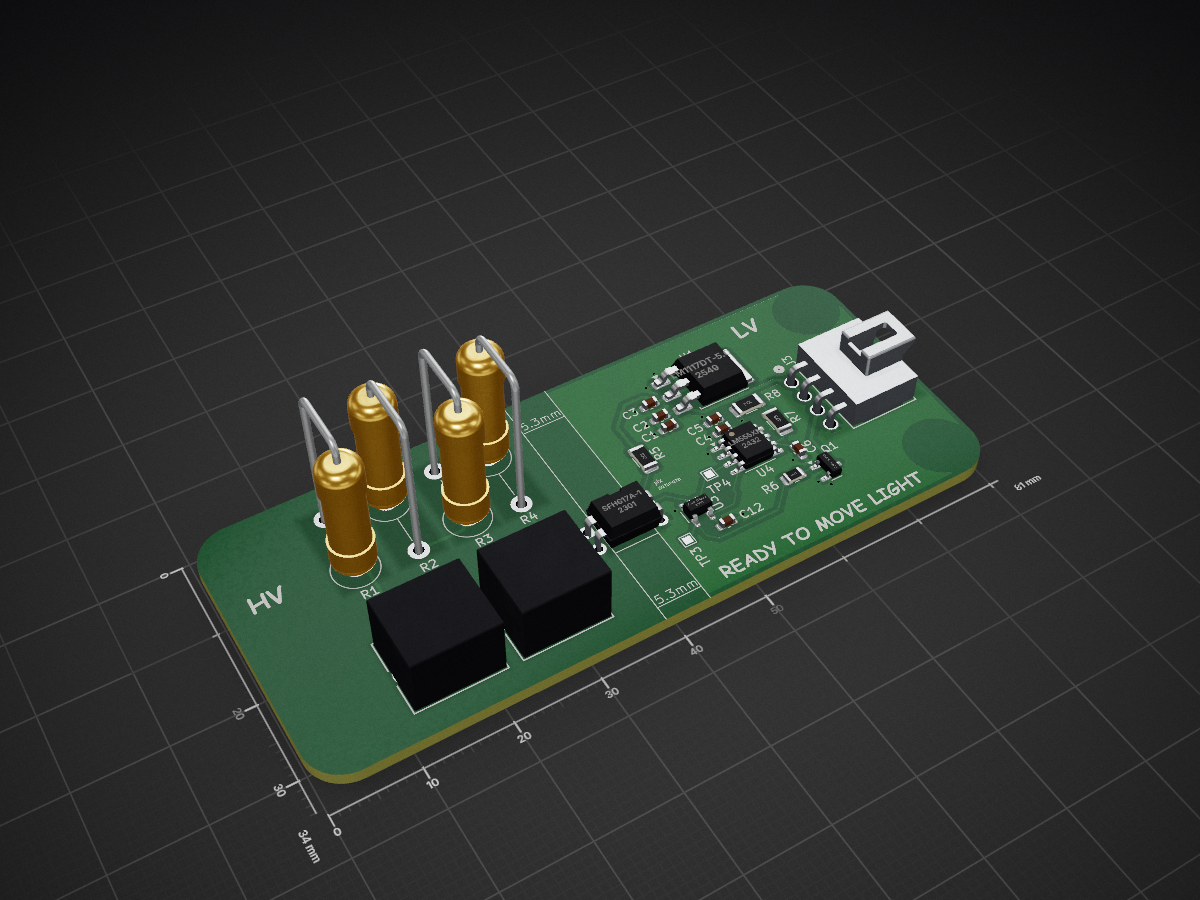
RML Quick is an open-source printed circuit board by LSUTigerRacing, from the LSUTigerRacing/Electronics repository on GitHub. It is a 2-layer board of 81 × 34 mm with 25 parts on 23 nets, routed with 114 tracks and 20 vias.
It is built around the 74AHC1G02GW, LM1117DT-5.0 and SFH617A-1. Its parts include 8 resistors, 7 capacitors, 4 ICs, 3 connectors and 1 transistor.




When making a new PCB, if the board is to be manufactured by JLCPCB. import the corresponding board constraints from Board Templates/JLC
This section will walk you through downloading the repository to your computer for the first time. You only need to do this once.
A token is essentially a password that lets Git on your computer talk to GitHub securely.
git-access), set an expiration, and check the repo scope"Cloning" means downloading a full copy of the repository to your computer.
Open Git Bash and run the following commands one at a time:
git clone https://github.com/LSUTigerRacing/Electronics.git
cd Electronics
When prompted for a password, paste the token you copied in the previous step.
In Git Bash, highlight and right-click Electronics to open the folder in File Explorer. From there, open the KiCad project file (.kicad_pro).
This section covers the full workflow for making changes and submitting them every time you work on something.
[!IMPORTANT] Never commit directly to
main. All changes must go through a pull request.
Before starting any work, pull the latest changes from the repository so you're not working on an outdated copy.
cd Electronics
git pull origin mainA "branch" is your own isolated workspace. Think of it like making a photocopy of the project — you make your edits on the copy, and only merge it back once everything looks good.
Replace your-branch-name with something descriptive (e.g. fault-latch-rework).
git checkout -b "your-branch-name"Open the KiCad project and make your changes. Save your work when done.
"Staging" tells Git which files to include, and "committing" saves a snapshot of those changes with a description.
git add .
git commit -m "Brief description of what you changed""Pushing" uploads your local branch so others (and GitHub) can see it.
git push -u origin "your-branch-name"main and the compare branch to yoursA reviewer will look over your changes. Once approved, your branch will be merged into main and can then be deleted.
| Qty | Value | Footprint | References |
|---|---|---|---|
| 4 | 5.1k | Resistor_THT:R_Axial_DIN0516_L15.5mm_D5.0mm_P7.62mm_Vertical | R1, R2, R3, R4 |
| 3 | 1u | Capacitor_SMD:C_0603_1608Metric | C2, C4, C6 |
| 2 | 100n | Capacitor_SMD:C_0603_1608Metric | C5, C12 |
| 2 | 10u | Capacitor_SMD:C_0603_1608Metric | C1, C3 |
| 2 | TestPoint | TestPoint:TestPoint_Pad_1.0x1.0mm | TP3, TP4 |
| 2 | Tyco | Library:tyco | J1, J2 |
| 1 | 100k | Resistor_SMD:R_1206_3216Metric | R8 |
| 1 | 10k | Resistor_SMD:R_1206_3216Metric | R5 |
| 1 | 47k | Resistor_SMD:R_1206_3216Metric | R7 |
| 1 | 680 | Resistor_SMD:R_0805_2012Metric | R6 |
| 1 | 74AHC1G02 | Package_TO_SOT_SMD:SOT-23-5 | U3 |
| 1 | LM1117DT-5.0 | Package_TO_SOT_SMD:TO-252-3_TabPin2 | U1 |
| 1 | LM555xM | Package_SO:SOIC-8_3.9x4.9mm_P1.27mm | U4 |
| 1 | NANOFIT-4PIN | BSPD:SAMMY-4PIN | J3 |
| 1 | Q_NMOS_GSD | Package_TO_SOT_SMD:SOT-23 | Q1 |
| 1 | SFH617A-1 | Package_DIP:DIP-4_W7.62mm | U2 |
It measures 81 × 34 mm and has 2 copper layers, 1.6 mm thick.
25 parts, built around the 74AHC1G02GW, LM1117DT-5.0 and SFH617A-1. The full list of its parts is on this page, with links to each part's symbol and footprint where PCBKit's library has them.
From the LSUTigerRacing/Electronics repository on GitHub, at the commit this page was made from: the board is RML/RML Quick/RML Quick.kicad_pcb. PCBKit opens the board in the browser, with nothing to install.
Its repository states no licence, so its author keeps all rights: ask LSUTigerRacing before reusing the design.
LSUTigerRacing/Electronics
This repository contains all of the KiCad Schematics for the 2026 TigerRacing Formula SAE's Electronics Subsystem.

LSUTigerRacing/Electronics
This repository contains all of the KiCad Schematics for the 2026 TigerRacing Formula SAE's Electronics Subsystem.

LSUTigerRacing/Electronics
This repository contains all of the KiCad Schematics for the 2026 TigerRacing Formula SAE's Electronics Subsystem.

LSUTigerRacing/Electronics
This repository contains all of the KiCad Schematics for the 2026 TigerRacing Formula SAE's Electronics Subsystem.

LSUTigerRacing/Electronics
This repository contains all of the KiCad Schematics for the 2026 TigerRacing Formula SAE's Electronics Subsystem.

LSUTigerRacing/Electronics
This repository contains all of the KiCad Schematics for the 2026 TigerRacing Formula SAE's Electronics Subsystem.

LSUTigerRacing/Electronics
This repository contains all of the KiCad Schematics for the 2026 TigerRacing Formula SAE's Electronics Subsystem.

LSUTigerRacing/Electronics
This repository contains all of the KiCad Schematics for the 2026 TigerRacing Formula SAE's Electronics Subsystem.

LSUTigerRacing/Electronics
This repository contains all of the KiCad Schematics for the 2026 TigerRacing Formula SAE's Electronics Subsystem.

LSUTigerRacing/Electronics
This repository contains all of the KiCad Schematics for the 2026 TigerRacing Formula SAE's Electronics Subsystem.

LSUTigerRacing/Electronics
This repository contains all of the KiCad Schematics for the 2026 TigerRacing Formula SAE's Electronics Subsystem.

LSUTigerRacing/Electronics
This repository contains all of the KiCad Schematics for the 2026 TigerRacing Formula SAE's Electronics Subsystem.


jerry-kerenzikov/ytterbium
Project files for Ytterbium modular CPU platform and Yprog programming tool


JonathSpirit/GP8B
G_Processor8Bits a homemade without any microcontroller 8bits processor


andreika-git/hellen-one
Hellen-One Hardware Platform for rusEFI Engine Management System
