2 layers200 × 150 mm

 lorenzonotaro/lncpu8
LNCPU is a design for a hobby 8-bit processor.
Flags is an open-source printed circuit board by lorenzonotaro, from the lorenzonotaro/lncpu repository on GitHub. It is a 2-layer board of 149.4 × 102.8 mm with 26 parts on 68 nets, routed with 967 tracks and 155 vias.
It is built around the 74HCT541D, 74LS32SC and 74LS157PC, with the 74HCT173D, 74HCT74D and 74LS04PC among its other parts. Its parts include 13 capacitors, 12 ICs and 1 connector.


LNCPU is a design for a hobby 8-bit processor.
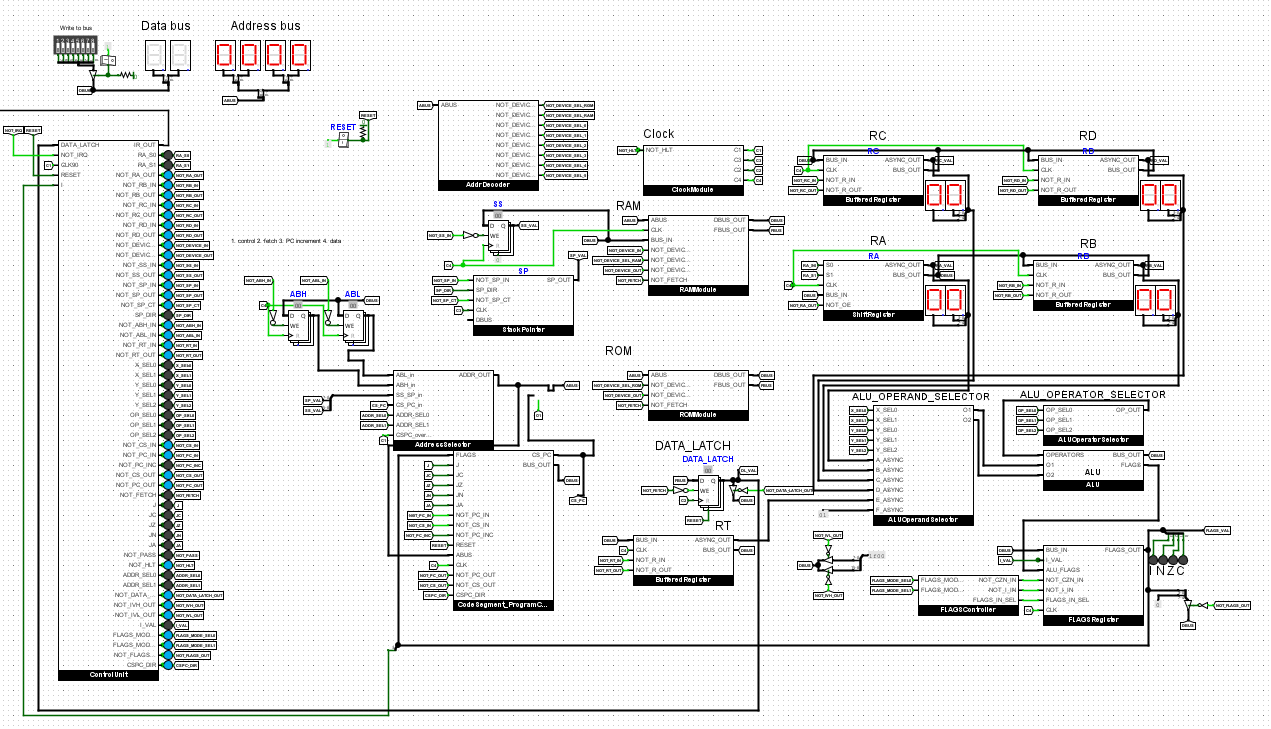
Overview of the repository:
v1 is the first implementation of the lncpu. Here you will find the Logisim simulation and the KiCad project (currently under construction), as well as the Python script for generating the control unit EEPROMS.
lnc is an assembler and C compiler written in Java for the lncpu. It is kept up to date with the current implementation.
eeprom-serial-loader is a utility program for editing binary data and loading it to/from EEPROMS.
lncpu-emu is a simple emulator for the lncpu written in C.
lnfsutils is a utility program for working with the lnfs filesystem, a simple FS designed to work on the lncpu.
Programs contains some sample programs you can assemble and run on the lncpu as well as Notmon, a utility program strongly inspired in its functionality (and name) by Wozmon, made by Steve Wozniak for his Apple I.
extras contains some additional tools, such as a VsCode extension for lnasm.
Physical implementation: work in progress. The Logisim simulation is basically done and tested. Some adjustments to the architecture may still be made, but the main design is complete. The KiCad project is under construction, and it might be necessary to properly simulate the design with actual hardware simulation software (e.g. an HDL simulation) before implementing it physically.
Assembler and C compiler: the assembler is basically complete and stable. The C compiler is still a work in progress, but it is already usable for small-medium sized programs. Arrays and structs are yet to be implemented. The register allocator is very basic and can be improved and general optimization passes in the various stages would be very beneficial for an inefficient architecture like this one.
EEPROM editor and loader: the utility is basically complete and stable. Some improvements can be made to the UI, but it is already usable. More loaders other than the AT28C64 can be added.
Emulator: The emulator is also basically done, but it is very basic and can be improved a lot. It is currently Windows-only because of the use of <conio.h> for keyboard input, but porting it to Linux or MacOS should be easy.
Programs: A simple BIOS for the lncpu is under development. Notmon is basically complete and stable, but more features can be added.
Extras: The VsCode extension has syntax highlighting and basic symbol support for lnasm files. More features can be added, such as code snippets and integration with lnc.
lnc and eeprom-serial-loader.gcc).Note: I suggest using my fork of Logisim-evolution (logisim-lncpu branch) to open the Logisim project. It includes useful features like:
If you're on Linux, make.sh will build everything for you. Usage:
./make.sh [--no-eeproms] [--no-eeprom-serial-loader|--no-esl] [--no-lnc] [--no-lnfs|--no-lnfs-utils]If you're on Windows, use make.bat instead. Usage:
./make.bat [--no-eeproms] [--no-eeprom-serial-loader|--no-esl] [--no-lnc] [--no-lnfs|--no-lnfs-utils]These scripts will create an output folder containing:
lnc.jar: the assembler and C compiler along with lnc.bat/lnc.sh scripts for easy usageeeprom-serial-loader.jar: the EEPROM editing and loading utility along with eeprom-serial-loader.bat/eeprom-serial-loader.sh scripts for easy usagelncpu-emu.exe: the LNCPU emulator executableeeproms: a folder containing all the generated control unit EEPROMs (if you have my fork of Logisim, you may open the Logisim project, then go to Simulate -> Debug LNCPU -> Load CU EEPROMS and select this folder to load them all at once).lib folder containing libraries for lnc/lnasmIt is recommended to add the output folder to your PATH environment variable for easy usage of lnc and eeprom-serial-loader from any location and allow the Logisim debugger to compile and load programs directly.
| Qty | Value | Footprint | References |
|---|---|---|---|
| 9 | 100n | Capacitor_THT:C_Disc_D5.0mm_W2.5mm_P2.50mm | C3, C4, C5, C6, C7, C8, C9, C10, C11 |
| 3 | 74LS32 | Package_DIP:DIP-14_W7.62mm_LongPads | U5, U9, U13 |
| 2 | 220n | Capacitor_THT:C_Disc_D5.0mm_W2.5mm_P2.50mm | C1, C2 |
| 2 | 74LS08 | Package_DIP:DIP-14_W7.62mm_LongPads | U2, U3 |
| 2 | 74LS157 | Package_DIP:DIP-16_W7.62mm_LongPads | U11, U12 |
| 1 | 74HCT173 | Package_DIP:DIP-16_W7.62mm_LongPads | U4 |
| 1 | 74HCT541 | Package_DIP:DIP-20_W7.62mm_LongPads | U8 |
| 1 | 74HCT74 | Package_DIP:DIP-14_W7.62mm_LongPads | U6 |
| 1 | 74LS04 | Package_DIP:DIP-14_W7.62mm_LongPads | U10 |
| 1 | C_Polarized | Capacitor_THT:CP_Radial_D5.0mm_P2.00mm | C12 |
| 1 | C_Polarized | lncpu:CP_Radial_D4.0mm_P2.00mm-Large-Holes | C13 |
| 1 | LNCPU Type B Header | lncpu:LNCPU_Type_B_Header | U1 |
| 1 | LNCPU_FLAGS_Connector | Connector_PinSocket_2.54mm:PinSocket_1x06_P2.54mm_Vertical | J1 |

lorenzonotaro/lncpu
LNCPU is a design for a hobby 8-bit processor.


ksr/YACC1-D
YACC1 (Yet Another Custom CPU) - definitive tree: hardware, firmware, software, tools and docs for the hand-built TTL computer. Supersedes ksr/YACC1-2020.

CatspersCoffee/S100-Boards
S-100 bus boards designed and built: Z80 and 80386 CPU cards, SRAM/DRAM memory, CPLD/FPGA I/O and SPI boards, an 18-slot backplane and bus terminator.

telec16/modular-synth
Little side project, don't expect much updates.


Julesc013/project-carbon
Hardware and software for custom CPUs, FPUs, and computer systems.
It measures 149.4 × 102.8 mm and has 2 copper layers, 1.6 mm thick.
26 parts, built around the 74HCT541D, 74LS32SC, 74LS157PC and 74HCT173D. The full list of its parts is on this page, with links to each part's symbol and footprint where PCBKit's library has them.
From the lorenzonotaro/lncpu repository on GitHub, at the commit this page was made from: the board is v1/kicad/flags/flags.kicad_pcb. PCBKit opens the board in the browser, with nothing to install.
Its repository states no licence, so its author keeps all rights: ask lorenzonotaro before reusing the design.