2 layers92 × 99 mm

 k-takata/PCB_envmeter_esp32c33
IoT environment meter using ESP32-C3 and BME680
PCB envmeter esp32c3 is an open-source printed circuit board by k-takata, from the k-takata/PCB_envmeter_esp32c3 repository on GitHub. It is a 2-layer board of 72 × 47.5 mm with 31 parts on 29 nets, routed with 211 tracks and 11 vias.
It is built around the ESP32-C3-WROOM-02-H4, AP7333-33SAG and NJM2845DL1-33-TE1, with the 2SC2001 among its other parts. Its parts include 9 resistors, 4 capacitors, 4 ICs, 3 connectors and 2 diodes. It belongs with the ESP32 and RISC-V boards of this library.


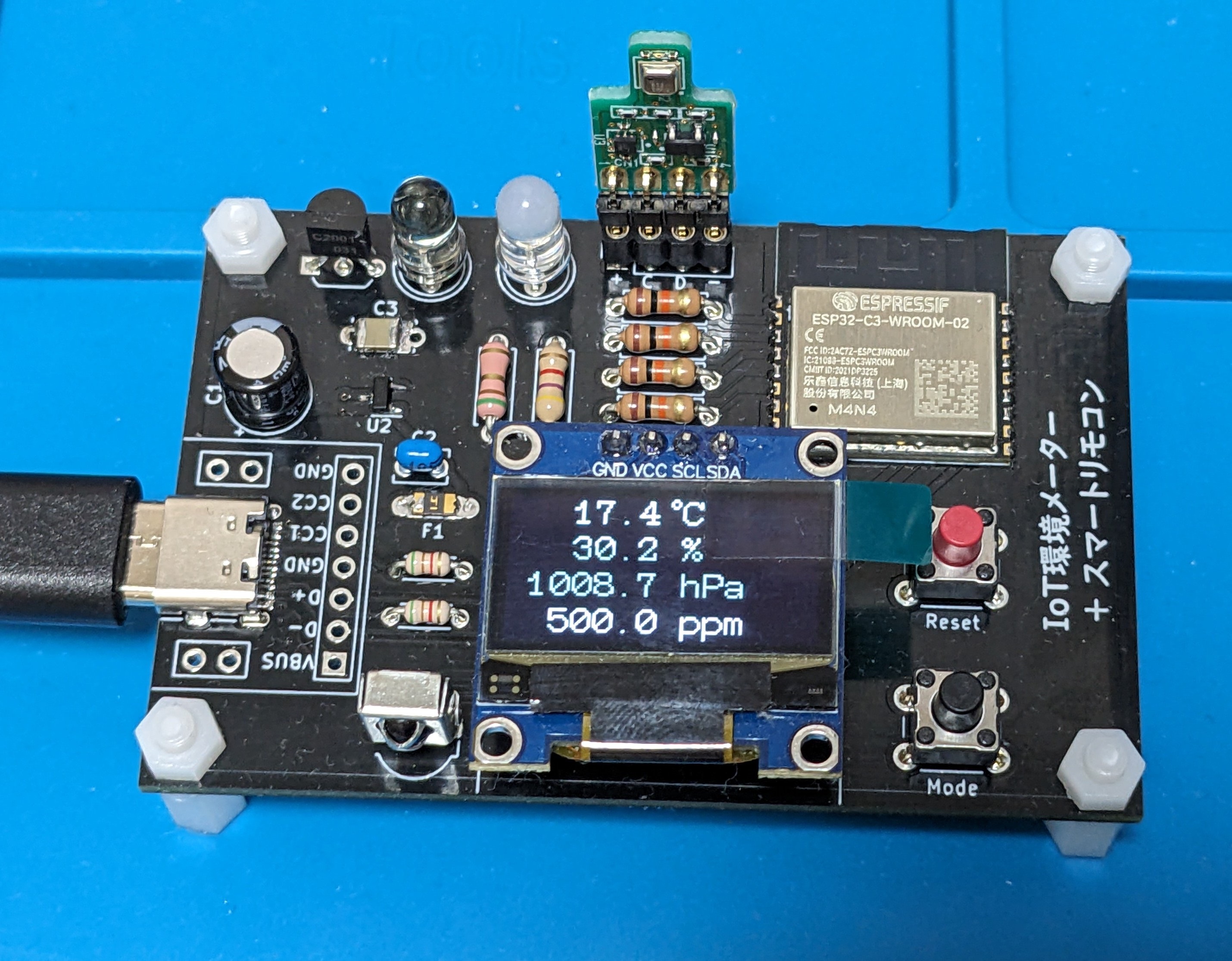
ESP32-C3とBoschのBME680を使い、温度、湿度、気圧、二酸化炭素換算値などを測定し、結果をAmbientにアップロードできる環境メーターです。
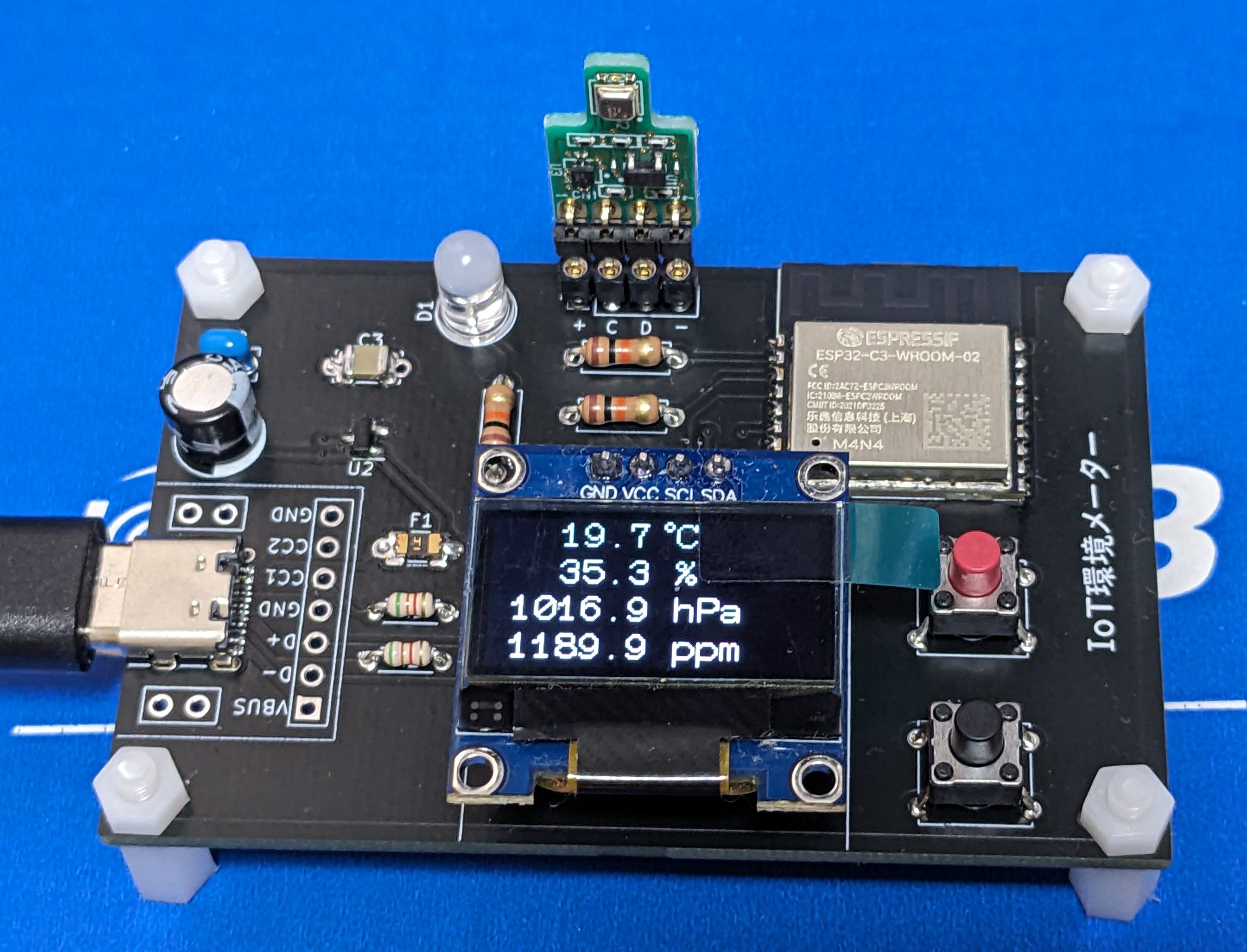
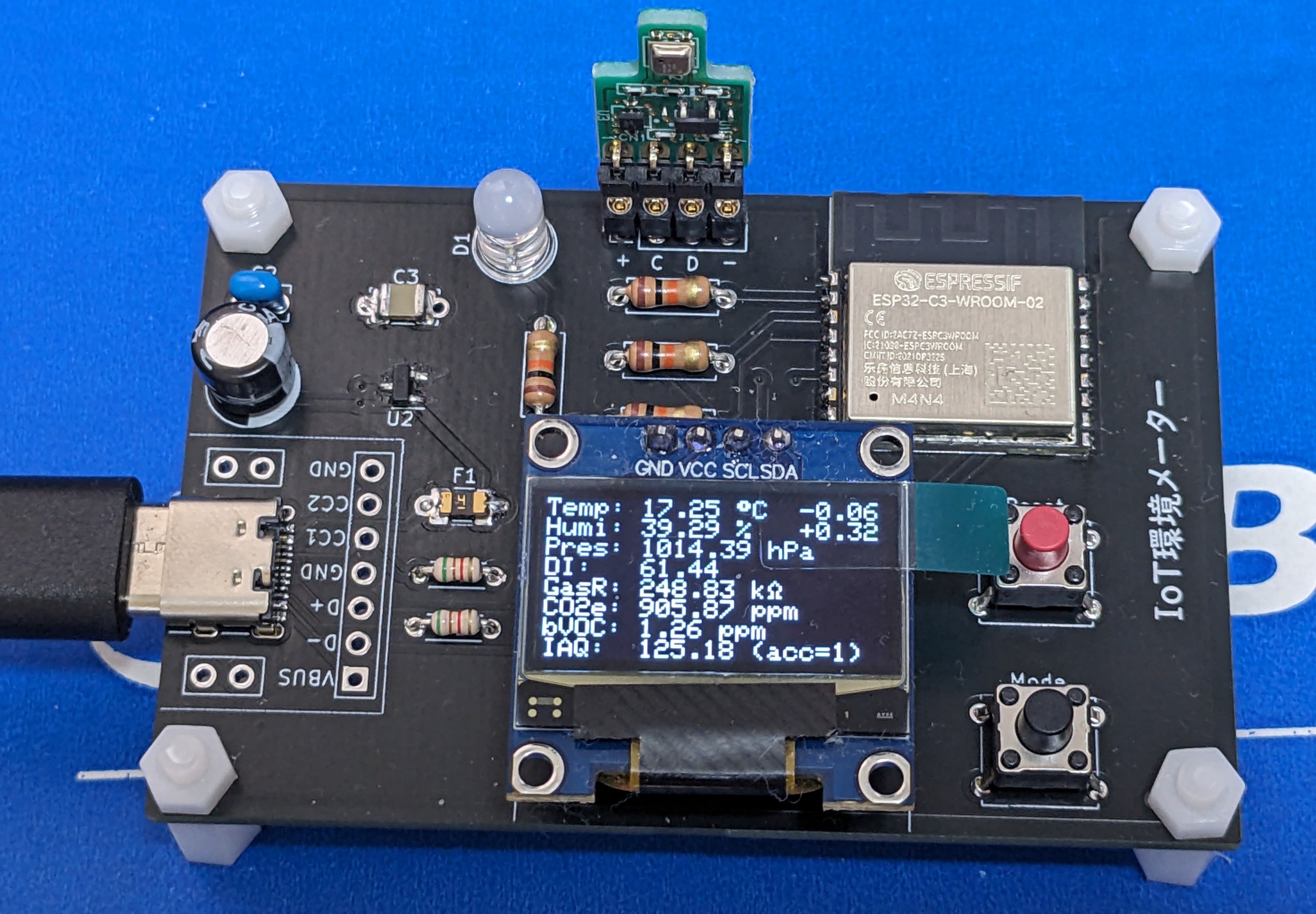
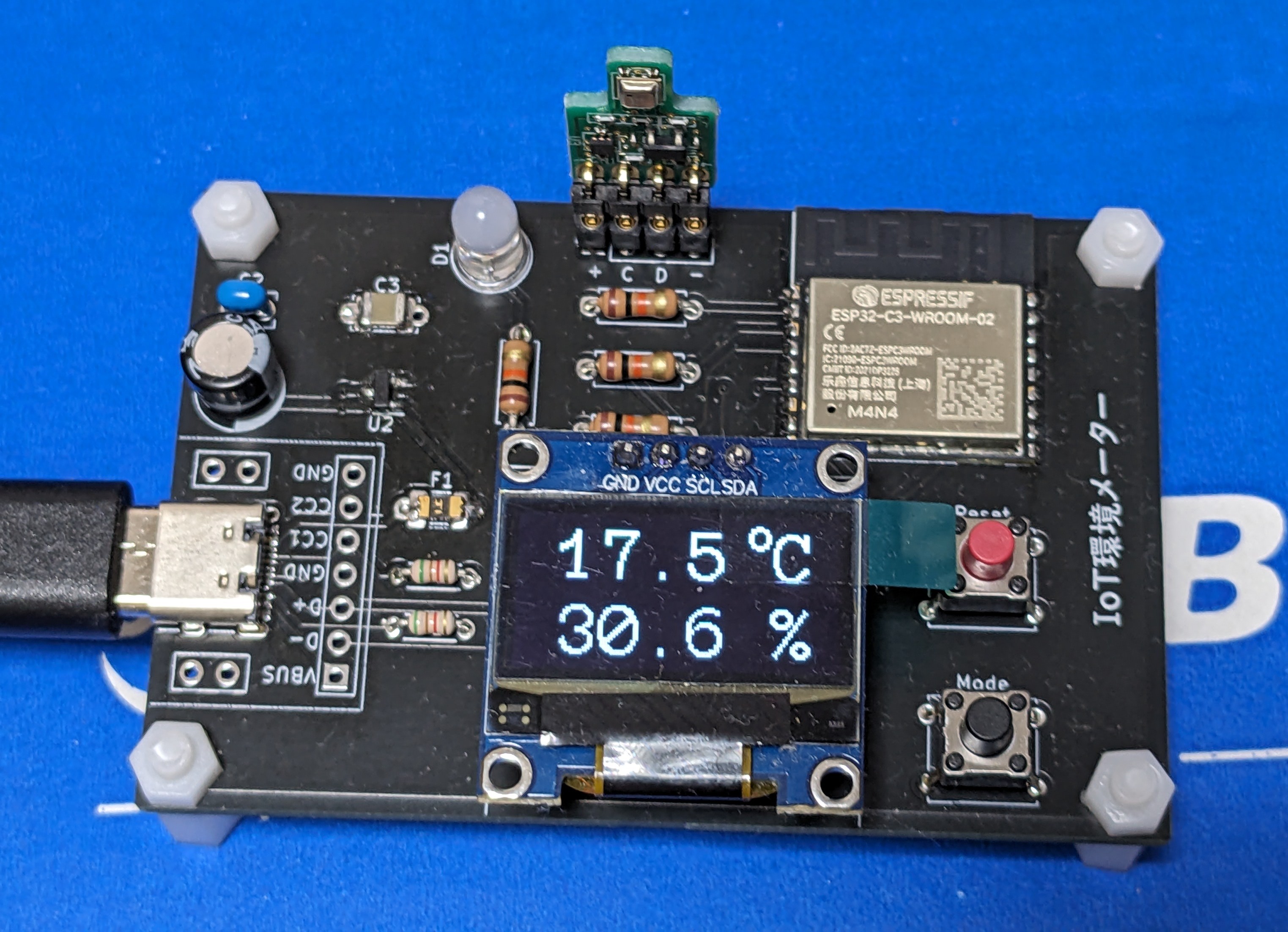
表示には0.96inch OLEDを使用し、スイッチで通常表示・詳細表示・簡易表示を切り替えることができます。
Rev. 2 からは赤外線送受信部を備え、スマートリモコン機能も使うことができます。
Rev. 1 のソフトウェア及び解説記事は「ESP32-C3とBME680でIoT環境メーターを作る」で公開しています。
Rev. 2 のソフトウェア及び解説記事は以下で公開しています。
KiCad 7.0
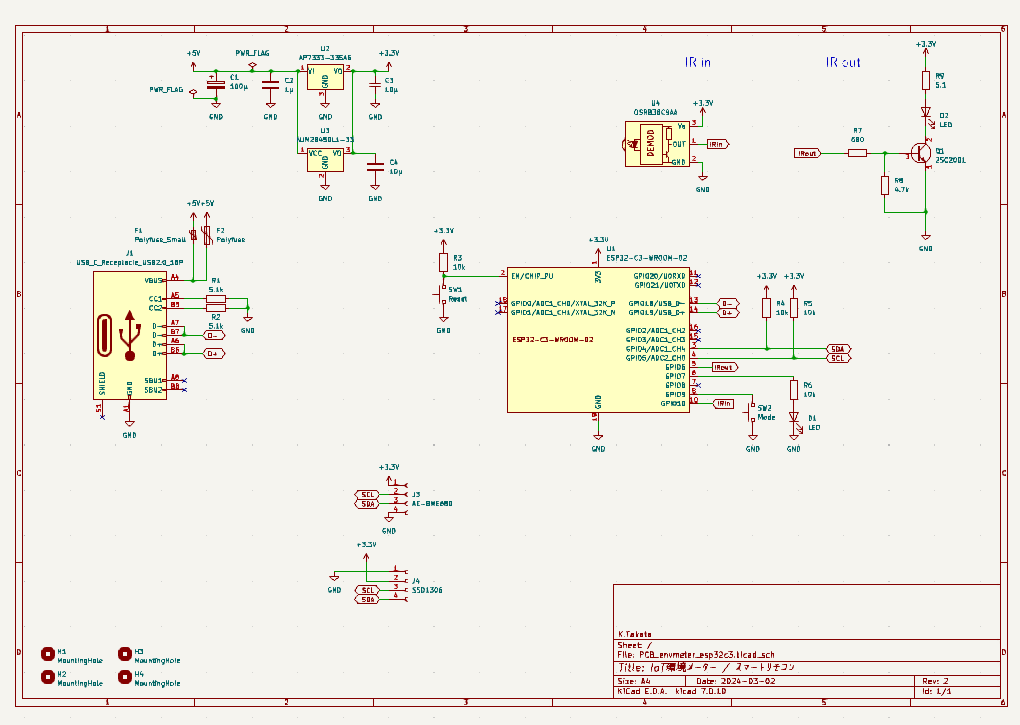

| Reference | 個数 | 値 | 説明 |
|---|---|---|---|
| C1 | 1 | 100μF | 電解コンデンサー φ6.31 (100 ~ 470μF) |
| C2 | 1 | 1μF | 積層セラミックコンデンサー、2.54mmピッチ |
| C3 (*1) | 1 | 10μF | 積層セラミックコンデンサー、表面実装 (3225 あるいは 3216 サイズ) |
| C4 (*1) | 1 | 10μF | 積層セラミックコンデンサー、5mmピッチ |
| D1 | 1 | 赤色LED φ5 | |
| F1 (*2) | 1 | 0.5A | ポリヒューズ、表面実装 |
| F2 (*2) | 1 | 1.1A | ポリヒューズ |
| J1 (*3) | 1 | 5077CR-16-SMC2-BK-TR | USB Type-Cコネクター |
| J2 (*3) | 1 | USB Type-CコネクターDIP化キット、同等品でも可 | |
| J3 | 1 | 細ピンソケット 1x4 (あるいは1列ICソケット) | |
| J4 | 1 | ピンソケット 1x4 (あるいはロープロファイルピンソケット) | |
| (J3) | 1 | AE-BME680 | 総合環境センサー |
| (J4) | 1 | 0.96インチ 128×64ドット OLED、SSD1306搭載 | |
| R1, R2 | 2 | 5.1kΩ | 緑茶赤金、小型 |
| R3, R4, R5, R6 | 4 | 10kΩ | 茶黒橙金 |
| SW1 | 1 | Reset | タクトスイッチ(赤) |
| SW2 | 1 | Mode | タクトスイッチ(黒) |
| U1 | 1 | ESP32-C3-WROOM-02-N4 | Wi-Fi モジュール |
| U2 (*4) | 1 | AP7333-33SAG | 低損失三端子レギュレーター 3.3V 300mA |
| U3 (*4) | 1 | NJM2845DL1-33 | 低損失三端子レギュレーター 3.3V 800mA |
注:
| Reference | 個数 | 値 | 説明 |
|---|---|---|---|
| U4 | 1 | OSRB38C9AA | 赤外線リモコン受信モジュール |
注: 赤外線リモコン受信機能を使わない場合は組み立て不要です。
| Reference | 個数 | 値 | 説明 |
|---|---|---|---|
| D2 | 1 | OSI5LA5113A | 赤外線LED φ5 |
| Q1 | 1 | 2SC2001 | |
| R7 | 1 | 680Ω | 青灰茶金 |
| R8 | 1 | 4.7kΩ | 黄紫赤金 |
| R9 | 1 | 5.1Ω | 緑茶金金、1/2W 小型 |
注: 赤外線リモコン送信機能を使わない場合は組み立て不要です。
「ESP32-C3とBME680でIoT環境メーターを作る」を参照してください。
以下の記事を参照してください。
通常表示
詳細表示
簡易表示
CC0
このサイズならば、まっすぐ足が奥まで挿せる。 ↩
| Qty | Value | Footprint | References |
|---|---|---|---|
| 4 | 10k | Resistor_THT:R_Axial_DIN0207_L6.3mm_D2.5mm_P7.62mm_Horizontal | R3, R4, R5, R6 |
| 4 | MountingHole | MountingHole:MountingHole_3.2mm_M3 | H1, H2, H3, H4 |
| 2 | 5.1k | Resistor_THT:R_Axial_DIN0204_L3.6mm_D1.6mm_P5.08mm_Horizontal | R1, R2 |
| 1 | 100μ | Capacitor_THT:CP_Radial_D6.3mm_P2.50mm | C1 |
| 1 | 10μ | Capacitor_THT:C_Disc_D4.7mm_W2.5mm_P5.00mm | C4 |
| 1 | 10μ | Capacitor_SMD:C_1210_3225Metric_Pad1.33x2.70mm_HandSolder | C3 |
| 1 | 1μ | Capacitor_THT:C_Disc_D3.8mm_W2.6mm_P2.50mm | C2 |
| 1 | 2SC2001 | Package_TO_SOT_THT:TO-92_Inline_Wide | Q1 |
| 1 | 4.7k | Resistor_THT:R_Axial_DIN0207_L6.3mm_D2.5mm_P7.62mm_Horizontal | R8 |
| 1 | 5.1 | Resistor_THT:R_Axial_DIN0207_L6.3mm_D2.5mm_P7.62mm_Horizontal | R9 |
| 1 | 680 | Resistor_THT:R_Axial_DIN0207_L6.3mm_D2.5mm_P7.62mm_Horizontal | R7 |
| 1 | AE-BME680 | Connector_PinSocket_2.54mm:PinSocket_1x04_P2.54mm_Vertical | J3 |
| 1 | AP7333-33SAG | Package_TO_SOT_SMD:SOT-23 | U2 |
| 1 | ESP32-C3-WROOM-02 | PCM_Espressif:ESP32-C3-WROOM-02 | U1 |
| 1 | LED | LED_THT:LED_D5.0mm_IRGrey | D2 |
| 1 | LED | LED_THT:LED_D5.0mm | D1 |
| 1 | Mode | Button_Switch_THT:SW_PUSH_6mm | SW2 |
| 1 | NJM2845DL1-33 | Package_TO_SOT_SMD:TO-252-2 | U3 |
| 1 | OSRB38C9AA | OptoDevice:Vishay_MOLD-3Pin | U4 |
| 1 | Polyfuse | Capacitor_THT:C_Disc_D4.3mm_W1.9mm_P5.00mm | F2 |
| 1 | Polyfuse_Small | Fuse:Fuse_1206_3216Metric_Pad1.42x1.75mm_HandSolder | F1 |
| 1 | Reset | Button_Switch_THT:SW_PUSH_6mm | SW1 |
| 1 | SSD1306 | Connector_PinSocket_2.54mm:PinSocket_1x04_P2.54mm_Vertical | J4 |
| 1 | USB_C_Receptacle_USB2.0_16P | mylib:Connector_USB_C_simple_combo | J1 |


kim-xps12/m5stack_board_dynamixel_ttl_rs3485
When using this repository in your own environment, please import HY2.0-4P.kicadmod into the appropriate library. I import it into the global library so that it can be used from other projects as well.


It measures 72 × 47.5 mm and has 2 copper layers, 1.6 mm thick.
31 parts, built around the ESP32-C3-WROOM-02-H4, AP7333-33SAG, NJM2845DL1-33-TE1 and 2SC2001. The full list of its parts is on this page, with links to each part's symbol and footprint where PCBKit's library has them.
From the k-takata/PCB_envmeter_esp32c3 repository on GitHub, at the commit this page was made from: the board is PCB_envmeter_esp32c3.kicad_pcb and its schematic PCB_envmeter_esp32c3.kicad_sch. PCBKit opens the board in the browser, with nothing to install.
Its repository states no licence, so its author keeps all rights: ask k-takata before reusing the design.