
4 layers241.8 × 174.8 mm

 jonnyh64/palrvs14
PAL reversing
Palrvs is an open-source printed circuit board by jonnyh64, from the jonnyh64/palrvs repository on GitHub, published under the MIT licence. It is a 2-layer board of 23.9 × 40.4 mm with 10 parts on 32 nets, routed with 164 tracks and 0 vias.
It is built around the PAL16L8-5JC. Its parts include 8 resistors and 2 ICs.
This work started within the thread "Project to create an ATX 80286 mainboard based on the IBM 5170" at the Vintage Computer Federation Forums (https://forum.vcfed.org/index.php?threads/project-to-create-an-atx-80286-mainboard-based-on-the-ibm-5170.1243108/).
The thread creator (username "rodney") looked for help on how to retrieve the PAL equations of U87 and U130 on the IBM 5170 (the original IBM PC/AT computer) motherboard. While I tried to help, he figured the equations out with other tooling from http://techno-junk.org, but I found the topic interesting, so I kept on researching.
Reverse engineering PAL chips has likely been done as early as in the 1980s, when plenty of companies cloned the PC/AT. Probably this has just not been publicly documented.
The earliest description of the idea behind I could find was a schematic from 2007 with title "PLD Analysis Board" developed by Charles M. (I'm trying to avoid publishing full names, hence "M.") and apparently originally available at http://cgfm2.emuviews.com. This site is no longer available, but a small subset of the information and schematics can be found at http://techno-junk.org. A PCB design for these schematics is available at https://github.com/pascalorama/paldumper.
Another description of the same idea has been published in the Vintage Computer Federation Forums by user "Chuck(G)" (Blog entries "Cloning a PAL/HAL") in October 2011. He was describing how to do the brute force readout on a PAL10L8 using a PC parallel port adapter and suggested to use a microcontroller for more complicated PALs. The microcontroller idea was implemented and described at https://electrickery.hosting.philpem.me.uk/digaud/arduino/ppread/palread.html.
In 2018, another implementation of the same idea was published at https://github.com/psurply/ReGAL.
In 2020, https://github.com/DuPAL-PAL-DUmper was published, providing support for more PALs (even registered ones).
The "Retro Chip Tester Professional" also supports reading protected PALs - see https://8bit-museum.de/hardware-projekte/hardware-projekte-chip-tester-english/.
Rodney used the "EPROM readout adapter" from http://techno-junk.org which basically "misuses" a chip programmer to apply all possible input combinations to the PAL via the EPROM address lines A0..A17. An analysis tool is then used to transform the "EPROM dump" into boolean equations. However, the boolean simplification and the job to produce a "fuse map" JEDEC file used to burn the equations into a PAL/GAL device is left to other tools.
Thanks go to:
The adapter and the scripts in this project only support the PAL16L8 chip for reading and the GAL16V8 chip for writing. From the latter, only the subset of features necessary to use it for replacing a PAL16L8 is used.
The main idea of this project is to provide a "one stop solution" to make a clone of a PAL16L8 in the form of a GAL16V8. It consists of:
For complex PALs, it might be necessary to manually tune the GAL equations generated by "pete.py", see examples below.
You need to build up a circuit board according to the following schematic:
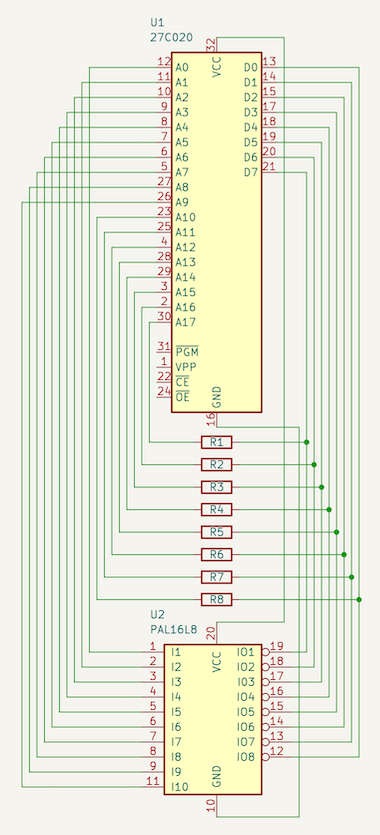
It is up to you to either hand wire this on a perfboard or to build it up with the provided KiCad PCB. If you choose the latter, I have published it for easy ordering at https://aisler.net/p/IUTCWVJK, but you also might order it at your preferred PCB manufacturer, of course.
The original schematic from Charles M. suggested 4k7 resistors. This value doesn‘t work for me (it does not give a stable reading with my minipro chip programmer) and neither does 2k2. Only after going down to 1k, it worked for me and so you also might need to experiment.
Go to www.python.org, download a recent Python version (anything >= 3.7 should do) and install it.
Put your PAL16L8 into the adapter and the adapter into your chip programmer.
(Do NOT put your PAL16L8 into your chip programmer directly - this will not work.)
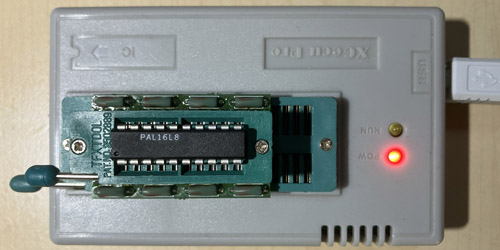
Instruct your chip programming application to read a 27C020 EPROM and save the data to a file, e.g. named pal.bin. The generated file length must be 262144 bytes. If your file length is different, something is broken. Do not try to continue, it will not work.
E.g., if you own one of the popular MiniPRO TL866xx series of chip programmers and have the excellent command line application from https://gitlab.com/DavidGriffith/minipro installed, use:
minipro -p am27c020@dip32 -x -r pal.binATTENTION: I found that this dump does not always work reliably, possibly due to timing issues. Please make sure to perform the dump multiple times and compare the files. If you cannot get multiple identical dumps, something is wrong in your setup.
On your command line, run python3 pete.py pal.bin (adapting the filename
to what you have chosen). This will generate a file called
pal_pete_equations.pld (adapted to your filename), which contains
the PAL equations.
A GAL16V8 (like a PAL16L8) only supports up to 7 products per output value and only up to 1 product per output enable. For complex PALs where one output value depends on another output value, pete.py might not be able to find equations within these limits. In this case, you need to think how to optimize further and fix up the equations manually.
On your command line, run python3 simplegalasm.py pal_pete_equations.pld
(again, adapting the filename to what you have chosen). This will generate a file called
pal.jed.
Put your GAL16V8B DIRECTLY into your chip programmer (NOT using the adapter!) and instruct your EPROM programmer to write pal.jed to the GAL.
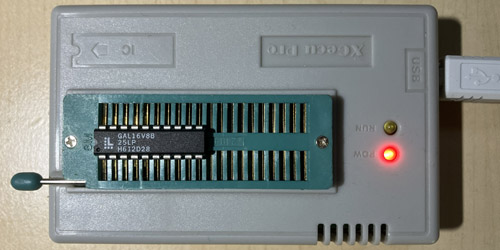
Again with the minipro command line utility as example:
minipro -p gal16v8b -w pal.jedATTENTION: Be careful to specify the exact GAL type you are using. "gal16v8" and "gal16v8b" are NOT compatible at the chip programming level. The fuse maps (i.e. the fuse numbers) are the same, but the order in which the fuse information is sent during chip programming differ (this applies to fuse numbers 2120 to 2193). If you specify the wrong type, programming seems to work fine, but the GAL outputs will not behave according to the equations (just think about what happens when you shuffle fuse numbers 2120 to 2193...).
The first example analyzes the equations of U87 on the IBM 5170 (the original IBM PC/AT computer) motherboard.
First, dump the PAL with the adapter PCB as described above:
minipro -p am27c020@dip32 -x -r ibm_5170_u87.binThen, let pete.py find out the equations: As the U87 pin names are known from the IBM Personal Computer AT technical reference, we pass them to pete.py:
python3 pete.py -p "RAS,MEMW,IOR,AIOW,Q1,IO_CS_16,AEN_1,AEN_2,Q4,FSYS_16,END_CYC,RES_0WS,DMA_AEN,XA0,XBHE,GATE_245,DIR_245,DATA_CONV" ibm_5170_u87.binThe generated equations in ibm_5170_u87_pete_equations.pld will have one equation which cannot be translated directly into a GAL fuse map. Let's leave ibm_5170_u87_pete_equations.pld untouched and create a copy to modify:
cp ibm_5170_u87_pete_equations.pld ibm_5170_u87.pldThe problematic equation is:
XBHE.oe = !AEN_1
  # !AEN_2;
GAL16V8s only support one term per output enable. So we need to find a simplification. Looking around in the remaining file, we will find:
!DMA_AEN = !AEN_1
  # !AEN_2;
That means, that the pin value equation (which DOES support more than one term!) for
!DMA_AEN is the same as for XBHE.oe. We can therefore replace the equation for XBHE.oe
like this:
XBHE.oe = !DMA_AEN;Doing this change in ibm_5170_u87.pld gives as equations usable for creating the fuse map:
python3 simplegalasm.py ibm_5170_u87.pldCongratulations, you can now program a GAL16V8B for replacing U87 in your IBM 5170 motherboard:
minipro -p gal16v8b -w ibm_5170_u87.jedThe second example analyzes the other PAL on the IBM 5170 motherboard: U130.
Get the EPROM dump using the adapter PCB:
minipro -p am27c020@dip32 -x -r ibm_5170_u130.binLet pete.py find out the equations:
python3 pete.py -p "RESET,ERROR,BUSY,XA0,XA3,XIOW,SM_IO,CS287,INTA,TIEDGND_11,NPCS,UNUSED_13,UNUSED_14,UNUSED_15,UNUSED_16,RESET_287,IRQ_13,BUSY_286" ibm_5170_u130.binThis time, the equation for one output value will not be directly usable, so create a copy to modify again:
cp ibm_5170_u130_pete_equations.pld ibm_5170_u130.pldThe problematic equation is:
!UNUSED_14 = !RESET & XA3
  # !RESET & XIOW
  # !RESET & SM_IO
  # !RESET & CS287
  # !RESET & !INTA
  # ERROR
  # BUSY
  # TIEDGND_11;
GAL16V8s only support at most 7 terms per output value. So we need to find a simplification. Looking around in the remaining file, we will find:
!IRQ_13 = ERROR
  # BUSY;
So, ERROR # BUSY can be replaced by !IRQ_13:
!UNUSED_14 = !RESET & XA3
  # !RESET & XIOW
  # !RESET & SM_IO
  # !RESET & CS287
  # !RESET & !INTA
  # !IRQ_13
  # TIEDGND_11;
Doing this change in ibm_5170_u130.pld gives as equations usable for creating the fuse map:
python3 simplegalasm.py ibm_5170_u130.pldCongratulations, you can now program a GAL16V8B for replacing U130 in your IBM 5170 motherboard:
minipro -p gal16v8b -w ibm_5170_u130.jed| Qty | Value | Footprint | References |
|---|---|---|---|
| 8 | Resistor_THT:R_Axial_DIN0207_L6.3mm_D2.5mm_P7.62mm_Horizontal | R1, R2, R3, R4, R5, R6, R7, R8 | |
| 1 | 27C020 | palrvs:Mirrored_DIP-32_W15.24mm | U1 |
| 1 | PAL16L8 | palrvs:ZIF-20_W7.62mm_Socket | U2 |


54weasels/sun3_60
Notes on each section: - CPU - 68030 support left out entirely - 68881 in the schematics but left out of the PCB - MMU - U2001 which would be needed to support any video, either P4 or built-in not in the PCB - U314…


raymondh2/CompaqPortableIII
Current PCB Memory Expansion board layout is untested. The backplane for the expansion cards is tested and working.

ronnyroy111/inboard386
Reverse engineered schematics, PCB and logic equations for the Intel 386/PC accelerator


It measures 23.9 × 40.4 mm and has 2 copper layers, 1.6 mm thick.
10 parts, built around the PAL16L8-5JC. The full list of its parts is on this page, with links to each part's symbol and footprint where PCBKit's library has them.
From the jonnyh64/palrvs repository on GitHub, at the commit this page was made from: the board is palrvs_kicad/palrvs.kicad_pcb and its schematic palrvs_kicad/palrvs.kicad_sch. PCBKit opens the board in the browser, with nothing to install.
Its repository publishes it under the MIT licence: you may reuse it on that licence's terms (keep the author's notice, and for a copyleft licence share your changes alike).