4 layers70 × 72 mm

 jonbro/aleatorium7
lua scriptable musicbox
Buddhabox is an open-source printed circuit board by jonbro, from the jonbro/aleatorium repository on GitHub. It is a 2-layer board of 48.3 × 22.9 mm with 54 parts on 74 nets, routed with 471 tracks and 57 vias.
It is built around the RP2040, W25Q64JVZPIQ and TPS63031DSK, with the BAT54C among its other parts. Its parts include 24 capacitors, 10 resistors, 4 ICs, 4 connectors and 3 switches. It belongs with the RP2040 boards of this library.


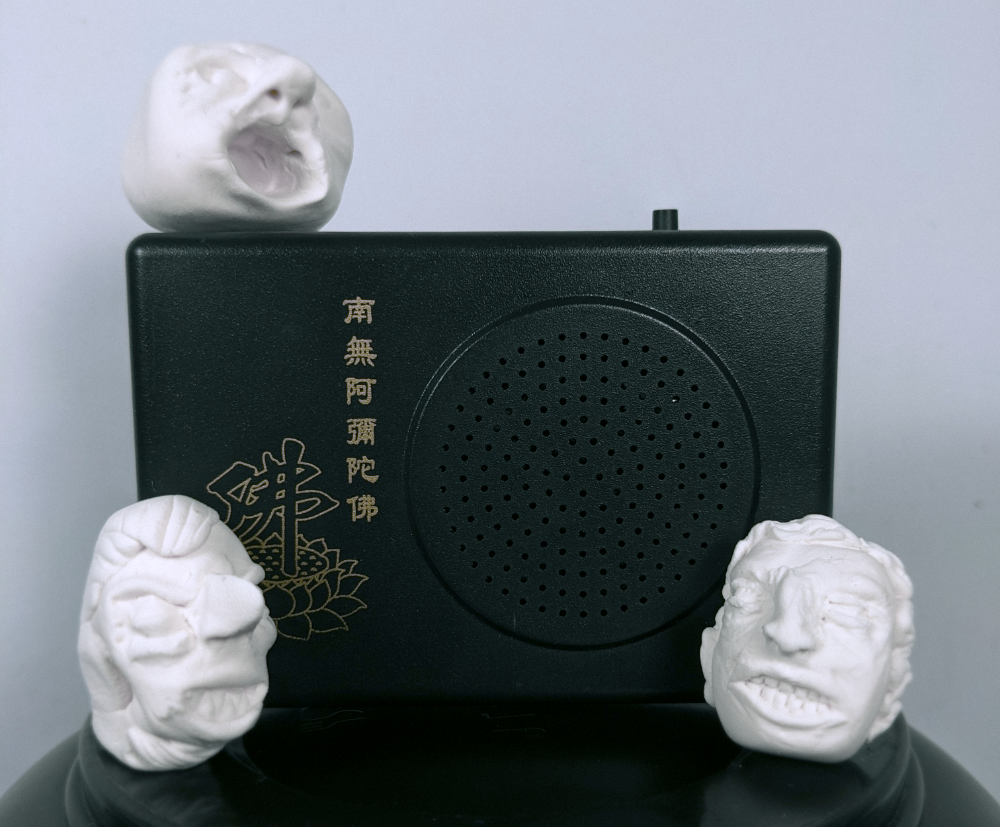
A lua scriptable buddha box board swap.
The hardware on this project is forked from Eric Brombaugh's RP2040 boardswap for buddha boxes. I'm so glad he opensourced this, a programmable buddha machine is something that I've long wanted.
The firmware contains an lua scriptable 8 channel synthesizer and sequencer. The synth has the following features:
The sequencer is a callback that is run at 96ppq. All further sequencing must be done by you.
You write new songs for aleatorium by connecting to it with usb, and loading lua scripts onto it with the web based code editor.
The scripting interface is quite simple, but there are some example files, jam1 and jam2. The globals.lua file contains parameter constants for altering the synth voices.
-- setParam(voiceNumber, targetParameter, value)
-- voiceNumber: 0-7, the voice you want to set
-- targetParameter: use the params table from globals.lua
-- value: 0-255. Some parameters take a value from globals here, see below
setParam(0, param.timbre, 80)

-- playNote(voiceNumber, midiNoteValue)
-- voiceNumber: 0-7, the voice you want to set
-- midiNoteValue: 60 is middle c
playNote(0, 60)

-- tempoSync
-- called 96 times per quarternote. Currently there is no way to set the bpm other than recompling the firmware.

function tempoSync()

end

-- Special param targets:

-- shape - pick the voice shape, these are a subset of the oscilators from MI Braids
setParam(0, param.shape, shape.morph)

-- Env target - env1Target always goes to volume and the assigned target, env2Target only goes to the assigned targetA live version of the editor is available here. Requires a non-firefox browser, due to using webserial. Make sure you connect to the device before you start trying to use it.
Use ctrl+p to send the current script to device and execute. You can run the following commands in the console:
-- save
-- provide a filename without quotes to save the file. This will add it to the set of songs that is looped through when pressing the button.
-- scripts are limited to a maximum of 16k
-- folders are not currently supported
save mysong.lua

-- load
-- provide a filename without quotes to load the file. This will replace the contents of the editor with the script.
-- folders are not currently supported. You cannot load the globals file.
load mysong.lua

-- del / rm
-- provide a filename without quotes to delete the file. This will remove it from the filesystem, and it will no longer be part of the songs on device
rm mysong.lua| Qty | Value | Footprint | References |
|---|---|---|---|
| 13 | 0.1uf | Capacitor_SMD:C_0402_1005Metric | C6, C7, C8, C9, C10, C11, C12, C15, C17, C18, C19, C21, C25 |
| 5 | 10uf | Capacitor_SMD:C_0402_1005Metric | C1, C2, C5, C20, C27 |
| 3 | 1k | Resistor_SMD:R_0402_1005Metric | R2, R6, R10 |
| 3 | 600@100mhz | Inductor_SMD:L_0603_1608Metric | FB1, FB2, FB3 |
| 2 | 10k | Resistor_SMD:R_0402_1005Metric | R1, R9 |
| 2 | 1uf | Capacitor_SMD:C_0402_1005Metric | C22, C23 |
| 2 | 220pf | Capacitor_SMD:C_0402_1005Metric | C24, C26 |
| 2 | 27.4 | Resistor_SMD:R_0402_1005Metric | R5, R7 |
| 2 | 30pf | Capacitor_SMD:C_0603_1608Metric | C3, C4 |
| 2 | 5.1k | Resistor_SMD:R_0402_1005Metric | R3, R4 |
| 2 | SW_Push | Button_Switch_SMD:SW_Push_1P1T_NO_CK_KMR2 | SW1, SW3 |
| 1 | 1.5uH | Inductor_SMD:L_Coilcraft_LPS3010 | L2 |
| 1 | 100k | Resistor_SMD:R_0805_2012Metric | R8 |
| 1 | BAT54C | Package_TO_SOT_SMD:SOT-23 | D1 |
| 1 | Battery | Connector_PinHeader_2.54mm:PinHeader_1x02_P2.54mm_Vertical | J5 |
| 1 | Crystal_4pin_SMD | Crystal:Crystal_SMD_3225-4Pin_3.2x2.5mm | Y1 |
| 1 | Jumper_2_Bridged | Jumper:SolderJumper-2_P1.3mm_Bridged_Pad1.0x1.5mm | JP1 |
| 1 | LED Green | LED_SMD:LED_0603_1608Metric | D3 |
| 1 | MAX98357A | Package_DFN_QFN:TQFN-16-1EP_3x3mm_P0.5mm_EP1.23x1.23mm | U2 |
| 1 | PICOPROBE | Connector_PinHeader_2.54mm:PinHeader_1x05_P2.54mm_Vertical | J2 |
| 1 | RP2040 | emeb_library:RP2040 | U3 |
| 1 | RV12 | emeb_library:RV12 | RV1 |
| 1 | SW_PushSide | Button_Switch_THT:SW_Tactile_SPST_Angled_PTS645Vx83-2LFS | SW4 |
| 1 | Speaker | Connector_PinHeader_2.54mm:PinHeader_1x02_P2.54mm_Vertical | J4 |
| 1 | TPS63031DSK | Package_SON:WSON-10-1EP_2.5x2.5mm_P0.5mm_EP1.2x2mm | U6 |
| 1 | USB_C_Receptacle_USB2.0 | MyLibrary:USB-C_SMD-TYPE-C-31-M-12 | J7 |
| 1 | W25Q64JVZPIQ | Package_SON:WSON-8-1EP_6x5mm_P1.27mm_EP3.4x4.3mm | U5 |
It measures 48.3 × 22.9 mm and has 2 copper layers, 1.6 mm thick.
54 parts, built around the RP2040, W25Q64JVZPIQ, TPS63031DSK and BAT54C. The full list of its parts is on this page, with links to each part's symbol and footprint where PCBKit's library has them.
From the jonbro/aleatorium repository on GitHub, at the commit this page was made from: the board is Hardware/buddhabox.kicad_pcb and its schematic Hardware/buddhabox.kicad_sch. PCBKit opens the board in the browser, with nothing to install.
Its repository states no licence, so its author keeps all rights: ask jonbro before reusing the design.


FallenFireGit/RP2040-Devboard
This repository contains my work with the RP2040 microcontroller, where I experimented with embedded programming, basic hardware integration, and peripherals like LEDs and buttons.


hackclub/hackducky
The hackclub themed USB rubber ducky ! - Check out hackducky

zartarn15/hubble-metal-detector
STM32-based digital metal detector with custom hardware and embedded DSP firmware.
