
2 layers80 × 110 mm
NucDeck Left Controller PCB
dmcke5/NucDeck
The Open Source DIY Handheld Gaming PC!
59 parts561CERN-OHL-S-2.0

 jfl209/atreus
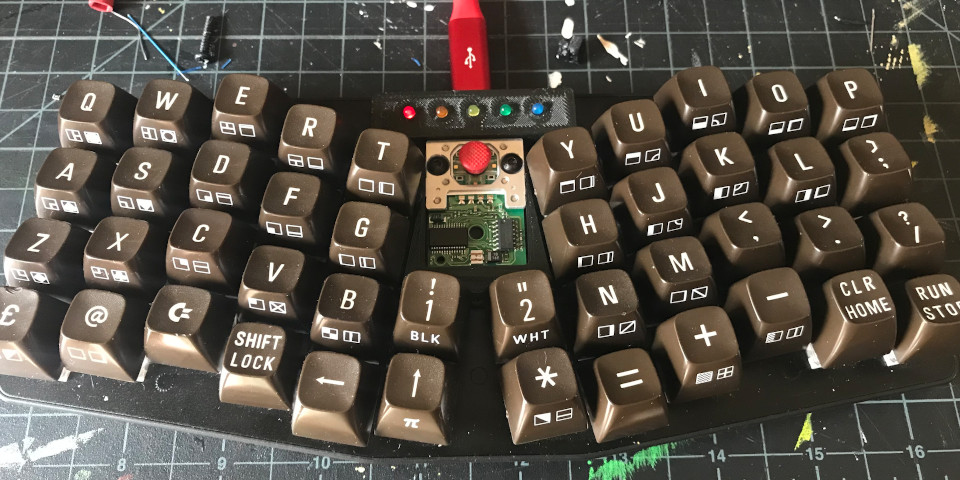
QMK firmware + KiCad daughterboard + 3D-printed holder for my Keyboardio Atreus with a PS/2 TrackPoint mod. Reconstructed from a chip dump after losing the original source.
Atreus trackpoint is an open-source printed circuit board by jfl209, from the jfl209/atreus repository on GitHub. It is a 2-layer board of 51.2 × 10 mm with 21 parts on 16 nets, routed with 112 tracks and 28 vias.
It is built around the WS2811. Its parts include 5 diodes, 3 resistors, 2 ICs and 1 capacitor. It belongs with the keyboards and input boards of this library.
QMK firmware for my Keyboardio Atreus + PS/2 TrackPoint mod.
The original firmware source was lost. This repo was rebuilt from the running keyboard:
dump/atreus-flash.hex was read off the ATmega32U4 over Caterina/avr109.keyboards/atreus_trackpoint/.If you're future-me opening this cold: start with docs/DECODING.md (how
the keymap was recovered) and docs/HARDWARE.md (what's on the PCBs).
hardware/, gerbers in
hardware/gerbers/) with:
hardware/3d-printed/atreus trackpoint holder v*.stl). Iterated through 8 versions in Jan 2021 — v8 is the last,
presumably the keeper. The originating CAD (likely Fusion 360) was not
recovered.5 layers, all built on the standard 4×12 Atreus matrix:
| # | Name | Activation | What's on it |
|---|---|---|---|
| 0 | BASE | default | QWERTY |
| 1 | SHIFT | hold right thumb MO(1) | every alpha key sent as LSFT(letter) — thumb-driven shift |
| 2 | NUM | hold left thumb MO(2) | digits, brackets, shifted symbols |
| 3 | FN | hold MO(3) from SHIFT | F1-F15, arrow cluster |
| 4 | ADJ | hold MO(4) from NUM | numbers + arrows combined |
Right-thumb keys are mod-tap:
RCTL_T(KC_QUOT) — tap for ', hold for Right-CtrlRALT_T(KC_MINS) — tap for -, hold for Right-AltTrackpoint mouse buttons are at matrix positions [2,5] and [2,6] — the
center of the third row, wired through the matrix as KC_BTN1 / KC_BTN2.
See keyboards/atreus_trackpoint/keymaps/default/keymap.c for the full
keymap.
This repo contains only the custom keyboard folder. Drop it into a QMK checkout to build:
# 1. Get QMK
git clone https://github.com/qmk/qmk_firmware.git
cd qmk_firmware
make git-submodule        # pulls chibios, lufa, etc.

# 2. Link in this keyboard
ln -s ~/git/atreus/keyboards/atreus_trackpoint keyboards/atreus_trackpoint

# 3. Build
qmk compile -kb atreus_trackpoint -km default
# (output: atreus_trackpoint_default.hex in the repo root)
Before flashing a fresh build, confirm the trackpoint pins in
keyboards/atreus_trackpoint/config.h are correct. They were guessed, not
recovered. See docs/HARDWARE.md § "How to verify the pins".
If a new QMK release renamed something and the build breaks, the original firmware was built around early-2021 QMK — pin to a commit from that window and port forward in small steps.
# Restore the captured backup
./flash.sh

# Or flash a fresh build
./flash.sh path/to/atreus_trackpoint_default.hex
To enter bootloader mode: hold Fn+Esc if the binding survived in your
build, otherwise press the reset button on the bottom of the keyboard —
it's accessible through a small hole in the bottom plate, poke it with a
paperclip.
.
├── README.md
├── flash.sh                          # one-command flash helper
├── dump/
│   ├── atreus-flash.hex              # working firmware backup (re-flashable)
│   └── atreus-flash.bin              # raw binary, same content
├── docs/
│   ├── DECODING.md                   # how the keymap was recovered from the dump
│   └── HARDWARE.md                   # schematic notes, pin assignments, gotchas
├── hardware/
│   ├── atreus_trackpoint.{sch,kicad_pcb,pro,net,lib}
│   ├── 3d-printed/                   # printable STLs (v1-v8) of trackpoint holder
│   └── gerbers/                      # PCB fab files
├── keyboards/
│   └── atreus_trackpoint/            # QMK keyboard (symlink into qmk_firmware/keyboards)
│       ├── atreus_trackpoint.{c,h}
│       ├── config.h                  # matrix + trackpoint pin defs (TODOs!)
│       ├── rules.mk
│       ├── info.json
│       └── keymaps/default/
│           ├── keymap.c              # 5-layer keymap
│           └── rules.mk
└── tools/
└── decode_keymap.py # the decoder used on the dump| Qty | Value | Footprint | References |
|---|---|---|---|
| 10 | TestPoint | TestPoint:TestPoint_Pad_1.0x1.0mm | TP2, TP3, TP4, TP5, TP6, TP7, TP8, TP9, TP10, TP11 |
| 5 | LED | LED_THT:LED_D3.0mm | D1, D2, D3, D4, D5 |
| 3 | R | Resistor_SMD:R_0805_2012Metric | R1, R2, R3 |
| 2 | WS2811 | Package_SO:SOP-8_3.76x4.96mm_P1.27mm | U1, U2 |
| 1 | CP | Capacitor_SMD:C_1206_3216Metric | C1 |
dmcke5/NucDeck
The Open Source DIY Handheld Gaming PC!


dmcke5/XWii-Controller
The Wii U gamepad layout is a fan-favourite for many gamers yet it is rarely used in the current generation of controllers.


carlos-paniagua/TapeTicsProject
This repository contains the hardware and software design files for TapeTics

JCohner/booth
Using 1000 NeoPixels with FastLED library we are controlling a custom built DJ booths lighting. The NeoPixels are organzied into rectangles on a DJ of which the light difuses around the rectnagle.

TheBlueManCoding/ModularControlPanel
Mechanics, PCB and Software for my modular control panel that is used with my cnc machine driven by LinuxCnc
It measures 51.2 × 10 mm and has 2 copper layers, 1.6 mm thick.
21 parts, built around the WS2811. The full list of its parts is on this page, with links to each part's symbol and footprint where PCBKit's library has them.
From the jfl209/atreus repository on GitHub, at the commit this page was made from: the board is hardware/atreus_trackpoint.kicad_pcb. PCBKit opens the board in the browser, with nothing to install.
Its repository states no licence, so its author keeps all rights: ask jfl209 before reusing the design.