
2 layers181 × 97 mm
OpenDeck r3.1.2
shanteacontrols/OpenDeck
A platform for building interactive control and sensing devices using MIDI and OSC built with Zephyr RTOS.
262 parts960Apache-2.0

 jenneva-li/qmk_keyboard1
Split mechanical keyboard
Qmk scorpio left is an open-source printed circuit board by jenneva-li, from the jenneva-li/qmk_keyboard repository on GitHub. It is a 2-layer board of 174.2 × 117.5 mm with 149 parts on 108 nets, routed with 398 tracks and 31 vias.
It is built around the PRTR5V0U2X. Its parts include 56 diodes, 39 capacitors, 7 resistors, 5 ICs and 3 connectors. It belongs with the keyboards and input and lEDs and displays boards and the STM32 boards of this library.
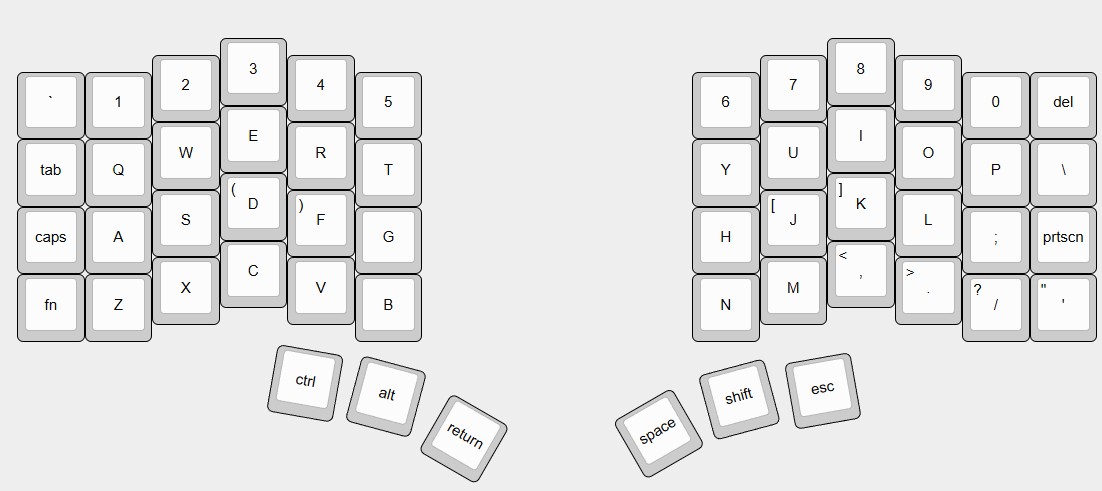
This is a fully customizable split mechanical keyboard featuring per-key RGB lighting, dual 2.2″ LCD displays, and complete QMK firmware support.
Note: This project is currently under development. Detailed build instructions and documentation will be provided soon.
This section outlines the planned features and improvements for the project. It is a work in progress and will be updated as development continues.
| Qty | Value | Footprint | References |
|---|---|---|---|
| 27 | 0.1uF | Capacitor_SMD:C_0402_1005Metric | C1, C2, C10, C11, C12, C13, C14, C15, C16, C17, C18, C19, C20, C21, C22, C23 +11 |
| 27 | D | Diode_SMD:D_SOD-123 | D1, D2, D10, D11, D12, D13, D14, D15, D16, D17, D18, D19, D20, D21, D22, D23 +11 |
| 27 | choc_SK6812MINI-E | PCM_marbastlib-choc:LED_choc_6028R | LED1, LED2, LED10, LED11, LED12, LED13, LED14, LED15, LED16, LED17, LED18, LED19, LED20, LED21, LED22, LED23 +11 |
| 23 | choc_v1_SW_HS | PCM_marbastlib-choc:SW_choc_v1_HS_CPG135001S30_1u | CH1, CH10, CH11, CH12, CH13, CH15, CH16, CH17, CH18, CH19, CH21, CH22, CH23, CH24, CH25, CH26 +7 |
| 8 | MountingHole_Pad | MountingHole:MountingHole_3.2mm_M3_DIN965_Pad | H1, H2, H3, H4, H5, H6, H7, H8 |
| 6 | 100nF | Capacitor_SMD:C_0402_1005Metric | C40, C102, C103, C104, C105, C108 |
| 4 | 5.1k | Resistor_SMD:R_0402_1005Metric | R1, R2, R5, R6 |
| 4 | choc_v1_SW_HS | PCM_marbastlib-choc:SW_choc_v1_HS_CPG135001S30_1.5u | CH2, CH8, CH14, CH20 |
| 3 | 100n | Capacitor_SMD:C_0805_2012Metric | C41, C42, C43 |
| 2 | 1N4148 | Diode_SMD:D_SOD-123 | D40, D41 |
| 2 | 1uF | Capacitor_SMD:C_0402_1005Metric | C106, C107 |
| 2 | 500mA | Fuse:Fuse_1206_3216Metric | F1, F2 |
| 2 | 68k | Resistor_SMD:R_0805_2012Metric | R8, R9 |
| 2 | PRTR5V0U2X | Package_TO_SOT_SMD:SOT-143 | U2, U5 |
| 2 | USB_C_Receptacle_USB2.0 | PCM_marbastlib-various:USB_C_Receptacle_HRO_TYPE-C-31-M-14 | J1, J3 |
| 1 | 10uF | Capacitor_SMD:C_0603_1608Metric | C101 |
| 1 | 120 | Resistor_SMD:R_0805_2012Metric | R7 |
| 1 | CR2013-MI2120 | Display:CR2013-MI2120 | U4 |
| 1 | Conn_01x05 | Connector_PinHeader_2.54mm:PinHeader_1x05_P2.54mm_Vertical | J2 |
| 1 | DFU | Button_Switch_SMD:SW_SPST_TL3342 | RESET1 |
| 1 | MMUN2133LT1G | Package_TO_SOT_SMD:SOT-23-3 | Q3 |
| 1 | STM32G474CETx | Package_QFP:LQFP-48_7x7mm_P0.5mm | U1 |
| 1 | XC6206PxxxMR-Regulator_Linear | Package_TO_SOT_SMD:SOT-23 | U3 |
shanteacontrols/OpenDeck
A platform for building interactive control and sensing devices using MIDI and OSC built with Zephyr RTOS.


0x23/nmWave-Interferometer
An Open Source Interferometer for Accurate Distance Measurements

ph-design/PH60-SC
A printable low-profile 60% wireless mechanical keyboard kit powered by ZMK firmware.
It measures 174.2 × 117.5 mm and has 2 copper layers, 1.6 mm thick.
149 parts, built around the PRTR5V0U2X. The full list of its parts is on this page, with links to each part's symbol and footprint where PCBKit's library has them.
From the jenneva-li/qmk_keyboard repository on GitHub, at the commit this page was made from: the board is qmk_scorpio_left/qmk_scorpio_left.kicad_pcb and its schematic qmk_scorpio_left/matrix.kicad_sch. PCBKit opens the board in the browser, with nothing to install.
Its repository states no licence, so its author keeps all rights: ask jenneva-li before reusing the design.