Skip to the content
2 layers71.5 × 23.5 mmKeypad bridge, the printed circuit board in 3D

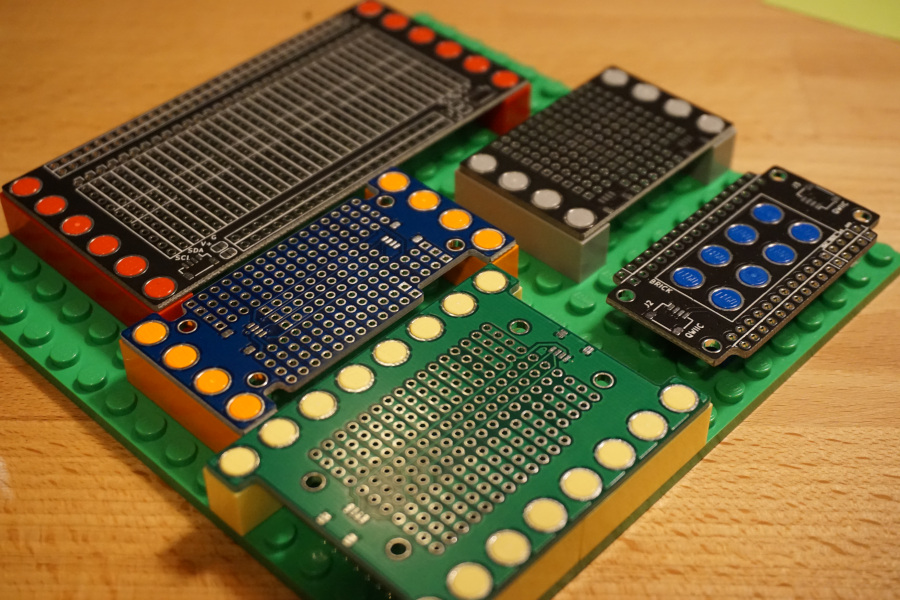
Put your circuits on your plastic bricks of choice

Size
71.5 × 23.5 mm
Copper layers
2
Thickness
1.6 mm
Parts
3
Nets
14
Pads
32
Tracks, vias
64, 16
Pours
2
Routed
Yes
KiCad
KiCad 5 (file 20171130)
Created
17 Jan 2021
Updated
22 Apr 2022

Overview

Keypad bridge is an open-source printed circuit board by jamesmunns, from the jamesmunns/brick-mount repository on GitHub. It is a 2-layer board of 71.5 × 23.5 mm with 3 parts on 14 nets, routed with 64 tracks and 16 vias.

It belongs with the keyboards and input and interfaces and adapters boards of this library.
README

README.md

Brick Boards

Brick Board prototyping boards

Boards designed to be compatible with LEGO and other plastic building blocks.

There are KiCAD footprints for a variety of different brick arrangements in the parts folder. I've also included a number of personal projects using these footprints in the boards/ folder.

LICENSE

The contents of the parts/brick-4_9id-6_0od.pretty/ folder are licensed under a CC0 license.

Parts

3
QtyValueFootprintReferences
1keypad-connectorEverything:keypad-connectorU2
1keypad-connector-ledsEverything:keypad-connector-ledsU1
1keypad-connector-matrixEverything:keypad-connector-matrixU3

More from jamesmunns/brick-mount

12
  • 4 layers97 × 87 mmSprocket panel, the printed circuit board in 3D

    Sprocket panel

    jamesmunns/brick-mount

    Put your circuits on your plastic bricks of choice

    494 parts40
  • 2 layers97 × 99 mmProto quarter panel, the printed circuit board in 3D

    Proto quarter panel

    jamesmunns/brick-mount

    Put your circuits on your plastic bricks of choice

    188 parts40
  • 2 layers95.5 × 127.5 mmChoc keypad, the printed circuit board in 3D

    Choc keypad

    jamesmunns/brick-mount

    Put your circuits on your plastic bricks of choice

    148 parts40
  • 4 layers34 × 47.5 mmChar panel, the printed circuit board in 3D

    Char panel

    jamesmunns/brick-mount

    Put your circuits on your plastic bricks of choice

    136 parts40
  • 2 layers97 × 95 mmProto half cables panel, the printed circuit board in 3D

    Proto half cables panel

    jamesmunns/brick-mount

    Put your circuits on your plastic bricks of choice

    116 parts40
  • 4 layers15.5 × 47.5 mmChar, the printed circuit board in 3D

    Char

    jamesmunns/brick-mount

    Put your circuits on your plastic bricks of choice

    60 parts40
  • 2 layers47 × 47 mmClink, the printed circuit board in 3D

    Clink

    jamesmunns/brick-mount

    Put your circuits on your plastic bricks of choice

    60 parts40
  • 2 layers63.5 × 95.5 mmProto half cables, the printed circuit board in 3D

    Proto half cables

    jamesmunns/brick-mount

    Put your circuits on your plastic bricks of choice

    46 parts40
  • 2 layers47 × 95 mmProto half, the printed circuit board in 3D

    Proto half

    jamesmunns/brick-mount

    Put your circuits on your plastic bricks of choice

    42 parts40
  • 4 layers47 × 15 mmSprocket, the printed circuit board in 3D

    Sprocket

    jamesmunns/brick-mount

    Put your circuits on your plastic bricks of choice

    35 parts40
  • 2 layers79 × 47 mmBlack pill breakout, the printed circuit board in 3D

    Black pill breakout

    jamesmunns/brick-mount

    Put your circuits on your plastic bricks of choice

    27 parts40
  • 2 layers47 × 31 mmProto quarter, the printed circuit board in 3D

    Proto quarter

    jamesmunns/brick-mount

    Put your circuits on your plastic bricks of choice

    18 parts40

Similar boards

  • 2 layers40 × 30 mmBlinky, the printed circuit board in 3D

    Blinky

    earthtojake/text-to-cad

    Design physical products with AI

    3 parts26kMIT
  • 2 layers51.9 × 16 mmPassive2-rpi non standard adapter, the printed circuit board in 3D

    Passive2-rpi non standard adapter

    hzeller/rpi-rgb-led-matrix

    Controlling up to three chains of 64x64, 32x32, 16x32 or similar RGB LED displays using Raspberry Pi GPIO

    3 parts4.4kGPL-2.0
  • 2 layers16.3 × 16.3 mmSensor, the printed circuit board in 3D

    Sensor

    scottbez1/splitflap

    DIY split-flap display

    3 parts4.2k
  • 2 layersSub, the printed circuit board in 3D

    Sub

    atopile/atopile

    Design circuit boards with code! ✨ Get software-like design reuse 🚀, validation, version control and collaboration in hardware; starting with electronics ⚡️

    3 parts4kMIT
  • 2 layers85 × 30 mmDual stomp, the printed circuit board in 3D

    Dual stomp

    torvalds/GuitarPedal

    Linus learns analog circuits

    3 parts2.5kGPL-2.0
  • 2 layers124.5 × 33.7 mm172319-1 connector, the printed circuit board in 3D

    172319-1 connector

    rusefi/rusefi

    rusefi - GPL internal combustion engine control unit

    3 parts1.2k
  • 2 layers10.5 × 83 mmProgrammingAdapter, the printed circuit board in 3D

    ProgrammingAdapter

    stuartpittaway/diyBMSv4

    Version 4 of the diyBMS

    3 parts1.1k
  • 2 layers21.2 × 51.3 mmPico reset, the printed circuit board in 3D

    Pico reset

    hackclub/sprig

    🍃 Learn to code by making games in a JavaScript web-based game editor.

    3 parts1.1kMIT

Questions

How big is the Keypad bridge PCB?

It measures 71.5 × 23.5 mm and has 2 copper layers, 1.6 mm thick.

What parts does the Keypad bridge use?

3 parts. The full list of its parts is on this page, with links to each part's symbol and footprint where PCBKit's library has them.

Where can I download the Keypad bridge KiCad files?

From the jamesmunns/brick-mount repository on GitHub, at the commit this page was made from: the board is boards/keypad-bridge/keypad-bridge.kicad_pcb. PCBKit opens the board in the browser, with nothing to install.

Can I use the Keypad bridge design in my own project?

Its repository states no licence, so its author keeps all rights: ask jamesmunns before reusing the design.