2 layers78 × 60 mm

 IvaylooTs/StarTracker3
How do we determine our attitude in space?
FutureConcepts is an open-source printed circuit board by IvaylooTs, from the IvaylooTs/StarTracker repository on GitHub. It is a 2-layer board of 103.5 × 103.5 mm with 44 parts on 197 nets.
Its parts include 20 resistors, 8 capacitors, 4 ICs and 2 connectors. It belongs with the Raspberry Pi (Linux) boards of this library.
Team Name: CASSI
Project Name: CASSI (Celestial Alignment System for Satellite Inertial-control)
Official Category: Star Tracker 1
Team Members:
Michael Yan, Ivaylo Tsekov, Alexandra Nedela, Dilyana Vasileva, Tsvetomir Staykov
How do we determine our attitude in space?
This project implements a star tracking system using a Raspberry Pi with an AI camera to determine the orientation of the system based on captured star images using a deterministic algorithm. Once calibrated, the system works in tandem with an IMU (Inertial Measurement Unit) to track orientation without continuous visual input. When drifting occurs, due to environmental variables, power loss, or other factors, the system automatically recalibrates.
Go to the digital_twin folder in the src directory. It contains:
main.py – main file with all the systemsstar_distances_sorted.db – database with calculated angular distances, sorted in ascending orderstar_identified.png – sample image from previous teststest_images – dir with images from Stellarium for testing purposes (uses specific resolution and FOV)create_hash.py - a script to generate a hash map from database table "AngularDistances"catalog_hash.py - an already generated hash with the script above using 2 degree tolerancestellarium360_new.js - a script to be pasted into stellarium console for testing purposesscript_images - dir with images generated from the above scriptTo run the script, you will need the sqlite3 and cv2 libraries installed on your system, and Python 3.
To run the script, use:
python3 main.py The results in your terminal should be:
Files that should be generated when you run the script:
We have two tables in our database.
Table 1 – "Stars" contains the HIP of each star according to the Hipparcos catalog, the magnitude of each star, and x, y, z coordinates of a unit vector corresponding to their RA and DEC coordinates in the equatorial coordinate system.
Table 2 – "AngularDistances" contains the calculated angular distance between each pair of stars in Table 1, sorted from lowest to highest value.
The stars are filtered based on:
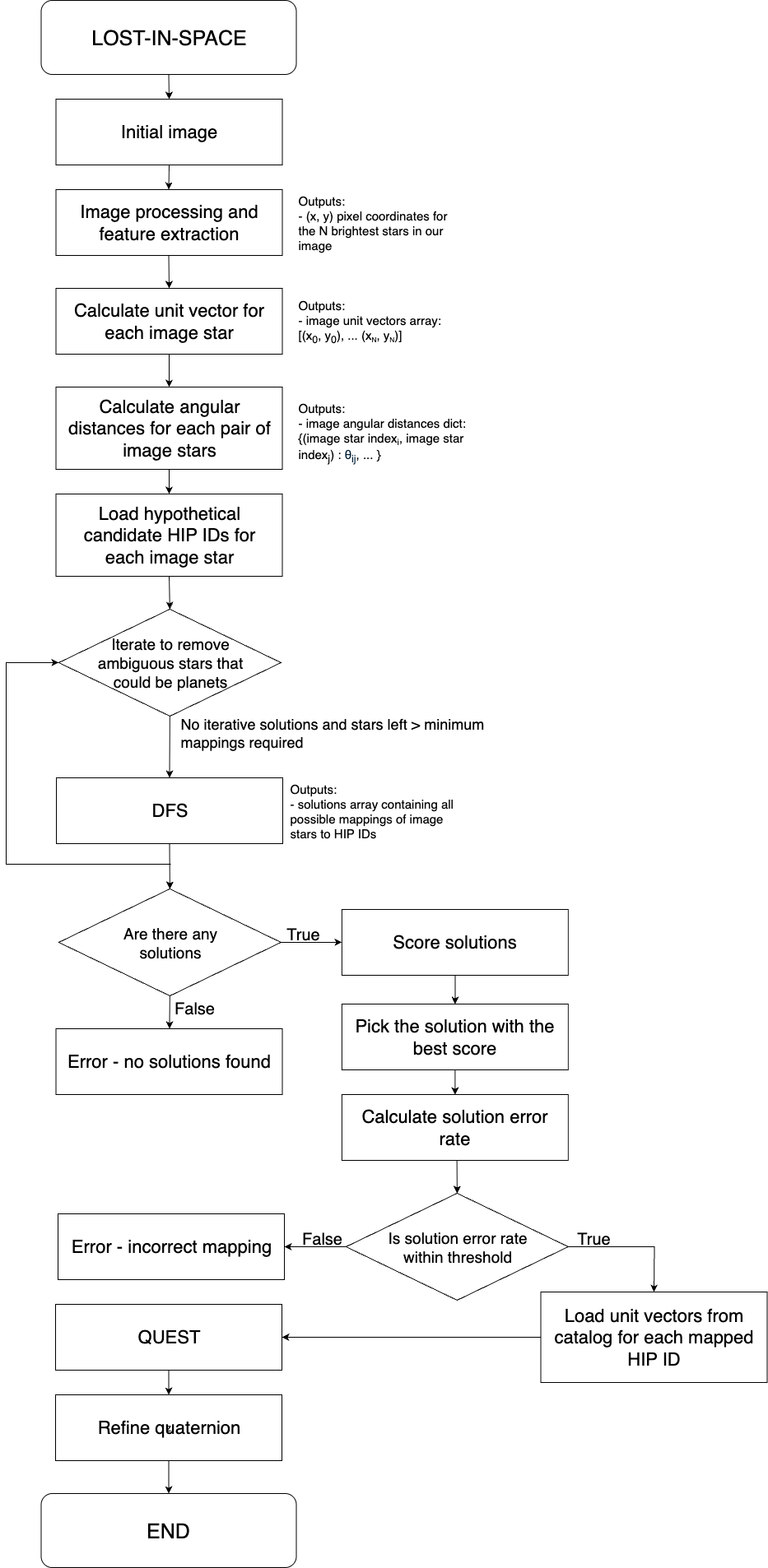
We're implementing a Lost-in-Space approach based on pair matching. The algorithm has four main parts:
The stars in the image are filtered based on: Brightness, Size, and Eccentricity.
Then we select the N brightest stars in our image using blob detection and the cv2 Python module. From this, we get the (x, y) coordinates of the center of each star in the image.
Notes and Ideas:
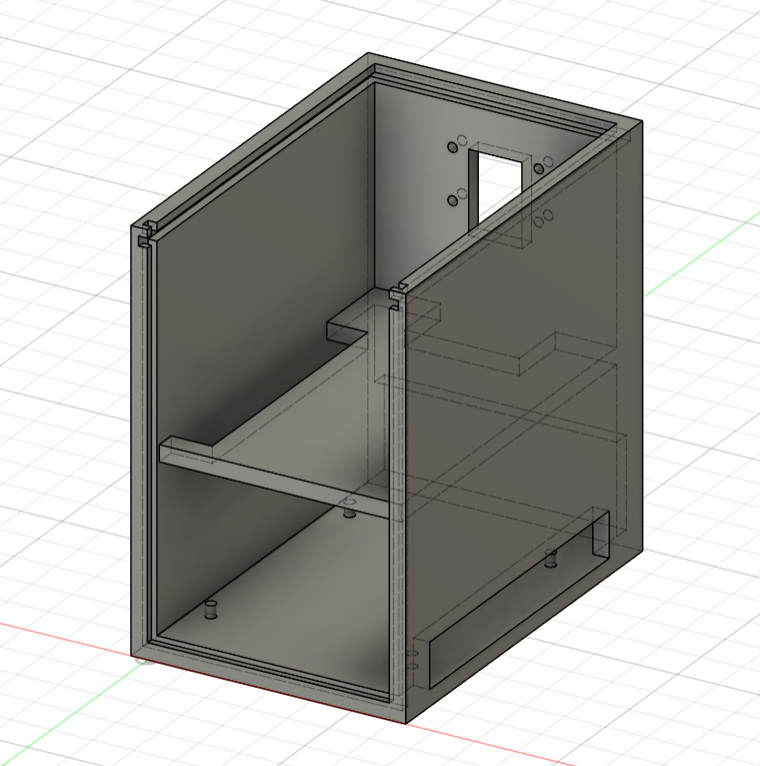
Modular, layered physical design:
3D CAD models and assembly diagrams are available in the DOCS/ directory
| Qty | Value | Footprint | References |
|---|---|---|---|
| 20 | R | Resistor_SMD:R_2010_5025Metric_Pad1.40x2.65mm_HandSolder | R1, R2, R3, R4, R5, R10, R11, R12, R13, R14, R15, R16, R17, R18, R19, R20 +4 |
| 8 | C | Capacitor_SMD:C_Elec_6.3x5.4 | C1, C2, C3, C4, C5, C6, C7, C8 |
| 1 | CAT24M01W | Package_SO:SOIC-8_3.9x4.9mm_P1.27mm | U2 |
| 1 | CAT811MTBI-GT3 | Package_TO_SOT_SMD:SOT-143 | U3 |
| 1 | ComputeModule5-CM5 | CM5IO:Raspberry-Pi-5-Compute-Module | Module1 |
| 1 | LOGO | LOGO | G*** |
| 1 | LTC2358-16 | Package_QFP:LQFP-48_7x7mm_P0.5mm | U1 |
| 1 | RJ45_Abracon_ARJP11A-MASA-B-A-EMU2 | Connector_RJ:RJ45_Abracon_ARJP11A-MA_Horizontal | J2 |
| 1 | USB3_A_Stacked | Connector_USB:USB3_A_Molex_48406-0001_Horizontal_Stacked | J1 |
| 1 | VSC8541XMV-0x | Package_DFN_QFN:QFN-68-1EP_8x8mm_P0.4mm_EP5.2x5.2mm | U4 |
The 36 most common of 44 parts.
It measures 103.5 × 103.5 mm and has 2 copper layers, 1.6 mm thick.
44 parts. The full list of its parts is on this page, with links to each part's symbol and footprint where PCBKit's library has them.
From the IvaylooTs/StarTracker repository on GitHub, at the commit this page was made from: the board is Docs/schematics/FutureConcepts/FutureConcepts.kicad_pcb and its schematic Docs/schematics/FutureConcepts/FutureConcepts.kicad_sch. PCBKit opens the board in the browser, with nothing to install.
Its repository states no licence, so its author keeps all rights: ask IvaylooTs before reusing the design.


mudmin/AnotherMaker
This is where I will store code snippets for AnotherMaker Videos

qbancoffee/imac_g3_ivad_board_init
iMac G3 IVAD board initialization with an arduino

Stefan-Olt/MISRC
MISRC Is a multi channel RF capture device for FM RF, S-Video, CVBS RAW capture and anything else, but intended and supported for the decode family of projects vhs-decode, ld-decode, hifi-decode.
