
2 layers151.8 × 78.3 mm
Minigeki
defvs/minigeki
A portable implementation of an ONGEKI controller, with all necessary buttons, two macros, RGB LED support, USB-C.
68 parts22GPL-3.0

 ishantmahatopro/Apex-MUX
A Blackmagic Design DaVinci Resolve Speed Editor with Slide Potentiometers, designed for budget video editors
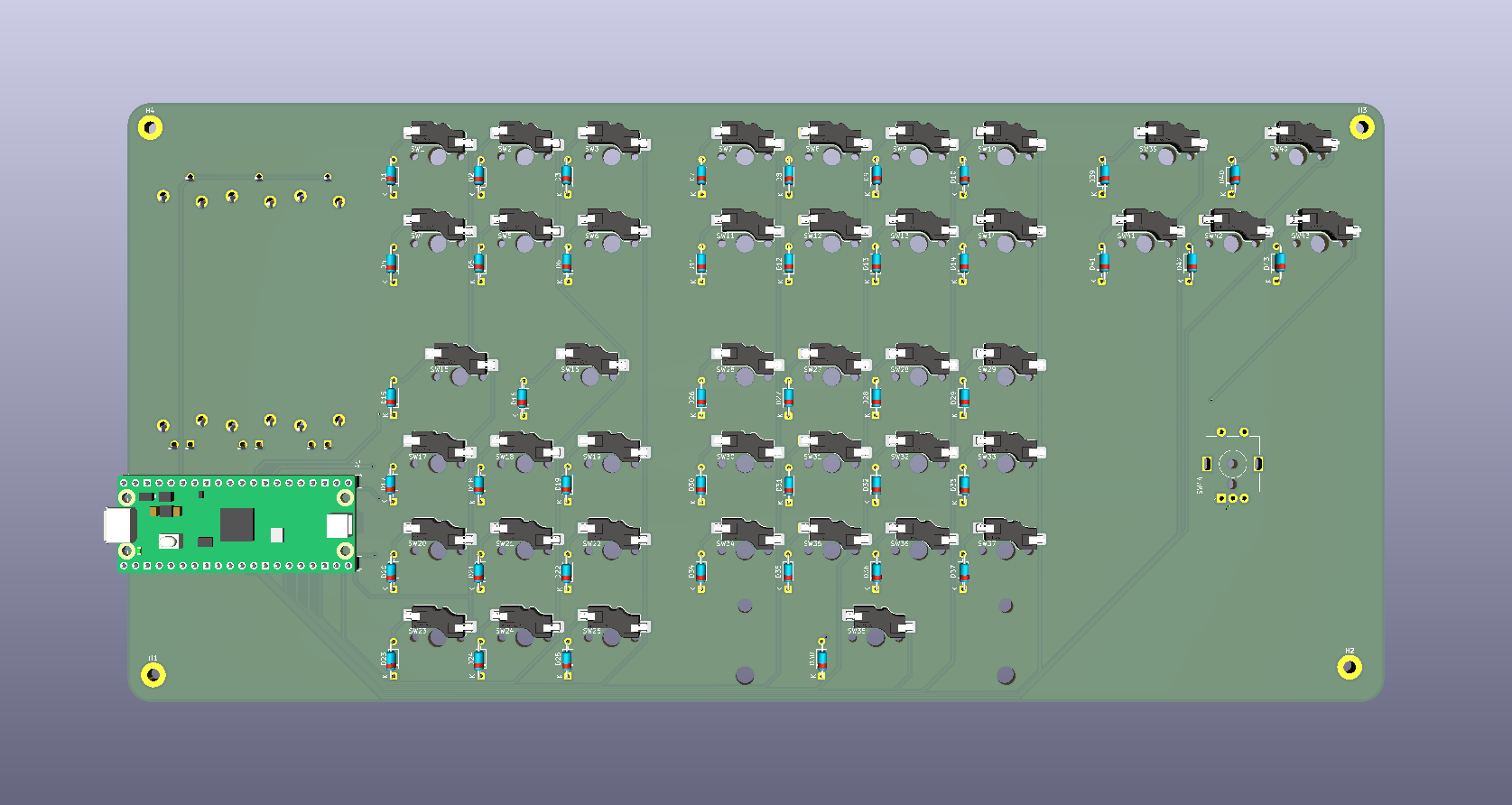
Apex MUX is an open-source printed circuit board by ishantmahatopro, from the ishantmahatopro/Apex-MUX repository on GitHub. It is a 2-layer board of 274.8 × 130.9 mm with 96 parts on 81 nets, routed with 293 tracks and 14 vias.
It is built around the PTA4543-2015DPB103. Its parts include 45 switches, 43 diodes and 3 resistors. It belongs with the RP2040 boards of this library.
A custom DaVinci Resolve Speed Editor you can actually build. Mechanical switches, slide pots, and a rotary jog wheel for the fraction of the cost. Starts at ₹13,432 (~$161 USD) instead of the $450 Blackmagic asks for.
I spend way too much time in DaVinci Resolve, and half that time is spent hunting through menus and digging for keyboard shortcuts. The Blackmagic DaVinci Speed Editor looked perfect—until I saw the price tag (₹43,000). That's ridiculous for what's essentially a keyboard with some sliders.
So I did what any maker does when they find something too expensive: I built one myself.
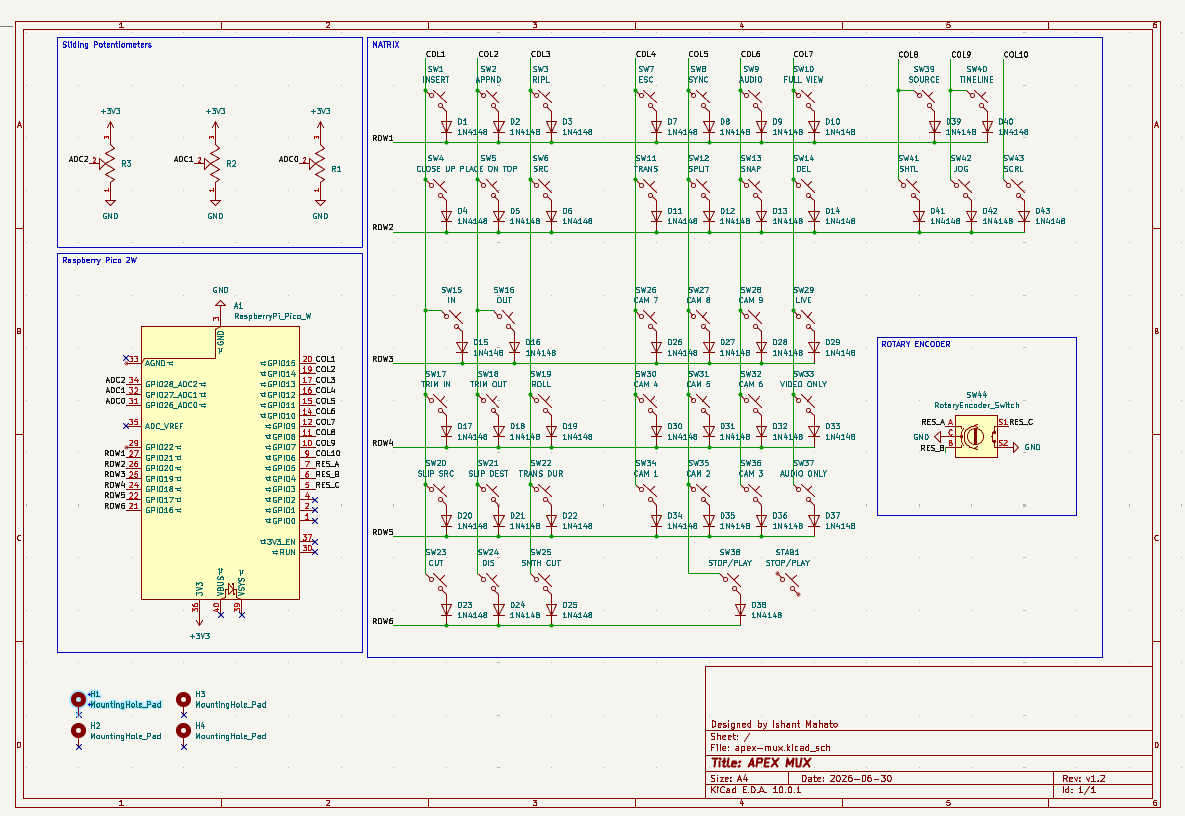
Apex MUX is a fully custom control surface with 43 mechanical switches, 3 slide potentiometers for color grading, a rotary encoder for timeline scrubbing, and a custom PCB that actually fits the way DaVinci works. Everything you need. Nothing you don't.
Total cost: ₹13,432 (about $161 USD)
| Component | Cost | Notes |
|---|---|---|
| Electronics (Pico W + diodes + pots) | ₹2,104 | From Robu.in |
| Switches + stabilizers + encoder | ₹3,694 | Stackskb.com (Akko Cilantro switches are solid) |
| PCB manufacturing (5 boards) | ₹4,770 | JLCPCB |
| 3D printed enclosure | ₹2,414 | Two parts, FDM print |
| Solder, wire, cable | ₹450 | Stuff you'll need anyway |
Comparison: Blackmagic Speed Editor costs ₹43,000 and does basically the same thing (but locked to their layout).
It's just CircuitPython. Download it, flash it to the Pico, copy some files over, done. Your PC sees it as a keyboard.
Setup:
.uf2 file onto the Pico while holding BOOTSELfirmware/ folder to the CIRCUITPY drive that appearsThe firmware handles:
Want to remap buttons? Edit firmware/keymap.py, change whatever you want, save it. CircuitPython picks it up automatically. No compilation, no flashing. Just edit and go.
See firmware/README.md for full docs and troubleshooting.
| Designator | Component | Part Number | Qty | Price (₹) | Price ($) | Supplier / Link |
|---|---|---|---|---|---|---|
| A1 | Raspberry Pi Pico W | RPI-PICO-W | 1 | ₹1,009.00 | $12.09 | Robu.in |
| D1-D43 | 1N4148 Ultrafast Recovery Diode | 1N4148-NXP | 43 | ₹450.00 | $5.39 | Robu.in |
| R1/R2/R3 | Bourns Slide Potentiometer (3x) | PTA4543-2015DPB103 | 3 | ₹564.00 | $6.76 | Robu.in |
| R4 | Bourns Rotary Potentiometer | PTV09A-4225F-B203 | 1 | ₹81.00 | $0.97 | Robu.in |
| SW1-SW43+ | Akko Cilantro Switch (Pack of 45) | CILANTRO-45 | 45 | ₹1,499.00 | $17.97 | StacksKB |
| SW44 | Gateron Hotswap Sockets | GATERON-HS | 45 | ₹450.00 | $5.39 | StacksKB |
| SW38 (Stab) | Durock Clear Screw-In Stabilizers V2 | DUROCK-STAB-V2 | 1 | ₹1,595.00 | $19.12 | StacksKB |
| PCB | 2-Layer FR4 PCB (5x units) | FR4-2L-274x130 | 5 | ₹4,770.00 | $57.17 | Robu.in |
| Enclosure | Main Body (FDM 3D Print) | PLA-WHITE-MAIN | 1 | ₹1,207.00 | $14.47 | Robu.in |
| Enclosure | Top Plate / Cover (FDM 3D Print) | PLA-WHITE-PLATE | 1 | ₹1,207.00 | $14.47 | Robu.in |
| Assembly | Lead-free Solder (30g) | SAC305-30G | 1 | ₹100.00 | $1.20 | Robu.in |
| Accessory | USB 2.0 A-to-Micro Cable | USB-2.0-A-MICRO | 1 | ₹100.00 | $1.20 | Local |
| Subtotal | ₹13,032.00 | $156.20 | ||||
| Tax / Estimated Fees | ₹400.00 | $4.80 | ||||
| TOTAL | ₹13,432.00 | $161.00 |
├── README.md                 # You are here
├── BOM.csv                   # Full bill of materials
├── apex-mux-journal.md       # Build log with timestamps
├── firmware/                 # CircuitPython code
│   ├── code.py              # Main loop
│   ├── config.py            # Pin configuration
│   ├── keymap.py            # DaVinci button mapping
│   ├── matrix.py            # Key scanning
│   └── analog.py            # Potentiometer + encoder
├── PCB/                      # KiCAD files
│   ├── apex-mux.kicad_sch   # Schematic
│   ├── apex-mux.kicad_pcb   # PCB layout
│   └── production/          # Fabrication files
│       └── apex-mux.zip     # Send this to JLCPCB
├── CAD/                      # 3D models
│   ├── Main.step            # Enclosure body
│   └── Plate.step           # Top cover
└── cart/                     # Cost breakdown screenshots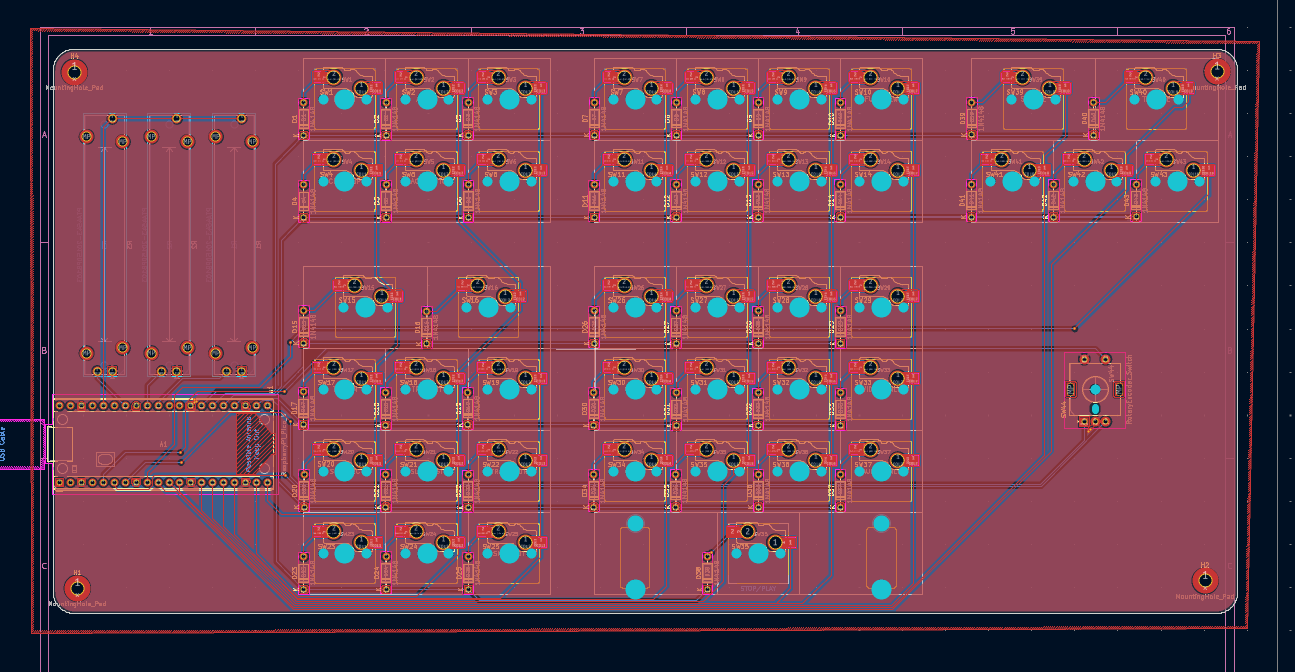
MIT. Do whatever you want with it. Copy it, modify it, sell it (though honestly the margins aren't great). Just don't pretend you invented it.
Made with actual soldering iron time and real frustration. August 2026.
| Qty | Value | Footprint | References |
|---|---|---|---|
| 43 | 1N4148 | Diode_THT:D_DO-35_SOD27_P7.62mm_Horizontal | D1, D2, D10, D11, D12, D13, D14, D15, D16, D17, D18, D19, D20, D21, D22, D23 +27 |
| 4 | MountingHole_Pad | MountingHole:MountingHole_2.7mm_Pad | H1, H2, H3, H4 |
| 3 | PTA4543-2015DPB103 | Potentiometer_THT:Potentiometer_Bourns_PTA4543_Single_Slide | R1, R2, R3 |
| 2 | CAM 2 | PCM_marbastlib-mx:SW_MX_HS_KS-2P02B01-01_1u | SW35, SW35 |
| 1 | APPND | PCM_marbastlib-mx:SW_MX_HS_KS-2P02B01-01_1u | SW2 |
| 1 | AUDIO | PCM_marbastlib-mx:SW_MX_HS_KS-2P02B01-01_1u | SW9 |
| 1 | AUDIO ONLY | PCM_marbastlib-mx:SW_MX_HS_KS-2P02B01-01_1u | SW37 |
| 1 | CAM 1 | PCM_marbastlib-mx:SW_MX_HS_KS-2P02B01-01_1u | SW34 |
| 1 | CAM 3 | PCM_marbastlib-mx:SW_MX_HS_KS-2P02B01-01_1u | SW36 |
| 1 | CAM 4 | PCM_marbastlib-mx:SW_MX_HS_KS-2P02B01-01_1u | SW30 |
| 1 | CAM 5 | PCM_marbastlib-mx:SW_MX_HS_KS-2P02B01-01_1u | SW31 |
| 1 | CAM 6 | PCM_marbastlib-mx:SW_MX_HS_KS-2P02B01-01_1u | SW32 |
| 1 | CAM 7 | PCM_marbastlib-mx:SW_MX_HS_KS-2P02B01-01_1u | SW26 |
| 1 | CAM 8 | PCM_marbastlib-mx:SW_MX_HS_KS-2P02B01-01_1u | SW27 |
| 1 | CAM 9 | PCM_marbastlib-mx:SW_MX_HS_KS-2P02B01-01_1u | SW28 |
| 1 | CLOSE UP | PCM_marbastlib-mx:SW_MX_HS_KS-2P02B01-01_1u | SW4 |
| 1 | CUT | PCM_marbastlib-mx:SW_MX_HS_KS-2P02B01-01_1u | SW23 |
| 1 | DEL | PCM_marbastlib-mx:SW_MX_HS_KS-2P02B01-01_1u | SW14 |
| 1 | DIS | PCM_marbastlib-mx:SW_MX_HS_KS-2P02B01-01_1u | SW24 |
| 1 | ESC | PCM_marbastlib-mx:SW_MX_HS_KS-2P02B01-01_1u | SW7 |
| 1 | FULL VIEW | PCM_marbastlib-mx:SW_MX_HS_KS-2P02B01-01_1u | SW10 |
| 1 | IN | PCM_marbastlib-mx:SW_MX_HS_KS-2P02B01-01_1.5u | SW15 |
| 1 | INSERT | PCM_marbastlib-mx:SW_MX_HS_KS-2P02B01-01_1u | SW1 |
| 1 | JOG | PCM_marbastlib-mx:SW_MX_HS_KS-2P02B01-01_1u | SW42 |
| 1 | LIVE | PCM_marbastlib-mx:SW_MX_HS_KS-2P02B01-01_1u | SW29 |
| 1 | OUT | PCM_marbastlib-mx:SW_MX_HS_KS-2P02B01-01_1.5u | SW16 |
| 1 | PLACE ON TOP | PCM_marbastlib-mx:SW_MX_HS_KS-2P02B01-01_1u | SW5 |
| 1 | RIPL | PCM_marbastlib-mx:SW_MX_HS_KS-2P02B01-01_1u | SW3 |
| 1 | ROLL | PCM_marbastlib-mx:SW_MX_HS_KS-2P02B01-01_1u | SW19 |
| 1 | RaspberryPi_Pico_W | Module:RaspberryPi_Pico_Common_THT | A1 |
| 1 | RotaryEncoder_Switch | Rotary_Encoder:RotaryEncoder_Alps_EC11E-Switch_Vertical_H20mm_MountingHoles | SW44 |
| 1 | SCRL | PCM_marbastlib-mx:SW_MX_HS_KS-2P02B01-01_1u | SW43 |
| 1 | SHTL | PCM_marbastlib-mx:SW_MX_HS_KS-2P02B01-01_1u | SW41 |
| 1 | SLIP DEST | PCM_marbastlib-mx:SW_MX_HS_KS-2P02B01-01_1u | SW21 |
| 1 | SLIP SRC | PCM_marbastlib-mx:SW_MX_HS_KS-2P02B01-01_1u | SW20 |
| 1 | SMTH CUT | PCM_marbastlib-mx:SW_MX_HS_KS-2P02B01-01_1u | SW25 |
| 1 | SNAP | PCM_marbastlib-mx:SW_MX_HS_KS-2P02B01-01_1u | SW13 |
| 1 | SOURCE | PCM_marbastlib-mx:SW_MX_HS_KS-2P02B01-01_1.5u | SW39 |
| 1 | SPLIT | PCM_marbastlib-mx:SW_MX_HS_KS-2P02B01-01_1u | SW12 |
| 1 | SRC | PCM_marbastlib-mx:SW_MX_HS_KS-2P02B01-01_1u | SW6 |
| 1 | STOP/PLAY | PCM_marbastlib-mx:STAB_MX_4u | SW38 |
| 1 | SYNC | PCM_marbastlib-mx:SW_MX_HS_KS-2P02B01-01_1u | SW8 |
| 1 | TIMELINE | PCM_marbastlib-mx:SW_MX_HS_KS-2P02B01-01_1.5u | SW40 |
| 1 | TRANS | PCM_marbastlib-mx:SW_MX_HS_KS-2P02B01-01_1u | SW11 |
| 1 | TRANS DUR | PCM_marbastlib-mx:SW_MX_HS_KS-2P02B01-01_1u | SW22 |
| 1 | TRIM IN | PCM_marbastlib-mx:SW_MX_HS_KS-2P02B01-01_1u | SW17 |
| 1 | TRIM OUT | PCM_marbastlib-mx:SW_MX_HS_KS-2P02B01-01_1u | SW18 |
| 1 | VIDEO ONLY | PCM_marbastlib-mx:SW_MX_HS_KS-2P02B01-01_1u | SW33 |
defvs/minigeki
A portable implementation of an ONGEKI controller, with all necessary buttons, two macros, RGB LED support, USB-C.

MichaelStickels/Macro_Pad_2.0
DIY custom macro keypad and Deej volume control board with RGB based on the Seeed Studio XIAO RP2040 and CircuitPython.

jsmnbom/esp-butt
A physical controller for intimate devices. No phone. No app. Just knobs, sliders, and hundreds of compatible toys.


Polprzewodnikowy/SummerCart64
SummerCart64 - a fully open source N64 flashcart

sudomesh/disaster-radio
A (paused) work-in-progress long-range, low-bandwidth wireless disaster recovery mesh network powered by the sun.

It measures 274.8 × 130.9 mm and has 2 copper layers, 1.6 mm thick.
96 parts, built around the PTA4543-2015DPB103. The full list of its parts is on this page, with links to each part's symbol and footprint where PCBKit's library has them.
From the ishantmahatopro/Apex-MUX repository on GitHub, at the commit this page was made from: the board is PCB/apex-mux.kicad_pcb and its schematic PCB/apex-mux.kicad_sch. PCBKit opens the board in the browser, with nothing to install.
Its repository states no licence, so its author keeps all rights: ask ishantmahatopro before reusing the design.